
Community Forums › Forums › Ready-to-use Robots › Prop Firm Robots › Prop Firm Robots: Errors and Solutions
- This topic has 782 replies, 1 voice, and was last updated 1 week, 1 day ago by
jordan6566.
-
AuthorPosts
-
March 6, 2024 at 9:44 pm #240127
fxbam
ParticipantI wonder if this is true? This could explain why my EAs (5 charts) haven’t been trading over the last 2 weeks. I’m going to disable news on all of them and see if that makes a difference. I’ll let you know if I see an improvement over the next week.
March 7, 2024 at 9:37 pm #240299marco190
ParticipantI have the same problem, gold opened in the USD account but no USDCHF since February 25, 24, so it hasn’t made a trade yet. And nothing has been done in the EURO account for a few days, since
1 week.Does the FTMO Expert (app) only run in the USD account or also in the EURO account (I am a foreigner)?Markus
March 7, 2024 at 10:15 pm #240307Alan Northam
ParticipantHi Marco,
If you go to the Prop Firm Robot App, set the time period to Y1 and look at each robot you downloaded you can see how often each robot trades on average. For example: EURAUD right now says it had placed 52 trades over the last one year. This means it makes one trade each week on average. This will give you an idea how often you should expect the robots to trade.
Also, it doesn’t make any difference to the robots if your home currency in the US dollars or the Euro.
For reference, I have also added the following links to show you how I trade the robots. This might help to give you an idea on how you can devise your own trading plan.
https://community.algotradingspace.com/forums/topic/recommended-forex-pairs/#post-236573
https://community.algotradingspace.com/forums/topic/recommended-forex-pairs/#post-239251
Alan,
March 9, 2024 at 5:34 pm #240599ParticipantHi burakosalva,
Are you using the FTMO demo account?
Alan,
March 9, 2024 at 5:36 pm #240598burakosova
Participanthello again i understand that the robots not opening trades frequently but my question was different. My robots didnt open any trades but when i check the same week from robot app the same robots made some trades. However this week my robots opened trades through 03.03-09.03 week but the results arent the same with the robot app. Here is my XAUUSD m5 v6.1 robot stats and the same robot for the past week from the robot app
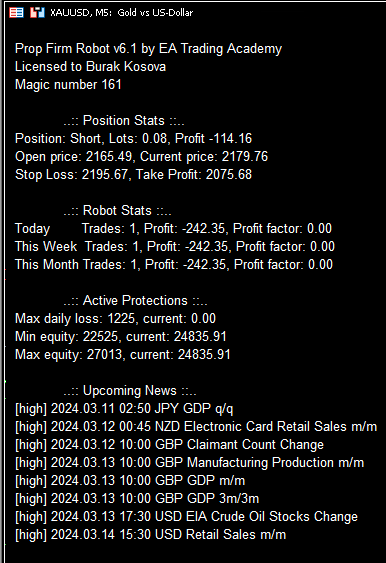
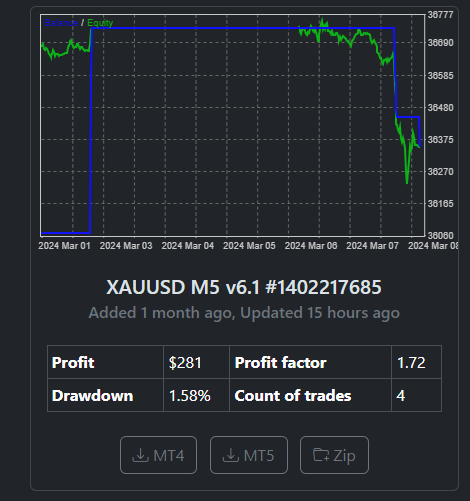
as you can see my robot opened 1 trade and lose 1% since my account is 25k but with same account size robot app shows 4 trades and 281$ profit. I placed that one last weekend so it was running the whole week.
March 9, 2024 at 5:36 pm #240601Participanthi Alan,
Nope im using fundednext demo but on the same account also xauusd 15m v6.0 was running. This robot stats with the one on the ftmo robot app are the same.
March 9, 2024 at 5:53 pm #240603ParticipantHi burakosova,
The actual trading results with your broker can be different than what shows up in the Prop Firm Robot app. Even with FTMO I have noticed differences when the same robot is traded on the FTMO demo account and the FTMO Challenge account. The reason for this is the historical data are not the same.
Here is what you need to know about the Prop Firm Robots app: The results shown on the app are from backtesting done with EA Studio and not from trading on an FTMO demo account or an FTMO Challenge. While EA Studio is the best backtester there is, it does not perfectly replicate the same results of an FTMO demo account or an FTMO Challenge. It is a backtest simulation!!! Therefore, while XAUUSD M15 showed the same result as the Prop Firm Robot app I wouldn’t expect it to perfectly match your trading results every week. Also, for the same reason, don’t expect the results of XAUUSD M5 to always be same as the app.
Alan,
March 9, 2024 at 6:00 pm #240606Participantok thank you for your response. Also as i understand Petko passed some challenges with placing top 3 performers from the last week. I am also trying that and the robots from the last week have an opened position does he closes them or waiting for the trades to reach tp or sl.
March 9, 2024 at 6:15 pm #240610ParticipantHi burakosova,
Yes it is possible to pass the challenge with the top 3 robots from the previous week but it is not always possible. If it were possible to do this every time he would have passed all the challenges and varification stages and he would have max’ed out all the funded accounts possible on all the prop firms. What you need to know about trading is there are no guarantees only possibilities. For this reason, while Petko has passed challenges using the top 3 robots from the previous week I do not believe he always succeeds a passing the challenge this way.
I am not sure if Petko always allows the robots to reach tp or sl. What makes sense to me is if the robot is very close to reaching the tp but looks to be changing direction I would close out the trade and I wouldn’t doubt Pekko would do the same thing. Also if a trade is close to sl and starts to change direction I would let the trade continue to run. If the trade the starts to reverse direction again and start heading towards sl at that point I would close out the trade.
Alan,
March 21, 2024 at 2:05 pm #242850Gleston Fernandes
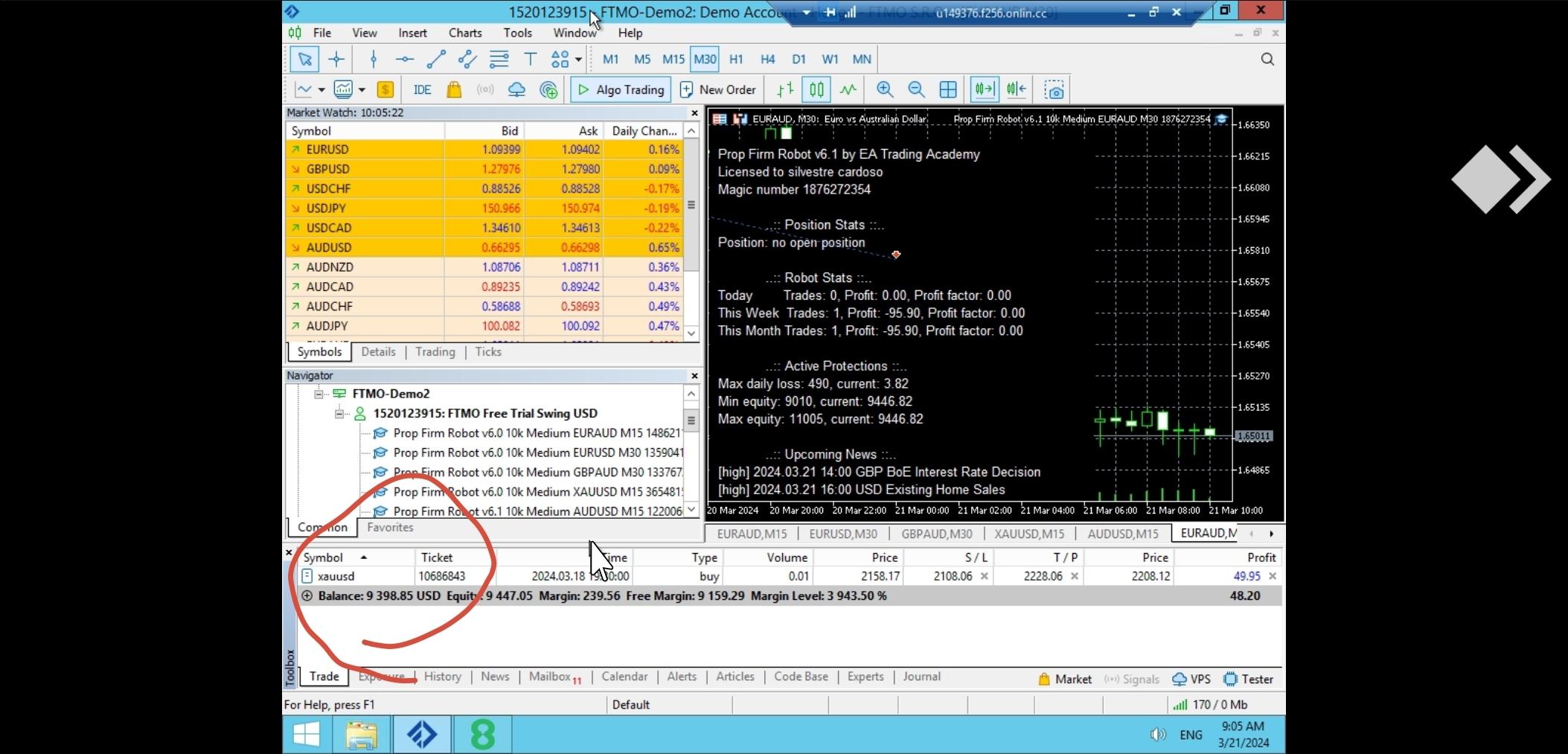
ParticipantHy the ftmo robot made a loss the minimum loss Was 500 I have attached the screenshot below please check
 March 26, 2024 at 10:01 pm #244554
Gent Gashi
ParticipantI start robot about 4 hours ago but didnt open any trade is that normal?
March 27, 2024 at 12:54 am #244582ParticipantHi Gent,
The Prop Firm robots normally open about one trade each day on average. So just give it a day or two to see how many trades you get.
Alan,
April 16, 2024 at 12:58 pm #249074Francesco Moro
ParticipantHi!
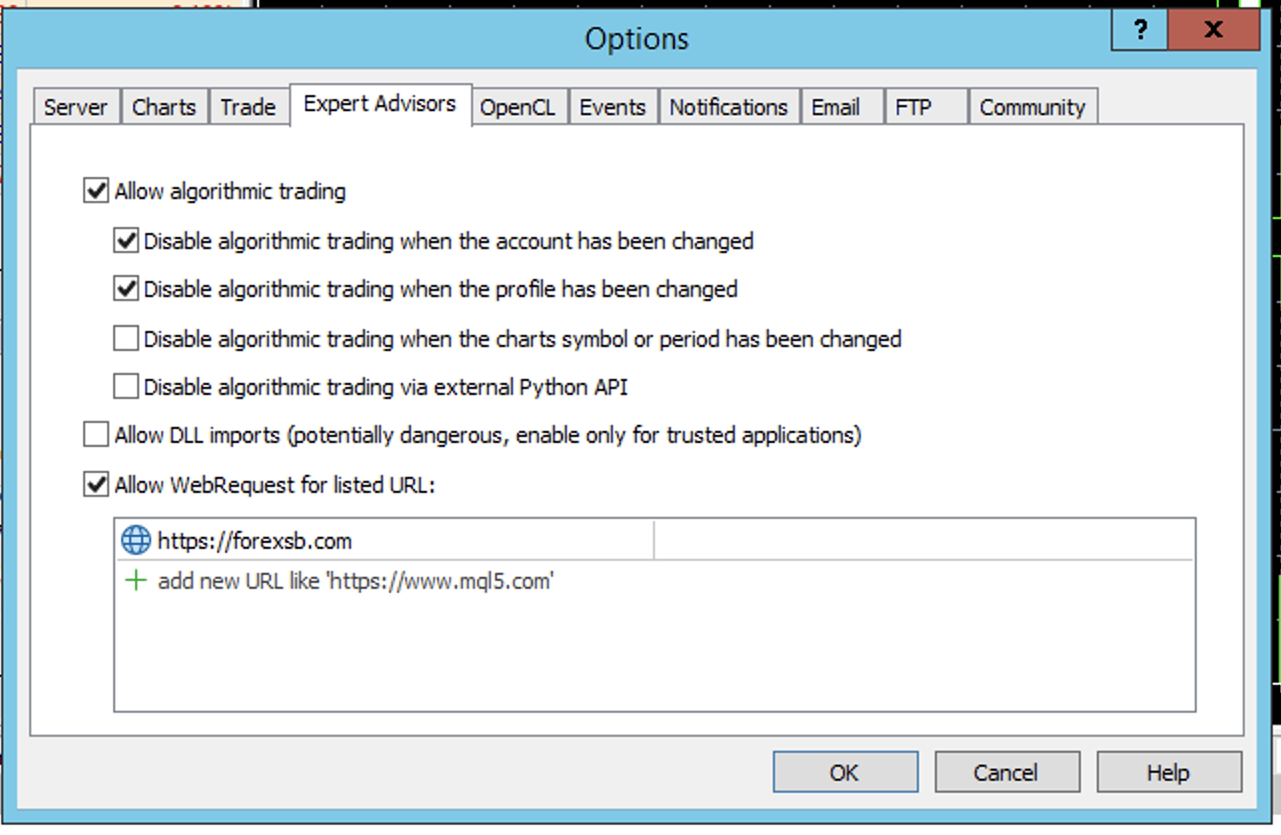
every time I reinstall the EA it keeps saying “turned off”
, my license is active.

 April 16, 2024 at 12:59 pm #249102Participant
Hi Francesco,
In the upper left corner of your trading chart it shows the Minimum Equity protection has activated. This stops your account from trading. This happened because the Prop Firm robots you installed on your trading chart is for a 100K account, whereas, your account size is $50,000. You need to download the 50K robot and install it in your trading chart.
Alan,
April 17, 2024 at 1:31 pm #249407Konstantinos Borsis
ParticipantDo we need to allow for the indicators to show on screen for the EA to take trades or this is not affecting trading?
I have added 3 top performers from the app for the last 2 days have not opened any trades yet. Please advise.
-
AuthorPosts
- You must be logged in to reply to this topic.