
Community Forums › Forums › Ready-to-use Robots › Prop Firm Robots › Prop Firm Robots: Errors and Solutions
- This topic has 782 replies, 1 voice, and was last updated 1 week, 1 day ago by
jordan6566.
-
AuthorPosts
-
February 14, 2024 at 9:39 pm #234597
Llalmar Goedhart
MemberI’ve installed the FTMO robot from the new video of Pesko. https://youtu.be/U5-sRBhZwk0?si=L58kPzsp5i2Esdee
I have the bot running for a whole day with no trades being made and no errors in the journal. Is this normal behavior for the bot? The bot is running on a FTMO 100K demo account.
February 14, 2024 at 11:31 pm #234623Alan Northam
ParticipantHi Llalmar,
You can look at the FTMO app and then look at the robot you downloaded. Then you can see how many trades were taken over the lookback period such as one week or one month or one year or five years. This will give you an idea as to how often the robot places trades.
Alan,
February 15, 2024 at 12:09 am #234638MemberHi Alan,
Thanx for your fast response. I see that the bot have made 1 trade previous week with a profit of $2k+, so I will wait more patiently. This is also a good tip for other users in this forum subject!
February 15, 2024 at 1:14 am #234662Ruben Alday
ParticipantI have been reading emails for hundred that the robot does not work. Please wake up …you will never pass a challenge bcs the bot is just an scam.
February 15, 2024 at 1:22 am #234664MemberYes Pesko have made one FTMO robot available for free. So I will test the robot if it’s profitable. I see also many messages of people who have problems with the bot. I see more messages of problems then succes. But that’s often the case, that the people who have problems will go to the forum and the people that have success will not post a message. Or not so many as people who have a problem with the bot. I will post my results when I’m finished testing the bot.
February 15, 2024 at 1:49 am #234670ParticipantHi Llalmar,
Please be advised the profit depends upon the risk taken.
Alan,
February 15, 2024 at 1:58 am #234672ParticipantHi Ruben,
Trading the FTMO app robots is not necessarily for everyone. I would suggest creating your own robots using EA Studio. This way you would have more control over how the robots are created. Besides my trading the FTMO app robots I also create my own FTMO robots using EA Studio. Recently, I started sharing the results of my robots on the forum so traders not having success with the FTMO app robots could see there is another way to trade robots. The following link will take you to the topic where I share the results of my own FTMO robots.
Alan,
February 20, 2024 at 8:20 pm #236552Patrick Verlee
ParticipantHi there
I completed the compiling of all the downloaded EAs and attached each one to the correct timeframe
After attaching the chart, I notice the EA disconnects from the chart after little more than 1 minute. Any idea why ?
Did I miss anything at the installation ?
February 20, 2024 at 8:37 pm #236555ParticipantHi there
Here’s a screenshot where it says Expert Advisor turned off.
February 20, 2024 at 8:55 pm #236564ParticipantHi Patrick,
This happens when the FTMO robots downloaded do not match up with the account balance. For example: If you have an account balance of $10,000 then with the FTMO app you need to select the account size before you download the EAs. You also need to select the correct Max Loss, Max Daily Loss, and the Profit target.
Alan,
February 20, 2024 at 9:33 pm #236570ParticipantIt’s an 80000 euro Account and the EA says 100000. Is that the issue ? You said it would automatically adapt. So I didn’t change anything in the EA now.
Let me know. Thanks
February 20, 2024 at 9:45 pm #236571ParticipantI got it working Adam. thanks for the guidance
February 20, 2024 at 10:00 pm #236580Marin Stoyanov
KeymasterHey Patrick, in a recent discussion Miroslav from our dev team explained why the FTMO Robot deactivates due to the ‘Minimum equity’ protection feature. The robot is designed with three key protections to align with Prop Challenge requirements: Daily loss, Minimum equity, and Maximum equity, with specified thresholds to manage risks effectively. For an account with a different size than the build-in you need to modify the protections and adjust entry lots. For 80,000 EUR account an easy solution would be to divide the relevant properties in the $100,000 robot file by 0.8 (80,000:100,000=0.8).
February 20, 2024 at 10:20 pm #236610ParticipantHi Patrick,
What I said was it doesn’t matter if the account is in EUROs or USD. If you need any help adjusting your robots parameters let me know.
Do you want to set a price target where the robot will stop working?
Do you want to set a specific account risk you where you will want the robot to stop working?Let me know if I can help!
Happy to hear you got it working!
Alan,
February 22, 2024 at 2:04 am #236927philippe ney
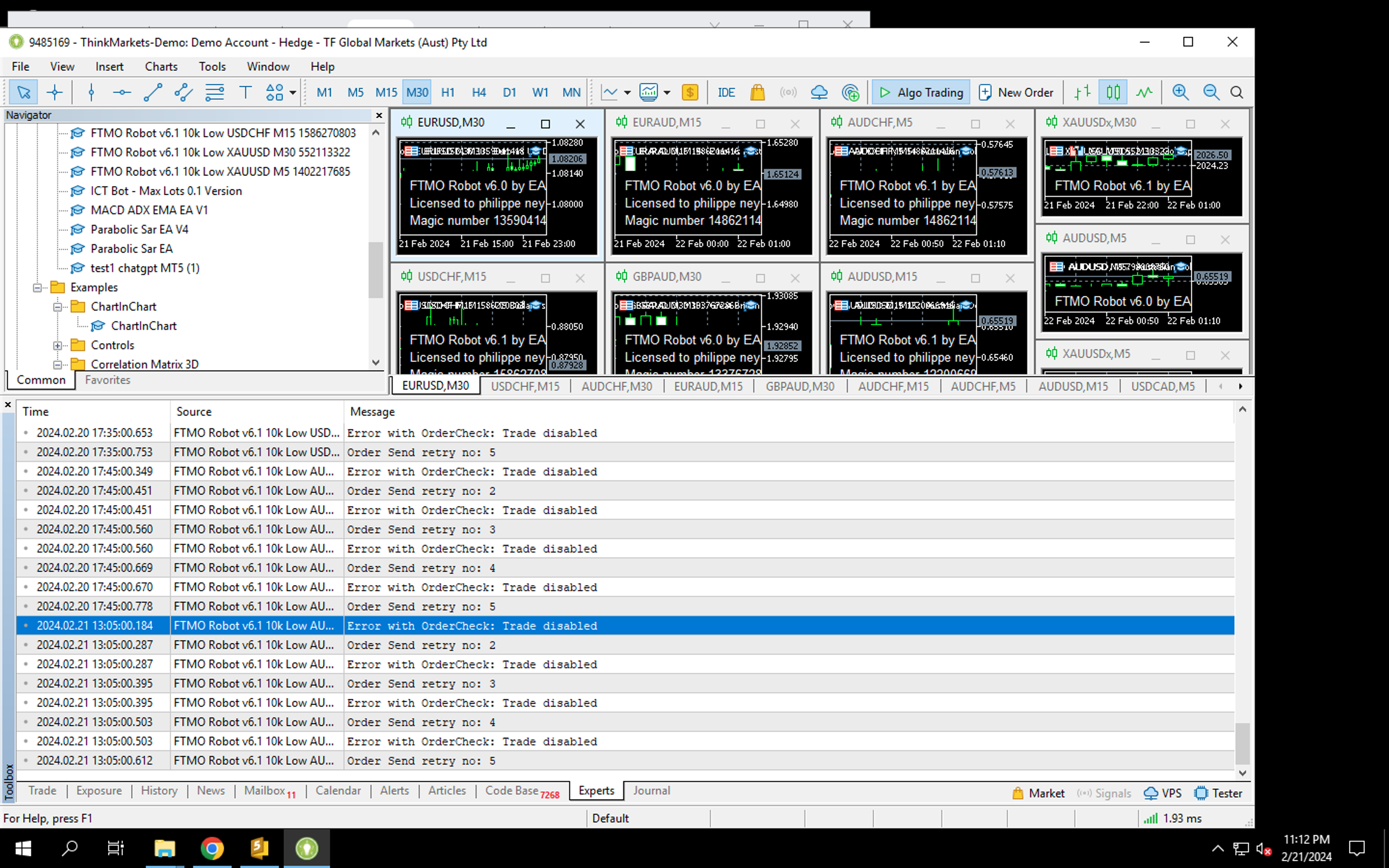
ParticipantHello my robots are not getting the trades. started. and I keep getting this error message in my experts tab: error with ordercheck, trade disabled – only gold trades are going through for some reason?
-
AuthorPosts
- You must be logged in to reply to this topic.