
Community Forums › Forums › Ready-to-use Robots › Prop Firm Robots › Prop Firm Robots: Errors and Solutions
- This topic has 782 replies, 1 voice, and was last updated 1 week, 1 day ago by
jordan6566.
-
AuthorPosts
-
July 31, 2023 at 7:00 pm #187485
Vincenzo Dallacqua
Participantdear petko,
I tried modifying the spread and the values as you recommended (I attach screenshot of the settings), but the problem remains (I attach screenshot of the error). I need to solve otherwise this EA is unusable. What can I do?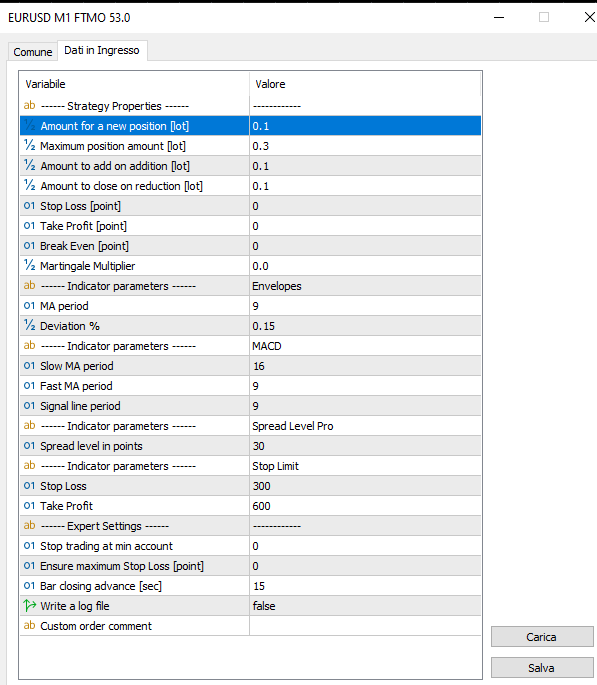 July 31, 2023 at 7:01 pm #187516
Alan Northam
ParticipantHave you tried this solution as I suggested earlier?: https://forexsb.com/forum/topic/7505/error-invalid-order-filling-type/
Try using MT4 instead of MT5. I am thinking MT4 does not have this issue.
August 1, 2023 at 2:50 am #187572dicyang
ParticipantHallo,
I have the following questions about the FTMO
ROBOT.It’s for MT4 or MT5
Thanks
August 1, 2023 at 2:52 am #187602ParticipantEither one!
August 1, 2023 at 3:21 pm #187631Kevin Burton
ParticipantI have just purchased the FTMO robot. I have an account with Blue Guardian MT4. This EA will not take a trade on the account back testing.
No Trades… nothing.
August 1, 2023 at 3:21 pm #187634ParticipantI May have found the issue, I did not have any data to back test.
I still do not understand the setting very well and would like to understand more.
Is it possible to see the Envelopes and other things on my TM4 as indicators?
August 1, 2023 at 3:35 pm #187697ParticipantHi Kevin,
When doing the backtest on MT4 you have to set up the Strategy Tester correctly. This video will walk you through the process.
As for the FTMO settings, what questions do you have?
The Envelopes can be added to the MT4 chart. You can find the indicators in the list of indicators on MT4.
Alan,
August 1, 2023 at 6:13 pm #187742Participantmy main question for this bot is scaling for risk or account size. He mentions 200k account in the video. What would be the best settings for a 100k account, or a 50k account.
August 1, 2023 at 7:29 pm #187760ParticipantFor smaller accounts scale Entry Lot Size, Max Lot size, Amt to Add on lot size, Stop loss, and Take profit proportionally.
August 2, 2023 at 2:14 am #187816JOSE RODRIGUEZ
ParticipantHi sir,
I installed the EA this monday and the EA had not opened any position yet. This is normal?
Thank you for your support
Jose
August 2, 2023 at 2:16 am #187819ParticipantHi Petko
2. What do you mean by ”high new”? I mean high impact news protection
August 2, 2023 at 10:09 am #187790ramis batku
ParticipantHi i have buyed the ea yestrday but dont react dont have opened any trade is staying there like dead by the way i have evaluation with myforex funds!?
August 2, 2023 at 10:11 am #187902Petko Aleksandrov
ParticipantHello Ramis,
The FTMO Robot will open trades when the price hits the Envelopes and there is confirmation from the MACD. The EA is not designed to trade frequently but to take strong reversal signals.
If you do not see trades for a few days, check out the journal for any errors. Also, make sure you keep your laptop/PC connected to the internet all the time, and the MetaTrader connected to the FTMO Server.
I like the word ”dead” for EA 🙂
August 2, 2023 at 10:11 am #187815fxbam
ParticipantI just purchased it today. Looking forward to testing this out.
August 2, 2023 at 10:18 am #187831DS Lee
ParticipantHello, I have the same issue with most of the people here, I run the EA with a proper setting on FBS Demo account since Monday.
No trades at all.
How can I resolve this?
Thanks in advance.
-
AuthorPosts
- You must be logged in to reply to this topic.