
Community Forums › Forums › Ready-to-use Robots › Prop Firm Robots › Prop Firm Robots: Errors and Solutions
- This topic has 784 replies, 3 voices, and was last updated 1 month, 2 weeks ago by
Ron Lee.
-
AuthorPosts
-
Vasile Popadiuc
ParticipantHello, I have installed the robots following the instructions and they do not algo trade on their own.
I have installed them, then compiled them, then turned on algo trading in MT5 and they won’t start.
Please advise.
Alan Northam
ParticipantAs long as the little hat in the upper right corner of the charts are blue then the EAs/robots are running. They may take as long as a day bdfore you start seeing some new trades develop.
alan,
Tanyeem gazi
ParticipantI HAVE BEEN REACHING OUT AND GOT NO FIX FOR IT
I PURCHASED THE FTMO ROBOT NOTHING SHOWS NOT EVEN IN MY EMAIL
CAN ANYONE GIVE ME THE LINK OF FTMO V5.1 THANK YOU
ParticipantGo to your account and click on Orders or Subscriptions. If not there them contact [email protected].
Alan,
Olivier Hoeksma
ParticipantI have multiple funding accounts. I want to place the bot on all those. Is there a possiblity that you have multiple windows open for diffrent accounts? Like having multiple meta traders 5 open.
Petko Aleksandrov
KeymasterYes, you can do that. When you install the MT platform you need to select a different directory (folder name).
ne fv
ParticipantHello team,
I’ve setup the new FTMO bot 5.1, made sure the AlgoTrading is turned on before adding the bot, yet no trade is being taken.
please am I doing wrong. Please I need help.
thank you
ParticipantIf you see a blue hat in the upper right corner of the chart then the robot is working properly and you just need to give it more time to see trades develop.
If you do not see the blue hat you have not installed the robots correctly. To install correctly remove the robot from the chart, Turn on Algo Trading, and then install the robot.
Alan,
MILWARD
MemberGood day.
my robot is not working and it has been three since i purchased it and it has not taken any trades. does it work only on VPN?
Juan Guirao
ParticipantEA’s should ideally run on a VPS (not a VPN, but a VPS). This is to prevent having issues due to power or internet outages in your home.
However, you should still be able to run the robot on your PC.
When you say it is not working, what exactly do you mean? What are you seeing?
MemberHi Jaun I appreciate your answer. what I meant was that it has been three days and it has not taken any trades I am not sure of what could be the reason but i did everything that was instructed on the video but it does not take any trades.
ParticipantHi Milward,
Yes the robot will work on your pc. If you are using MT4 and there is a smiley face in the upper right corner of the chart then the robot is installed properly. If you are using MT5 and there is a blue hat in the upper right corner of the chart then the robot is installed properly.
If the robots were not installed properly you need to remove the robot. Make sure the Autotrading or Algotrading button is depressed and then install the robot.
If the robot is installed properly then you will need to give it more time for a trade to develop. Since you have been waiting for three days now I would expect a trade to develop anytime now.
If none of these solves your problem please let me know!
Alan,
Memberthanks Alan i will try that
Michael Walsh
ParticipantWhen I change pairs the pairs on the right side of the screen do not change they stay the same.
Day 3 with no trade. I need some help,
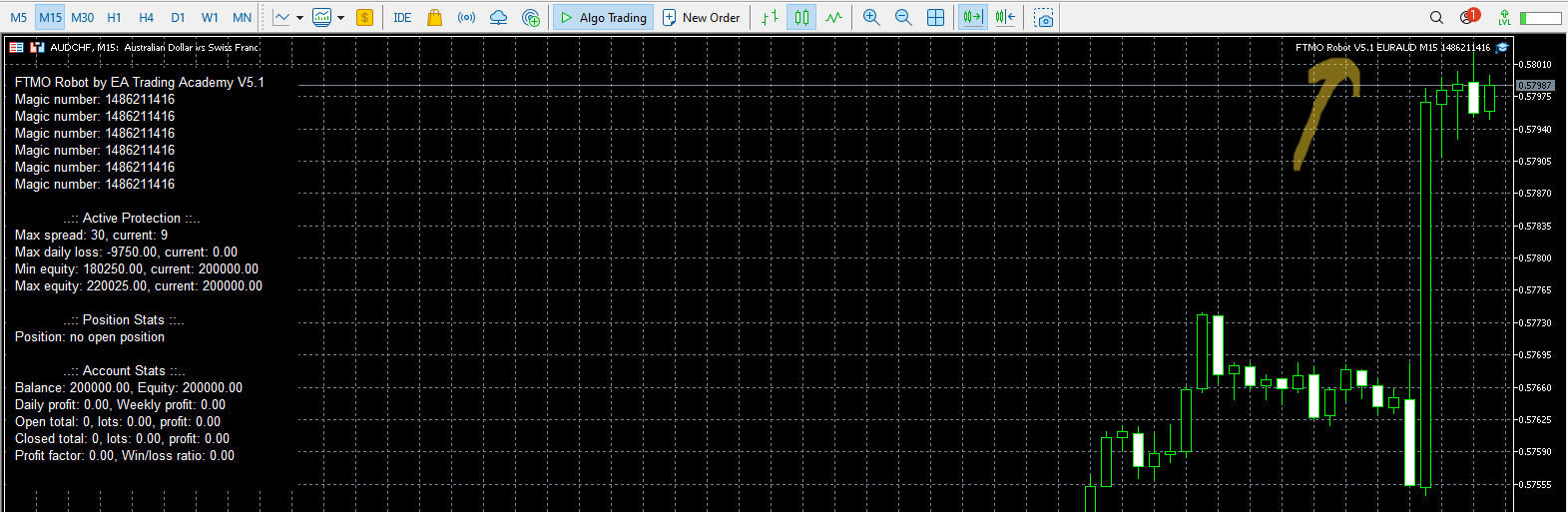 please..Participant
Right click on the blue hat, select Expert Advisor, select Remove. Now you can install a new Expert Advisor.
Alan,
-
AuthorPosts