
Community Forums › Forums › Ready-to-use Robots › Prop Firm Robots › Prop Firm Robots: Suggestions and Ideas
Tagged: #Newpairs #Propfirmapp, FTMO Robot, Prop Firm Robots, prop firm robots app, propfirm, risk managemnet
- This topic has 195 replies, 59 voices, and was last updated 11 months, 2 weeks ago by
Maria Docheva.
-
AuthorPosts
-
Robert Forbes
ParticipantWould it be possible to expand the range of trading accounts, or to allow us to put in a custom amount that automatically works out the setting?
For example, FXIFY is offering substantial discounts for challenges, and they have a $15000 account, and up to $400000. Also, Surgetrader has a $250000 account. It would be great to get settings for these account sizes.Thanks!
heroking82
Participanthello.
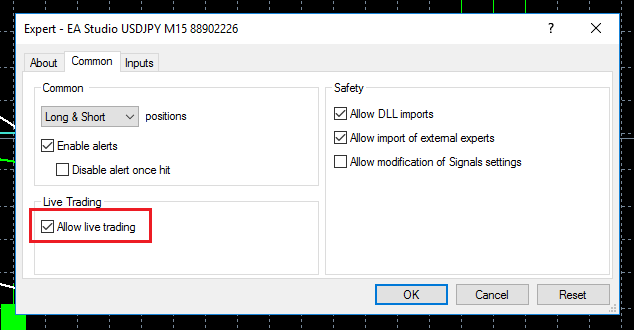
i would like to turn off a FTMO robot instead of removing it from charts…
is it possible to do the slash (//) technique with FTMO robots?
if so which line. cheers
Alan Northam
ParticipantHi heroking82,
Go to the Expert Advisor properties box and uncheck the following:
Alan,
ParticipantParticipantlegend. cheers
Robby Mesenberg
MemberHey there!
as we got the backtest Feature, is it clever to Trade them on funded Accounts?
Does anyone have experience on that?
ParticipantHi Robby,
The FTMO app does the backtest so traders do not have to spend time backtesting the Expert Advisors. I take the top 1 to top 3 Expert Advisors from the FTMO app and apply them to an FTMO Challenge.
Alan,
MemberThanks for your answer alan. I meant trading them on funded. Not Challenge. Do you have experience with that?
Gilles Ruelens
ParticipantAlan
The top 1 -> top 3 is it from the weekly, daily, monthly?
thx in advance
ParticipantHi Robby,
Yes you can use the FTMO robots from the FTMO app on a funded account. The only difference is that the robot will automatically close the robot when the account reaches 10% profit. To keep this from happening you can turn this feature off in the robots properties dialog box. The other thing is you don’t want the robot to drawdown very much so you really need to protect the account from hitting the max daily loss limit and the max account loss limit. So I would suggest tightening these up as well. I would also suggest not risking more than 0.5% of account balance until after you have made 1 or 2% profit. Again this is to protect the account from drawing down. All these changes can be made in the robots properties dialog box. Since you have gone through the process of passing the challenge and the verification stages you do not want to loss your account once it is funded. So slow and easy to start until you get some profit, then you can increase the risk.
Alan,
ParticipantHi Gilles,
I use the weekly time period to select the top 3. I did this at the beginning of the week. Right now my account is up about 1.6%.
Alan,
Trader 27
ParticipantHere’s a feedback and improvement suggestion after running ftmo robot on live funded account. During New York Close, brokers tends to widen the spread, yes entry protection is in place for the EA, however, an opened trade that’s still running will be stopped out prematurely by the broker. Hence is there a way to improve the robot to prevent such losses.
Thanks in advance.
MUSTAFA SAMEH
ParticipantHello
I have a suggestion regarding the filter for the previous period, whether a day, a week, or a month
Is it possible to add a date from to to so that we can, for example, know the profits and losses for two weeks, not just one week?ParticipantHello
I have a suggestion regarding the filter for the previous period, whether a day, a week, or a month
Is it possible to add a date from to to so that we can, for example, know the profits and losses for two weeks, not just one week?vinnysvinyl
ParticipantYes! I second this. A month is a little too long, a week a bit too short. Being able to manually select a range would allow us to hone in on the Goldilocks zone ; )
-
AuthorPosts