
Community Forums › Forums › Ready-to-use Robots › Prop Firm Robots › Prop Firm Robots App & v6.0 – New Features Released!
- This topic has 519 replies, 97 voices, and was last updated 1 year, 9 months ago by
NIKOS KYRIAKOU.
-
AuthorPosts
-
January 4, 2024 at 1:54 pm #224570
Alan Northam
ParticipantHi David,
Yes you can open a new FREE FTMO demo account every 14 days. I have done this many times myself!
Alan,
January 4, 2024 at 1:58 pm #224572ParticipantHi David,
When testing to find the best performing robots Petko suggests one to two weeks. Petko has also indicated he likes to see from three to five closed trades on the top performing robots with a profit factor of 1.2 or greater.
Alan,
January 4, 2024 at 2:05 pm #224574ParticipantHi David,
Petko suggests trading the top 1 to 3 performers. Petko has indicated in another topic he has never failed a challenge when trading the top 1 performer. He says it just takes longer.
Please keep in mind when you trade just the top 1 performer your account risk is limited to 1%. When trading the top 3 your account risk becomes 3%. Trading the top 3 performers can help you pass the challenge sooner but comes at a cost of increasing risk to 3%.
Alan,
January 4, 2024 at 2:15 pm #224576ParticipantHi Miguel,
I have addressed this with FTMO support. They do not block traders until there is a total of all traders accounts adding up to $400,000. Once this amount is reached they will send emails to all traders trading the same strategy and ask them to change their strategy. It is only after they send out the email and the traders refuse to change their strategy that they will lock out your account. So, there is really nothing to worry about when trading with FTMO. Petko has started in another Topic you can change the strategy by changing the indicators settings by a small amount and it will not significantly change the performance of the EA. Petko also says you can change the strategy by changing the Magic Number.
Alan,
January 4, 2024 at 2:19 pm #224579ParticipantHi Danny,
It has been typical in all the FTMO robots created by Petko that they don’t necessarily place a lot a trades in a short period of time but the trades that are placed have a higher probability of being winners. Also, we are still in the latter days of the holiday period when volatility is low. I would expect volatility to start picking up next week and you may start to see more trades. Hang in there!
Alan,
January 4, 2024 at 2:23 pm #224582ParticipantHi Johann,
If you have purchased on the the several FTMO plan options go to your Account, click on the FTMO robot app Tab, select the robots you want to download. If you cannot download the robots then you need to contact [email protected] .
Alan,
January 4, 2024 at 2:55 pm #224588Nelson Silva
ParticipantGood Morning Trading Academy i have received an email whit the news about your FTMO Robots and i find the very nice, special the test from 5 years i think it is very good proof that they work.
I have 1 question:
1- I have seen in the forum that some Persons have the: https://platform.algotradingspace.com/courses/ftmo/ftmo-challenge-course/ that have a price of 249€ and they get lifetime access too the FTMO robots. So my question is if buying the https://platform.algotradingspace.com/premium-robots/ftmo-robot/pricing-plans/ can I get access too the FTMO Challenge Course too or not?
Or i have too do the other way? buy the Course and have lifetime access too the FTMO Robots?
Many thx for help
January 4, 2024 at 3:19 pm #224603Wealth
ParticipantAny information on this?
January 4, 2024 at 3:30 pm #224605ParticipantYou can disable the news filter in the Expert Advisors properties dialog box.
Alan,
January 4, 2024 at 3:37 pm #224609ParticipantHi Alan,
I know that. But I don’t want it on the bot. I like my bots lean and mean. How can I remove it from inside the code? Is there a way to do that? Thanks.
January 4, 2024 at 4:15 pm #224621ParticipantYou would need to contact [email protected] to answer that question.
Alan,
January 4, 2024 at 4:51 pm #224630Danny Pyttel
ParticipantGibt es hier deutschsprachige Nutzer?
January 4, 2024 at 4:52 pm #224631ParticipantAre there any German-speaking users here?
January 4, 2024 at 5:17 pm #224601RUBIANO LACERDA DE ALMEIDA
ParticipantGood morning, I downloaded the FTMO APP in the settings I chose, simulating a challenge but I put it in a demo account that was already running. It happens that after adding the EA, an Error message appears that I send as an attachment. And automatically the robot is removed as you can see in the Journal.
I ask for help with this situation.
Att
Rubiano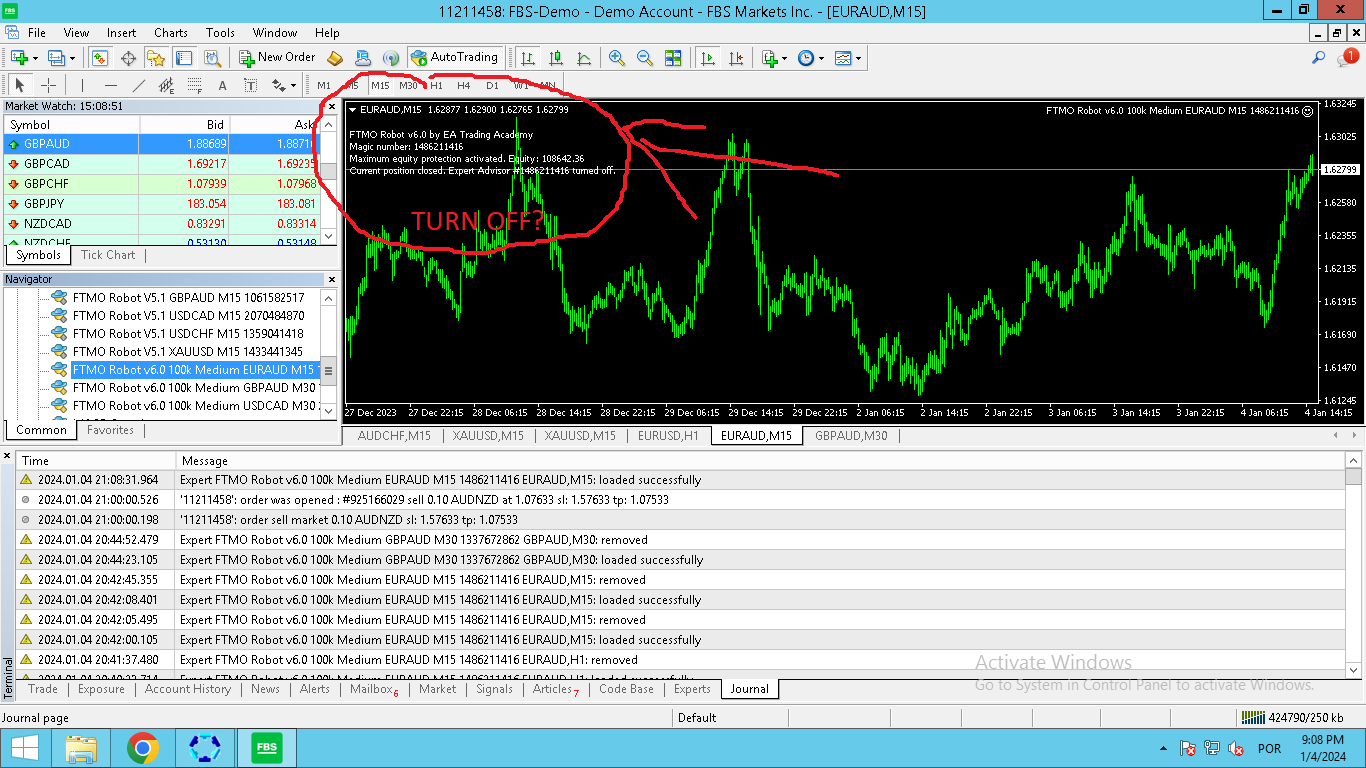 January 4, 2024 at 5:43 pm #224645
Sammy Trader
MemberYou need to take off V5 first. Dont use both versions.
So, you deactivate the algo trading, remove the older Robots (V5) from chart. Close MT4, delete the files from the Data Folder.
Get the new Robot with V6 and then do the ritual of installing the new robots.
-
AuthorPosts
- You must be logged in to reply to this topic.