
Community Forums › Forums › Ready-to-use Robots › Prop Firm Robots › Prop Firm Robots App & v6.0 – New Features Released!
- This topic has 519 replies, 97 voices, and was last updated 1 year, 9 months ago by
NIKOS KYRIAKOU.
-
AuthorPosts
-
April 1, 2024 at 4:18 pm #245812
Marin Stoyanov
KeymasterHey traders,
I’ve got some amazing news to share!
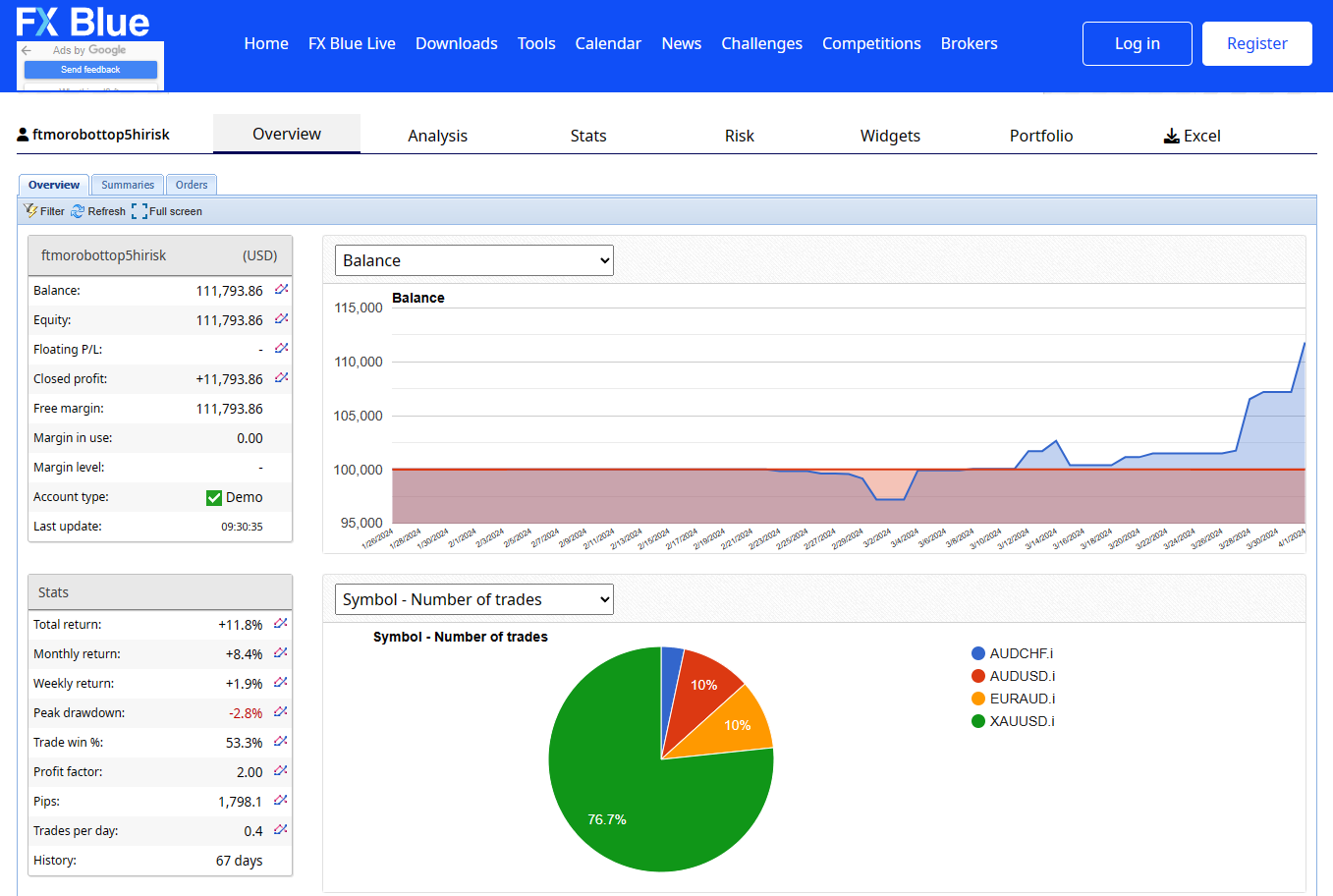
The Prop Firm Robots (or FTMO ROBOT) have successfully passed yet another challenge! This time, it was on a $100k challenge account with Infinity Forex Funds. What I did is that I relied on the Top 5 EAs from the Prop Firms App on the weekly timeframe. I took a bit of a risk by doubling the lots once the account hit 5%. It took the Prop EAs a solid 40 days to pass the challenge, and what’s even more impressive is that they managed to gain a whopping 15% in just the last 30 days, which is awesome to see!
Also, we will show in a video how we used the Prop Firm Robots so that you can see how we passed the challenge!
Here is an image of some of the stats as well:
Kind Regards,
NikosApril 3, 2024 at 11:19 pm #246437Joseph Yong
ParticipantHi Guys,
My small turbo challenge just got knock out by The Funded Engineer not because of the FTMO EA but I think this Prop firm is not dishonest.I have checked my dasboard and I didn’t break any rules of their rules . So stay away from this prop firm.
Hello Joseph ,
I hope this message finds you well.
Thank you for reaching us out via email, As per checking you are trading during market rollover, during this time spreads and slippage tends to widen unpredictably.
Price didn’t need to close down your allowed Max Daily / Daily drawdown for account to be breach as soon as price hit your allowed max equity drawdown then the account will be breached.
If you are wondering why your dashboard show a value above the allowed loss limit that is because at some point your account went below the allowed equity limit then got breach after that price went in your favor and got close above it.
It’s designed that way otherwise people would continue to hold to a losing trade until it becomes positive if this is not the case.
Should you have other questions and query, please feel free to contact us via live chat available in the website.
Best regards,
Funded Engineer Team
April 4, 2024 at 11:37 am #246525Alan Northam
ParticipantHi Joseph,
Thanks for the heads up!
Alan,
April 6, 2024 at 4:30 pm #246970ParticipantHi everyone,
I have a few questions while getting my EAs set up on a Demo Account:
1.) When we download the robots and select the right account size from the Robots App, do we need to do any adjusting of the Pips for Stop Loss / Take Profit at all? Or they’re already correct? How about when scaling?
2.) Does anything change if we decide to use just 1 EA vs. 10 EAs on the account? Will the robots prevent us from entering too many trades at once across multiple pairs, and manage risk so as not to blow the account, if we are running multiple robots?
3.) Also, let’s say we are doing a $400K Challenge. Would we download the $200K challenge, then what settings would we adjust to make it suitable for a $400K Challenge? Would it just be the lot sizes only, or do we adjust pips for Take Profit and Stop Loss (similar question as above). What other adjustments would we make, if we download the $200K robot, but want to adjust it for a $400K Account?
Thanks so much everyone for your help 🙂
NcioApril 6, 2024 at 6:28 pm #246993ParticipantHi Nicholas,
1. Before you download the prop firm robots you first need to select the account size, Max loss, Max daily loss, Profit target, Risk, and News filter option. Then when you download the robots they will already include all these settings. When scaling all you will need to do is to adjust the lot size.
2. All the robots are separate from each other and do not interact. So if you selected the risk Medium (1% per trade) and you decide to trade all 10 robots your overall account risk will be 10%. Professional traders do not risk more than 2% on any one trade nor do they accept more than 6% per day. This will give you some guidelines as to how many robots to trade at one time.
3. For a 400K challenge the Max loss, Max daily loss, and Profit target will need to be adjusted. If the percentages for the 400K challenge are the same as the 200K challenge then all you should need to do is to double these amounts.
Alan,
April 8, 2024 at 1:45 pm #247293Ryan Sloan
ParticipantI’m going to make this request again here since it’s been overlooked. Surely there is a way of setting the amount of the challenge so it can be auto adjusted, I’m about to introduce a different prop firm that has challenges that has different challenge amounts – the prop firm robot can definitely be beneficial for this as the rules are also slightly different – however as you scale the challange amounts vary depending on the account type you have. They are not as simple as 10k 15k 25k 100k etc, can this be adopted.
April 8, 2024 at 2:33 pm #247303ParticipantHi Ryan,
I have sent your request to support. In the meantime if you will add the prop firm parameters to this thread I can calculate the values you will need.
Alan,
April 8, 2024 at 6:02 pm #247329ahmad aboud
Participanti subscribed for 6 months and its still remaining 2 months but in my account its says i cant download any robot because i dont have any plans , how come ? i stil have 2 months remaining
April 8, 2024 at 6:34 pm #247342ParticipantHi ahmadaboud,
I have forwarded your concern to support.
Alan,
April 8, 2024 at 9:56 pm #247373Nicholas Moreno
MemberHi traders,
I’m following along with Petko’s video to compile the robot source code in order to place it on the MT5 platform.
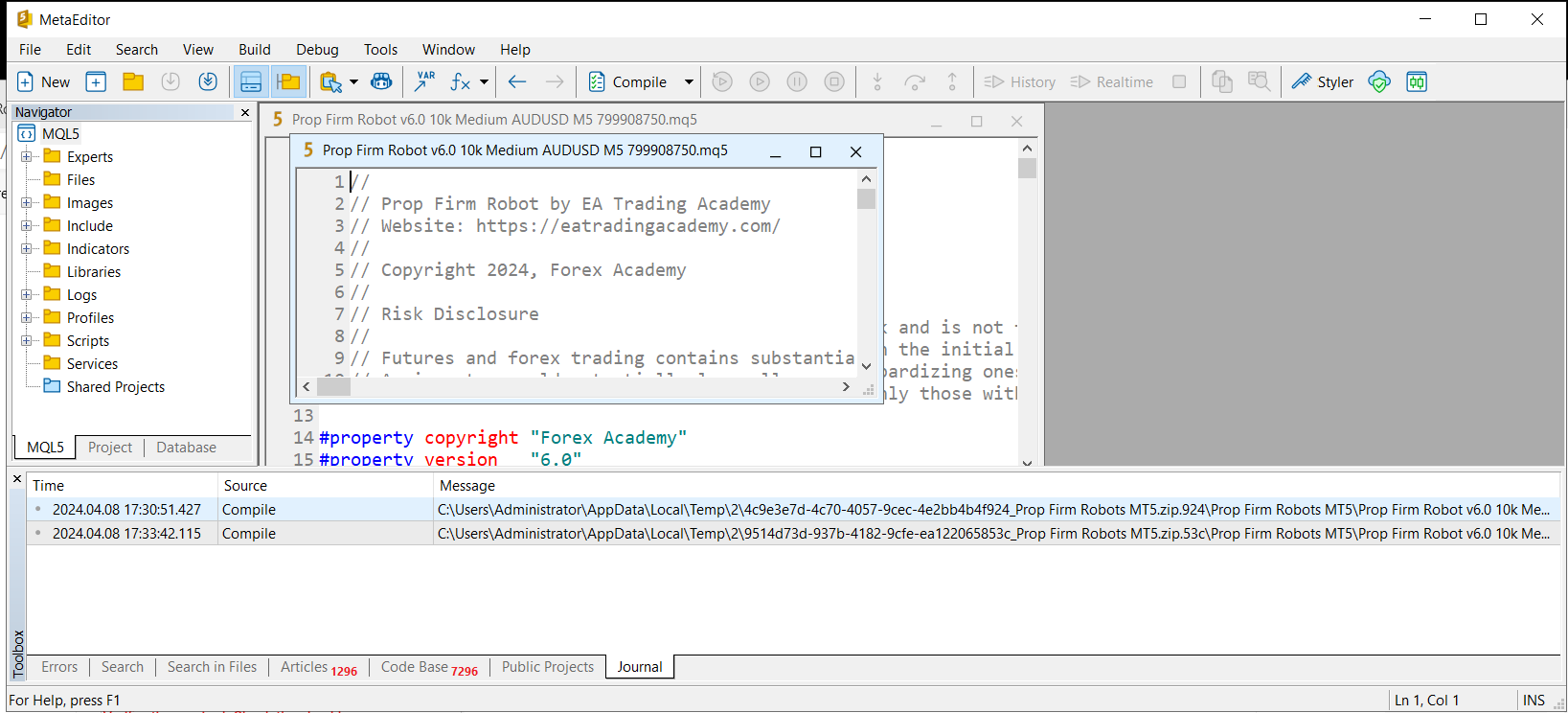
I’ve downloaded the top5 EAs, opened them on my VPS and clicked “Compile” in MetaEditor.
The issue I’m running into is, in Petko’s demo video, i see the MQL5 files show up right away, in the same folder, with a green check mark right after compiling them.
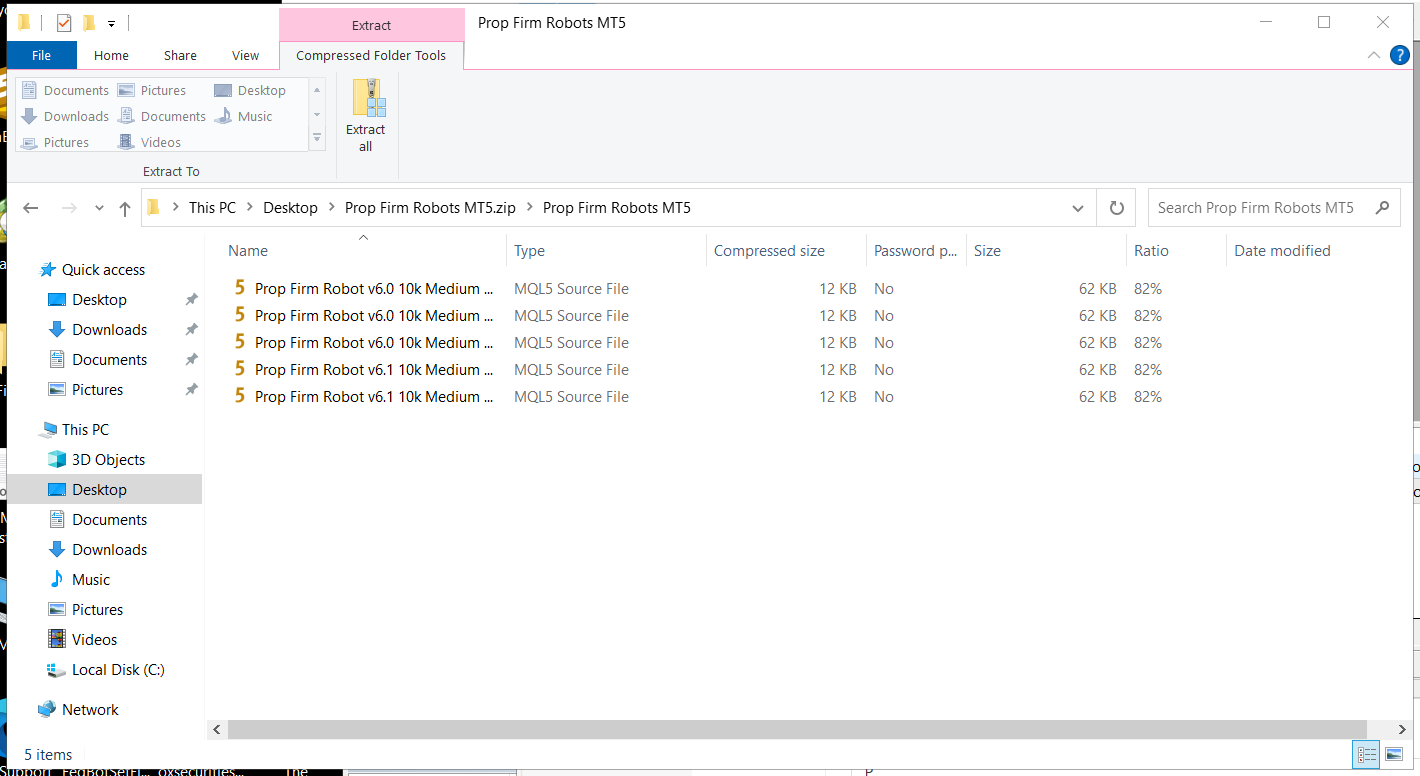
For me, that is not happening. They don’t show up in the same folder where the downloaded EAs are, which is saved to my desktop. I’ve been searching for them but can’t find them.
Does anyone know where to find the Complied files?
I’ll attach some images below:
What MetaEditor Looks like after i open the EA and hit “Compile”
What my folder looks like after compiling the EA file (notice, no MQL5 program files with a green check mark, as in Petko’s demo):
Thank you very much for your help!
Nico
April 8, 2024 at 9:56 pm #247378ParticipantHi traders, I’m having an issue when compiling the robots in MetaEditor.
I’m following along with Petko’s demo video here: https://www.youtube.com/watch?v=5EWNP9L2q5U
I downloaded the top 5 EAs to my VPS desktop.
I click them, they open in MetaEditor, then click the “Compile” button.
But, after I do that, I don’t see the MQL5 Program files (with the green checkmarks) anywhere in the folder. I can’t find them on the VPS anywhere.
Here is what Petko shows they should look like in his video:
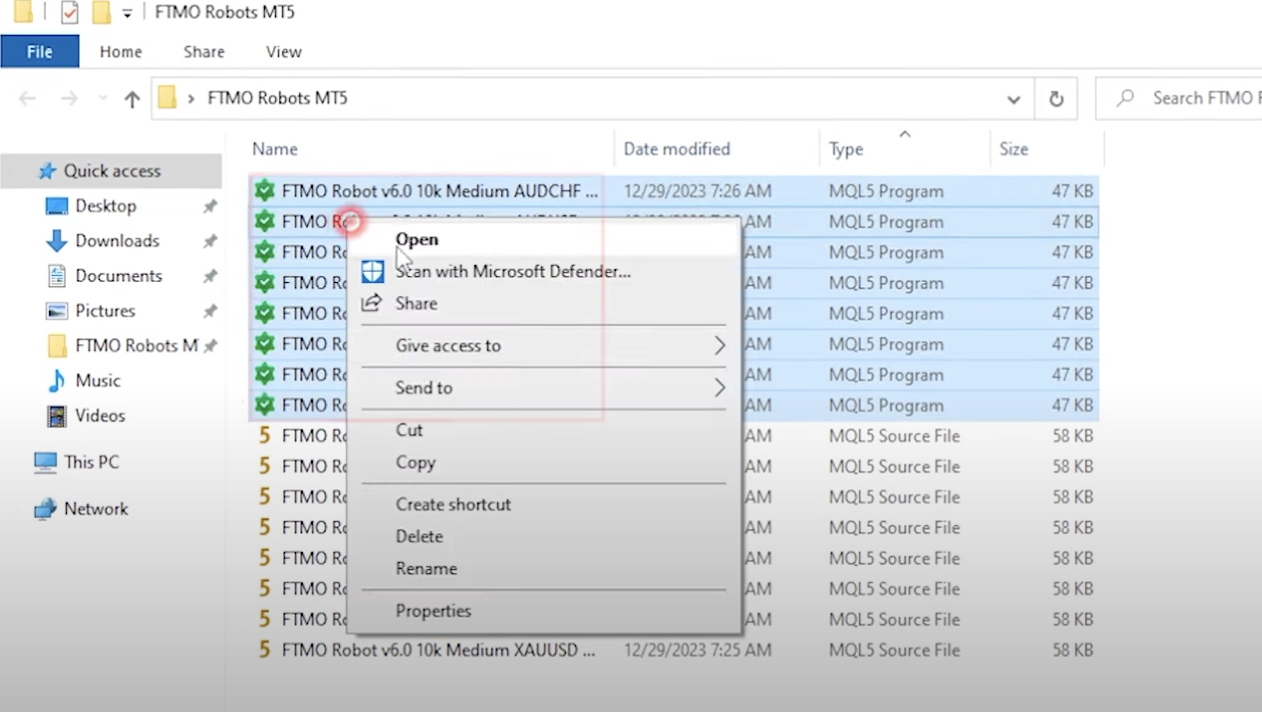
Can anyone help figure out how to find the “green check mark” compiled files after clicking Compile?
Thank you! 🙂
-Nico
PS sorry if this posts twice, i just posted it but it seems to have disappeared.
April 8, 2024 at 9:57 pm #247391ParticipantHi Nicholas
Close MT5 and then reopen it. Look in Navigator window and you should see the robots. If you see them in the Navigator window then they are compiled. If this does not work let me know!
Alan,
April 8, 2024 at 10:32 pm #247398ParticipantThank you Alan! I did find them now, so thank you so much.
I believe my Robots are all set up on my Demo account, so I’m excited to see some activity this week 🙂 thank you!
April 8, 2024 at 10:57 pm #247405ParticipantHi Nicholas,
Fantastic!
Alan,
April 9, 2024 at 8:36 am #247476ParticipantHi Guys,
I am coming across a “consistency rules” on a few challenges now.
How do we use the EA to overcome this issue?
Appreciate your advice!
Joseph
-
AuthorPosts
- You must be logged in to reply to this topic.