
Community Forums › Forums › Ready-to-use Robots › Prop Firm Robots › Prop Firm Robots App & v6.0 – New Features Released!
- This topic has 519 replies, 97 voices, and was last updated 1 year, 9 months ago by
NIKOS KYRIAKOU.
-
AuthorPosts
-
January 19, 2024 at 11:52 am #227881
MUSTAFA SAMEH
ParticipantHello
Can you add historical data for other companies, for example fundednext, as well as add an account size of 6000k?January 19, 2024 at 1:06 pm #227927Gavin
ParticipantGreat new feature of the Robot App, but I don’t see all robots for timeframes M1, W1, D1. Why is that ?
January 20, 2024 at 3:52 pm #228393Petko Aleksandrov
ParticipantAs I explained in another topic, the FTMO app shows the open trades as closed (this is how the MT back tester also works).
So, you will usually see fewer trades in your account history than in the app. So it would be best if you looked at the opened trades as well:
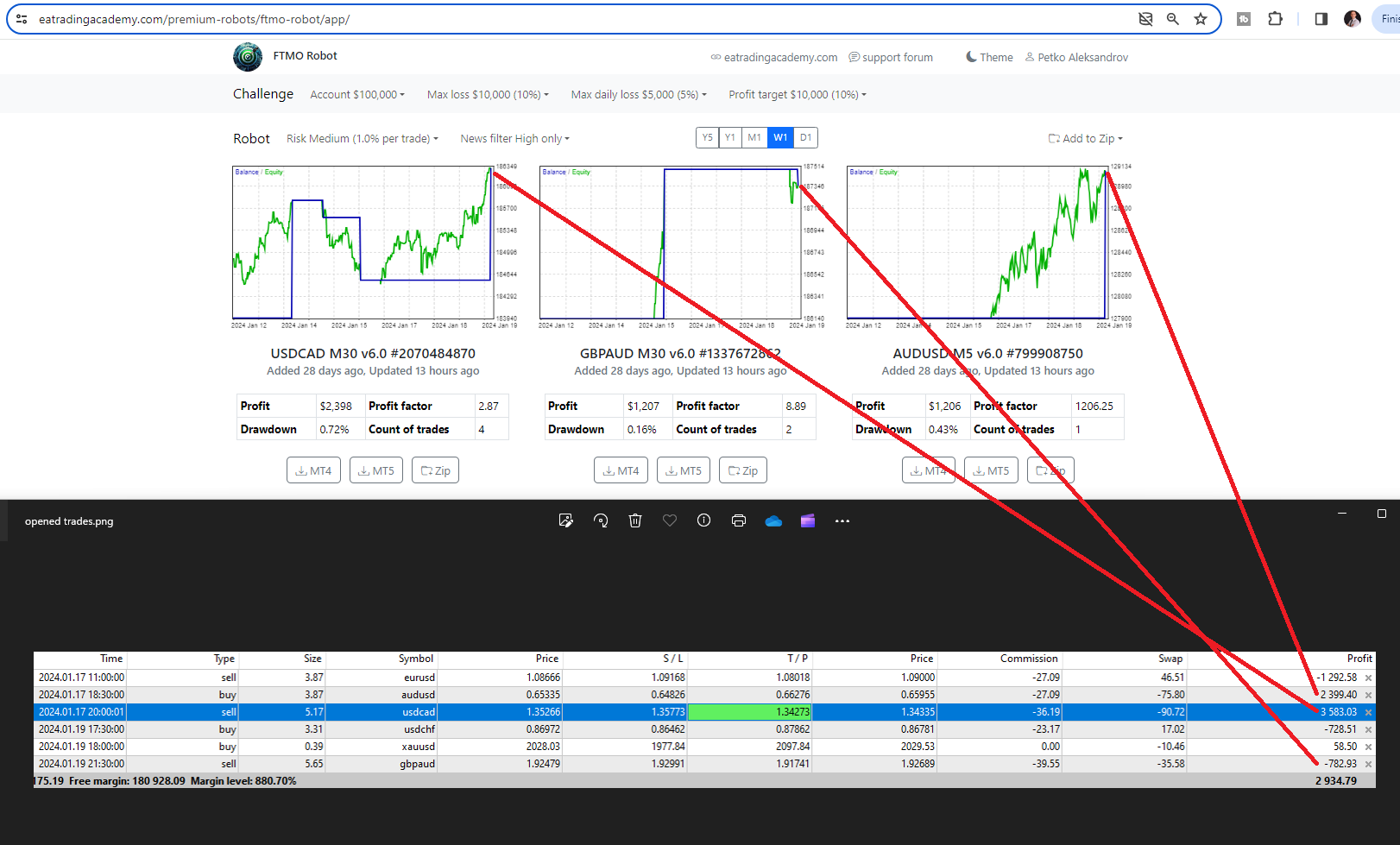
Also, there could be some differences if your MT was disconnected and trade was missed.
January 20, 2024 at 5:22 pm #228415Gaurav Kataria
ParticipantDear Alan,
if possible please make another Upgrade on all the EAs from Robot Builder You have because it takes very seriously: lack of trades in MT5 every one is newbies when compared toeas without set files we have no control no Chance .. only You and Petko dear can do anything if they want to All expert advisors whatever timeframe could be helpful for all your should atleast be opening once a week open one trade..
January 20, 2024 at 5:59 pm #228422Alan Northam
ParticipantHi Gaurav,
I use MT4. With MT4 I see 9 trades opened and closed this past week and 6 trades opened this past week and are still open.
FTMO V6.0 does not use set files as the robots already have the set files loaded into them so there is no need to supply them.
Alan,
January 21, 2024 at 12:27 pm #228559ParticipantCan you add an update by choosing a specific time period and not just the last day, week, month or year?
January 21, 2024 at 12:28 pm #228561ParticipantWhy is no one replying to my comments?
January 21, 2024 at 12:43 pm #228563ParticipantHi Mustafa,
The support team only checks on the forum occasionally. For faster response contact [email protected] for feature requests.
Alan,
January 21, 2024 at 6:01 pm #228629Marin Stoyanov
KeymasterHello Mustafa, thank you for the suggestions about the different timeframes, and different historical data and account sizes. I will forward this to our development team to see if possible additions can be implemented. We already have on our road map to add different account sizes and currencies so this will be implemented in the future.
January 21, 2024 at 6:13 pm #228634Bence Bela
ParticipantHi,
Could somebody please tell me which pairs were the top performers last week? When I check in the robot app USDCHF comes up on top but that pair has only had losses for me during the past week so something must be off with either my robots or with the app.
Please advise.
January 21, 2024 at 6:15 pm #228635ParticipantHey traders,
We’ve updated the USDCHF EA in the FTMO Robot App.
After multiple tests, we found that the trading results on M15 are better than M30. The strategy remains the same, but we’ve updated the indicators’ SL, TP, and several parameters.
Please visit the app and download the new version according to your challenge size and risk tolerance.
I also published a video about the latest update: https://youtu.be/ETd8y1CPYi8
January 21, 2024 at 6:47 pm #228645ParticipantHi Petko,
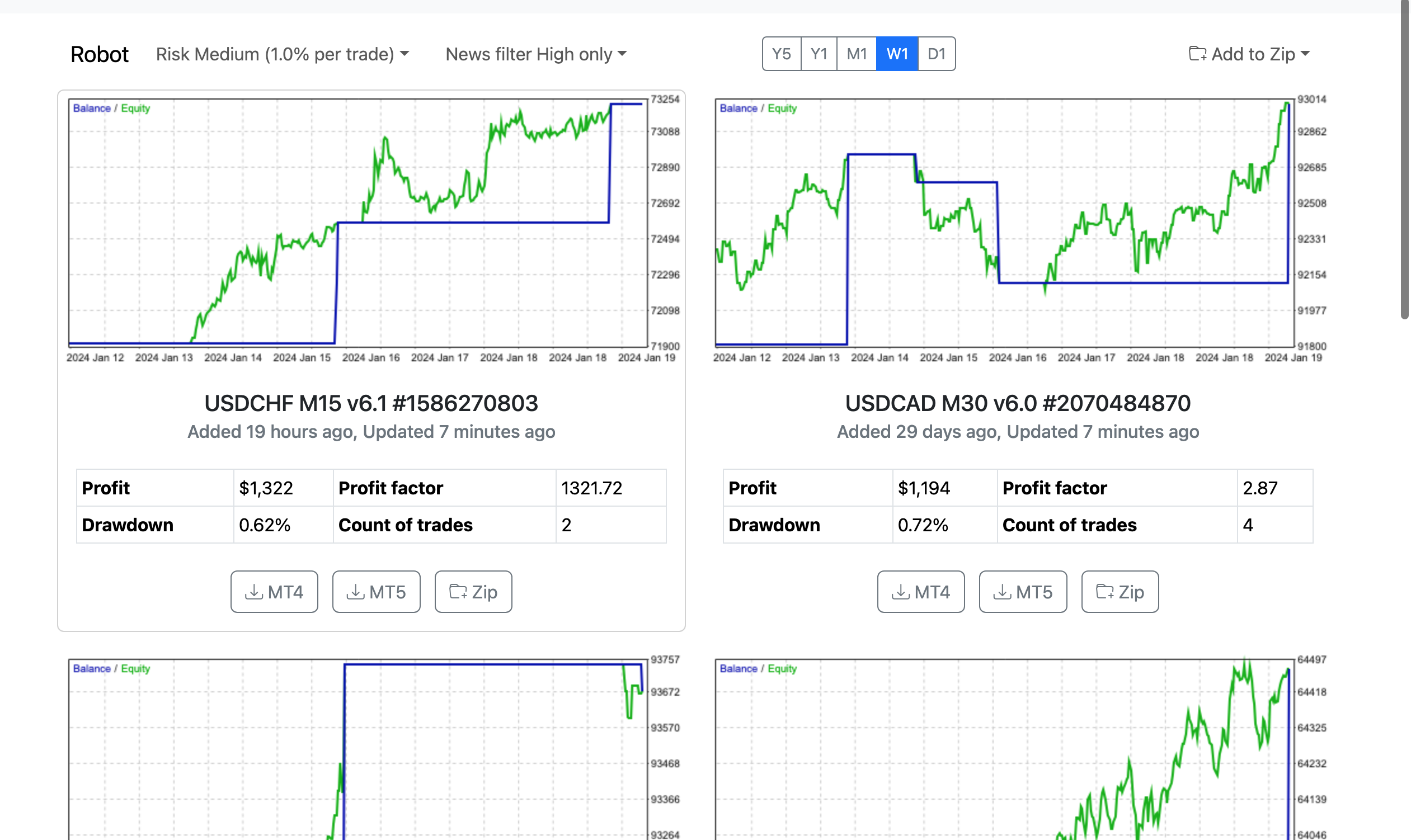
I assume the video you just uploaded is fairly recent. Why does my FTMO Robot app keep showing the USDCHF pair as the most profitable for the past week. This pair has lost 3 trades during the past week for me on a FX2 Evaluation and I see that even in the video you uploaded its showing as unprofitable. Why is my robot app still shows as profitable. Please I need help with this asap because i dont want to work with false data. I attached a screenshot.
How can it be that only my robot app is showing incorrect data. I see nobody having this same issue but this is the app itself. What could I do?
And you also mention that EURAUD did not execute a trade in the last one week. Well, it did for me. A profitable one. So how can that be? Its like my robots are completely different from the rest.
Help would be much appreciated.
 January 21, 2024 at 7:20 pm #228658Participant
Hi Bence,
Petko had discovered over the last week USDCHF had losing trades on the M30 time frame so he updated it this weekend. The USDCHF time frame is now M15. You need to upload the new updated version for trading this next week.
Alan,
January 21, 2024 at 7:29 pm #228660ParticipantHi Alan,
Ok that explains the USDCHF issue.
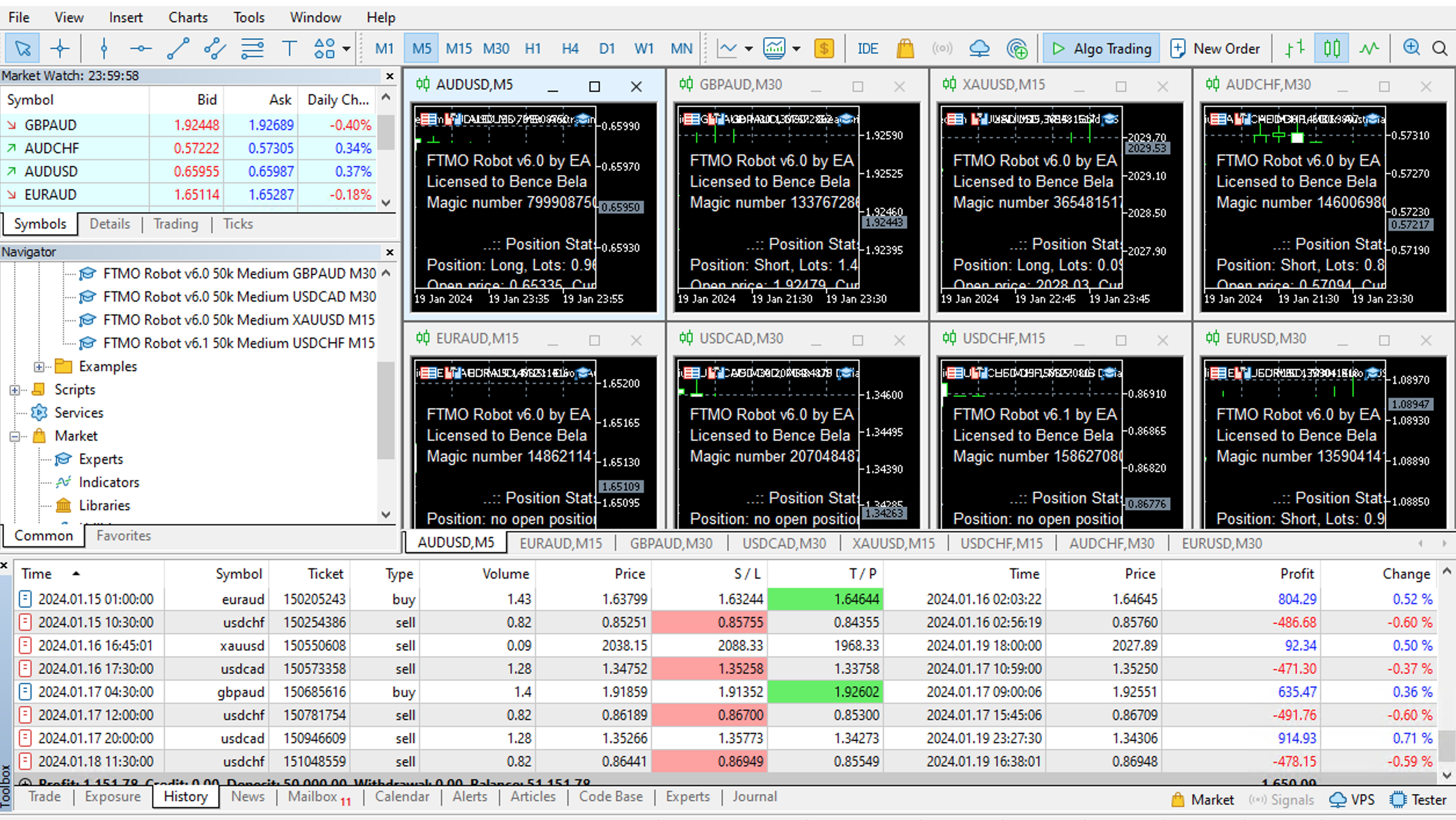
What about EURAUD? The app shows that there were no trades for EURAUD in the past week. But actually I did have 1 profitable trade with the robot for that pair. Its already closed in profit. Screenshot attached. I am running the robot on an FX2 evaluation same as Petko. Why is that profitable trade not showing up in the app?
 January 21, 2024 at 7:41 pm #228663Participant
Hi Bence,
The FTMO app uses the historical data from the FTMO server. However, the historical data from the FX2 server can be somewhat different. As a result the currency pairs traded can be slightly different. I run the FTMO V6.0 robots on FTMO Challenge and the 8cap Evaluation and I see where one currency pair traded on 8cap is not traded in the FTMO Challenge. This is normal as the historical data is slightly different.
Alan,
-
AuthorPosts
- You must be logged in to reply to this topic.