
Community Forums › Forums › Ready-to-use Robots › Prop Firm Robots › Prop Firm Robots App & v6.0 – New Features Released!
- This topic has 519 replies, 97 voices, and was last updated 1 year, 9 months ago by
NIKOS KYRIAKOU.
-
AuthorPosts
-
January 3, 2024 at 5:10 pm #224339
Andy Keane
ParticipantTried both ideas still same issue.
January 3, 2024 at 5:16 pm #224341Bob Gal
ParticipantHello,
I purchased the FTMO course in November, do I have access to the FTMO Robot App.
I’ve tried clicking on the link in my account but I’m being diverted.
Kindly advise.
Thanks
Rob
January 3, 2024 at 5:17 pm #224342Sammy Trader
MemberHi Andy ,
These are your possible fixes for Error 5203 :
1.Check your internet connection: Make sure your device is connected to the internet and the connection is stable.
2.Restart MT5
3.Check MT5 server: It’s possible that the server you’re trying to connect to is experiencing issues. Try connecting to a different server if possible.
4.Contact your broker: If none of the above solutions work, it would be best to get in touch with your broker. They can provide information about any server issues or maintenance that might be causing the problem.
5.Reinstall MT5: As a last resort, you might need to uninstall and reinstall MT5. This can help clear any corrupted files that might be causing the problem.
January 3, 2024 at 5:18 pm #224343MemberIf you are still paying for the updates then check this email in your inbox with Subject – New Year, New FTMO Robot App (+ v6.0)
January 3, 2024 at 5:19 pm #224345Alan Northam
ParticipantIt’s working on my end!
Maybe its being blocked by firewall?
Alan,
January 3, 2024 at 5:38 pm #224350ParticipantThanks I will try contacting the broker I have the this on VPS with other bots running and getting news. But with a different broker.
January 3, 2024 at 6:01 pm #224357ParticipantCan you manually place trades? Place a trade with 0.01 lot size and then close it. This will indicate MetaTrader is communicating with the brokers server. Also, are you sure the broker you are using allows trading with Expert Advisors? For example forex.com does not allow using EAs on their demo accounts but you can use them on their live trading accounts. Crazy!
Alan,
January 3, 2024 at 6:33 pm #224368Anthony126
ParticipantLoving the look of the update and can see the hard work getting put in by the team !
January 3, 2024 at 8:37 pm #224389John Guthmiller
ParticipantI purchased ”The Complete FTMO Challenge Course” which had the Forex Robot EA Lifetime Updates as part of the deal. Now that this New Version of FTMO Robot App & v.6.0 has come out, I have the app in my account but when I try to download the new Robots v6.0 I get this message:
”To access and download the FTMO Robots, you need to be a registered user and have an active plan with us.
Please log in to download the Expert Advisors. If you haven’t purchased a plan yet, you can select one that suits your needs here.”I was led to believe that I have ”Lifetime Updates” to the FTMO Robot EA but it seems there is some problem accessing and downloading the new EA’s.
Does anyone else have this problem?? And how did you get the problem corrected??
Thank you for any help that might solve this problem…
Thanks,
John
January 3, 2024 at 9:05 pm #224396Marin Stoyanov
KeymasterHello John, you do have lifetime access. Please try clearing your browser cache, then login to the Academy website if you haven’t and access the FTMO Robot App again.
January 3, 2024 at 9:06 pm #224397KeymasterHello, you do have lifetime access. Please try clearing your browser cache, then login to the Academy website if you haven’t and access the FTMO Robot App again.
January 3, 2024 at 9:53 pm #224413Wealth
ParticipantCan we add another news outlet if this one is not working?
January 3, 2024 at 9:57 pm #224414ParticipantHi Wealth,
The news outlet should work! What problem are you having? Did you watch the video for FTMO v6.0? It shows how to configure the news filter.
Also did you add the following (see the red rectangle in the image below):
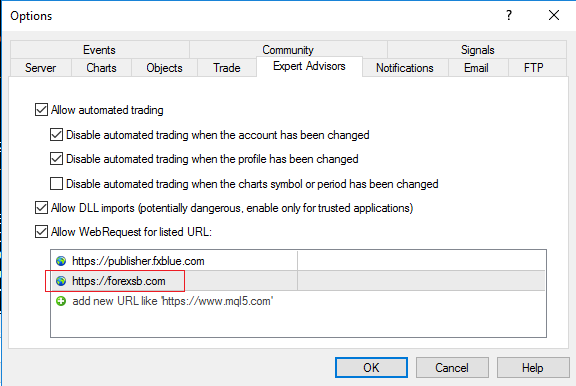
Alan,
January 3, 2024 at 10:02 pm #224415ParticipantI see people having issues with it. Maybe having another option might help. Also, in case your website server goes down. It would be a great idea to have a backup.
January 3, 2024 at 10:10 pm #224417ParticipantI am using a live account on AXI and run other EAs with this account. The broker is now looking into the issue. They have said that they do not believe the problem to be anything to do with them, but before confirming this they want to check.
-
AuthorPosts
- You must be logged in to reply to this topic.