
Community Forums › Forums › Ready-to-use Robots › Prop Firm Robots › Prop Firm Robots App & v6.0 – New Features Released!
- This topic has 519 replies, 97 voices, and was last updated 1 year, 9 months ago by
NIKOS KYRIAKOU.
-
AuthorPosts
-
January 3, 2024 at 11:27 am #224234
Petko Aleksandrov
ParticipantHello everyone,
As we embark on a new year, we’re excited to announce some major updates to our FTMO Robot that we believe will significantly enhance your trading experience.
1. Introducing the FTMO Robot App: During 2023 we developed the app which makes the whole process easier. This new app simplifies the process of updating and monitoring your EAs.Before downloading an EA, you can now access detailed information on its Profit, Profit Factor, and Drawdown, allowing you to make more informed decisions.
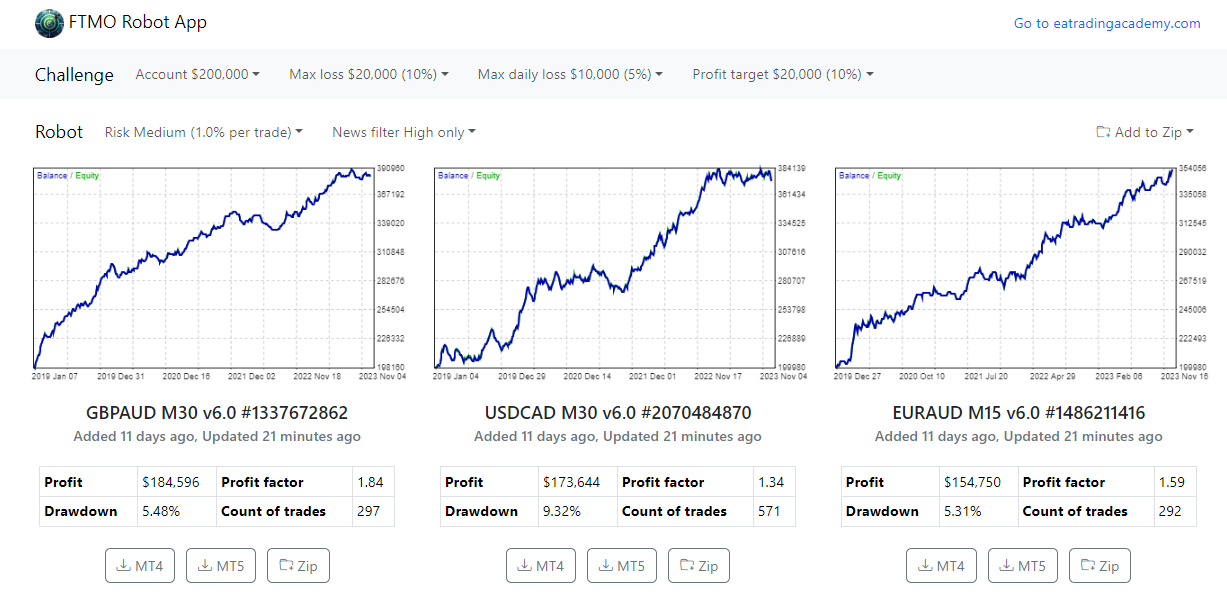
2. Automated Parameters for Various Account Sizes: To further streamline your trading process, we’ve automated the setup of parameters and lot sizes according to different account sizes and risk settings. You can now select your account size and specify your maximum loss, daily loss limit, and profit target in the app. The FTMO Robot app will do the rest, generating the best-suited robots for your conditions, removing the need for manual set file imports.

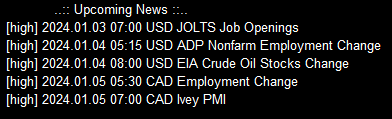
3. News Filter Added: We’ve listened to your feedback and added a highly requested feature – the News Filter. This feature is designed to improve risk management by keeping your open trades active while preventing the initiation of new trades during high-impact news events. Please note that this filter only restricts the opening of new positions; your exit orders and SL/TP settings will still function as normal on your open positions.
4. Trading on Different Time Frames: After extensive testing, we’ve made a significant change. Our robots will now operate on varying time frames, specific to each currency pair. This is based on our findings that certain pairs achieve better performance on different time frames, thereby optimizing your trading strategies.
5. Update January 14, 2024
Enhanced Maximum Daily Loss (Currency): Now, this feature resets at a specific hour every day, offering you greater control over your daily trading limits.
Maximum Daily Drawdown %: A new equity drawdown protection that monitors and limits your daily drawdown in percentage terms – a crucial tool for managing risk effectively.
Daily Reset Hour (Terminal): Set the exact time for the Daily Loss and Drawdown protections to reset. This aligns with your trading strategy and schedule, offering bespoke risk management.
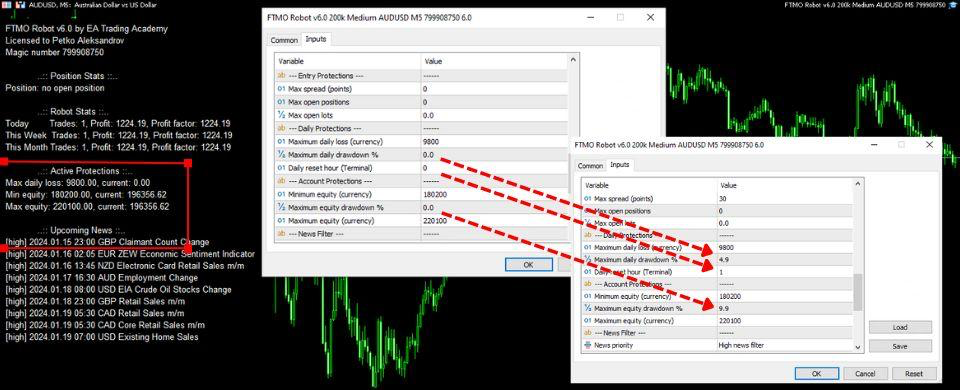
Maximum Equity Drawdown %: This new feature limits the maximum equity drawdown, safeguarding your investment against unexpected market movements.
Note: When any of these protection mechanisms are triggered, the Robot will automatically close all current positions and turn off to ensure your trading aligns with your risk parameters.6. Update January 18, 2024 Tracking the results

Backtest Period Filter: View the top-performing EAs over different periods (last day, week, month) directly within the app. This eliminates the need for manual backtesting and tracking performance on Myfxbook.
Why This Matters:
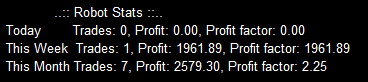
Stay informed with real-time data. Our backtests are recalculated every 30 minutes using real historical data from FTMO, ensuring you always know which are the Top performers in the last 1 week or last 1 month:
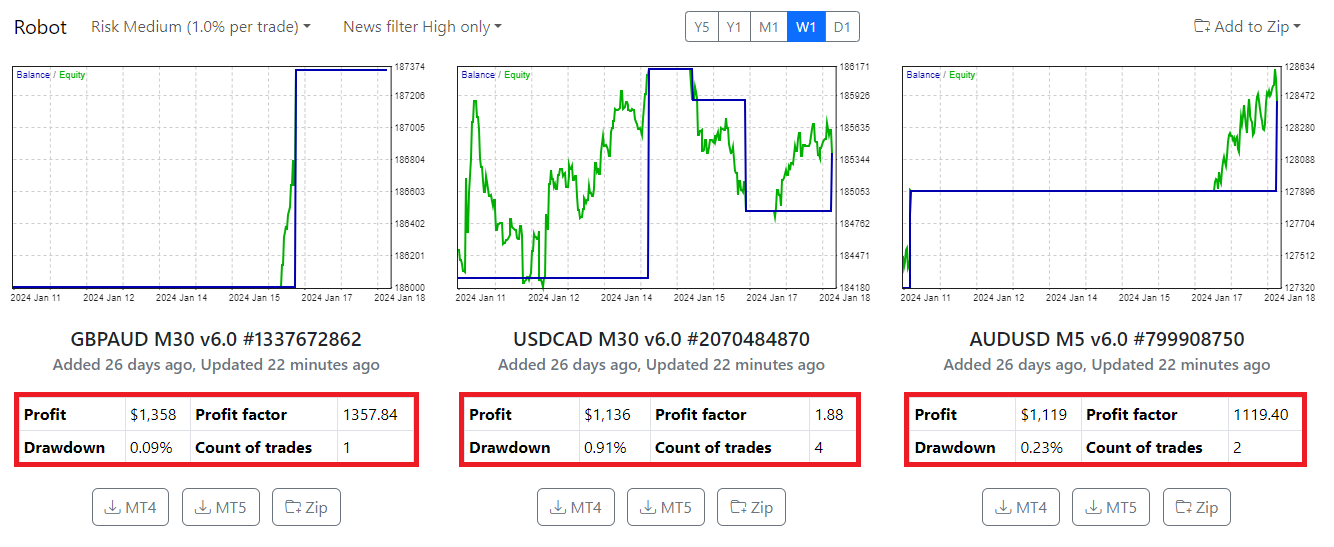
More, you can effortlessly monitor your Daily Profit, Weekly Profit, and Monthly Profit right from the charts themselves. This means there’s no need to connect your trial/demo account to Myfxbook anymore to keep track on which is the best EA to trade or which is the top Performer in the last 1 week.
Update February 1, 2024 Expanded Robot Collection
We’re thrilled to announce an update to the FTMO Robot App that we believe will greatly enhance your trading experience.
Expanded Robot Collection: Our robot lineup has grown from 8 to 14, offering you a broader range of trading strategies and optimizations. In addition to new robots, we’ve fine-tuned some for existing currency pairs but with optimizations for new timeframes, allowing for more personalized trading strategies.
Why This Update Matters: With a wider selection of robots, you can better match your trading approach and objectives. These robots are specially optimized for various timeframes, leading to more precise and effective trading strategies. More robots mean more opportunities to profit under different market conditions.
We’re committed to continuously enhancing the functionality and performance of our tools to provide you with the best trading experience. To assist you in making the most out of these new features, we’ve put together a comprehensive video guide on how to use the FTMO Robot app.
We encourage you to share your experiences and feedback on these updates. Your insights are invaluable in helping us improve further. If you have any questions or wish to discuss these new features, feel free to post here.
Wishing everyone a prosperous trading year!
Best regards,
Petko Alexandrov
PS. Those of you who purchased the FTMO Robots need to log in to their account in the Academy and will be able to download the latest version, 6.0, from the FTMO Robot App.
January 3, 2024 at 12:08 pm #224241Stefan Kooij
MemberIm buyed the course from you, but i can’t find the FTMO ROBOT app to download in my account? where can i find it?
January 3, 2024 at 1:10 pm #224251Alan Northam
ParticipantStefan,
Go to your Account and then select FTMO ROBOT app.
Alan,
January 3, 2024 at 1:30 pm #224255MemberGood Morning,
Thank you!
I have a question about the max dailylos.
Does the daily loss only apply to that currency or to your entire account?
January 3, 2024 at 1:40 pm #224256ParticipantJust to that Expert Advisor/robot.
Alan,
January 3, 2024 at 1:54 pm #224259MUSTAFA SAMEH
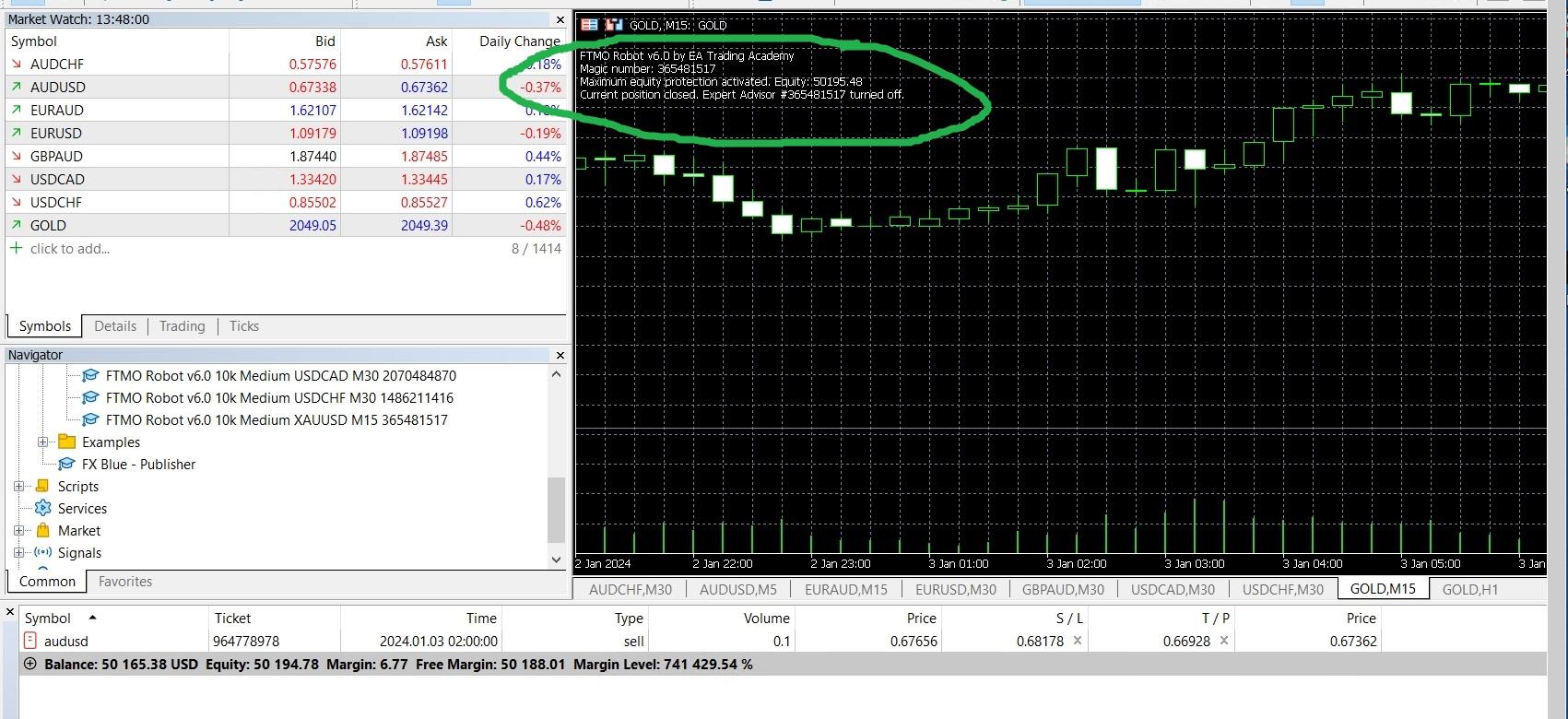
ParticipantI deleted the old version and ran the new version, but I don’t know where the error is
 January 3, 2024 at 2:01 pm #224261Participant
This means that deals in one currency are closed or closed when all robots reach the daily loss ?
January 3, 2024 at 2:17 pm #224268ParticipantEach robot works independently from all other robots. So if robot ‘A’ hits the daily loss only that EA will close the open trade and the robot will be removed from the chart.
Alan,
January 3, 2024 at 2:23 pm #224271ParticipantHi Mustafa,
The Maximum Equity Protection was hit at $50195.48, so the open trade is closed and the EA/robot is removed. This is done to keep the robot from turning downward causing your account to start losing money. This is a handy feature when using in an FTMO Challenge. To pass the challenge your FTMO account has to gain 10%. So it your account reaches 10% profit it will close the open trade and remove the robot to complete the challenge.
Alan,
January 3, 2024 at 3:30 pm #224298Andy Keane
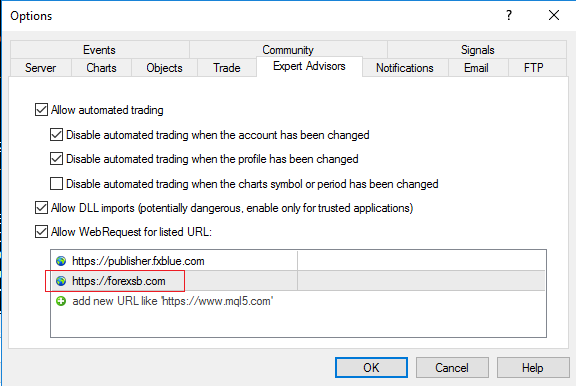
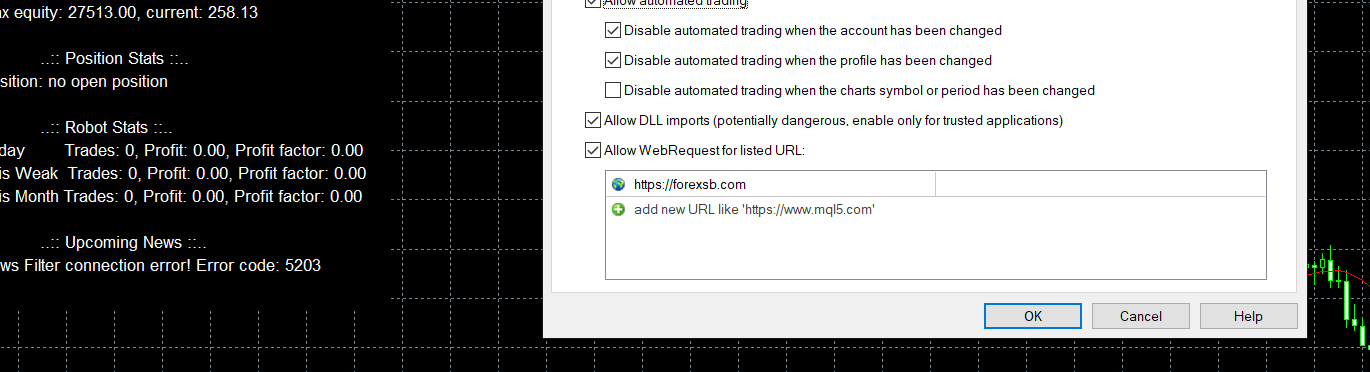
ParticipantHave followed instructions on the news filter. But I get the message “News Filter Connection Error! Error Code :5203. Any ideas
January 3, 2024 at 3:49 pm #224303ParticipantHi Andy,
Add the following (see red rectangle):
 January 3, 2024 at 4:40 pm #224318Participant
 January 3, 2024 at 4:56 pm #224329
0xBitpool
ParticipantQuick question about the risk sizing: if we choose 1% in the app, and then download the top 3 robots, is it 1% PER ROBOT or for the whole set?
January 3, 2024 at 5:01 pm #224332Marin Stoyanov
KeymasterBased on the error description, it appears to be a network-related issue with the news service. The Expert’s settings look fine. Please try to remove and reattach the expert or restart the MT terminal.
January 3, 2024 at 5:02 pm #224335Sammy Trader
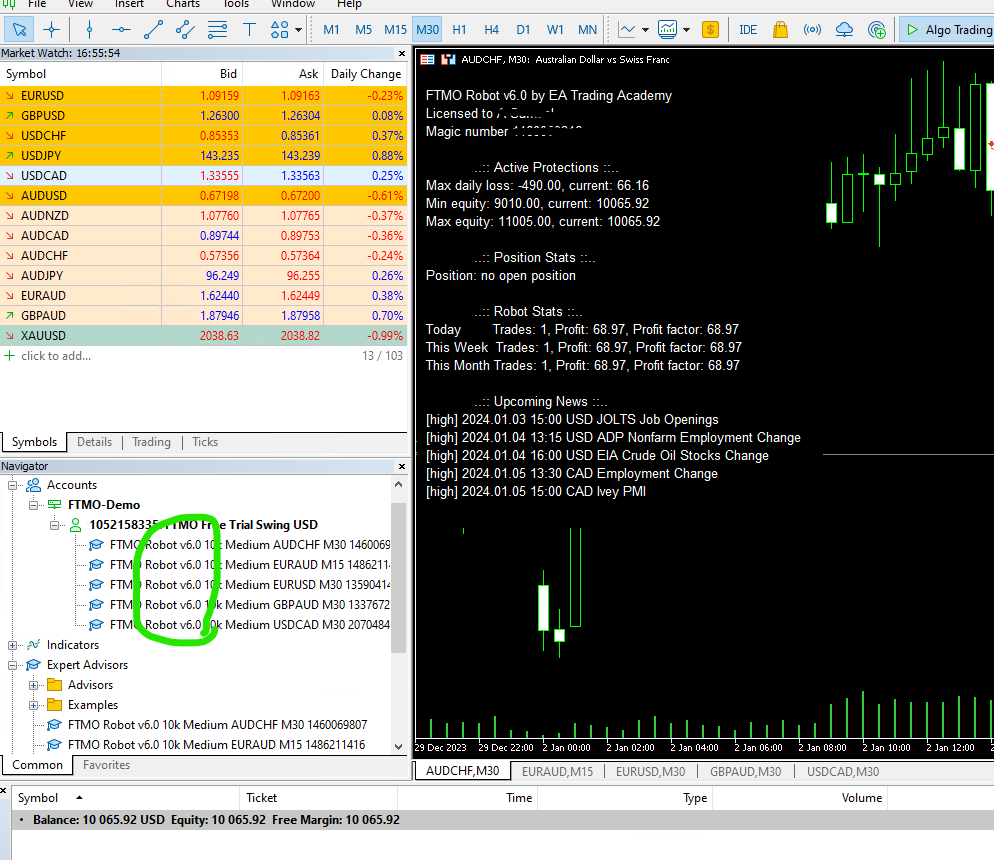
MemberAll set – Its the waiting game now, I am not tweaking any settings given by FTMO Robot App. Playing with the top 5 EAs, let’s see.
-
AuthorPosts
- You must be logged in to reply to this topic.