
Community Forums › Forums › Forex Strategy Builder Pro › Forex Strategy Builder Pro: Features and Settings
- This topic has 50 replies, 17 voices, and was last updated 1 year, 9 months ago by
chekzi.
-
AuthorPosts
-
April 20, 2020 at 9:14 am #45410
Petko Aleksandrov
ParticipantHey Simon,
I think what you are looking for is not possible. You the Generator to find the indicators for the Higher time frames, right?
The Generator works only on the current time frame that you have selected, and in this case, this is your lower time frame.
So the best thing you can do is to set the higher time frames as filters, and then run the generator to find some more rules.
You can Lock as well some indicators that you want to have by default.
May 3, 2020 at 12:41 pm #46839tangshaobo8
Memberhi teacher,i don’t know how to build different time ea(just like your lesson’GBPUSD-3TF-RSI’)
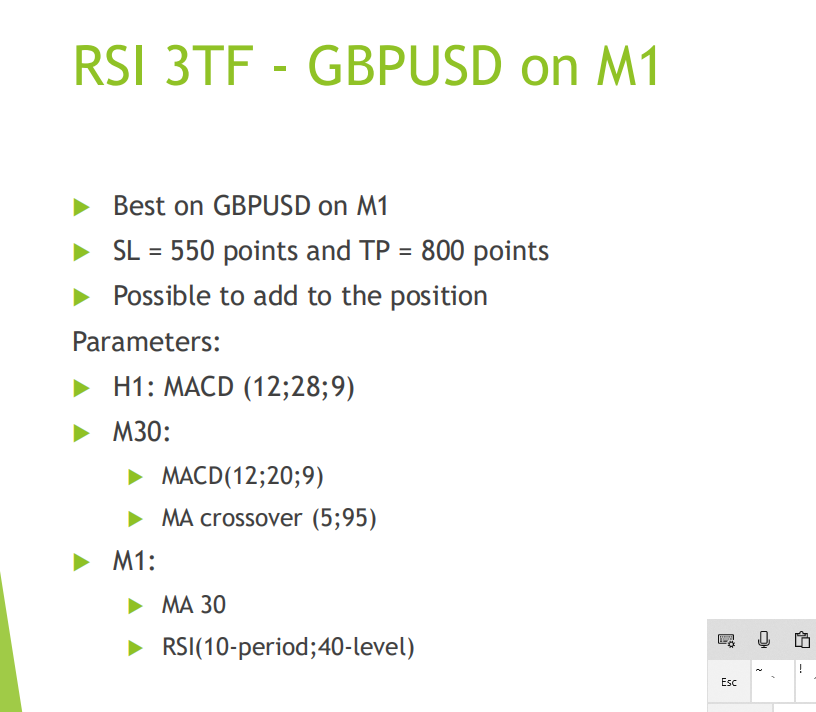
and how to use trend line and other line build ea in ea studio?how to use ichimoku in ea?
a
May 7, 2020 at 7:44 am #47129ParticipantHello Tangshaobo8,
This Expert Advisor was created with FSB Pro. There we have the option to create strategies with higher time frame filters.
Did you watch the free videos from Mr Popov on the FSB pro page?
Here they are:
https://platform.algotradingspace.com/software/forex-strategy-builder-professional/
June 22, 2020 at 10:49 am #51558Ilan Vardy
ParticipantHi Petko / Desi
I have just completed the Top 10 USDJPY Expert Advisors: Algorithmic Day Trading course. This was, sort of, my first introduction to FSB Pro for generating and optimising strategies using this software.
I have completed most of your other Algo courses, and have been using EA Studio to create many strategies for a few months now. For most I run the optimizing and robustness tools.
My question is: if EA Studio already has optimizing and robustness tools built in, is it necessary to use FSB Pro too?
When you create EAs in EA Studio, do you, after creating them, import them to FSB Pro, and perform additional optimizing and robustness? I have found that when using EA Studio, if my acceptance criteria and robustness settings are too strict, I get only a few strategies. Would you advise less strict acceptance criteria in EA Studio to generate more strategies, and then afterwards optimize them in FSB Pro?
Thanks as always,
Ilan
June 22, 2020 at 11:52 am #51570ParticipantHey Ilan,
Good question!
FSB Pro is the more advanced and complicated software for the traders.
It has some more features that EA Studio doesn’t have (but the Reactor is with EA Studio, which is the treasure there).
FSB Pro has higher time frames, which I like the most. As you saw in the USDJPY course, the strategies trade on M5, for example, but I filter them on M30 and H1. This way, we can trade the smaller time frames but to filter on the higher. Or the opposite thing.
It has logical groups. It has the bridge to trade on MetaTrader(that was created long ago before having the EAs).
And something important to know. EA Studio opens the trades on the opening of the bar. While FSB Pro can open IN the bar, that matters a lot for some strategies.
It is good to have struck acceptance criteria and have fewer strategies. I prefer having one good EA instead of 50 that might not perform as I want.
What you can do is to loosen the acceptance criteria and just filter the EAs after that from the Collection by adding additional filters.
Cheers,
June 22, 2020 at 12:01 pm #51572ParticipantThanks Petko!
I’m looking forward to the FSB course
December 19, 2020 at 10:53 am #69731Morgan Daniel
ParticipantThanks for reaching out to me , you have made my day.Please i am new in coding but with ur programme, it has really helped me, however
I have one major issue which is
If lets say i want to use MACD
and i just want to say when the MACD is above “0” place a sell order
or place a buy order when below “0”
bcos your program doesn’t show numbers or Constantsor for instance if i just want to programme just one indicator called RSI. so that i can say when the RSI is above 75 trigger sell and when its below 15 trigger Buy
December 20, 2020 at 9:43 pm #69745ParticipantHey Morgan,
In FSB Pro you need just to add the entry rules and the exit rules. When you add it, there is the option to select what are the rules:
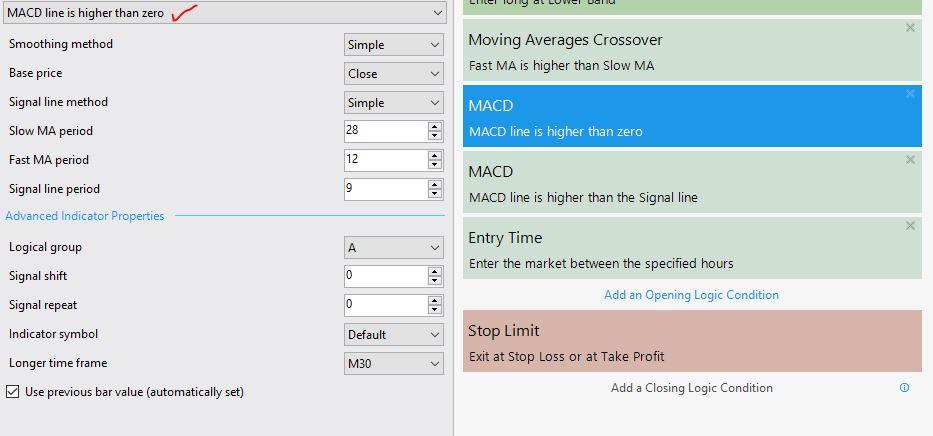
From there you can select the parameters.
November 10, 2022 at 4:54 pm #130752Alan Northam
ParticipantDoes FSB Pro allow to select if an EA will close trades before an important news announcement? I have RSB Pro but do not know what is can and cannot do. Recently, Petko completed a beginners course for FSB. I took this course but did not learn enough to understand why I should use this software instead of EA Studio. I find it a show coming to have a software bundle that includes FSB Pro but does not include the RSB Pro course. If FSB Pro does not allow to select whether or not an EA should close all open trades before an important news announcement then I think this would be a valuable update to EA Studio and or FSB Pro.
November 10, 2022 at 5:32 pm #130774ParticipantHey Alan.
Glad to hear from you. There is no such filter, and with my tests during the news, I never concluded that it is better to pause the EAs.
You can do such a test with the very same EAs in two accounts. In one of them, you can pause the EAs, and with the other, you can leave them running 24/5.
Test is at least for a month.
FSB Pro works slowlier compared to EA Studio (solved now with the Express Generator), but it has higher time frame filters, more analytical tools, and more indicators.
FSB Pro works on the closing of the bar(also during the bar), and EA Studio on the opening. Which makes them quite different, and it is hard to say which one is better. They generate different EAs.
November 10, 2022 at 10:19 pm #130792Samuel Jackson
MemberHey Alan,
FSBpro has the functionality to add this yourself if you are able to code.
As to why to use either over the other, other than the new what is it you are trying to do with the software? If you expand a little further on what you are looking for then I can advise you further 🙂
Both software have their different strengths and weaknesses and compliment each other really well but it all depends on what you want to do.
November 11, 2022 at 2:11 am #130801ParticipantHi Samuel,
During important news it is quite possible for the price of an asset to drop more than 5% of account balance if lot size is too large. This could then cause FTMO account to fail test. If the lot size is made quite low to avoid a 5% account balance drawdown then the FTMO account may not reach 10% profit by end of its testing period. I understand what Petko that over the long term the swings caused by important news events will cancel each other, however, when trying to use EA’s with FTMO this logic does not apply. The alternative is to either manually close all trades before an event, if I can remember to do so and I am at my computer which I may not be able to do, or to find an MT4 script I can add to each EA code. I am just trying to figure out how to handle this potential problem when trying to pass the FTMO testing period.
November 15, 2022 at 4:43 pm #131121ParticipantI got your point now. I would close the trades manually before the news.
November 16, 2022 at 5:58 pm #131198MemberYeah this sounds like more of a hybrid approach requiring sole manual intervention.
You could also run your algo on a few demo and monitor the magnitude of the moves around news releases to determine how it’s likely to impact.
I personally just leave mine running and don’t worry about the news, I just consider it to be captured in the history of my drawdown size and set my risk accordingly.
November 17, 2022 at 3:01 pm #131268ParticipantI also keep my algo trading running all the time. The backtest includes past movements from the news, so if you have balanced money management, it should not be an issue.
-
AuthorPosts
- You must be logged in to reply to this topic.