
Community Forums › Forums › Forex Strategy Builder Pro › Forex Strategy Builder Pro: Features and Settings
- This topic has 50 replies, 17 voices, and was last updated 1 year, 9 months ago by
chekzi.
-
AuthorPosts
-
March 29, 2020 at 8:27 am #43051
Simon Chong
Participantok. I found the answer. It’s on opening logic. But my thought is like this. Trade long only when D1 is on uptrend while my current chart is on M1. How do I do that?
March 30, 2020 at 11:48 am #43484Petko Aleksandrov
ParticipantHello Simon,
the higher time frames are available only in FSB Pro.
I show it in details in the courses:
Forex strategy course – Portfolio trading strategies + 12 Expert Advisors
Algorithmic day trading – Top 10 USDJPY Expert Advisors
Did you watch these courses? Basically, you select which will be your major time frame.
Let’s say you want to trade on M5:

This is where is your main time frame. Where the EA will execute the trades.
After that, you select the indicators that you want to use on the higher time frames. Let’s say you want to use MACD on M30:
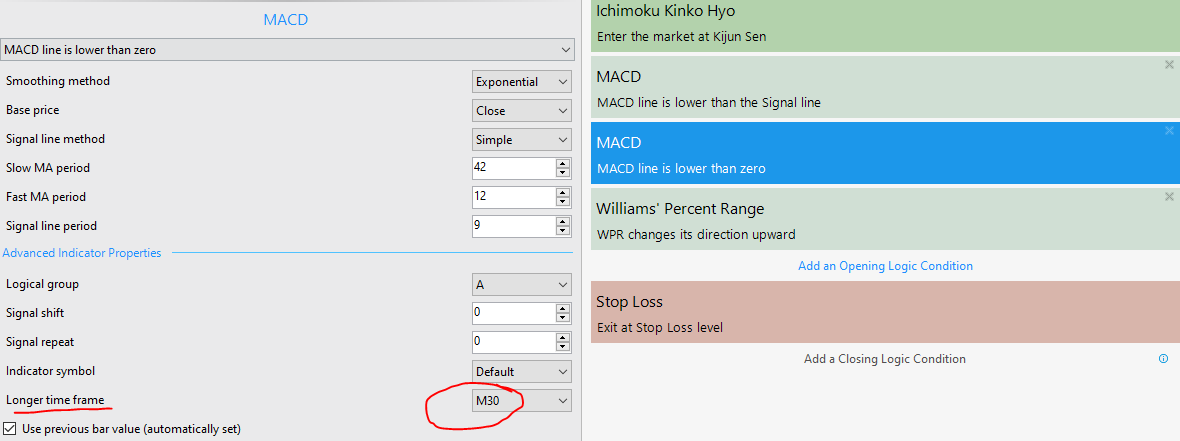
From the drop-down menu you can select which time frame you want to use as a filter.
Cheers,
March 30, 2020 at 11:57 am #43486ParticipantHello Simon,
Glad to hear from you.
Which indicator do you want to identify that the D1 is on uptrend? Use that filter as a higher time frame filter on D1 chart.
Cheers,
Petko A
April 3, 2020 at 7:59 am #43793ParticipantHi Petko,
I’m interested in both EA Studio and FSB Pro but I still can’t find the reasons that I need both although I understand the differences between both programs. Few questions that might help me to find out the answers.
1. Can I import EA from EA Studio to FSB Pro? Meanwhile, change the setting in bulk? Eg, change from Lot to percentage.
2. Can both run in my VPS? The OS is window server 2008
3. How do you use both programs to maximize profits?
April 4, 2020 at 4:54 pm #43872ParticipantHey Simon,
Glad to hear that you want to learn more and improve.
1. Not yet, but we are waiting for this update(can not really say when this will happen).
However, when you generate EA with EA Studio, you can build the same strategy in FSB Pro, and use some of the options there.
2. Yeah, the EAs that comes from EA Studio and FSB Pro is suitable for MetaTrader. And MetaTrader can run without issues on different VPSes.
3. This is a good question. Usually, with EA Studio I aim to create strategies that are more suitable for the sideways market. Buy when the price is cheap, and sell when the price is expensive. White with FSB Pro, I create trend-following strategies. I use the higher time frame filters option.
For example, trading on M1 or M5 and using confirmation on M30 and H1.
But EA STUDIO is faster because it works only with Meta trader Indicators and the other good tool is the Reactor that creates for you EAs, tests them, optimizes them fully automatically so you can have a ready portfolio of strategies/EAs. The tool Validator from EA Studio is also fantastic because you can recalculate old strategies, whole portfolios, and collections.
Personally for me, FSB Pro is more professional and you have 100s of custom indicators. But it is harder to be explained, and this is why in the courses, I show more EA Studio. But sometimes I get better and simpler EAs with EA Studio…
They just create a different type of EAs and when you combine, the best results are coming.
April 6, 2020 at 7:52 am #43967ParticipantHi Petko,
Thanks for the comprehensive explanation. The No.2 question actually mean can FBS Pro software install in my VPS (OS is window server 2008)?
I found out that there is no search bar for me to find a related topic in this forum. Can you create one?
Regards,
Simon
April 6, 2020 at 11:49 pm #44271Charbel
ParticipantHello
Well any idea how i can determine a specific trading session for FSB PRO generated strategies, so they close all positions at the end of the session? (like EA Studio)
April 7, 2020 at 11:00 am #44301ParticipantHey Simon,
Adding a search bar in the Forum is in our to-do list.
Yes, there should be no problem installing FBS Pro on the VPS. I have done it.
Cheers,
April 7, 2020 at 11:11 am #44302ParticipantHello Charbel,
Glad to hear from you.
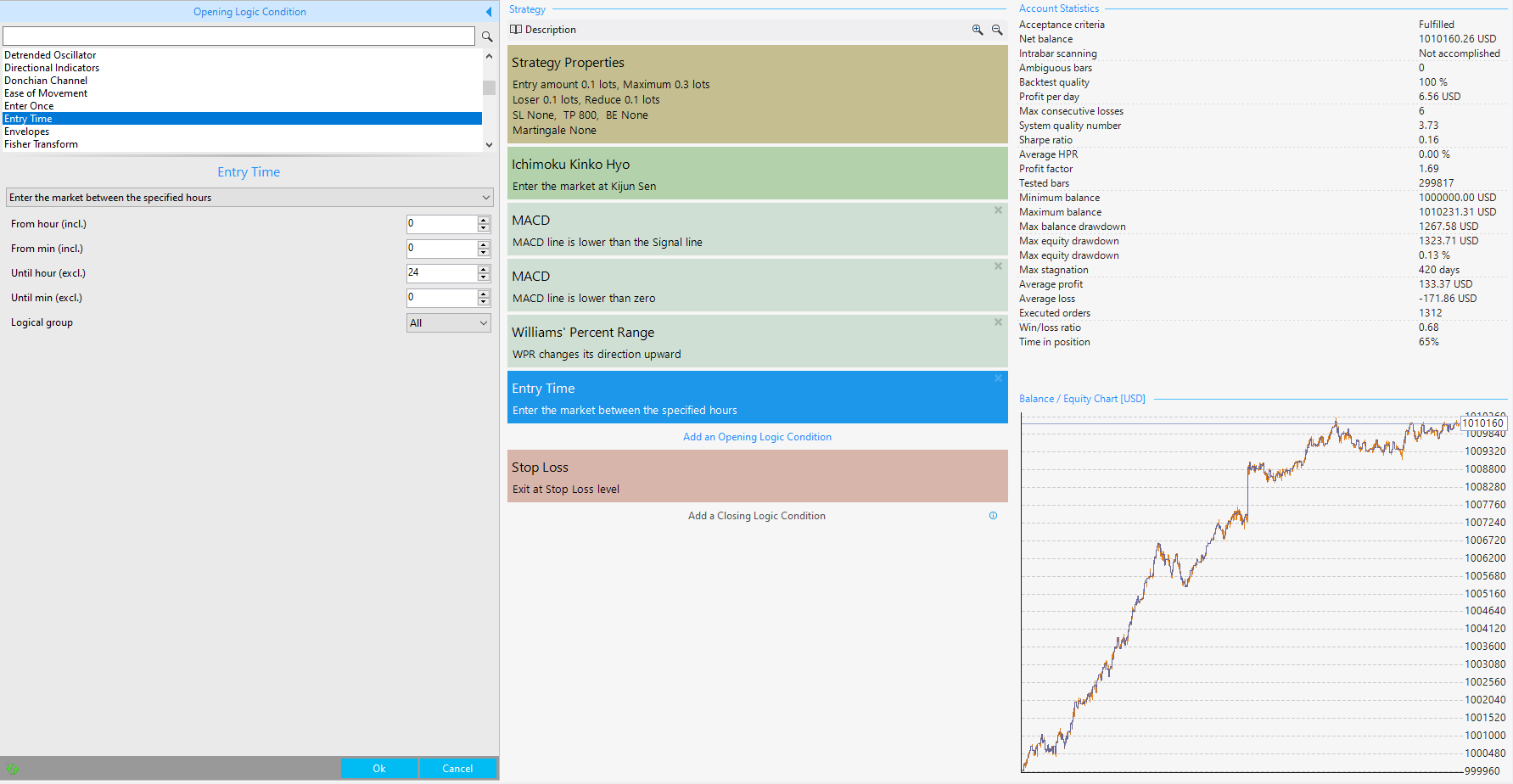
There is an indicator called Entry Time:
 April 7, 2020 at 3:02 pm #44385Participant
Thank you petko for your quick reply… I appreciate your fast response..
April 9, 2020 at 10:32 pm #44417ParticipantHello,
Well we all know that a trading strategy that works well on a variety of different markets is more robust than one that works on just one of those markets. However, I’m wondering if there is a feature in fsb pro that can be used to process many markets data (few ones, we all know there s no holly grail) while searching the strategy, rather than finding thousands of strategies that works profitably on single market and fails on all the others during the robustness test??
April 11, 2020 at 9:19 am #44563ParticipantHello Charbel,
When you run the Multi Market you actually see which other markets are profitable for the strategy.
However, you won’t see the same good results as the origin market. After that, you will need to optimize the strategy, which brings the risk to over-optimize it.
I guess you want to make it just easier, and use one strategy on a couple of markets, but our experience shows that this is hard to achieve or nearly impossible.
April 11, 2020 at 12:11 pm #44660Participantthank you petko for your quick reply as usual..
April 12, 2020 at 10:13 am #44767ParticipantSure, Charbel!
Let me know if there is anything else.
Cheers,
April 17, 2020 at 7:11 pm #45374ParticipantHi Petko,
My lower time frame is ready but I want the system to generate a higher time frame indicator without touching my lower time frame indicator. What would you suggest?
-
AuthorPosts
- You must be logged in to reply to this topic.