
Community Forums › Forums › EA Studio › EA STUDIO HOW TO
- This topic has 29 replies, 2 voices, and was last updated 10 months, 1 week ago by
Valentinozerus.
-
AuthorPosts
-
October 25, 2024 at 3:11 pm #373236
Valentinozerus
Participant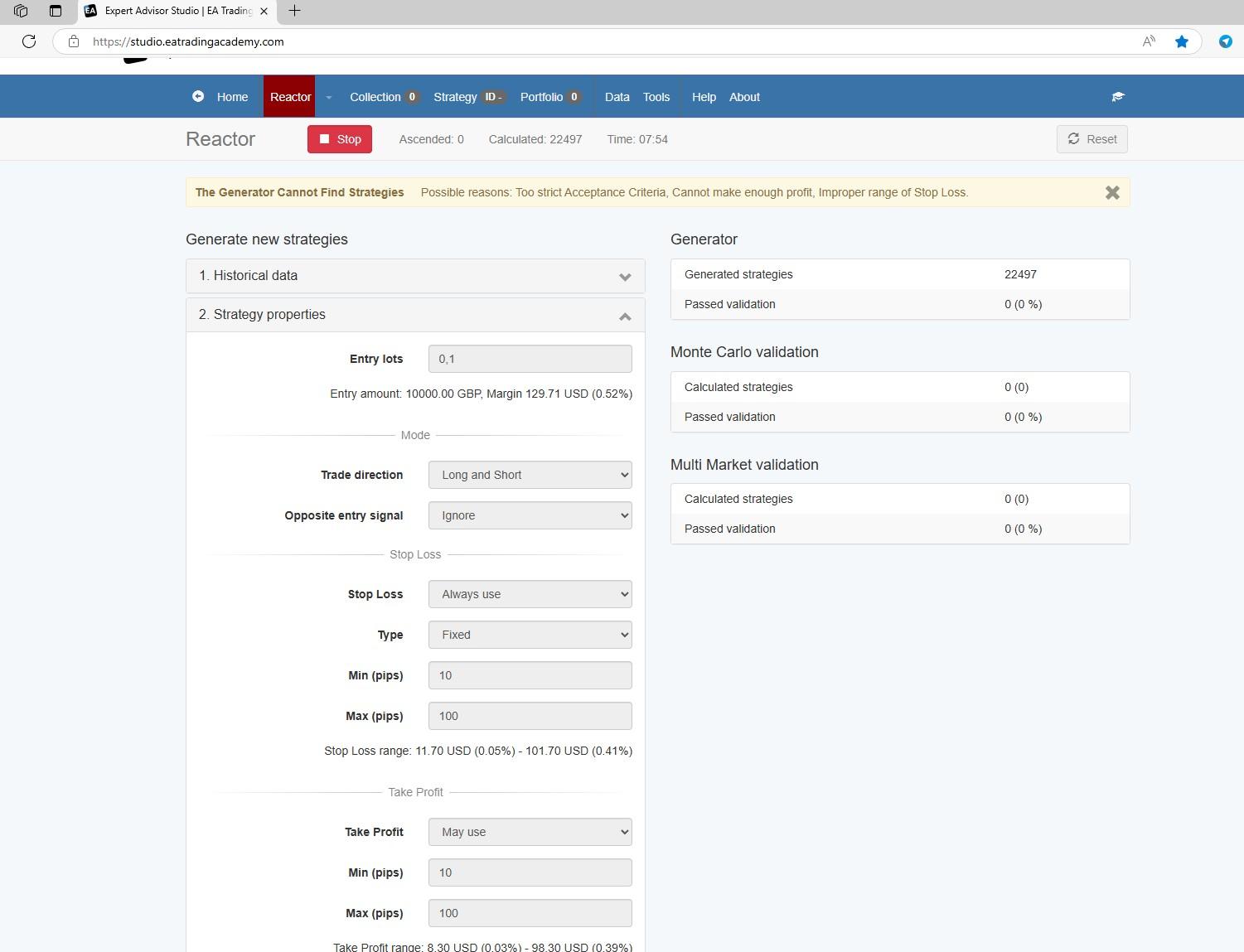 October 25, 2024 at 6:04 pm #373268
Alan Northam
ParticipantGo to Tools>Settings and click on Reset all Settings. Click on Download and you can save all your settings. Click on Upload to load all saved settings.
Alan,
October 25, 2024 at 6:06 pm #373269ParticipantThe Acceptance Criteria is not too strict if your Data Horizon is greater than 1 or 2 years. I usually set the Minimum Count of Trades to 1 per week based upon the Data Horizon. Sometimes I get that warning if there are not collected strategies after 3 minutes, it think. I just ignore it and let the Reactor to run.
Alan,
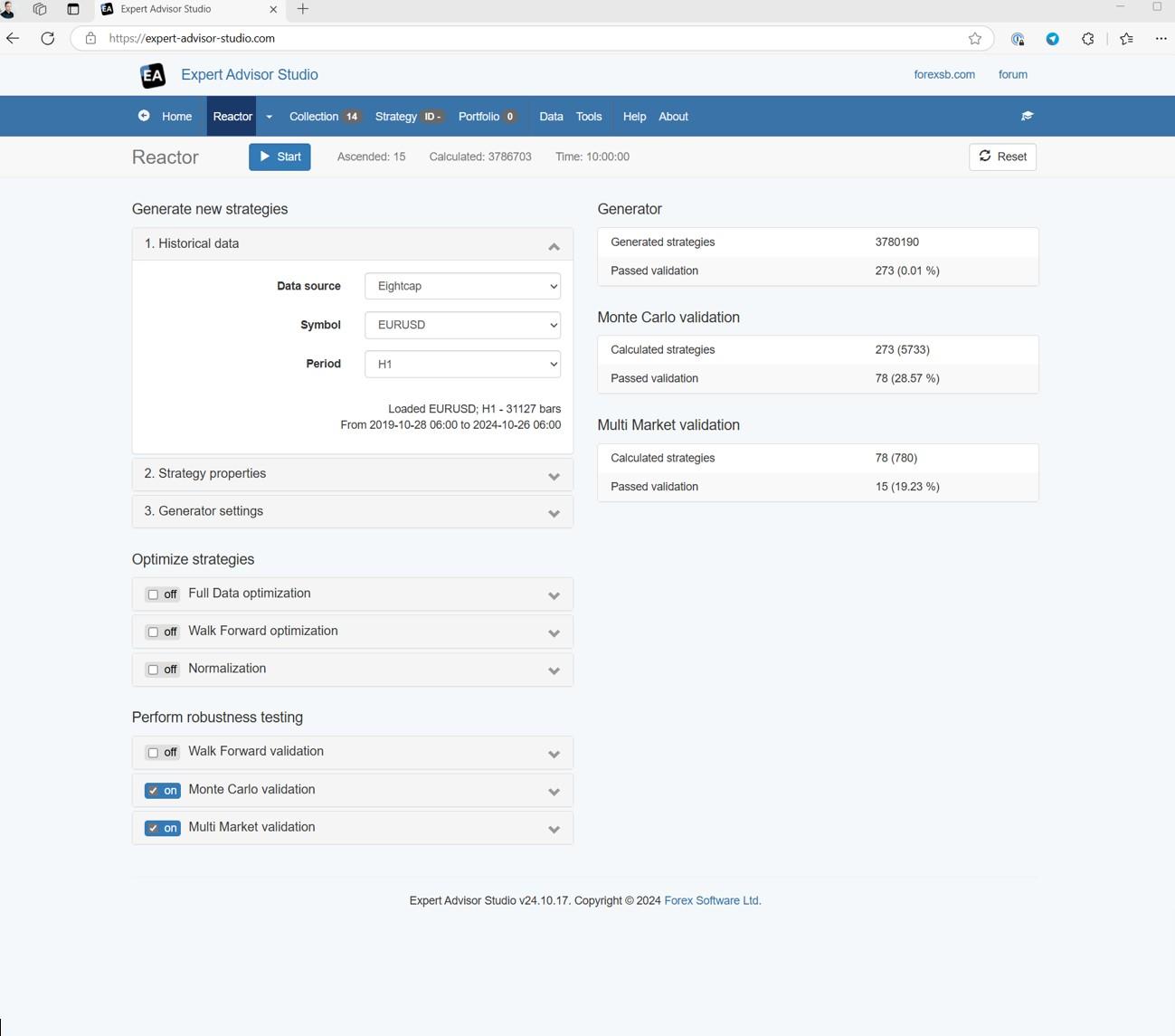
October 29, 2024 at 4:19 pm #373987ParticipantI’ve experimented a lot now and I think I’ve got a good result.
Could you check if this is a normal result?
In the first step I reset everything and made sure that my computer didn’t go into sleep mode during the computing time.
I Used 20%OOS
I expanded SL and TP a bit.
I let the reactor run 10 hours.There were 78 strategies through Montecarlo and 14 through Multi Market.
I think that’s enough for a portfolio EA.
Would you get a similar result?
Since I can’t send attachments in the forum, I sent you all the screenshots and the Jason file by email.
It would be great if you could take a look at it, then I can do the demo run in the next step.
I thank you very much in advance.
Sebastian
 October 29, 2024 at 6:24 pm #374006Participant
Hi Sebastian,
Good to hear from you!
This looks very nice. I think you got a handle on it.Aren’t you glad you used my methodology in learning EA Studio so you would not have wasted all those 14 precious Free Trial days?
I haven’t seen any email from you.
When you do the Free Trial be sure to use the Data Source you will be using in your demo account!
Alan,
October 29, 2024 at 7:14 pm #374010ParticipantHi Alan,
you are absolutely right, if I had chosen a different approach I would not have been able to properly use the demo period of EA Studio.I thank you for that.
The email has the subject:
Files and screenshots
and send to the address:
[email protected]Or should I send the screenshots to another address?
Sebastian
October 30, 2024 at 9:38 pm #374297ParticipantThanks for the detailed help. I will still consider stagnation and dropdown.
Can you recommend me a training course on the Express Generator? I would like to work with this tool right away because I understand the advantages in terms of speed.
Sebastian
October 31, 2024 at 2:59 am #374354ParticipantHi Sebastian,
ExpressGenerator is an add on to EA Studio. So you need to purchase EA Studio and ExpressGenerator to use it. ExpressGenerator uses PowerShell and does not have a graphical user interface. Click on the link to buy ExpressGenerator. Also at the bottom of the linked webpage you will see three videos explaining how to use ExpressGenerator.
Alan,
December 2, 2024 at 1:16 pm #381885ParticipantThis is a result of the computing power of your computer. All my computers run Intel processors. With an i5 processor I am able to run just one reactor and with an i7 processor I can run 3 reactors. There is a process you can use to test how many reactors you can run on your computer. I used this process to see how many reactors I could run on my computers. This link will show how it is done.
Alan,
January 26, 2025 at 1:17 pm #428209ParticipantThe first thing I do when using EA Studio is to set up the Settings. The following are the settings I use:
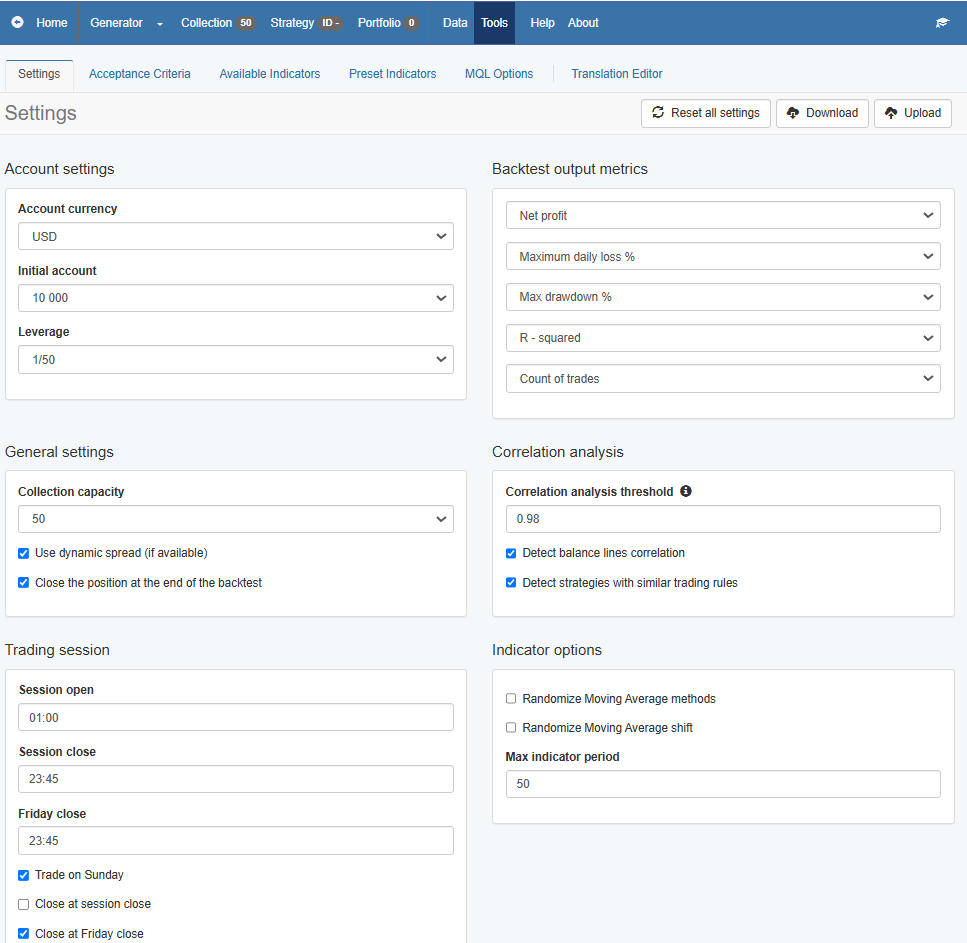
My methodology in learning how to use EA Studio
Alan,
February 9, 2025 at 2:14 pm #431118ParticipantThe 2nd thing I do when using EA Studio is to set up the Acceptance Criteria. The following are the settings I use:
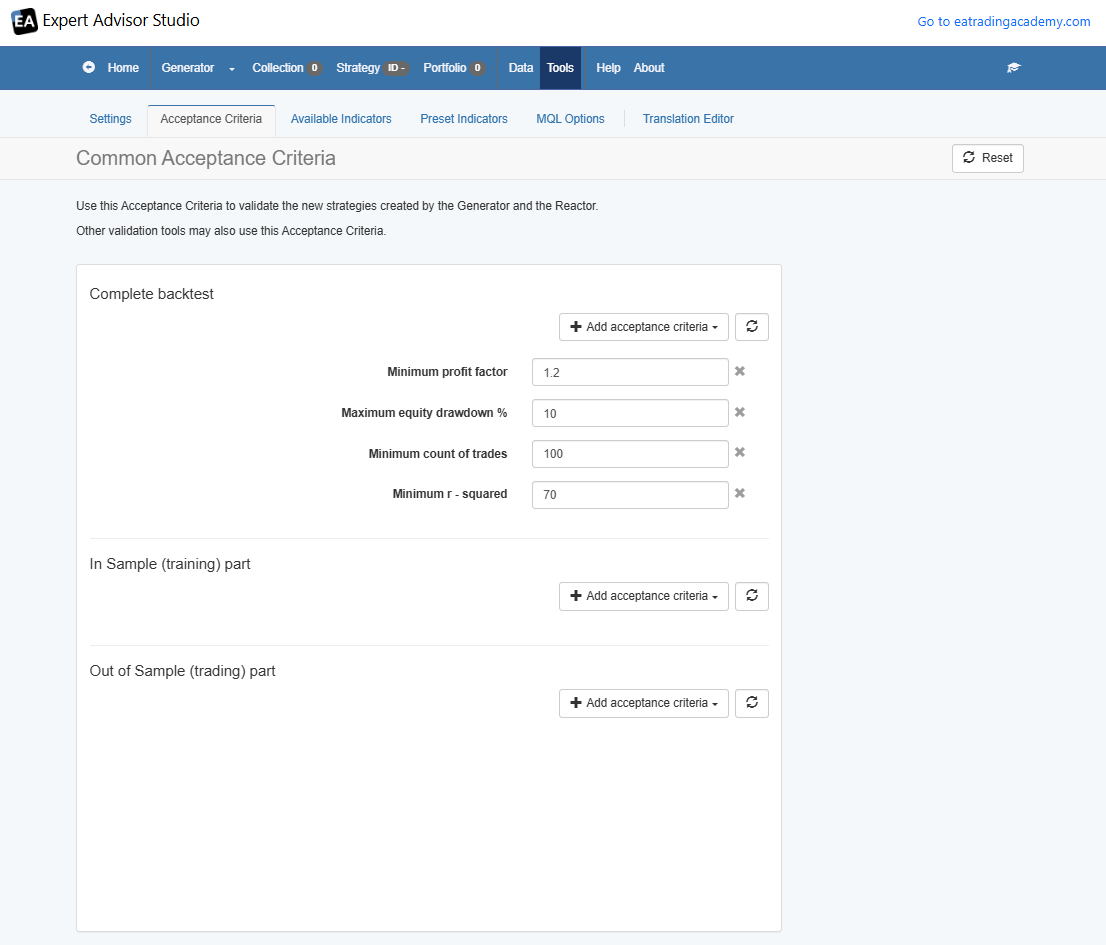
Note: The Minimum count of Trades changes depending on the lookback time frame. Currently it is set up to a lookback time frame of 5 years.
Please leave a comment if you are following this thread. In this way I will know if anyone is following it, Thanks!
Alan,
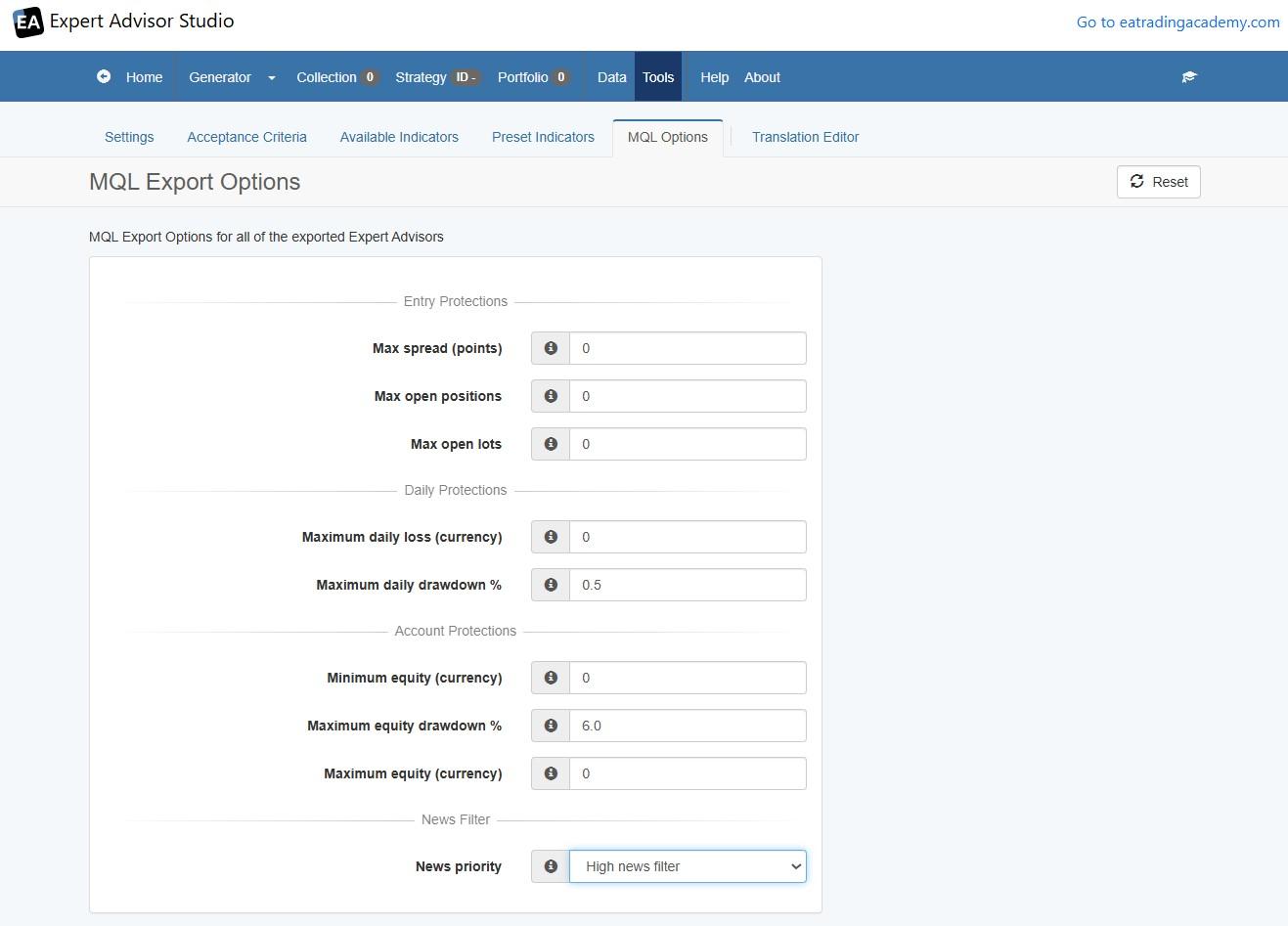
March 29, 2025 at 1:57 pm #442836ParticipantThe last thing I do before leaving the Settings Tab is to set the “Maximum daily drawdown %” to 0.5. This means that if the asset I am trading loses 0.5% of my account balance the assets position will be closed. I also set the “Maximum Equity Drawdown %” to 6.0. This means that if the account loses 6.0% the account will stop trading. Lastly, I set the “News Priority” to “High News Filter”. I find high news can cause high volatility in the markets whereas the “Low News Filter” does not.
Alan,
May 2, 2025 at 11:04 am #449809ParticipantHi Alan, I hope you’re doing well.
I’ve made really good progress in EA Studio.
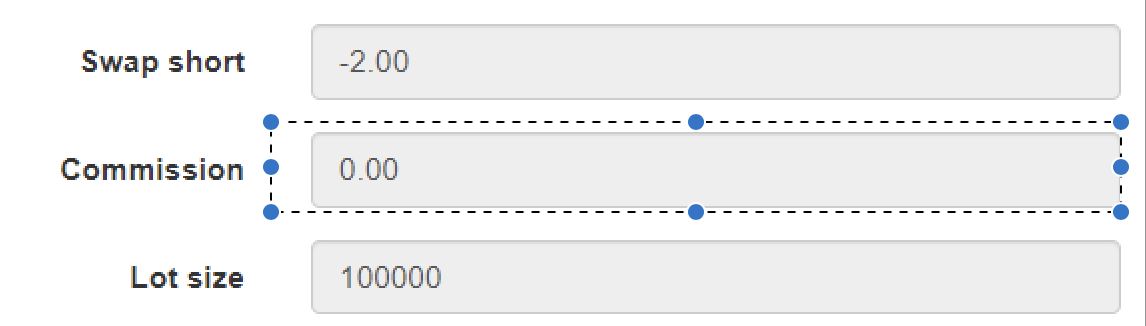
I have a basic question that I’m sure you can help me with.What do I have to set in the symbol setting in Commissio if my broker EightCap wants 5.50 Eur per trade?
Do I enter 5.50 or the total amount of 11.00 € for opening and closing the position once?It is not clearly described in the EA Studio help.
Can you help me?Translated with DeepL.com (free version)
 May 2, 2025 at 12:31 pm #449823Participant
Hi valentinozerus,
EA Studio only applies the commission at the closing of a position. Since the commission is only applied once you should include the full commission amount of 11.oo euro’s.
Alan,
May 2, 2025 at 2:12 pm #449839ParticipantHi Alan, thank you for your help.
I’ll do it like this -
AuthorPosts
- You must be logged in to reply to this topic.