
Community Forums › Forums › EA Studio › EA STUDIO HOW TO
- This topic has 29 replies, 2 voices, and was last updated 10 months, 1 week ago by
Valentinozerus.
-
AuthorPosts
-
June 18, 2024 at 12:29 pm #261773
Alan Northam
ParticipantEA STUDIO HOW TO
Are you interested in creating your own Expert Advisors using EA_Studio?
INTRODUCTION TO EA_STUDIO
=========================
As an introduction to EA Studio I recommend the following process:1. Open the free version of EA Studio in your browser. Do not log in! Do not Start Trial! Do not Purchase! You can work with EA Studio in your browser just by opening it up in your browser and clicking on the menu tabs in the blue bar. There are a few features you cannot use with this free version of EA Studio like downloading Expert Advisors or using the Portfolio feature.
Note: The free version can be used indefinitely. However, the Trial version is only good for 15 days and at this point in your journey to learning how to use EA Studio you do not need to use up those precious 15 free trial days. This is why I recommend that you do not click on the Trial button or the Purchase button at this time.
EA Studio works with the following browsers:
Chrome (Recommended)
Edge (Recommended)
Firefox
SafariHere is the link to open the free version of EA Studio in your browser: EA Studio Free Version
2. Take the free Expert Advisor Studio Course. this course will walk you through the basics of using EA Studio. You can use this course to practice using the free version of EA Studio.
Here is the link to the free Expert Advisor Studio course: Expert Advisor Studio Free Course
PROFESSIONAL LEVEL OF EA_STUDIO
===============================
Now that you have had some basic experience using EA Studio and are interested in continuing your journey to becoming a professional user of EA Studio, I recommend the following process:1. Purchasing EA Studio is a major investment. Making such an investment is not necessary at this point in your journey. However, I do recommend purchasing the EA Studio Professional Course. This course will walk you through the advanced levels EA Studio. I recommend you follow along with the free version of EA Studio in your browser as you go through the professional course. There will be a few things you cannot do with the free version of EA Studio that is taught in the Professional course but don’t let this bother you, just do what you can and we will fill in these gaps later.
Here is the link to open the EA Studio Professional Course: EA Studio Professional Course
2. Once you have gone through the Professional course, and have gained further knowledge in using EA Studio, now I recommend you to sign up for the free 15 day trial version of EA Studio. By having gone through the Professional course first without signing up for the free 15 day trial of EA Studio will give you more knowledge in using EA Studio so you can make better use of your limited time with the 15 day trial. Make sense? Once you sign up for the 15 day free trial of EA Studio and have back through the Professional course, as a refresher, created some Expert Advisors, download the Expert Advisors, install them in a demo copy of Metatrader 4 or Metatrader 5, and watched them make some trades you should have gained some good hands on experience using EA Studio.
Here is the link to EA Studio 15 day free trial: EA Studio 15 day free trial (Sign out and click on the Trial Button).
3. Now that you have created some Expert Advisors and watched them trade in MT4 or MT5 it is time to decide if you want to continue your journey with EA Studio. At this point in your journey you will need to purchase a lifetime license for EA Studio.
Here is the link to purchase the lifetime license to EA Studio: EA Studio (Sign out and click on the Purchase Button).
Once you have purchased the lifetime license to EA Studio you will be able to continue to practice creating Expert Advisors using the Professional Course as a reference. Learning how to use EA Studio to create Expert Advisors and how to use them to generate profits is not a sprint, it is a MARATHON! It will take some time to master using EA Studio and to create Expert Advisors that are profitable, but the results will be Worth It!
To show EA Studio can be used to create Expert Advisors to achieve a funded account with a prop firm here is a link to Infinity Forex Funds. This link will show you I used the Expert Advisors I created using EA Studio, the journey I took, and the strategy I used to reach a funded $100,000 account.
Ongoing Challenge: 10 EAs from EA Studio
Welcome aboard, and let the journey begin!
Alan,
October 22, 2024 at 3:48 pm #341435Valentinozerus
ParticipantHello Alan,
the approach is really great so you have the opportunity to get to grips with the topic without having to pay a lot of money. I’m now making my first portfolios without any pressure. So far, all of my open questions have been answered in the training. So it’s great to work through the material as you described it. Thank you!October 23, 2024 at 10:27 am #353294ParticipantHi Sebastian,
Thanks for your comments about the methodology in learning EA Studio. Happy to hear you are enjoying creating your first expert advisors. If you have any questions feel free to ask them here. And, please use the links provided so I can get credit.
Alan,
October 23, 2024 at 4:35 pm #354046ParticipantHi Alan,
All right. I’ll do it that way
October 24, 2024 at 2:32 pm #370914Participantcan you help me with one thing? Why do I get more results in the collection when I run one reactor and why worse results when I run two or three reactors?
Is this my computer or to my internet?
Sebastian
October 24, 2024 at 3:08 pm #370935ParticipantHi Sebastian,
It’s the computer. You need more computing power i.e. a more powerful computer. Assuming you are using Windows if your computer has an i5 processor use only one Reactor. If your computer has an i7 processor you can run three Reactors. Click on Task Manager>Performance and check the CPU and Memory usage. If the Memory is at at a very high level you might improve performance by adding more memory if your computer can handle that. If the CPU is running at very high levels then you need a more powerful microprocessor. I use a workstation desktop which I bought used. With my workstation I can run a lot of Reactors. I am collecting strategies everyday. Once every month I load all my strategies into EA Studio using the validator and then select the best ones to use for the next month. The alternative is to use ExpressGenerator but it is not easy to learn how to use and don’t recommend it until you have lots of experience with EA Studio.
To use the computer you have I would recommend letting the Reactor run for 23 hours, download the strategies, change the symbol, and repeat. Then do this for one month. Then load all the strategies into EA Studio using the Validator and then select the best performing strategies to save as EAs to trade the next month. The hardest thing to get through is the first month. From the second month onward you will have EAs trading while the computer is collecting new strategies. Also I would recommend using a demo account until you develop a profitable workflow.
Alan,
October 24, 2024 at 4:04 pm #371975ParticipantHi Alan,
that was a really useful answer. Thank you very much. Now I know what I have to do.Sebastian
October 24, 2024 at 4:07 pm #371977ParticipantI would recommend using what you have until you start generating profits and then expand.
Alan,
October 24, 2024 at 7:58 pm #373072ParticipantHi Sebastian,
I just thought of something! When you open more than one instance of EA Studio you cannot leave them as tabs in the browser. You need to separate the tabs into individual windows. When left as tabs when you switch tabs the Reactor in the first tab will stop working and the Reactor in the open tab will start working. In other words, the Reactor will only work in the current selected tab in the browser. To get all the Reactors to work they need to be running in separate browser windows.
Alan,
October 24, 2024 at 8:11 pm #373075ParticipantI’ll do that, in the next step I’ll test it on a demo at 8CAP anyway
Sebastian
October 24, 2024 at 8:14 pm #373076ParticipantHI Alan,
thanks for the tip, I’ve already found that out.
The problem appears to be with my computer. Everything works perfectly with one reactor.
Thank you for the good supportOctober 25, 2024 at 10:22 am #373190ParticipantI hope I don’t bother you too much with my questions but I just can’t get on my own at a few points in the learning process.
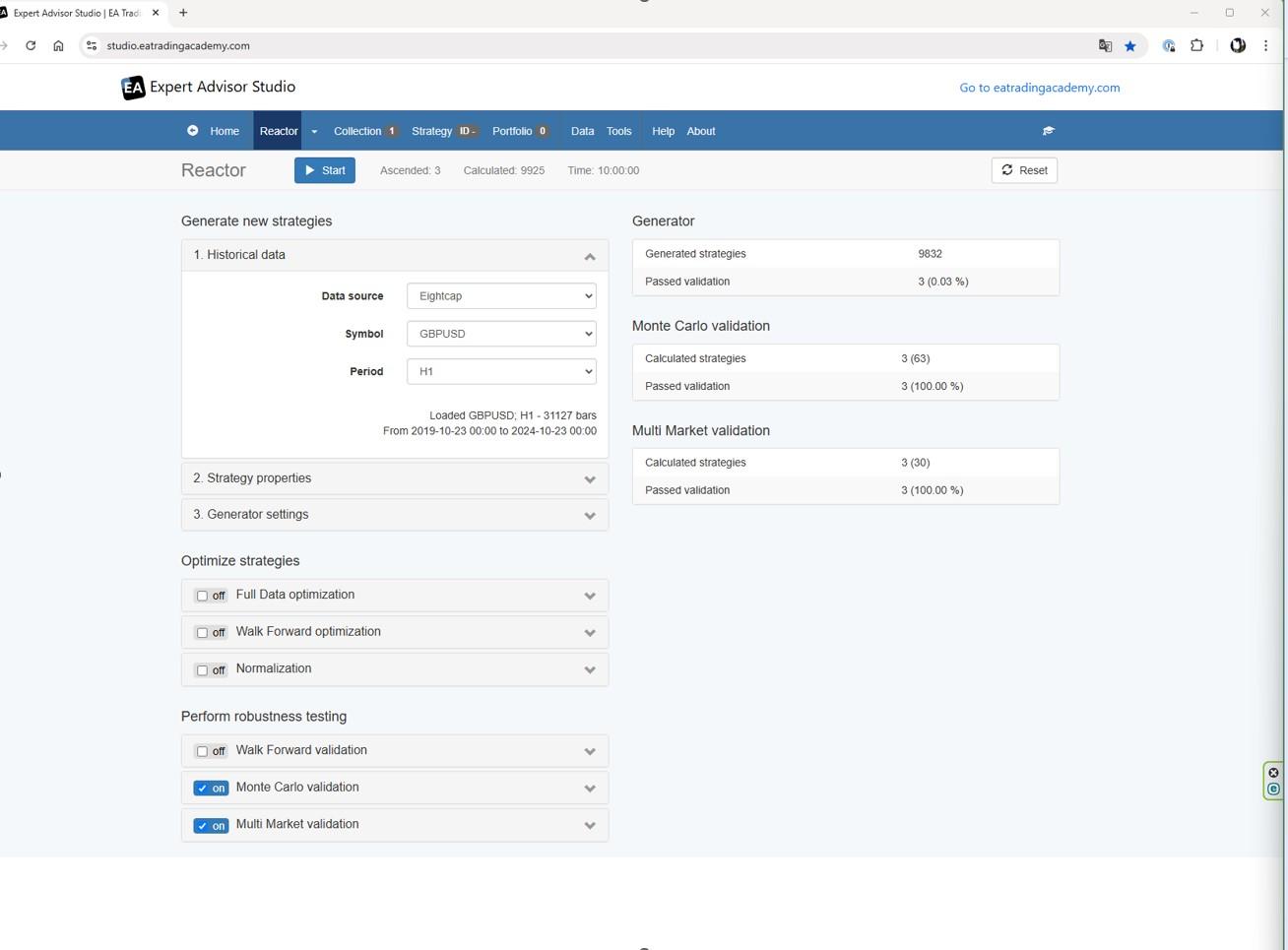
I work in the Reactor GBP H1+MonteCarlo. Here I get enough results. If I now add Multi Market, I only get one result. 4 out of 10 are to be valeded.
Is it again that so few strategies go through Multi Market? There were also only 3 strategies through the Generator and before without multi Martket over 25. Otherwise, I haven’t changed anything. Do you have an idea? a screeenshot is in the appendix.
Sebastian
 October 25, 2024 at 2:16 pm #373218Participant
Hi Sebastian,
There are a couple of things that does not look right with the screenshot provided:
1. After running the Reactor for 10 hours you should have seen hundreds of thousands of collected strategies.
2. I have never seen the Generator Passed Validations, the Monte Carlo Passed Validations, and the Multimarket Passed Validations all being of the same number. Normally, the Monte Carlo Passed Validations are less than the Generator Passed Validations, and the Multimarket Passed Validations being less than the Monte Carlo Passed Validations.
The first thing we need to fix is the number of collected strategies. Assuming you are using one of the supported web browsers please close all tabs except the one with EA Studio. Reset EA Studio to default settings. Set Symbol to GBPUSD, period to H1 and Date Horizon to 5 years and select Multimarkets and make sure Monte Carlo is selected. Set the Generator for 10 minutes. Now run the Reactor. After 10 minutes the reactor should stop.
I have performed this test with my Microsoft Windows computer with an i5 Intel processor.
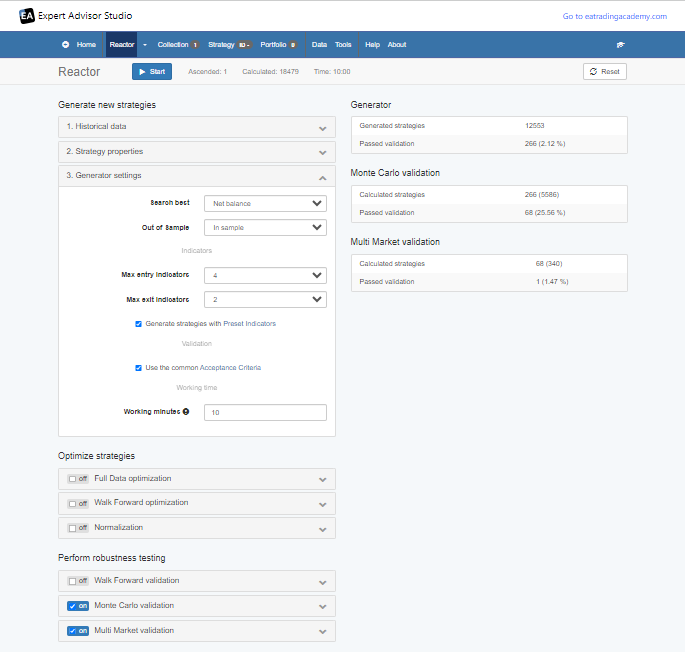
The following are the results I get:
As can be seen after 10 minutes more than 12,000 strategies were collected. Also the Monte Carlo Passed Validations are less than the Generator Passed Validations and the Multimarket Passed Validations are less than the Monte Carlo Passed Validations. This is what you should expect.
Also notice that after 10 minutes one strategy passed into the Collections. If I use some simple math I would expect to get 6 collected strategies after one hour and 60 collected strategies after ten hours.
Alan,
October 25, 2024 at 2:56 pm #373229ParticipantHello Alan,
thanks for the detailed answer. I will try to implement everything like this.
Can you tell me if there is an option somewhere to completely reset EA Studio?
And is it possible to export a report to see with which settings i have worked with?
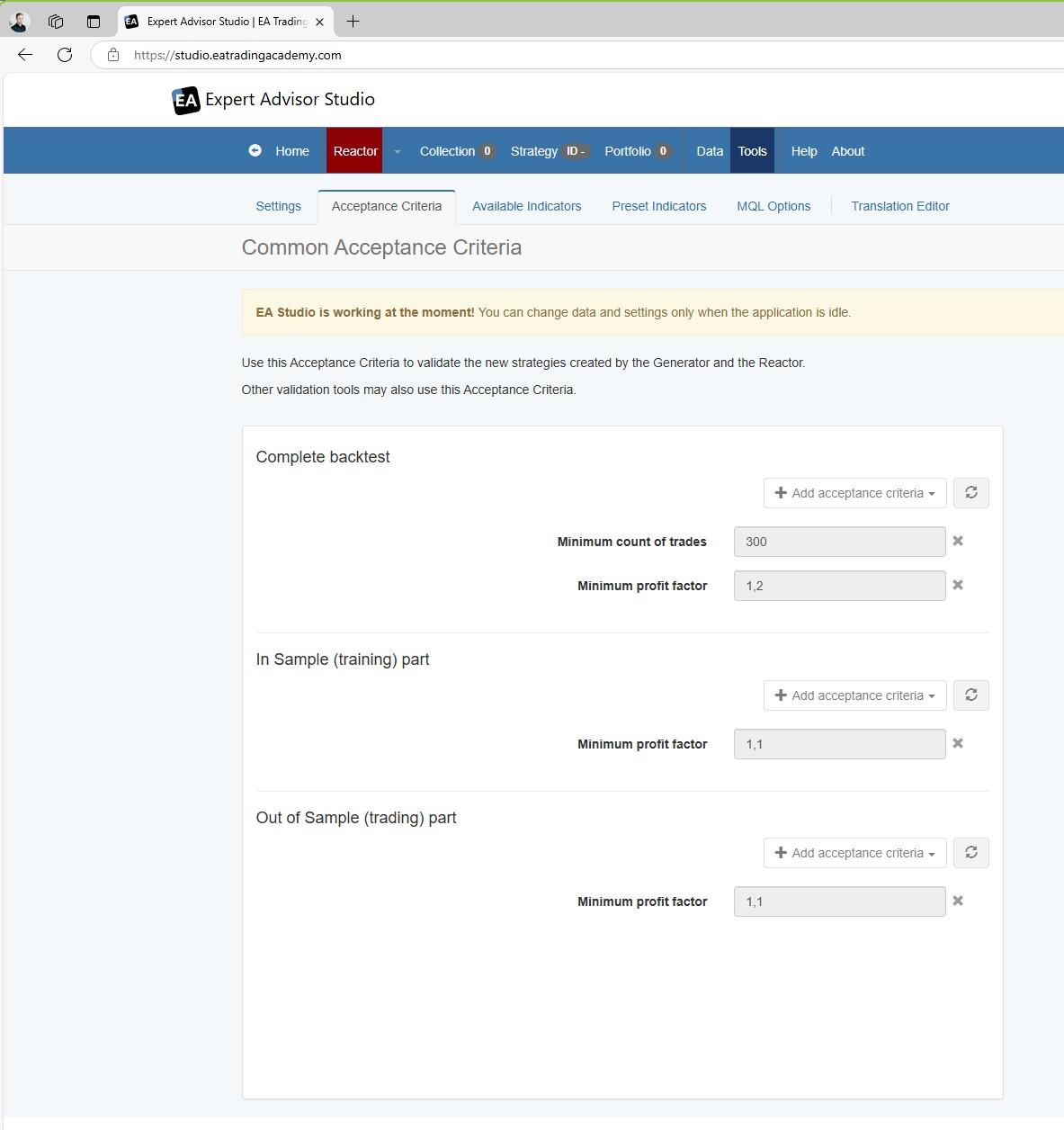
October 25, 2024 at 3:10 pm #373235ParticipantHere’s another addition: could it be that I have set the Acceptance Criteria too strict? There is an immediate warning.
I have attached a few screenshots for you. It would be great if you took a look at it.
-
AuthorPosts
- You must be logged in to reply to this topic.