
Community Forums › Forums › EA Studio › EA Studio Updates
Tagged: EA Studio Updates
- This topic has 179 replies, 27 voices, and was last updated 2 years, 1 month ago by
NIKOS KYRIAKOU.
-
AuthorPosts
-
Deniza
MemberReally liked the last video for the Walk Forward Optmization. I did not imagine such analysis are possible.
MemberHello Bob,
actually, the Walk Forward is a pretty old method. I am happy now it is in EA Studio and actually it was included in a great way.
Andi
ParticipantIt is great to have it now. I retested all of my EAs and removed 20% of them. Now I will need to catch it up with the number, but I always use it in the Reactor as you showed Petko!
Petko Aleksandrov
KeymasterHey Andi,
try not to “catch it up with the number” of EAs. This way you are forcing yourself to trade EAs that are not within your acceptance criteria or risk tolerance. You better trade with fewer EAs, but the right ones.
KeymasterHello Petko,
Thank you for the advice, I get your point. I know that, but somehow I really force my self-trading with more EAs. This time I think to listen to you from the beginning, not after mistaken 🙂
KeymasterHey Andi, you do not really need to listen to me. You have to trade the way you feel comfortable and convinced. I just share the mistakes I did in the beginning, and I hope others will not repeat them, ot at least minimize them 🙂
halvard
ParticipantHei Petko,
Is there a reason why you are using different settings on EURUSD / GBPUSD / USDCAD? Or is it just to show how to use the
different settings is EA Studio?
I have bought the courses for the different pairs, but got a little confused :).
Best regards
Halvard
Haliffa
ParticipantYes, I think Petko shows different ways to use the generator and the reactor in EA Studio. This way different strategies are created and better risk diversification is achieved.
I have all of his courses, and I am amazed by how he creates different EAs all the time. I know EA Studio and FSB are great pieces of software, I have been using them for over a year now, but it is important to use them the proper way. The programs just teach you how to trade as well…
ParticipantThank you 🙂
ParticipantHi Halvard,
yes, Haliffa gave you a nice answer. Creating strategies using different criteria will give you better diversification. For example, if you have strategies with smaller TP and SL, they will be more active and open and close a bigger number of trades. And having with a bigger range, the trades will last longer. Also, having strategies on different time frames is a great way to a wider risk-diversification.
KeymasterHey Petko,
I got your courses 2 months ago, I watched nearly all of them, and just now I saw that topic…stupid mistake from me.
I will know to follow the updates at the beginning of the month.
KeymasterHello Deenslavi,
here you can follow the updates of EA Studio as a software. Every new feature, change in some of the inputs, I normally do a video and post it here.
There is another topic with the Updates of the courses.
Cheers,
KeymasterHey Petko,
Hope you and your team are fine! I was wondering if there will be an update with the EA Studio regarding the new changes on the Acceptance criteria in OOS and the Walk forward. I see that when I run OOS with the Walk Forward I do not get the green line as in the courses. I guess this is because of an update.
Appreciate your work!
Regards,
KeymasterHello Andi,
yes, I will be recording such a video in the next days. Many of the users and students asked me about it, so the best will be to have a video. I will do my best to record it in the next 2-3 days.
Cheers,
KeymasterHello traders,
maybe some of you have noticed that there are new videos on the Landing page on EA Studio:
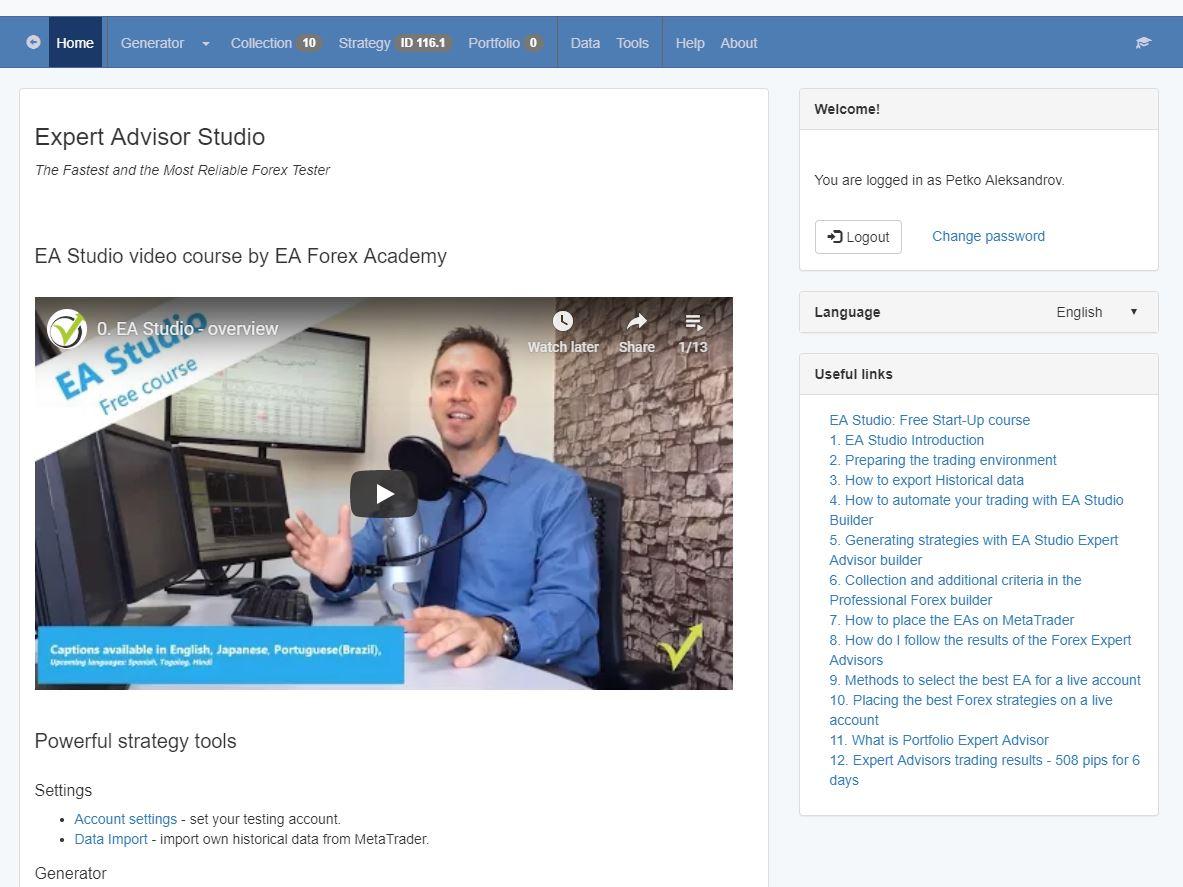
I decided to make a free start-up course about EA Studio which will help all traders that test the trial period. If you have already experience with EA Studio, I am sure there might be something new to learn.
On the right side, you can see each lecture, and you can click on it if you want to see specifically this video.
Also, we have already captions available in English, Portuguese(Brazil) and Japanese. There are some more languages coming up. If anyone likes to contribute to different languages, please let us know. 🙂
-
AuthorPosts