
Community Forums › Forums › EA Studio › EA Studio Updates
Tagged: EA Studio Updates
- This topic has 179 replies, 27 voices, and was last updated 1 year, 8 months ago by
NIKOS KYRIAKOU.
-
AuthorPosts
-
January 24, 2019 at 8:21 am #8741
Petko Aleksandrov
ParticipantHey Petko,
Thank you for making it clear about the r- squared! It was a mistery for me, and now it is much clearer.
I played with it a lot last night, finally i left few generators working for EURUSD, GBPUSD, USDJPY, EUGBP and AUDNZD.
I was so so surprised to see the results in the morning! Fantastic equity lines! 🙂
I shared one of the strategies in the Forum, and i hope the others will test it.
Sure that this feature will improve the EAs a lot, and it will make our choice much easier, because while generating we get EAs with good equity lines, not too much to filter from there.
January 24, 2019 at 8:31 am #8743ParticipantHi Petko,
Long time I did not look at the Forum, and I was so surprised to see so man new people and topics. This one is great. I like your videos, and I like that you make it clearer how to use the updates in EA Studio!
Keep up the good work!
January 24, 2019 at 9:44 pm #8752ParticipantHey Andi,
Glad to hear that I made it clearer with the r – squared. I had to test a lot before making this video, but it is really a huge thing with EA Studio.
Take your time to test more, and you will see even better results.
Happy to hear you shared a strategy! That is very generous in trading!
January 24, 2019 at 9:45 pm #8753ParticipantHello Rose,
Glad to see you back in the Forum. Yes, many students and traders joined the Forum, which makes me very happy.
I will keep you updated with the updates in EA Studio in this topic.
January 24, 2019 at 9:49 pm #8754ParticipantHey Jacpin,
Yes, the R-squared is WOW! But I tested it a lot before recording the video, because I wanted to show the best of it, and to demonstrate how to use it.
I am planning to include it in my generation permanently. Also, for the monthly updates of all courses. It really really improves the strategies.
I have prepared another video, which will surprise you even more. I will upload it tomorrow.
It is a method to generate the EAs using the trick with testing the recent data(avoiding Demo trading) and combination with the R-squared. Works brilliant!
January 24, 2019 at 10:06 pm #8759ParticipantHello Petko,
thanks so much for the video! I have some statistical skills but I did not imagine that r-squared could be implemented in EA Studio. It is really a top product in algorithmic trading.
So as far as I get it, the points around the regression lines are the results of the trades, right?
January 25, 2019 at 9:47 am #8768ParticipantHello Desita,
Yes, we can say they are the results of the trades, but added to the equity. Not alone.
Simply, when we use R – squared in the generator, it founds such strategies that the equity line is closer the the regression line.
Kind regards,
January 25, 2019 at 9:54 am #8770ParticipantHi Petko,
very nice topic here, we can learn more from the free videos you upload in Youtube.
Thank you for your hard work!
January 26, 2019 at 12:17 pm #8786ParticipantHello traders,
I have uploaded a new video with another updated in EA Studio regarding the Out of Sample.
So far I was not a fan of using the OOS, but with this update the things changed a lot!
Please, find the YouTube video here: EA Studio Updates: Out Of Sample monitor and acceptance criteria
There are two major improvements with Out Of Sample in EA Studio.
First, we have a change in the Acceptance criteria:
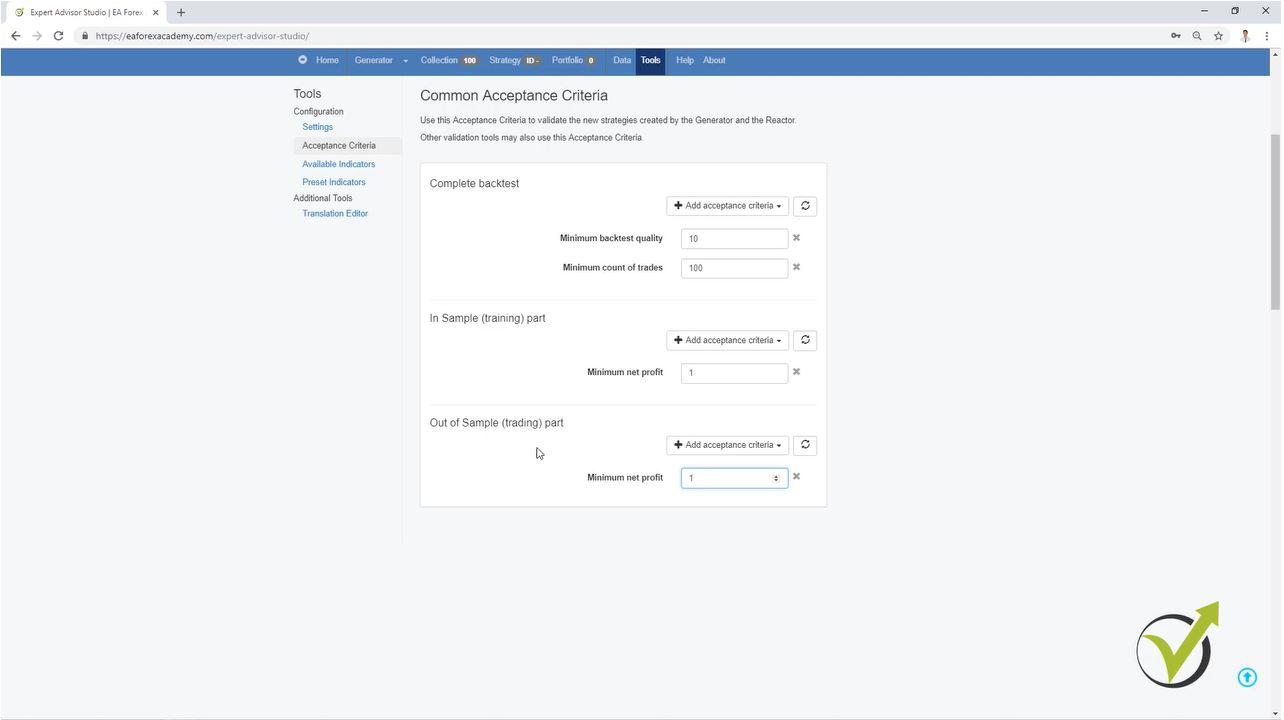
Now we have the chance to generate the strategies with different acceptance criteria for the Complete backtest, for the In Sample Part, and for the Out Of Sample part.
This way we can use for example, 70% of our Historical data to generate strategies with predefined acceptance criteria. And with the rest 30% we will see simulated trading from EA Studio, as it was actually trading. NOW, here is the thing: We want to see only the strategies that actually profited in these 30%. So we can place precise criteria in the Out of Sample part.
In one of my courses I showed a trick how to avoid Demo testing, but we had to change the data range, than filter the EAs manually. Now it is possible to do it all automatically.
Second we have the Out of Sample monitor:
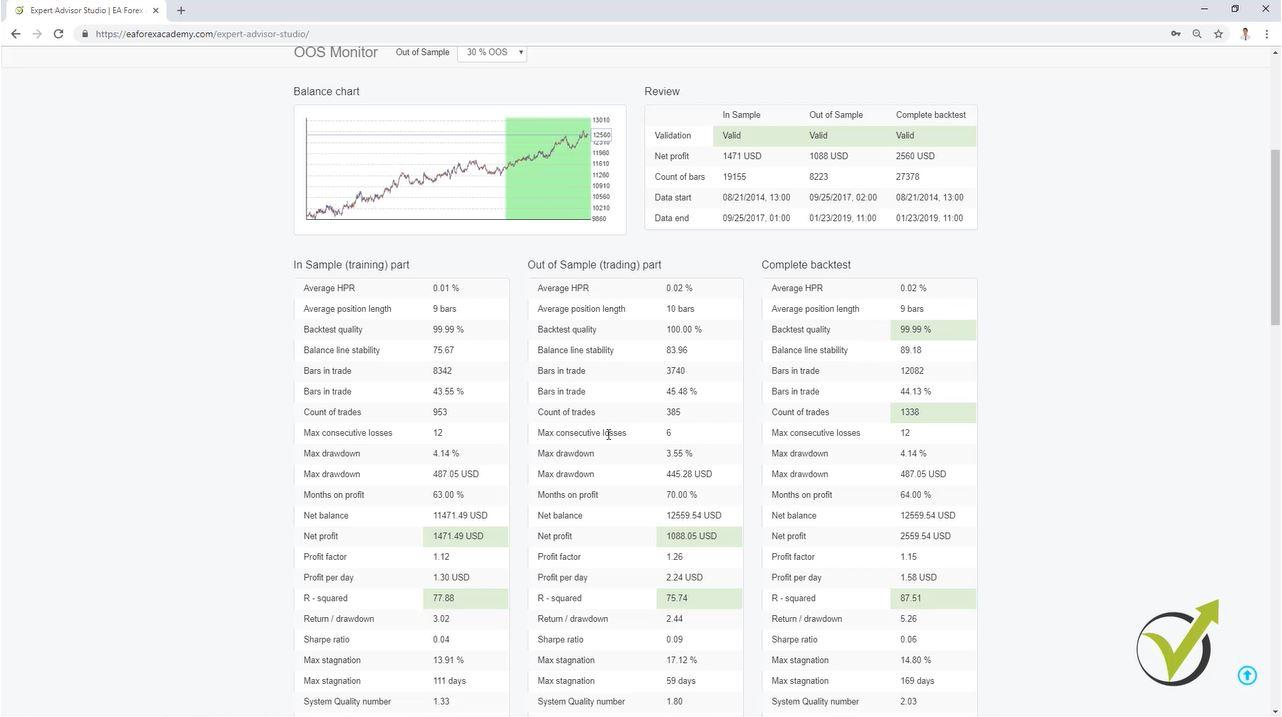
Here you will see detailed statistic for the complete backtest, the In Sample part, and in the Out Of Sample part.
In green you will see the same criteria that you have set in the Acceptance criteria. This shows that this is validated criteria. If it is in red, this means that the criteria was not validated with the minimum you have set in the acceptance criteria.
At the end of the video I show an example method how to generate trading strategies using the OOS in the acceptance criteria but in the Optimizer, not in the Generator. Combined with the r-squared new criteria, you will see great trading strategies.
January 26, 2019 at 10:55 pm #8801ParticipantAnother very interesting video, Petko! I had to watch it few times as I am still new with EA Studio, but at the end I got it how you generate such EAs!
Thanks a lot!
January 27, 2019 at 10:32 am #8813ParticipantWow! I missed to see this topic, and not watched the 4 videos in a raw! Very nice! I liked the last one the most. Interesting approach, Petko!
Thanks for the work to share what is new with EA Studio, this way we will use it properly.
January 28, 2019 at 2:53 pm #8849ParticipantChingi,
take your time to learn how to use it. i know some thing might be a bit more complicated, but I am sure after you go over all of the courses, all will become clear to you.
Cheers,
January 28, 2019 at 2:54 pm #8850ParticipantHey Chris,
Glad to hear from you again. Yes, I will do my best to keep you all updated with the new features in EA Studio, because some of them are very useful!
January 28, 2019 at 4:17 pm #8858edu
ParticipantHello petko,
i try this new method and one of the strategies with 0,01 is this
<script async src=”//s.imgur.com/min/embed.js” charset=”utf-8″></script>
It seems to good to be true and infact it has only 103 orders from 2/8/2016 to now
what do you think they are too poor data? If yes why we put 100 in the optimizer?
thank you
January 29, 2019 at 12:07 am #8869ParticipantHello Edu,
yes, 100 bars is small, in the video I give just an example method, but you should definitely look for stricter acceptance criteria.
The minimum I use is 300 count of trades, and depending on the time frame I am looking for 500 or 800 as min for count of trades.
-
AuthorPosts
- You must be logged in to reply to this topic.