
Community Forums › Forums › EA Studio › EA Studio Updates
Tagged: EA Studio Updates
- This topic has 179 replies, 27 voices, and was last updated 1 year, 8 months ago by
NIKOS KYRIAKOU.
-
AuthorPosts
-
November 6, 2019 at 9:12 am #26157
Petko Aleksandrov
ParticipantHello James,
yes, you can upload an Expert Advisor back if you go to the strategy editor, and after that, you click that arrow down on the left side of the Data resource:
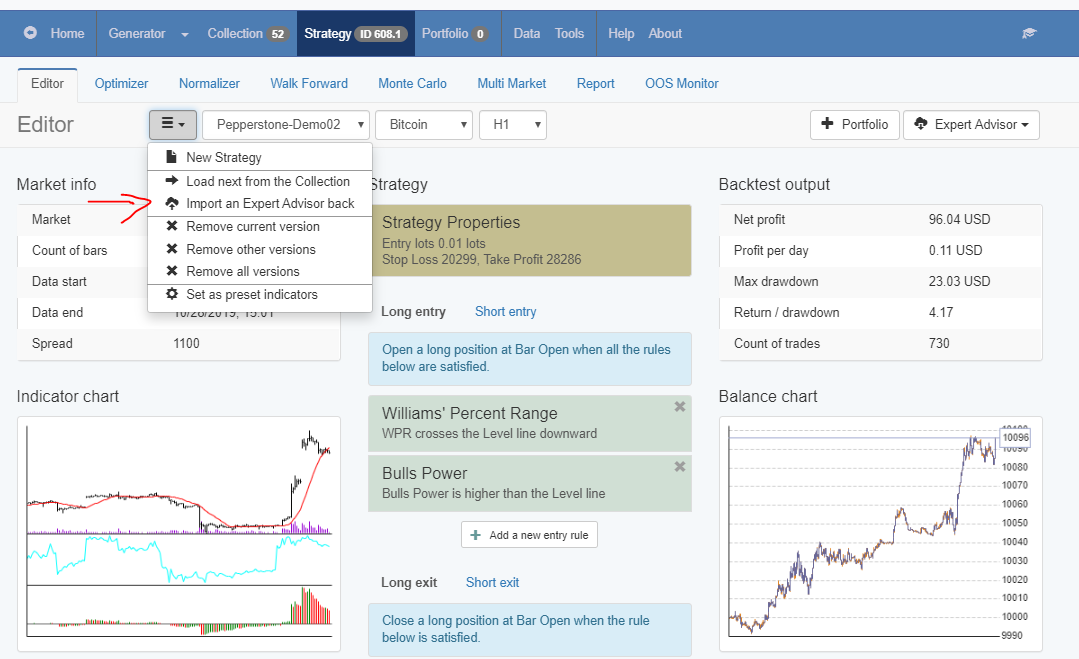
Also, if you want to import not just one but whole portfolio or let’s say the 10 EAs from any of my courses, you can use the Validator.
Drop them there, filter if you wish with acceptance criteria and Monte Carlo and press Start. The EAs that go trough will show in the collection.
November 29, 2019 at 2:23 pm #28482Jay-r Yuzon
MemberGood day Petko,
Regarding portfolio EA’s, you taught us in your courses how to edit the code of the portfolio EA especially on how to disable the trading of a particular EA within the portfolio. However, can you tell us how to adjust the position size as well? Where do we go in the code to do that, and what to do thereafter?
Cheers,
Jay-R
November 29, 2019 at 2:41 pm #28484ParticipantHi Jay-R,
the position size you can select it when you drag the EA over the chart. If you want to change it at one moment, just drag the EA again over the chart and select the new size. If you have already removed some of the strategies they will not apply because you would be using the new compiled Portfolio EA.
November 29, 2019 at 3:57 pm #28494MemberThanks Thapelo.
Yes, that would definitely be the method to be done if I want to change all of the position sizes for all of the strategies that are enabled to be traded within the portfolio ea.
I’m sorry for not being specific with my question, I meant suppose I would want to only change the position sizes of SOME of the strategies found within the portfolio but NOT ALL.
I’m assuming that it has something to do with altering the code itself?
Cheers,
December 2, 2019 at 10:18 am #28789ParticipantHey Jay-R,
as far as I know, you can not do that. The size is one for all of the strategies in the portfolio. If it was possible it would be in the input menu. I am sure they can add that, it is an idea, but that will bring you far away from the diversification.
Because if you increase the lot of one strategy it is the same as trading one expert advisor with higher lots in the account. But if that one starts to lose, it will bring you more losses and the others won’t be able to compensate because they are trading with smaller lots.
The idea of trading portfolio experts or many experts in the account is to have equal lots so there will be risk-diversification.
December 3, 2019 at 4:37 am #28917MemberNoted Bart. Thanks.
Yes, what I’m trying to do would definitely be contrary to the concept of diversification.
Currently, however, I’m using portfolio EA’s not for the purpose of diversification but simply to save space in my MT4 terminal while testing a number of strategies per currency pair.
Also, I’m still quite new in trading algos, and to be honest, I’m still not used to seeing a lot of magic numbers that’s why opted to test different strategies through portfolio EA’s to make things simpler initially.
I’ll get better through time =)
Cheers,
December 4, 2019 at 9:18 am #28991Bart Meijrink
ParticipantHey Jay-R,
Your idea is great! What you said that we could use Portfolio EAs to test the individual EAs, is a great idea! I never thought about it.
Let’s say we have 50 strategies, and instead of testing individually, we can test in 1 portfolio. Saving the collection will give us the idea after that of which strategies performed the best, or which ones are ot the top.
If the strategy ending on 005 makes the most profit, that would be the 5th strategy in the collection.
I will implement that from that week 🙂
Thanks, Jay-R!
December 5, 2019 at 11:47 am #29064MemberHey Bart,
Glad to know that method of testing helped out =)
I hope it aids you to bank more pips.
Cheers,
December 5, 2019 at 9:08 pm #29086ParticipantHey guys,
that is quite an interesting discussion that you had right here 🙂 Good job! This is how everyone progresses faster. Nice idea, Jay-R!
February 13, 2020 at 3:32 pm #37857ParticipantI really like these videos for EA Studio Updates. Petko explains very detailedly about every new feature.
I will be watching for your new videos.
Cheers
June 1, 2020 at 3:33 pm #50008ParticipantHello traders,
Last days I have recorded a video showing how to download Historical data from the Forex Historical Data App we have and how to make it work for any other broker’s data.
This is a great solution if you have a small number of bars, and you want to have more.
July 27, 2020 at 3:47 am #55373fxtadeusz
ParticipantHello
What is the difference between
free and paid EA Studio.July 27, 2020 at 8:38 am #55377ParticipantHi there!
The free EA Studio allows you to use all the features – generator, optimizer, robustness tools, Historical data, etc. The thing you can not do with it is to export Expert Advisors (Robots).
But you can test it for 15 days with the free trial. You can export as many EAs as you wish. There is no limitation.
The only difference better the EA Studio license and the trial is that you can not export Portfolio EAs with the trial.
July 28, 2020 at 10:33 pm #55454ParticipantThanks for the answer
this is what I ment.August 4, 2020 at 5:50 pm #55964ParticipantHey traders,
I have recorded a short video with some of the updates we have in EA Studio:
The generator is just the same, but it has a visual presentation of how every new and better strategy is performing compared to the previous one.
Also, you will see that we can limit now the number of Entry and Exit conditions.
Have a look at the video to make sure you are taking the most out of the software.
I will keep you updated with the recent improvements.
-
AuthorPosts
- You must be logged in to reply to this topic.