
Community Forums › Forums › EA Studio › EA Studio Tools and Settings › EA Studio Tools and Settings: Experience and Results
Tagged: #acceptance criteria, EA Studio, FTMO-Data
- This topic has 286 replies, 38 voices, and was last updated 1 year, 6 months ago by
Alan Northam.
-
AuthorPosts
-
July 31, 2022 at 9:25 am #120241
Alan Northam
ParticipantI am using 5 years of data for both M15 and H1. I have all setting as per “Forex Strategy Course + 12 EAs I Trade Live” course and I am using Premium data starting from 2017. The EA Studio Reactor running H1 is doing fine and after 9 hours the Collections is 52. However, the EA Studio Reactor running M15 after 9 hours has Zero Collections. I stopped it. As a test I changed the minimum trades from 300 to 100 and after 10 minute it had collected 3 trades. I then stopped it. I reset minimum trades back to 300 and restarted the Reactor. After 2 minutes I got the following message “The Generator Cannot Find Strategies Possible reasons: Too strict Acceptance Criteria, Cannot make enough profit, Improper range of Stop Loss, Improper range of Take Profit.” I then set the minimum trades to 200 and still get the error message after 2 minutes. So I have set the minimum trades back to 100. After 11 minutes it has collected 3 strategies and will leave it there. I guess I am surprised that I have to set minimum trades to 100. I would have expected M15 to have more trades than H1. Does this seem correct to you? Or, does something seem not correct?
July 31, 2022 at 12:29 pm #120255Samuel Jackson
MemberHi Alan, yes I would have expected it to be easier to pass the minimum trade count acceptance criteria on M15.
First are you absolutely sure of these three things:
1. The EA studio settings are identical except for the timeframe
2. This is for the same symbol
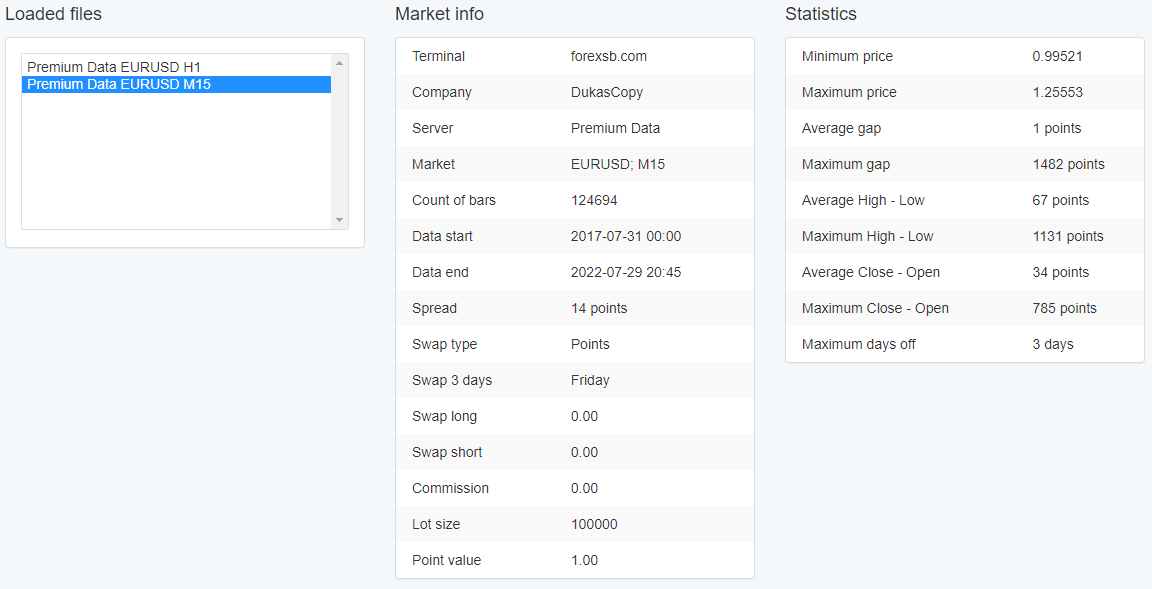
3. That you have all the bars for the full 5 year days range for M15 and there are no gaps (use the check in the data statistics to confirm this)
Once you have confirmed these I will be able to help more.
July 31, 2022 at 1:34 pm #120257ParticipantThe symbol is EURUSD. Yes the settings are all the same. After 4 hours Collector is 3.
 July 31, 2022 at 1:46 pm #120268Member
Interesting. All I can think of is that for M15 it’s not managing to find strategies because it is simply more difficult for this data, perhaps it’s just more noisy on this timeframe over the last 5 years (which it will be) and harder to predict.
I understand it’s a little unintuitive but it doesn’t mean that there is a mistake really. Worth asking questions but if after checks everything is as it should be then we can only assume it’s just harder to find strategies passing the acceptance criteria on this timeframe.
On the one hand it takes longer to generate strategies for M15 as there are 4x as many bars but then on the other I would have expected that it would have been easier to pass the minimum trade acceptance criteria but it must be struggling with the others.
What other acceptance criteria do you have set? I would leave the minimum count of trades at 300 but relax the other acceptance criteria a little bit so that you get some strategies in the collection and then filter from there.
Much better after an overnight generation to have a couple of hundred strategies in the collection that you can trim down using the performance filter than just have a handful in the collection.
July 31, 2022 at 3:08 pm #120379ParticipantI moved trades back to 300 and lowered minimum stop loss and take profit from 10 to 5. Still not working. Lowered from 5 to 2. Still not working. Lowered from 2 to 1. Now it is collecting strategies. Collected 3 strategies in the last 45 minutes.
July 31, 2022 at 11:48 pm #120438MemberHold on, lowered minimum stop loss and take profit from 10 to 5?? Set your ranges for minimum stop loss and take profit from 10 – 200.
Also for acceptance criteria just start with a simple minimum 300 trades and minimum profit factor of 1.2 for the complete sample. If using OOS then set the IS and OSS min profit factor to 1.1.
Also this seems to be a generation issue so don’t worry about running Monte Carlo or anything in the reactor. Just use the validator after you have a good collection to do this.
let me know how you go?
August 1, 2022 at 12:30 am #120442ParticipantBefore I lowered minimum stop loss and take profit from 10 to 5 I tried 10 – 200. I also tried 10 – 300. I still continued to get the message “The Generator Cannot Find Strategies Possible reasons: Too strict Acceptance Criteria, Cannot make enough profit, Improper range of Stop Loss, Improper range of Take Profit.” So since it wouldn’t start collecting strategies by moving the upper end of the range higher I tried lowering the lower end of the range. I had to lower it to 2 to get it to start collecting strategies. It is now 10 hours later and it stopped collecting. The collection total 6 strategies. Something just is not right. I am going to change to a different currency pair and see if the Reactor starts to work better.
August 1, 2022 at 2:47 am #120448ParticipantI ran the Reactor with GBPUSD M15 to verify if the Reactor is working correctly for 2 hours using the settings as per the “Forex Strategy Course + 12 EAs I Trade Live” course the number of Collections is Zero. I don’t think EA Studio is not working correctly!
I have 1 day left on my 15 day trial and I am not 100% convinced to purchase it.
August 1, 2022 at 5:22 am #120452MemberHi Alan,
100% EA studio is working correctly. But there is definitely some input that is off somehow.
I think the quickest and easiest way for me to get to the bottom of it at this point is for you to send me your EA studio settings .json file?
Are you able to attach it? Just go to tools and save settings and you will get a json file.
Having been through this process several times myself and also helped others, there is often some doubt with EA studio at the start and then later zero doubt and shown to be user error. It’s remarkably clever and highly quality assured software without doubt 🙂
Take a look at the thread below of someone having total dispair about Ea studio not working properly and then working through with support to find that all is well:
Send the settings through and I will take a look at what’s going on tonight and get back to you 😉
August 1, 2022 at 5:51 am #120455MemberAlso I would strongly recommend you check out this video https://youtu.be/z8FF1Uefdpo as a further check of how well EA studio is doing it’s job 🙂
I know there is just something off with this particular issue in the settings. Can be a bit slow resolving this way but as a long term user I’m sure I will be able to get to the bottom of it quickly once I upload your settings and take a look.
Hope the above forum thread and videos are helpful.
August 1, 2022 at 10:13 am #120466ParticipantI will be very interested in the errors you find and am anxiously awaiting your results!
August 1, 2022 at 10:31 am #120471MemberCool, I’ll need you to send me your settings file first though? Have you downloaded it yet? Once you have sent me the file definitely check out those links I sent you also. Both are really very useful when starting with EA studio 😉
Feel free to either attach the file here or just email it to me. I’ll get it quicker with email though 😉
August 1, 2022 at 10:43 am #120472ParticipantAll I can see in the forum is a way to attach an http link or an image file. I don’t see where I can attach a file. Also I don’t know how to get your email address.
August 1, 2022 at 10:44 am #120473MemberIll be able to take a look in about an hours time
August 1, 2022 at 10:53 am #120474ParticipantEmail sent!
-
AuthorPosts
- You must be logged in to reply to this topic.