
Community Forums › Forums › Trading Courses › Assignments for the Trading Courses
Tagged: Strategies Trading Forex
- This topic has 61 replies, 40 voices, and was last updated 7 months, 1 week ago by
Kabelo TLHAPI.
-
AuthorPosts
-
September 2, 2023 at 3:28 pm #195530
netbizint
ParticipantAutomated Forex Trading Course + 99 Expert Advisors
1. Download the Expert Advisors and place them on the MetaTrader platform.
I have downloaded them. I’ve also opened 2 x demo accounts to compare between two brokers I use.
Broker 1: Pepperstone, Leverage
Broker 2: AvaTrade2. Open 99 different chart windows – 33 for EURUSD, 33 for USDJPY and 33 for EURJPY. All should be on M15 time frame.
I have done so for both brokers on demo.
3. Compile the Expert Advisors and drag each one to a seperate chart and click on OK.
Done on both brokers.
4. Connect your MetaTrader account with FX Blue and follow the results.
I have done so and been following the results every couple of days.
5. Which are the top Expert Advisors that you have selected to use in a seperate account?
After seeing the results from the two brokers on 99, I chose Pepperstone to use for the top 3.
The first time I change was 3 x EURUSD.
Then a USDJPY showed as top 3 from AvaTrade and I have removed the 3 x EURUSD and put USDJPY.
Today USDJPY dropped and EURUSD came up as 3rd. Am now on 3 EURUSD again.
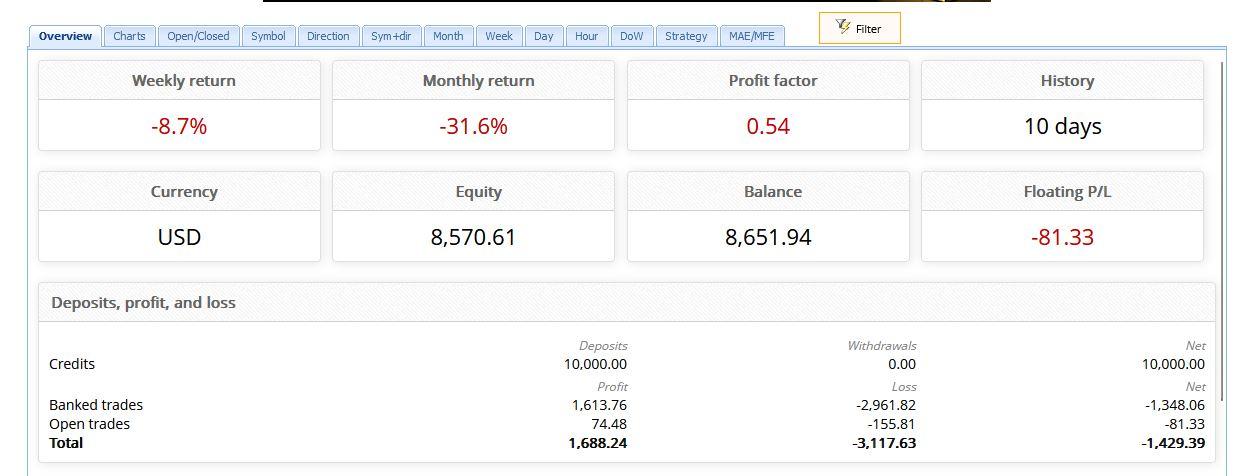
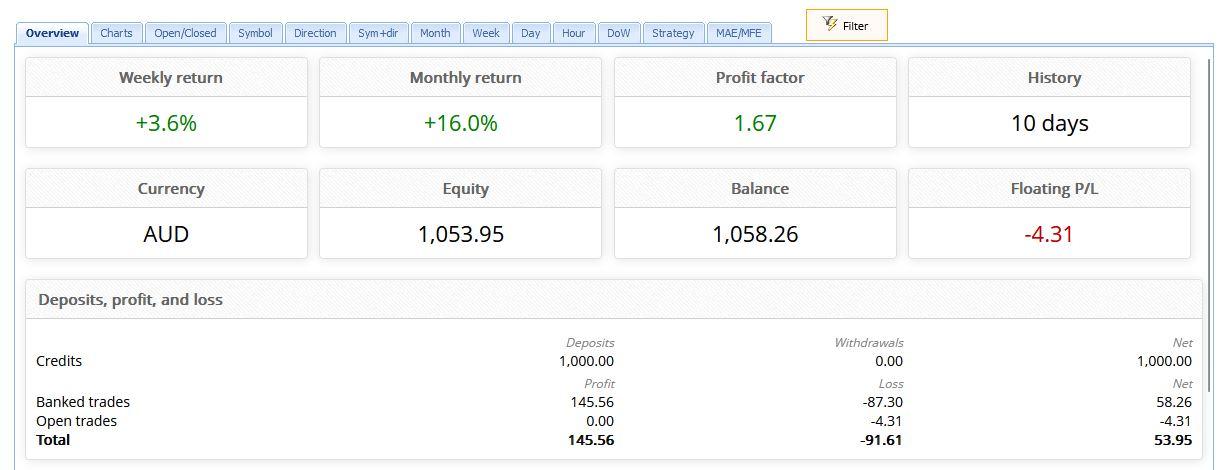
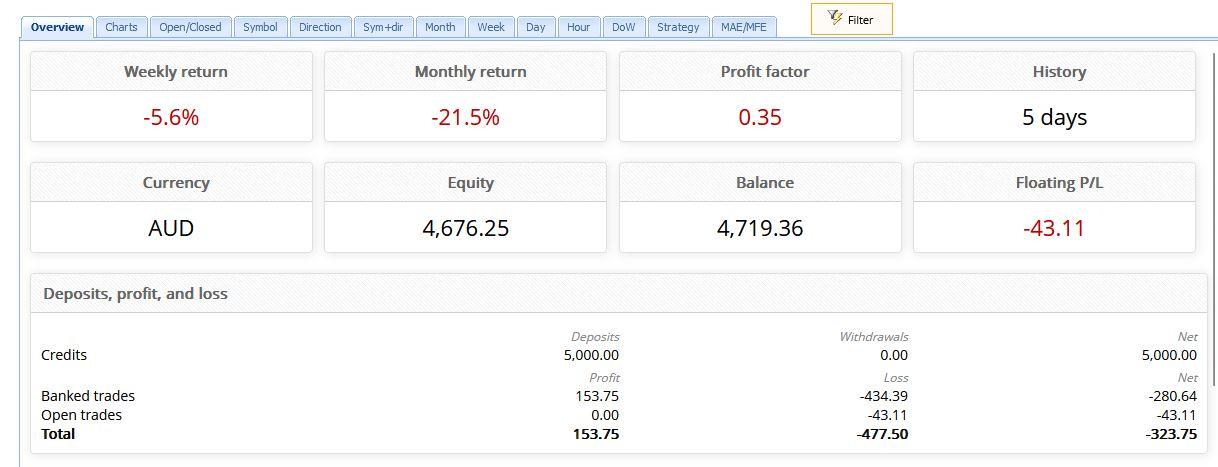
The performances comparing the 99 EAs and Top is attached.
AvaTrade 99 EAs
Pepperstone Demo 99 EAs
Top 3 Demo Pepperstone
Comments are welcome.
September 2, 2023 at 3:32 pm #195539Alan Northam
ParticipantI like the idea you are backtesting with two different brokers. The reason the top 3 keep changing is your backtest time is not long enough. You should backtest for at least 30 days before picking the top EA’s to move to a different account.
September 3, 2023 at 2:30 am #195635ParticipantThank you Alan. Will wait a bit longer and post an update after.
October 10, 2023 at 12:51 pm #203985ceo
Participantuestion 1
Which broker did you choose for your trading?Fbs Is it legit? yes
Question 2
Did you open a Demo account with the same size you are planning to trade real? I opened a demo account and a cent account
Question 3
Did you download the Expert Advisors and unzip them? Yes I do
Question 4
When placing the Expert Advisors in the Demo account, did you see the smiley face? Sure it did
Question 5
Do you see trades opening and closing? What are the first results? No I don’t
October 10, 2023 at 1:15 pm #203993ParticipantHi Ceo,
Sorry to hear you are having problems with the EA.
Do you mind if I ask a few questions so I can better understand the issue?
1. Which course did you take?
2. Which EA are you concerned about?
3. Did you install the EA on the correct chart and correct time frame?
4. How long has it been since you installed the EA?
5. What is the account size?
6. What is the Lot size?
Kind regards,
AlanOctober 24, 2023 at 6:00 am #206591Aki Zagarelos
ParticipantHi Course Advisers and Students 🙂 I’m Aki, Beginner trader and loving the course being offered here!! I’ve learned so much! Thank you!! 🙂
Question 1
Which broker did you choose for your trading? Is it legit?
BlackBull Markets is one I’m progressing with for live trading in the near future along with a few others I am in the throws of vetting. BlackBull Markets have been very compliant with providing me the relevant information around the regulators they are connected with.. makes for a much better trading relationship going forward! Well done Blackbull Markets!! Looking forward to live trading with you!Question 2
Did you open a Demo account with the same size you are planning to trade real?
No I didnt but I do intend to do so as can see the wisdom in doing so..
Question 3
Did you download the Expert Advisors and unzip them?
Yes
Question 4
When placing the Expert Advisors in the Demo account, did you see the smiley face?
Yes I did! 🙂
Question 5
Do you see trades opening and closing? What are the first results?
No this part doesn’t seem to be working for me, I have followed the instructions to the “T” turned on Auto trading prior to attaching the EA and all but don’t see any trades opening and closing against my demo account, the back testing usign the strategy tester I did and got really good results after getting the historical data provided here in the course and tools being offered here, I even tweaked the settings to see what kind of results I would get if I changed lot size, TP parameters etc Am I missing something for autotrading to take place on my demo account.. any suggestions is much appreciated!
Blessings
Aki
October 24, 2023 at 8:17 am #206617ParticipantHi Aki,
Depending upon which EA you are trying to trade could take from a few minutes to a few days before it will take a trade. As long as the EA is added to the chart properly you just need to give it more time to place that first trade.
Alan,
October 27, 2023 at 12:55 pm #207618ParticipantI thought that might have been the case but was unsure.. Thanks for the update, much appreciated.
Aki
December 9, 2023 at 8:02 am #219796mikelj
ParticipantWhich broker did you choose for your trading? Is it legit?
BlackBull – Demo accountDid you open a Demo account with the same size you are planning to trade real?
YesDid you download the Expert Advisors and unzip them?
YesWhen placing the Expert Advisors in the Demo account, did you see the smiley face?
YesDo you see trades opening and closing? What are the first results?
Not yetDecember 14, 2023 at 1:08 pm #220701Deniz Guner
MemberWhich broker did you choose for your trading? Is it legit?
Pepperstone , yes its legit
Did you open a Demo account with the same size you are planning to trade real?
yes
Did you download the Expert Advisors and unzip them?
yes
When placing the Expert Advisors in the Demo account, did you see the smiley face?
yes
Do you see trades opening and closing? What are the first results?
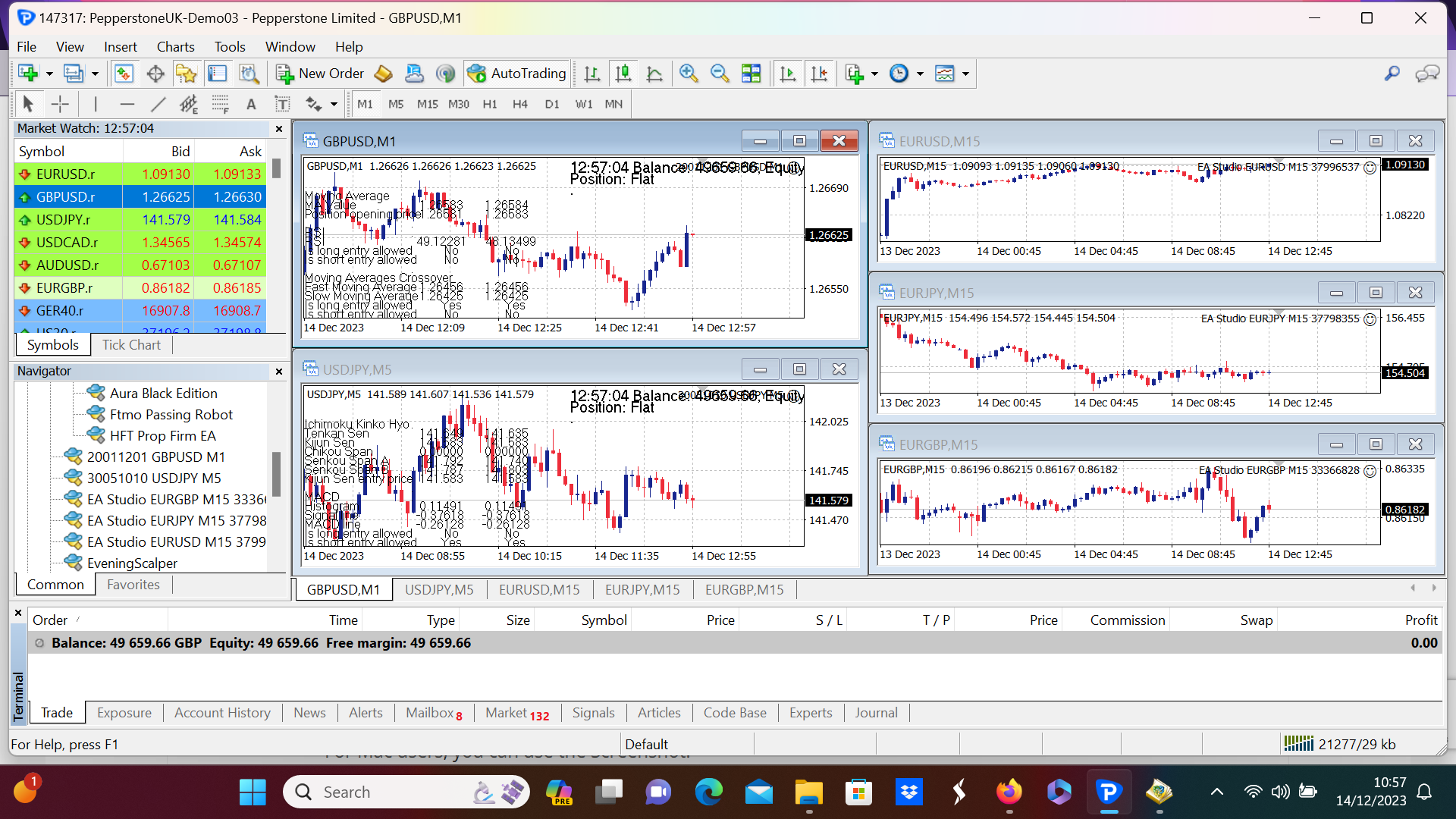
There are no trades opening , i also trialled another ea recently for 2 weeks and no trades were opened with that either , please advise how i can fix this ?
 December 14, 2023 at 4:23 pm #220731Participant
I know that Forex.com does not allow trading with EA’s on their demo account but does allow them on their live accounts. So I have to question if Pepperstone allows EA’s on their demo account. Check with them to verify they allow EA’s on their demo accounts.
Alan,
December 22, 2023 at 2:33 pm #222099RONEN FROHLICH
ParticipantQuestion 1
Which broker did you choose for your trading? Is it legit?-
balackbull / yes
Question 2
Did you open a Demo account with the same size you are planning to trade real?
yes
Question 3
Did you download the Expert Advisors and unzip them?
yes
Question 4
When placing the Expert Advisors in the Demo account, did you see the smiley face?
yes
Question 5
Do you see trades opening and closing? What are the first results?
No trade are apen- I get a mesage in the JUORNAL -invester mode [trades are not allowed]
December 22, 2023 at 2:44 pm #222104ParticipantTry logging into MetaTrader with the master pw and not the investor pw.
Alan,
December 22, 2023 at 3:34 pm #222110ParticipantDo you mean Master Password?
I am using the password that was set when I created the Demo acount
I am not using investor password
December 22, 2023 at 3:59 pm #222113Participant“No trade are apen- I get a mesage in the JUORNAL -invester mode [trades are not allowed]”
The Journal is saying you are in investor mode. This is why trades are not allowed. Contact your broker to resolve this issue. Evidently your broker gave you the investor password and not the master password.
Alan,
-
AuthorPosts
- You must be logged in to reply to this topic.