
Community Forums › Forums › Trading Strategies › Adding EAs to a Portfolio Expert Advisor
Tagged: Adding strategies, Portfolio, Validator
- This topic has 13 replies, 7 voices, and was last updated 2 years, 2 months ago by
Alan Northam.
-
AuthorPosts
-
October 22, 2020 at 1:38 pm #63821
Asser
MemberHi Petko! Hi guys!
I understand how to create strategies and put them into one (or several) Portfolio(s) Expert Advisor.
I also learned how to remove (or disable) losing strategies inside a Portfolio Expert Advisor.Now I need to know HOW to add (or replace) strategies to a Portfolio Expert Advisor already running on MT4.
Can anyone explain that and show me your method?
If there’s a video or a lesson on the subject, please point me to it.Thanks.
October 22, 2020 at 3:41 pm #63823Ilan Vardy
ParticipantHi Asser,
Simply drag the Portfolio EA from the Experts folder in MT into the Validator in EA Studio. Remove all acceptance criteria, and start the Validator. All of the strategies in the Portfolio EA will go into your collection. From there, remove or change any strategies you do not want, and move the rest to a Portfolio. If you have existing strategies in your Portfolio, you can either remove them, or keep them there if you would like them to be part of the Portfolio. From there, export the Portfolio EA and copy it into the Experts folder in MT, and attach it to a chart.
Remember to delete the old one from the Experts folder, and close the chart it was running on, or just apply the new Portfolio EA to the existing chart if it’s the same asset, and overwrite the older one.
Hope this is clear for you.
Ilan
October 22, 2020 at 10:06 pm #63826MemberVery clear so far! Sounds simple too! But…
I’m very visual Ilan and have to see it and digest it so I understand it fully before practicing it. Therefore I’m going to search all the courses and the Blog to see if there are any videos or screenshots showcasing the process in action.
If you know where to look (I have all the courses), please let me know.
Is that the only method or the simplest one?
Thank you for the quick answer and for putting me on the right track Ilan, I really needed it.
AsserOctober 22, 2020 at 10:19 pm #63827MemberNo need Ilan!
Found good articles in the blog.
Thanks again.
You’re the best 😉October 22, 2020 at 11:34 pm #63828MemberOK, I’m trying to digest your above guidance Ilan…
Two questions come to my mind:
- If you “drag”(or import) a portfolio Expert (only one file with many EAs inside) to the Validator, you’ll be importing all the EAs inside, including the winning (and losing) EAs.
It doesn’t make sense to me to recalculate the winning EAs in the Validator, since FXBlue already shows that they are winning. - Why are you removing all Acceptance criteria before running the validator?
It doesn’t make sense either because logically you should be using the same Acceptance criteria that you used when generating the old strategies.
Thanks.
October 23, 2020 at 11:07 am #63830ParticipantHi Asser,
I think I can answer both questions with one answer.
You are correct. The Portfolio EA is a single file with multiple strategies inside of it. The reason I said to remove all of the acceptance criteria is you asked initially how to add or remove strategies. In order to do that, you’d remove the acceptance criteria and then run the Validator to ensure all of the strategies are collected into the Collection, and you can then edit all, or any of them.
Of course, if you want to remove the losing strategies, set the acceptance criteria, and also, in Data Horizon, select the dates you want to check the strategies’ performance within, or to make it easier to remove those that don’t meet your criteria in current market conditions.
I hope this answers your questions – if you have any follow up questions, please feel free to ask me.
Thanks,
Ilan
November 15, 2020 at 9:08 pm #66253tremosor
ParticipantHey Ilan,
After I validator portfolio EA, get the result from FXblue, The fxblue shows the result with magic number, and the collection show ID , I can’t find the relate.
thanks
November 16, 2020 at 10:26 am #66471ParticipantHi tremosor,
Yes, you are correct. A magic number gets generated when we export a strategy as an EA.
Your results in FX Blue will match your results in the Validator. What you can do, is instead of using FX Blue, simply use the Validator to check the performance by changing the dates in Data Horizon, and adding acceptance criteria and performance filters. You can then remove the EAs / Strategies not performing, and export those that are as new EAs with new magic numbers, either as individual EAs or as a portfolio EA, and attach it it / them to your chart/s.
Hope this helps,
Ilan
November 19, 2020 at 12:21 pm #66768jbcdk
ParticipantHi asser,
Could you please give a link to the “good articles in the blog” you found, mentioned by you 22 October.
Best regards
jens
November 20, 2020 at 1:09 pm #66791MemberTried to reply to you twice yesterday but this forum wouldn’t let me post my reply. Why? Beats me! Sent an email to [email protected] 24 hours ago, still no reply from them.
November 23, 2020 at 1:28 pm #67215MemberHi (Hej) Jens,
Sorry for the delay. The forum (or my browser) wouldn’t allow me to insert an image (no matter how much I reduce it’s size).
- Go to the top of this forum page
- Click on Blog
- There you can see many articles (with screenshots & video links)
- Do a search in the search box
- or scroll down through the many titles on the right side.
Here’s the complete URL address:
https://platform.algotradingspace.com/blog/I’m attaching a screenshot (the one I couldn’t insert even though I reduced the size to ridiculous 50 kb… and the moderator wouldn’t help)
December 30, 2023 at 4:22 pm #223590Matthias Bessler
ParticipantI just made my first Portfolio. The single strategies trade 0.01 Lot.
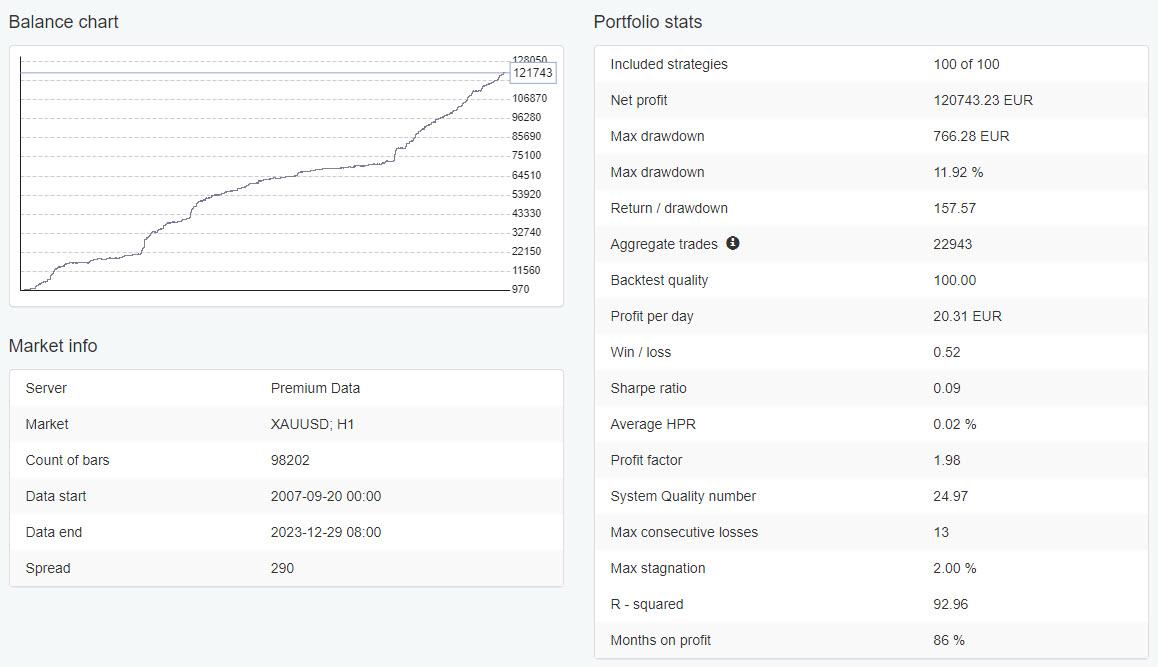
any opinions?
good, bad?
December 30, 2023 at 8:39 pm #223661aaronpriest
ParticipantPlace it on a demo account for a month and keep the strategies that do well to run live the following month.
December 30, 2023 at 8:54 pm #223664Alan Northam
ParticipantCreate another one using OOS of 10%. This will give you an idea on how it will perform outside the same period.
Also, that 11.9% max drawdown could cause an FTMO account to fail if you were to use your portfolio in an FTMO Challenge.
Alan,
- If you “drag”(or import) a portfolio Expert (only one file with many EAs inside) to the Validator, you’ll be importing all the EAs inside, including the winning (and losing) EAs.
-
AuthorPosts
- You must be logged in to reply to this topic.