
Community Forums › Forums › 21 Day Program › 21 Day Program: Access Issues & Assistance
Tagged: 21 day program, Link for 21 Day Algo Program, Sorry, this coupon is not applicable to selected products.
- This topic is empty.
-
AuthorPosts
-
October 23, 2024 at 10:59 am #353302
Ilan Vardy
ParticipantHey penguin,
I’ll forward this to Marin and ask him to take a look; I’ll revert once I hear back.
Cheers,
October 23, 2024 at 11:05 am #353303Marin Stoyanov
KeymasterHello @pengium, your email appears in a anti-spam blacklist of your anti-spam service provider (this doesn’t necessary meant that is a spam email, it could be that someone reported it like this). I removed it manually. Please try again and if problem persist you would need to use another email to enroll in the program.
October 23, 2024 at 11:12 pm #361687Giaani77
MemberHi Ilan,
I am very excited for this 21 days program. I succeeded in getting the “PROFESSIONAL TRADING STRATEGIES Course + 5 BOTS INCLUDED ” course, but unfortunately at the moment I cannot get the “Gold Trading Course for Beginners + Free XAUUSD Trading Robot” course. The system gives me this error message:

Can I ask you for assistance?
Thanks in advance,
Emanuele
October 25, 2024 at 9:27 am #373184ParticipantHi Emanuele,
I’ve asked Marin to take a look and let us know what the issue is. I’ll revert asap.
Ilan
October 25, 2024 at 9:51 am #373185KeymasterHey @Giaani77, you should have access now. Please log into your account and go to Courses and you should be able to see the course there. There was some issue that is fixed and you won’t have similar problems in the future.
October 31, 2024 at 4:55 am #374361mark liu
Participantnice
October 31, 2024 at 2:44 pm #374441Anthony M
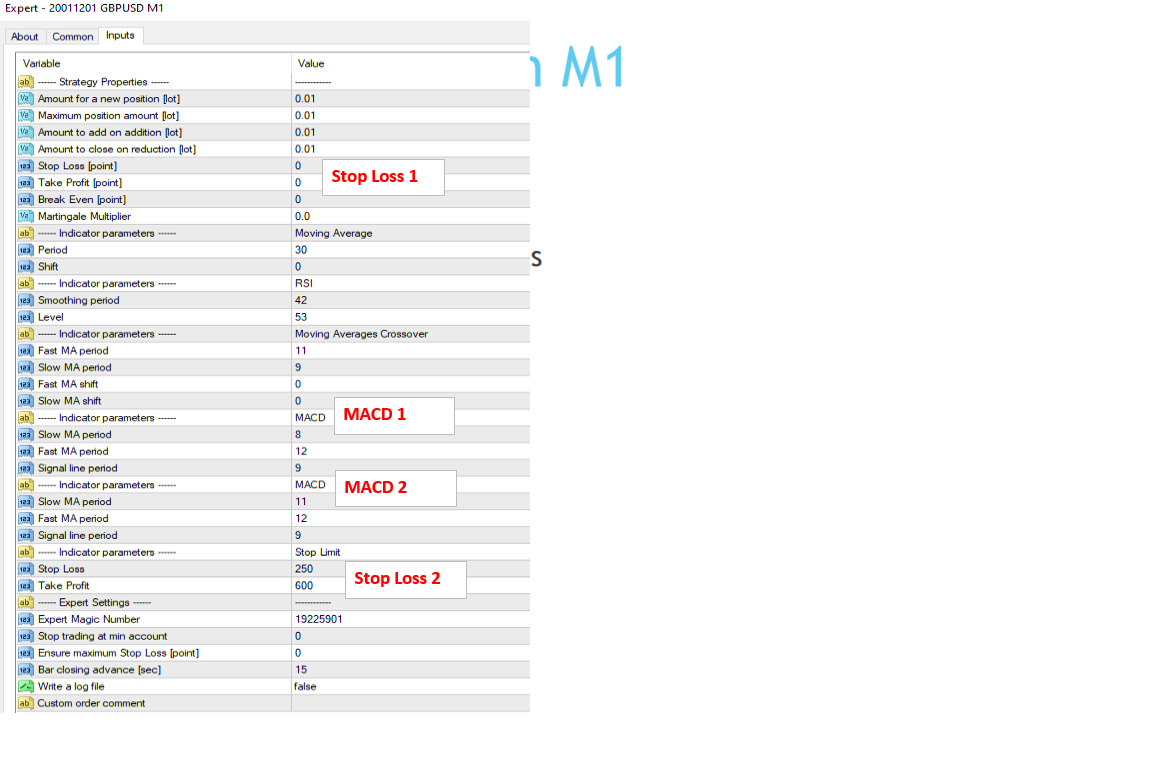
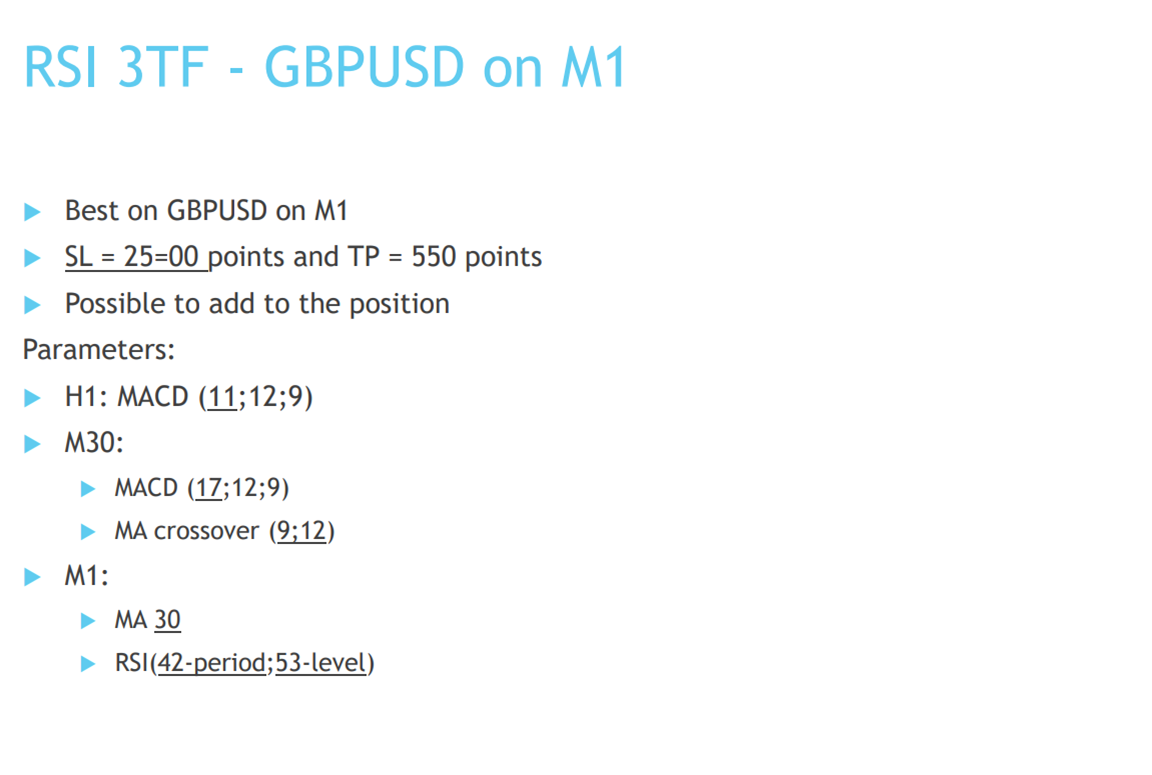
ParticipantI don’t know where to mention this but regarding the GBPUSD M1 EA in the “Professional Trading Strategies + 5 Bots Included” course:
The parameters in the EA do not align with the settings in the pdf
- There are two stop loss parameters in the EA but only one in the pdf
- There are two MACD settings in the EA and two on the setting pdf but there is no way of telling which one is which.
I would recommend including set files and labelling the timeframes in the EA.
Please let me know where in the EA to put the stop loss figures and MACD entries.
 November 18, 2024 at 4:57 pm #378925
Chas65player
ParticipantHi, would it be possible to join the 21 day Trading course that I have signed up for?
Regards,
charlesDecember 10, 2024 at 6:03 pm #383200Tahir Shaikh
ParticipantHi
i am getting error while trying to registerfor a 21 day free algo course
error is -Sorry, this coupon is not applicable to selected products.
Kindly assist ?
January 5, 2025 at 8:20 pm #410463Rafael Unas
Participanthello, i joined the 21 day program.
and when i go to the page to buy the program and apply the discount cuppon, get an error if i dont put eu vat number, and an error if i put.
can you assist?
thank you
January 9, 2025 at 12:19 am #425189kntrading
ParticipantJust wanted to say I ran into the same problem and agree the input settings are confusing. I’m not saying I know the right answer but here’s how I did it:
1. I put SL and TP on both places.
2. I went into the code to see which MACD is being used on which timeframe. Seems like MACD 1 (according to your picture) is used on M30 and MACD 2 is used on H1.
-
AuthorPosts
- You must be logged in to reply to this topic.