
Skip to content

Prop Firm Robots

FTMO Robot V5.1 is Live!

  • by Petko Aleksandrov
  • 99 replies
  • 0 voices
  • active 3 years ago
Viewing 15 posts - 1 through 15 (of 100 total)
  • Petko Aleksandrov Algo Trading Space team

    Dear traders,

    We know how important safety is when it comes to Prop Firms which is why we’ve updated the FTMO Robot to include a whole extra pack of protections!

    In the inputs you will find:

    Entry Protections:

    • Max spread
    • Max open positions
    • Max open Lots

    These protections are for the new signals that come from the robots. If the Spread is higher than 30 pips, for example, the trade won’t be open.

    Account Protections:

    • Max daily Loss
    • Min equity
    • Max equity

    Read more about each one below!

    In addition, we’ve added the Stats section, where you can set the statistics you want to see over the graph.
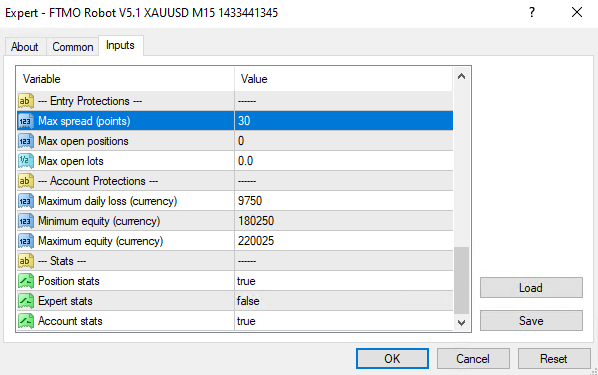
    Maximum daily loss

    It is a total loss from midnight.
    Daily loss = total profit of closed positions + current floating profit
    Daily loss % = 100 * Daily loss / Initial account

    This metric is reset at midnight.

    The corresponding validation criterion is Maximum daily loss %. It has a default value of 5%, which corresponds to $500 for an initial account of $10000.

    The “Maximum daily loss %” is relative to the Initial account. That is. 5% will be $500 for the complete backtest.

    Maximum loss

    This is the maximal loss relative to the initial account. It is not a Drawdown.

    The corresponding validation criterion is Maximum loss %. It has a default value of 10%, which corresponds to $1000 for an initial account of $10000.

    Maximum loss = Initial account – Minimal equity
    Maximum loss % = 100 * Maximum loss / Initial account

    Maximum Equity

    This protection is to secure the profits when the account reaches Target. The trade will close, and the EAs will be removed from the charts.

    Everyone who purchased the FTMO Robot will receive an e-mail with the new login details later today.

    Please test it and let us know if you find any bugs!

    Cheers,

    Petko A

  • dusktrader

    Can you please clarify the difference between these settings:

    • Account Percent Stop (default is set to 4.9)
    • Stop trading at min account (default is set to 0)
    • Ensure maximum Stop Loss [point] (default is set to 0)

    Ideally I would like to know how to achieve this:

    • ensure bot ever exceeds 5% daily loss
    • ensure bot stops trading before exceeding a lifetime drawdown such as 15%

    Thank you

  • Granit Mustafa

    do we need to remove the old robots and to put the new ? or just tu upload the  “set file”

  • Kris

    Nice improvements to the robot!

    Maybe I’m missing something, but you show a screenshot with Min and Max equity, but nothing with “Maximum loss” which you are explaining. I can’t seem to find that setting in the robots either.

    Can you help me out here?

  • Wealth

    Hi,

    I’m backtesting some of the bots and some are opening BUYS/SELLS at the same time. Some prop firms do not like this.

    How can I change the settings?

    I don’t see how I can change it inside the inputs section.

    Thanks.

  • nguyenqh.mt

    Honestly, why not zip all file in the download folder Petko, I have to click download each set file for each Pair. It cost me a day to do it. lol

    —-

    Ah Sorry, I saw The set file folder already in the zip file. Nice work

  • Petko Aleksandrov Algo Trading Space team

    I gues it happens with the different assets, right? This is if you trade all of them.

  • Petko Aleksandrov Algo Trading Space team

    At the end of the course, there is a lecture called The Latest FTMO Robot. There is a link to all versions of the FTMO Robot.

Viewing 15 posts - 1 through 15 (of 100 total)

Learn the method behind the answers.

The Academy’s free courses take you from a demo account to your first Expert Advisor, taught by the traders who answer here.