

Forum Replies Created
-
AuthorPosts
-
NIKOS KYRIAKOU
MemberYou can just limit the orders to open in the settings!
Kind Regards,
NikosMemberThat is the way we are doing it and it works!
Kind Regards,
NikosMemberHey Sifiso,
So, regarding your question, you can find this option in EA Studio so you can try it if you want!
Kind Regards,
NikosMemberHey Tsholo,
Sure!
Kind Regards,
NikosMemberHey kashane,
If you mean to download it from the app, that depends on if it will be one of the profitable robots. With that being said, it depends on the profitability.
Kind Regards,
NikosMemberHey VapoChill,
The pip size depends on the risk that you want to trade with. Also, to find the inputs of the EA, you just right click on the chart after you have placed the EA and then you just click on Expert List and Properties. From there you can change any settings you want for the EA.
Kind Regards,
NikosMemberHey Tsholo,
We are really glad to know that you liked our 21 Day Algo Program.
About your suggestion, I will forward this to the team!
Kind Regards,
NikosMemberHey majorone,
So, you need to close all orders of USDJPY M15 #2020345180 if this is the robot that trades at the moment and change it to the new one.
Also, you need to change the robot everyday if there is a more profitable robot than the one that you are currently trading with!
Kind Regards,
NikosMemberHey Shekeb,
Can you please send me a screenshot of the settings of the robots and also the platform?
Thank you!
Kind Regards,
NikosMemberHey WASIM,
There should already such function. In case it does not work, try to add the robot again to the chart.
Kind Regards,
NikosMemberHey Ahmed,
So, Meta Quotes is the company that creates Metatrader platform. In this case, I would just say that using a different broker might help achieve more accurate backtest and performance!
The brokers that we use are the ones in the link I provided in my last reply!
Try one of these brokers and let me know if that changes anything in the backtest and performance!
Kind Regards,
NikosMemberHey Ahmed,
So, when you are on the Expert Advisor Studio, trying to generate a new strategy, you should see this the Generator settings:
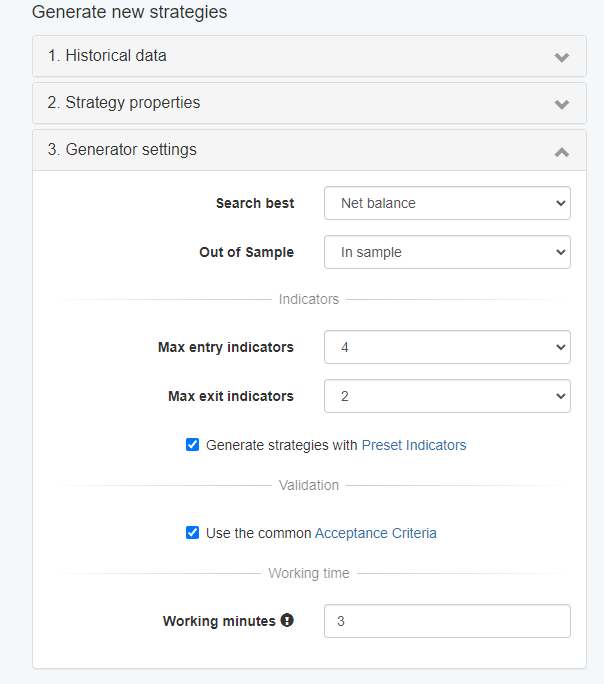
You just need to click on where it says Preset Indicators. After you click it, you will get to the Entry and Exit Rules page where you can change the rules that you want your strategy to follow and see what brings better profit:
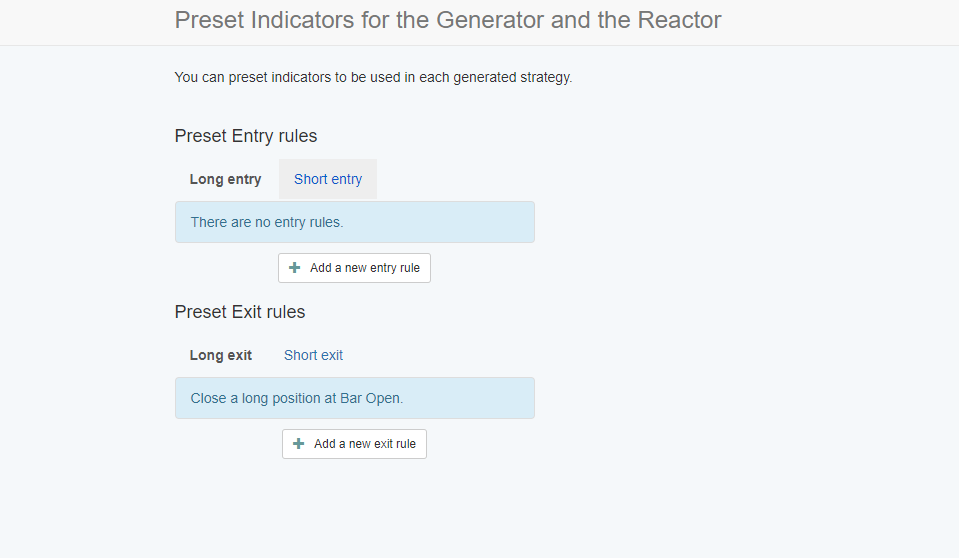
You just add the rules according to your strategy!
Also, about the broker, I would say to look to our trusted brokers and the reason for that is that we have seen better results using these brokers:
https://platform.algotradingspace.com/trusted-brokers/
Hope this helps!
If you have any more questions, let me know!
Kind Regards,
NikosMemberHey Craig,
I am sorry for the late reply.
So, these are the answers to your questions:
1. I check every start of the day or morning for more profitable robots
2. I do not close the positions
3. I close the position if I have to change the robot
4. I believe that before the news, the robots close the trades automatically but in case it does not happen you can close them manuallyHope this helps!
Kind Regards,
NikosMemberHey George,
I am sorry for the late reply.
I look at every start of the day to see if there is any more profitable robot.
Kind Regards,
NikosMemberHey majorone,
You just need to keep changing the robots once there is a more profitable one. I believe looking every day, is the best thing to do so that you do not miss on a more profitable robot from the App.
Kind Regards,
Nikos -
AuthorPosts