

Forum Replies Created
-
AuthorPosts
-
Petko Aleksandrov
ParticipantHello Jospjn,
Check out the data horizon and see if you didn’t place an end date:
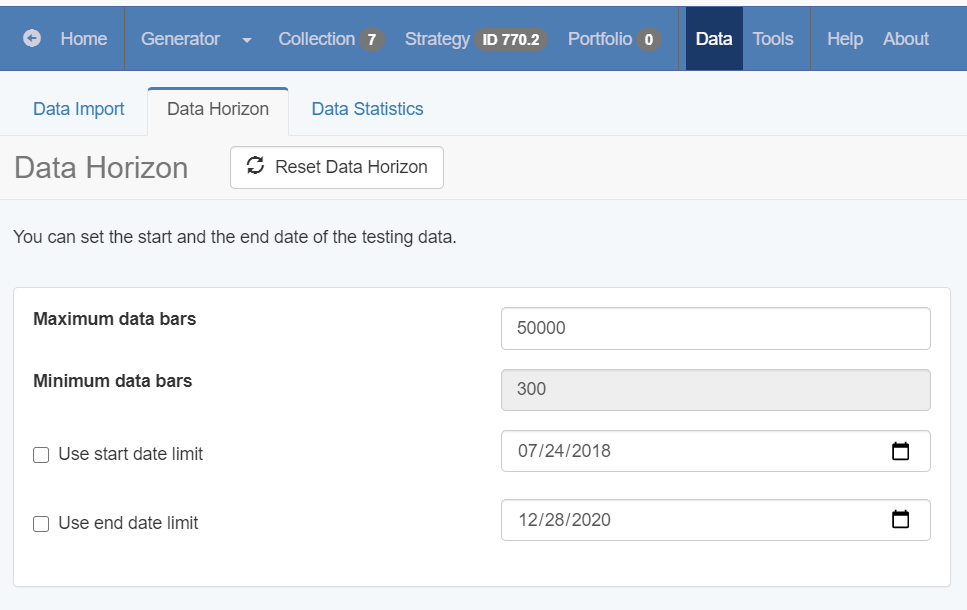
The data is updated all the time because it is important to have fresh data.
ParticipantDear traders,
The Bitcoin is back with a lot of volatility and movements.
It is a great time to trade it again, but be careful with the spread! Many brokers take advantage of the situation to charge huge spreads.
I wouldn’t suggest you use the Never Losing Formula if the spread is higher than $20.
Also, I have updated the Robot with some changes in the parameters. The TP remains the same.
You can find it attached as a resource file in the lecture.
Safe trading!
Petko A
ParticipantDear all,
I have reviewed the EAs from the Top 5 Forex Strategies course, and only the EURGBP needed some optimization. It is updated.
The EURUSD move was quite impulsive, so pay attention when trading EUR strategies.
I would suggest you lower the risk (smaller lots).
Cheers,
Petko A
ParticipantHey Sreeni,
Glad to hear from you! It makes me happy to know that the course was useful to you.
I usually do not put preset indicators in EA studio.
I run the generator with all the indicators and it shows me which are the best ones for the currency pair I selected to use.
Cheers,
ParticipantHello there!
Most probably the difference is because you have placed the EAs at a different time on the Demo and the Live accounts.
I guess what you did is to test the EAs on a Demo, and you placed some of them on the Live account.
The moment you place the EAs on the Live you might have opened trades on the Demo.
And on the lice account they will open on the next signal.
So it might take a week or even more (depending on the strategies) to start matching from Demo and Live.
Cheers,
ParticipantHello there!
Most probably the difference comes because you have placed the EAs at a different time.
I guess what you did is to place the EAs on a Demo to test and then you placed the winners on live?
Now, when you place EA in the Demo it starts opening trades. When you put it on a Live, it starts scanning for new signals. But during this time you might have a trade opening in the Demo. And in the live it will open a different trade. It could be with a different direction.
It depends on the strategy but sometimes it might take more than a week or the Demo and the Live to match the trades.
Cheers.
ParticipantHey Michal,
Glad to hear from you again.
I don’t think they can collect this money from you. Don’t worry about this. Just don’t answer the phone ever again. I would suggest you change the number as well.
I don’t think you can do a lot from the MetaTrader because even if you close the trades, they will open new ones. Anyway, on the right side where you see the losses, there is the x box. Try closing from there.
As I said, ignore all and continue your life. Forget about it.
Cheers.
ParticipantHey Thomas,
Yes, when you have more bars, the generator gets slower. The more bars you have the fewer strategies you will have at the end.
Recently I use about 50k bars. EA Studio is good enough to find nice strategies for a shorter period of time. And it is even better because we create strategies over the most recent Historical data.
ParticipantHey Jospjn,
I think you are doing it in a hard way. Why don’t you just download the data as json for EA Studio and import it? After that modify the settings from Tools.
Give it a try this way. You really don’t need to go to MetaTrader.
ParticipantHey guys.
I want to hear your feedback!
Is the free course for EA Studio basic enough? While I record the free course for FSB Pro I was wondering if I make It suitable for complete beginners.
If I hear your feedback on that, I would know if I can make it at a similar difficulty level or I should go for more basics.
Cheers.
ParticipantHey traders,
I have recorded a short video with some of the updates we have in EA Studio:
The generator is just the same, but it has a visual presentation of how every new and better strategy is performing compared to the previous one.
Also, you will see that we can limit now the number of Entry and Exit conditions.
Have a look at the video to make sure you are taking the most out of the software.
I will keep you updated with the recent improvements.
ParticipantHello there!
I think you have messed up somewhere with the data.As far as I understand you have downloaded the data from the Forex Historical App, didn’t you? That is the data from Dukascopy. And then you have changed the symbol settings in EA Studio settings to fit the JFD broker? It that correct? If so, then you are alright.
But you have a very small number of strategies generated which makes me think that you have not done it exactly this way.
Please, watch all the videos that are on our Historical data page.
ParticipantHey John,
Welcome to the Forum. I would suggest you trade at least 3 currency pairs. And why USDCHF exactly?
What is your rule to move the EAs from Demo to Live and from Live back to Demo?
Most importantly did you check if you have the same results on Demo and Live? When you place one EA in the live account, do you keep trading it in the Demo, and do you see the same results? Do the trades match?
Let me know so I can give you some tips.
August 4, 2020 at 5:34 pm in reply to: How does a profiting trade show up as a loosing trade? #55961ParticipantHey Leonard,
No, we pay the spread at the moment we open the trade. This means that if you buy, you buy at the ASK price (the more expensive price). And this is why you see loss right after the trade is opened.
ParticipantHey Michal,
I am sorry to hear that you are still in trouble. As I wrote to you the first time, you have hit a bad scammer.
If you can not close the trades, it means that you don’t have any control over the account.
I think the trades that you see in the account are not real at all. This means that the profits you saw were not real as well. This is something on their platform. They have some algorithms to show the clients’ profits, and then when they decide losses. This way, they have a reason to start calling you and ask you for more money.
If I were you, I would block the card that I used for funding the account. They have your credit card details, and they can withdraw at any moment from there. You lost enough, so don’t let them get more! Sadly to say, your initial deposit was gone at the moment you funded the account.
I would suggest you not to look for any authorities because there are the other scammers. You can not recognize which are the legit ones. They might scam you from there as well.
What would I do?
1. Block the credit card that was used.
2. Don’t open their website/platform ever again (this will make you forget about it)
3. Start practicing with a Demo account with any of the trusted brokers on our websites, and take some courses to learn how to do it by yourself
4. Don’t ever depend on someone else to manage your money
I know 250 is not a small amount, and it hurts. But I can tell you that people lose millions daily because of the scam brokers. Just in Bulgaria, there are over 300 such brokers, and so many people know about it, but no one does anything. They pay to the right people, and they keep scamming…
So…just say to yourself. ” I lost the minimum” “This was an experience that will be a good lesson for me” ” I am healthy, and this is the most important.”
Cheers, Petko
-
AuthorPosts