

Forum Replies Created
-
AuthorPosts
-
Petko Aleksandrov
ParticipantHey Petko,
I am using FSB Pro for such a long time now, and I always keep forgetting how to do that when I move the software to another computer, and I always refer to this video above 🙂
ParticipantHey Petko,
thank you for all updates, I have all the EAs on my Demo accounts, and some of them already on the live. You are the man!
ParticipantHello Riuzk,
Do you run same currency pairs, on same times frames and same acceptance criteria on all of them?
If you run for different assets, the explanation is simple – you have on the slowest computer the asset that fits best on your acceptance criteria.
August 12, 2019 at 10:23 am in reply to: Forex strategy course – Portfolio trading with 12 Expert Advisors – Questions #17835ParticipantHey Simon,
yes, you are correct, I was not a fan of it before. But it changed after the Acceptance criteria were updated with In Sample and Out of Sample options. This way we can choose criteria for both:
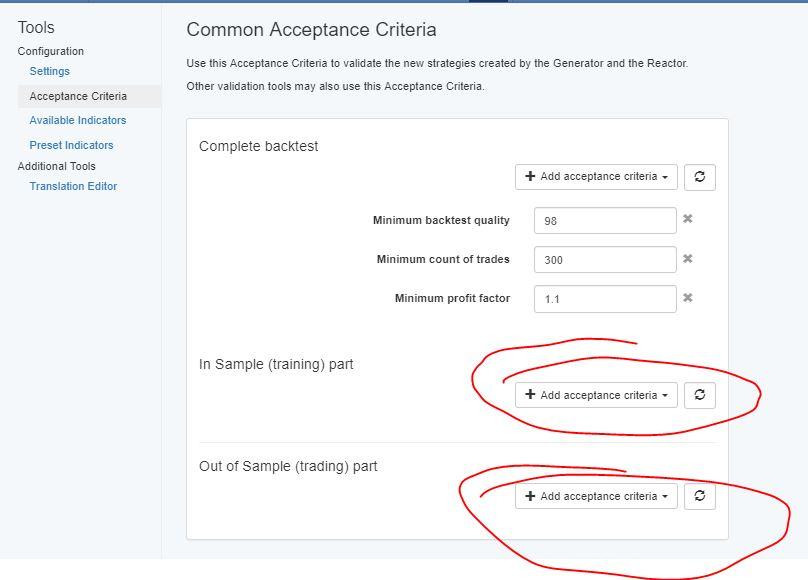
This is totally different now. Before we had it only for the complete backtest. Now, we can choose for both of the segments. This way we can filter in the Reactor the strategies that are profitable in the Out of Sample Part. And at the same time, we really test those on unknown data.
I understand you want to keep it simple and less work, everyone wants that for sure 🙂 However, concentrating on one currency pair is not really a good risk-diversification. Try to do at least three different assets. Also, on M1 you would like to trade the currencies that have the lowest spread, and GBPJPY is not one of those.
If you trade on M1, you can go to 300k.
Just run the reactor strictly, make sure to put Monte Carlo always to test the robustness, and look for Min Count of Trades. Increase it as much as possible.
Cheers,
ParticipantHey Riuzk,
Glad to hear from you. You are right! They are different. First was only FSB Pro, when I purchased it by myself. After that EA Studio came up.
And as far as I know, the idea of EA Studio was to be just simpler and faster. And it is faster, but not a simple program anymore. We can do really a lot. There are things that aren’t available with FSB Pro (like the Reactor).
However, FSB Pro allows us to create much more complicated EAs such as different time frames.
Personally, I prefer to use them both, just because this way I get different strategies which is what I always aim at – diversification.
Kind regards,
August 10, 2019 at 5:05 pm in reply to: Forex strategy course – Portfolio trading with 12 Expert Advisors – Questions #17748ParticipantHello Simon,
Glad to hear from you, and nice you post pictures, this way I can assist the most.
Now, the Monte Carlo is totally acceptable. As you can see there 20 out of 20 test validated(this is 100%).
I would increase a bit more the number of trades in the Acceptance criteria. I see you have 200k bars which allow you to request more bars.
The other thing is that I am not really a fan of using Full data optimizer. You have really the risk to over-optimize the strategies. Yes, you run the Monte Carlo, but still…I am just not a fan of it. If you find these strategies profitable in the future as well, then you are fine. Give it a try.
Normally, I would filter them a bit more. Recently I use more and more the min count of trades. I would just squeeze them to get the strategies with the most number of trades.
Let me know if there is anything else.
Cheers,
Participant8. Walk Forward optimization: Forex trading with Portfolio EAs
The new 3 Portfolio Expert Advisors for EURGBP, EURJPY, and GBPJPY are uploaded to the course.
Each one has 10 different strategies for each currency pair.
Participant7. Bitcoin Trading Robot – Cryptocurrency never losing formula
I have just updated the Bitcoin Robot that I use with the Never losing formula.
I did a small change in the Stochastic indicator. All the rest is the same.
The recent volatile moves with the Bitcoin allows us to keep the TP at $210.
Participant6. Bitcoin Algorithmic trading course + 99 Expert Advisors
I have uploaded the new 99 EAs for Bitcoin in the course.
Make sure to test them always on a Demo first, and select the best ones you want to use.
Participant5. Trading Portfolio Expert Advisors + 100 EURUSD strategies monthly
I have just uploaded the new 10 Portfolio EAs for the EURUSD currency pair.
Each Expert is with new 10 strategies inside.
Participant4. Ethereum trading course + 99 Algorithmic Trading Robots
The new 99 EAs for August are uploaded. You can find them at the same place – the lecture where I show how to place the EAs on Meta Trader.
ParticipantThanks for keep on updating the courses every month!
ParticipantYou are absolutely correct, Travis! I love what Pekto teaches in the courses, and I succeed to manage to make profits with his EAs and with the EAs I generate. Still on a relatively small live account, but it is profiting 🙂
ParticipantHello,
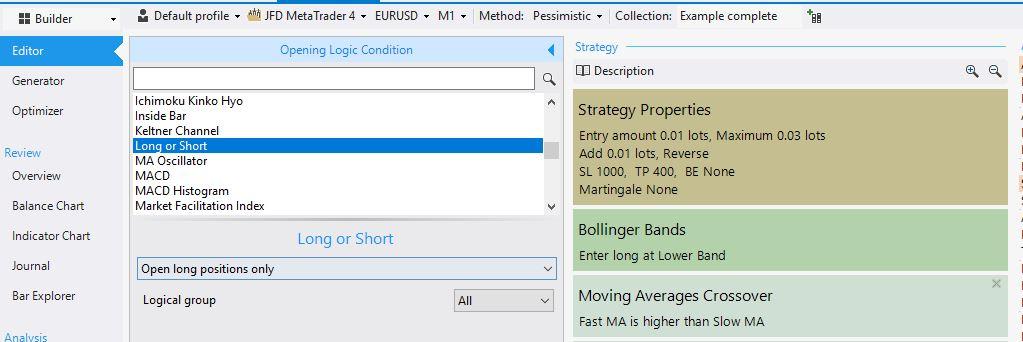
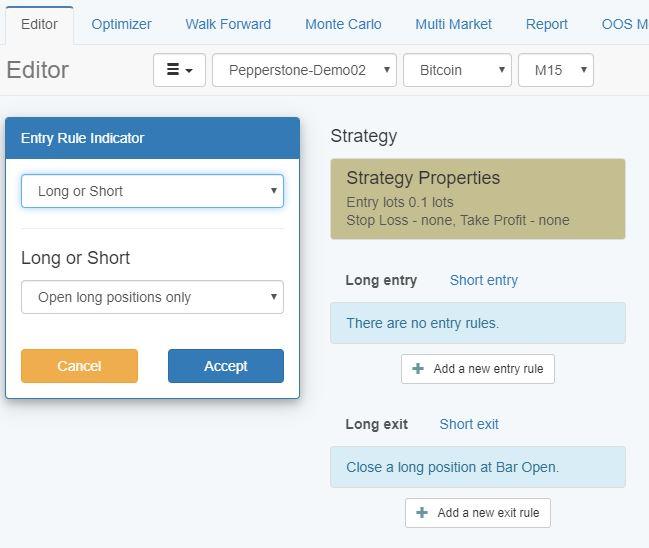
yes, it is possible. In EA Studio and in FSB Pro there is an indicator Long or Short. If you add it to the strategy, you can select if you want to have only long or only short trades.
This is in FSB Pro:
EA Studio:
 Participant
Hello Travis,
sorry for the late replay, somehow I missed the question and it went on the second page.
Yes, you can make it automatically. There is a script that you can drop in your Meta Trader, and it will export all the info. After that, you just drag the Historical data Script and it will update the data. You do it just one time.
Here is a video of how to do it:
Cheers,
-
AuthorPosts