

Forum Replies Created
-
AuthorPosts
-
Alan Northam
ParticipantHi Dylan,
With the setting you have, when you get an opposite signal the open position should be closed out. Then when you get a new signal a new position will be opened. If the new signal is a signal to go short then a sell market order will be placed. If a new long signal then a new buy market order will be placed. If you do not get an opposite signal then when the TP or SL is hit the open position will be closed.
Alan,
ParticipantIn my opinion you would probably see similar results as to what I am getting if not better! Keep me posted!
ParticipantThis is most likely an issue with your broker. Try a much smaller lot size. Also, does your broker allow auto trading with EAs?
ParticipantThat is a possibility and would be interesting to test out with another demo account. I would suggest you perform this test using FTMO demo accounts over the next two or three months and report your results as a separate topic in this forum.
Alan,
ParticipantThat is an unknown! What is known is that all EAs will have a period of profits and a period of drawdowns. Even if the EA shows in a demo account that it has been profitable over the last week and it is moved to a live account, there is still always the possibility that it could immediately start going through a period of drawdown. Keep in mind that drawdowns always start after a period of profits, and profits always starts after a period of drawdowns. It is a known fact that drawdowns are a healthy evil for the future of a profitable trending market. I always look at drawdowns as an indicating the market is going to make more profits in the near future.
Good discussion!
ParticipantHi Magiangelic,
No I did not swap out anything. That is not the purpose of the test. What I am doing is testing FTMO EURUSD version 4.1 and not version 4.3 to see how long the EA will continue to remain profitable over the long term. The FTMO demo accounts only last for 14 days and then you have to start a new 14 day demo account. I started the new FTMO demo account yesterday using the same FTMO EURUSD version 4.1 and already it is up by 1.8%. So we will see how profitable it is over the rest of the 14 day period. So, even the old version 4.1 is still being profitable over the long term.
I hope by performing this demo test it will give confidence to new traders that the EAs created by Petko can be profitable over the long term.
Alan,
ParticipantHi Gary,
Go to Tools>options>Charts
Then go to ‘Max bars in history’ and fill in the white space with 999999999999999
Then go to ‘Max bars in chart’ and fill in the white space with all 999999999999999
Then go back to chart and hold down HOME key and see if you get more data.
If this does not work then you will need to add premium data to the chart. Let me know how it goes!
Alan,
ParticipantHi Majdi,
Can you please refer me to the lecture or lectures where the MA is being discussed so I can review them. That way I would be able to answer your question, thanks?
Alan,
ParticipantHi Ruben,
I see you just installed the FTMO EA on Oct 11. The FTMO EAs don’t necessarily place trades everyday because of the M30 filter. Give it another day or two and you should see a trade being placed.
Alan,
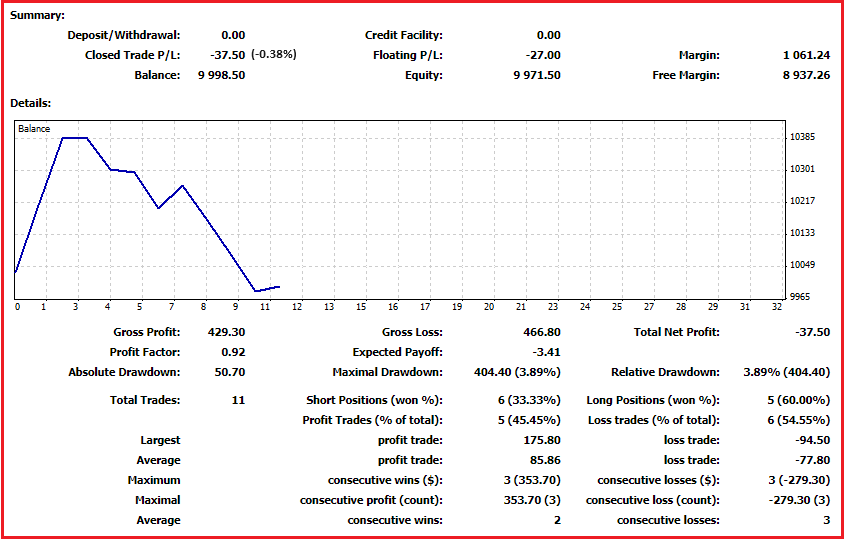
ParticipantThe following is the results of my fourth test of the FTMO robot V4.1 on an FTMO 14 day free demo account from Sept 26, 2023 through October 11, 2023. Account size $10,000. Lot size was 0.3 the recommended lot size for this account size. This is the first time the EA took a loss. The loss was -0.38% with a drawdown of 3.89%. If I combine the four test together the results would show a total profit since the beginning of August 2023 of 7.2%.
I will now start another 14 day demo and continue to test the FTMO EURUSD EA version 4.1.
Note I continue to test FTMO EURUSD version 4.1 and not version 4.2 version 4.3. What I am testing is how long will a single EA continue to show good results.
 Participant
It must have something to do with the MT4 terminal. I would download a new copy of MT4 from your broker and install it. Then install the indicator and see what happens.
ParticipantIt looks like you are using MT4 so that isn’t the problem.
I wonder if you are installing the correct file?
https://fxprosystems.com/forex-profit-supreme/
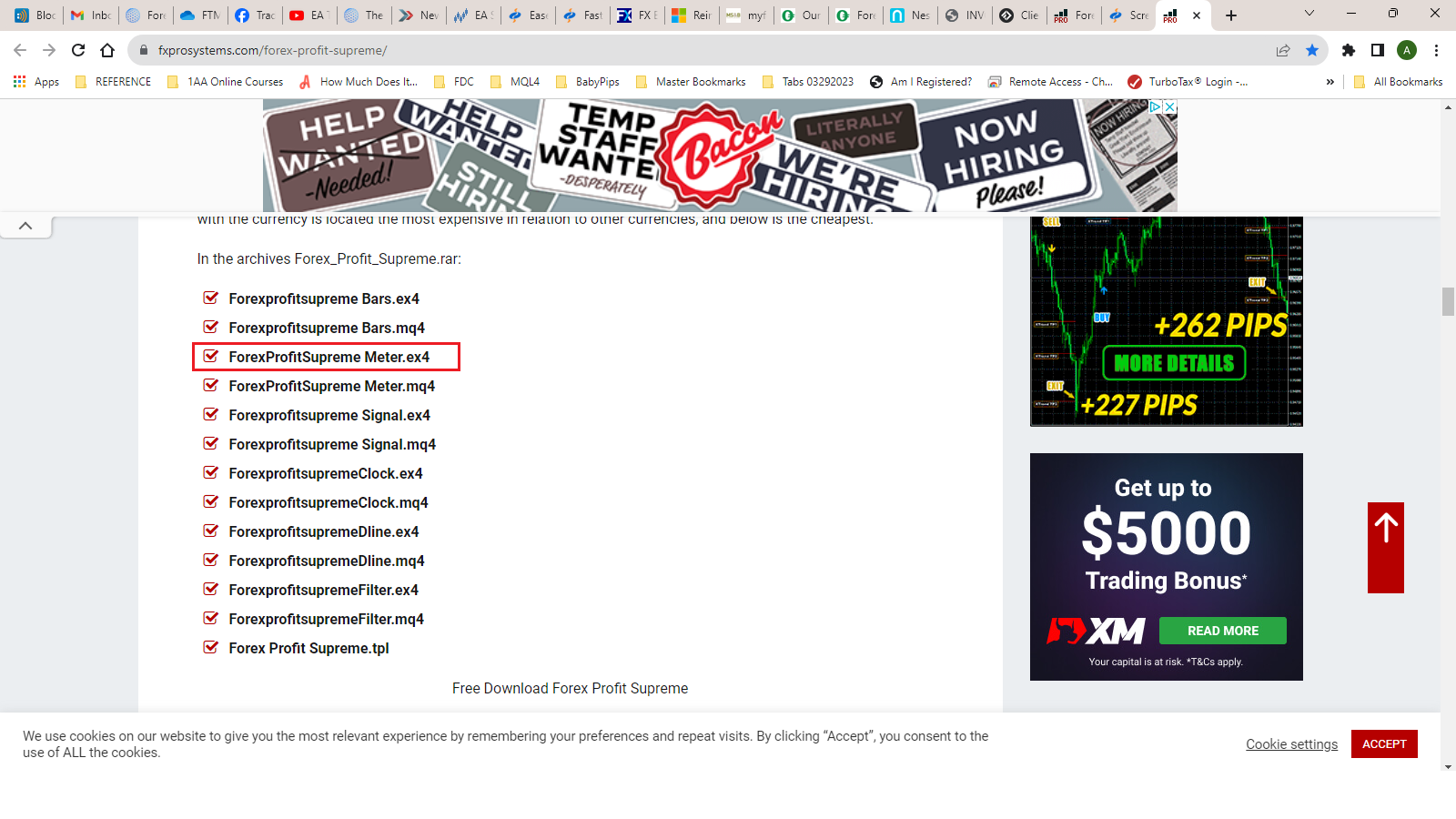
Install as an indicator.
ParticipantHi ibrahim,
No, you do not want to do that. When you switch to one account the other account will stop trading. The way to do this is to open two MetaTrader platforms.
Kind regards,
AlanParticipantThe FTMO demo account in the link above are the results of trading the FTMO EURUSD EA version 4.1 since August 1st.
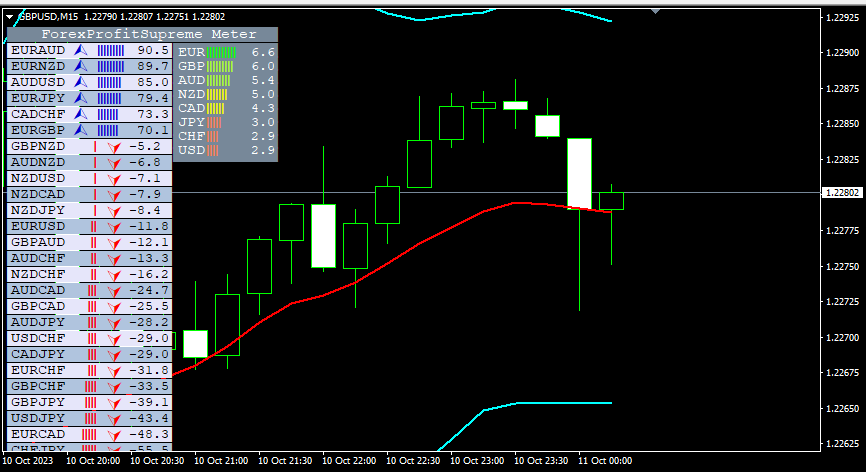
ParticipantI just downloaded it and installed the exe file in the indicator folder. I then loaded it onto a chart and it looks normal. Maybe delete it and reinstall and see if it looks correct.
-
AuthorPosts