

Forum Replies Created
-
AuthorPosts
-
Alan Northam
ParticipantSo here is what happens. When you get an entry signal a trade of 0.85 lots is opened. No additional lots can be added when a new entry signal is given because the maximum position size is set to 0.85. Then when a reversal signal is given the lot size is reduced to 0.00 closing out the trade because the Amount to Close on reduction is set to 0.85. Since the trade is closed out when the trend reverses SL is not moved to breakeven.
Alan,
ParticipantBetter yet just click on F7 and show me a screenshot of the EA Properties Box.
ParticipantInstall the FTMO EA on the M1 timeframe! Make sure the Auto Trading button in the tool bar is pressed. Maximize historical data on M1 and M30. Use recommended lot size for a 25K account. Then EA should work properly.
Alan,
ParticipantHi skaab,
Which EURUSD are you referring too? Can you provide the magic number so I can check on it?
Alan,
ParticipantThe same EA will trade differently with different brokers or prop firms because the historical data is not the same.
Alan,
ParticipantHere is one of my live FTMO EAs trading right now and showing the SL moved to breakeven. Note the red circle. The red dash is the original SL. It does not move because its price level is defined by the SL in points in the EA properties box. However, notice the red arrow, it is pointing at the new SL set at or near the original Buy price. So the orignal SL as defined in the properties box does not change. However, it is overridden in the EA’s coding such that the new SL takes priority.
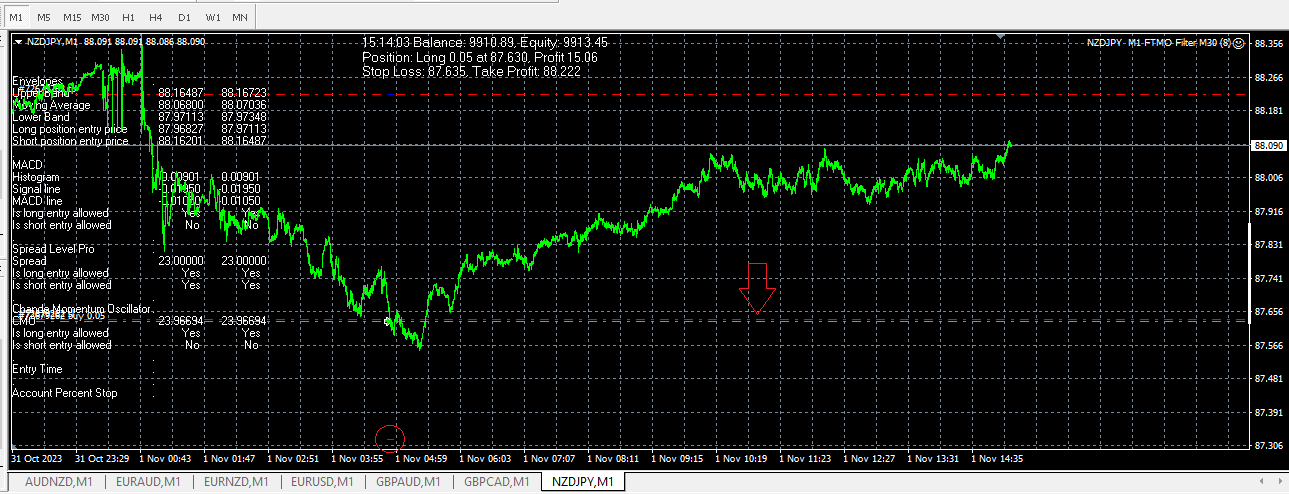
Hope this helps clear up the confusion.
Alan,
ParticipantI too am trading the FTMO EA’s and they are working correctly. When one of the EA’s reverses direction it will set a new SL at breakeven but the original SL does not change. You can see the original SL by a small red dash after the new SL is set at breakeven. So, the original SL does not move, however a new SL is set at breakeven. There is nothing wrong with the EA coding. FSBpro does not create faulty coding. When you compile the EA in MetaTrader Editor you can see there is no errors. If you are seeing error messages in your log file then the EA is not set up properly or there is an issue your broker. If you are using FTMO challenge or FTMO demo account and the EA is set up properly in MT4 or MT5 it will work correctly. The FTMO video lectures show how to set up the EA’s and how they perform when tested.
Alan,
ParticipantHi Handel,
I would recommend the FTMO EAs. You will get 7 EA’s one for each market. These EA’s have some safety features built into them just for prop trading. The problem with testing EA’s when there is no demo account available is that you have to test them with a different broker that allows demo accounts. The problem with doing this is that the historical data is not the same. I have tested the same EA’s with different brokers and found that get a profit with one broker and a loss with another, or one EA with one broker will take a trade but the trade will be missed with the other broker. So how to solve this problem. The way I do it is to test on a live account with the broker I am going to use but use the minimum size lot such as 0.01. Then the EA’s that show the best performance after testing for a couple of weeks I increase their lot size. I usually pick the top 3. I do this with my FTMO account. I have a small live 10K account where I test the EA’s I plan to trade. I then move the best ones to a larger account for trading. In my option, it is always best to test with the same account you plan on trading so the results will reflect more accurately.
Alan,
Alan,
ParticipantAfter your trade makes a profit of 300 points or more AND the trade reverses direction Breakeven will place a breakeven order to protect your account from loss. The SL in the EA properties box will not change. The breakeven order will override SL set in the properties box.
Alan,
ParticipantIf you place a Breakeven of 300 points this means that after your trade makes a profit of 300 points or more and the trade reverses direction Breakeven will place a breakeven order to protect your account from loss. The SL in the EA properties box will not change. The breakeven order will override SL price.
Alan,
ParticipantAfter your trade makes a profit of 300 points or more and the trade reverses direction Breakeven will place a breakeven order to protect your account from loss. The SL will not change. The breakeven order will override SL price.
No trades will be taken until after 1 hour after the market opens and will stop placing trades 1 hour before the market closes.
Alan,
ParticipantSorry to hear that none of the solutions mentioned above will not work for you. You can, however, just continue using your MAC with MT5 as it will work with some features having issues.
Another solution would be to purchase a windows computer. I have several computers running. I use one for general computer work. I use one for running demo trading EA’s. I use two computers for generating EA’s. I run 10 ExpressGenerators everyday on each computer. So this might be a solution for you. Use your MAC for general computer work and use a windows machine for trading.
Using a VPS is another solution as OxBitpool suggested. However, you need to make sure you use a VPS that uses windows. This way MetaTrader will work correctly. Another good reason to use VPS is in case you have a power outage or your internet service is interrupted your trading accounts will still be working normally. I use two VPS’s for all my live accounts for this reason.
It’s also a good idea to have a backup machine so if one machine fails you can always get to your VPS live accounts.
Alan,
ParticipantI too am in the US. A Portfolio of EA’s don’t work well in the US due to FIFO rules! What you can do is to use a demo account ie Dukascopy. com and run the portfolio of EA’s on it. Then use FX Blue or Myfxbook to track the best performing EA. Then you can trade the best EA in your US broker account or best two or three EA’s in separated US broker accounts.
Alan,
ParticipantOK, now I am starting to understand why you are having problems. MT4/MT5 were coded to work with windows. I am not a MAC user but I understand that programs like “Wine” to allow windows to run on a MAC does not work well with MetaTrader with some features not working.
I also understand that using “Parallels Desktop” which allows windows to run on a MAC does allow MetaTrader to work properly but I don’t have any confirmation that it really does. You would just have to try it.
I also know there is a version of MT5 for Mac which can be downloaded from:
https://www.metatrader5.com/en/terminal/help/start_advanced/install_mac
This is probably your best option.
Let me know what you decide to do and what works.
Alan,
Participant3% loss if all three EAs hit SL.
-
AuthorPosts