

Forum Replies Created
-
AuthorPosts
-
Alan Northam
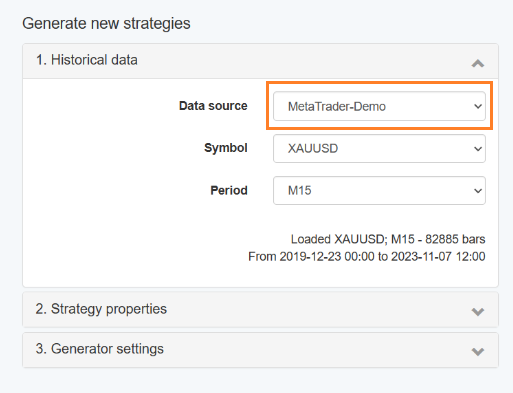
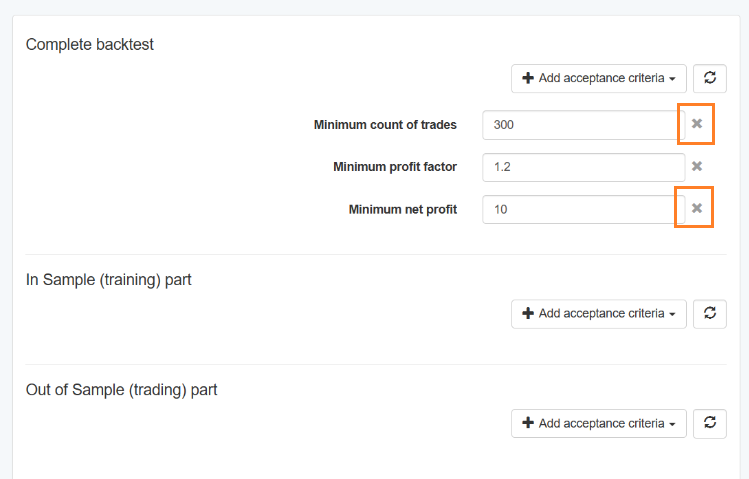
ParticipantRemove Minimum count of trades and Minimum net profit. I also recommend changing data source to premium data. Start from here and see if you get a collection of strategies. Once you have a collection of strategies go to Collections and you can filter count or trades, etc, from there.
Alan,
Change to premium data.
Click on ‘x’ in red box to remove.
 Participant
Hi Cobus,
Answer to question 1) You need to load the EA’s on the M15 chart.
Answer to question 2) You will need to adjust the lot size manually.
Answer to question 3) The new EAs were created with EA Studio and not FSBpro so you will not see all that extra data on the screen.
Answer to question 4) If you see all smiley faces then you are set to go. Give it more time for the new EA’s to place trades.
Alan,
ParticipantTrailing stop is not used with this EA.
Magic number is not available with MT5. Magic number is only available with MT4. This is one of several reasons why traders using EA’s prefer MT4.
With MT5 you can create your own magic number and add it to ‘Custom order comment”.
Alan,
ParticipantDelete poor performing EAs and create new ones.
Alan,
ParticipantHi OxBitpool,
Did the 3% drawdown occur when all 3 EA’s each retraced by 1% or was it because just one or two EA’s did. If it was not caused by all 3 EA’s that would suggest your risk is a little high. If the 3 assets (example EURUSD, etc) were to go through a more severe drawdown you could lose the account. Don’t try to complete the challenge in a short period of time as this could cause you to lose your account. Be mindful of risk! Remember the tortoise won the race.
Alan,
November 8, 2023 at 11:37 am in reply to: Trouble with portfolio calculations and different data #210740ParticipantHi Roni,
I will answer your questions based on info provided:
Answer to question 1) The reason why it is not using all 100 strategies is because some of the strategies are similar to others and so they are not moved to collections. In the collections tab there is a Records Stats box that will show the reason why some startegies are removed.
Answer to question 2) When you use premium data you have much more historical data than you do when you download data from pepperstone. This can be seen by the count of bars. With the preminum data there is a count of bars of 984, and with peperstone the count of bars is 300. So with the preminum data EA Studio can collect more strategies than with peperstone so the number of strategies moved to collection will be more with premium data than with peperstone.
Answer to question 3) This is because premium data has more history than you get with pepperstone so EA Studio cannot start collecting strategies as far back in time as it can with premium data.
Answer to question 4) Not all brokers are the same as their historical data is not the same. As a result you will get a different number of trades when you use different brokers. One thing you can do is to run the same EA on several different brokers in a demo account and let it run for a month. Then look at the results. The broker you would then want to use for live trading would be the one with the best performance.
Alan,
ParticipantHi Jurjen,
-When the same EA is installed on different brokers the results will be different. This is because the historical data on each broker is somewhat different due to their liquidity, volume of trades, volatility, etc. In addition the spreads are not the same and some brokers will charge a commission on each trades.
– One thing you can do is to test the brokers to see which one performs the best. To do this you can install the same EA on several different brokers demo accounts. Wait one month and see which broker had the most profit. Then use this broker for live trading.
– After passing the funded account it is up to you if you want to change the Lot size. The advantage of reducing the lot size would help keep the account from having a deeper drawdown that could cause you to lose the account. Leaving the lot size the same has the advantage of allowing for higher profits in a shorter period of time. So it depends upon the risk that you want to accept.
– Petko does not have a public demo account. However, I have been demo trading an FTMO EURUSD v4.1 EA since the first of August and I publish my results in the FTMO topic area of the forum. The link is below. As of two weeks ago the account was up 6%. I will be publishing my results up through tomorrow after the market closes tomorrow. It looks like the demo account will show a profit of 9% since the first of August. Also as of Yesterday (Monday) I have started trading this account with a live 10K FTMO challenge. I will be publishing these results twice a month.
Alan,
ParticipantHi Michael,
Sorry, for some reason I did not see your question.
Answer to Question 1) Go to Validator and upload the portfolio EA. Make sure Monte Carlo etc is not selected and Acceptance Criteria is not selected unless you want to filter the portfolio EA. Set date range and data source. Click on Start.
Answer to Question 2) Make sure lot size is not too large for the account size. I think maybe the symbol selection may not be correct. Can you select a symbol such as EURUSD instead of EURUSD-sb.
Alan,
ParticipantRemove Minimum count of trades and Minimum net profit. I also recommend changing data source to premium data. Start from here and see if you get a collection of strategies. Once you have a collection of strategies go to Collections and you can filter count or trades, etc, from there.
I will be moving this question to the EA Studio topic tomorrow.
ParticipantHi joko,
Leverage of 1:30 is sufficient to pass the FTMO challenge.
Alan,
ParticipantHi Bkennedy,
I am not aware of that recommendation. Where did you find that recommendation so I can check it out?
Alan,
ParticipantGive them more time. It could take a couple of days before you might see your first trades.
Alan,
Participantanswer 1: This is explained in the cheat sheet you can download from the FTMO course, However, I will explain how I would use the scaling plan for a 10K account. When I would start the challenge I would start with a lot size of 9.3 lots. Once I have $300 profit I would increase the lot size to 0.9 so that the next time the EA entered a trade it would trade with a lot size of 0.9 lots. Then once the account reached a profit of $900 I could increase the lot size to 2.7 lots. The idea about how much to scale up is so that if the EA hit the SL the account would be reduced to would not exceed the daily amount of 5%.
answer 2: This IS done by how you set up the first 4 lines in the FTMO EA properties.
answer 3: The TOP 10 Forex robots do not adhere to the 1:2 loss/win ratio.
Alan,
ParticipantEAtradingacademy does not have any such scripts to do what you are wanting to do. What you can do however is set up an account with FXblue.com where you will be able to monitor all your trades.
Alan,
ParticipantPetko was testing a new EA and it happened to be December when the new EA was created so he tested it during December. All newly created EAs should always be tested using a demo account. This is why he used a demo account during December. It was not about not risking real money during December it was about testing a new EA using a demo account before deciding to move the EA to a live account.
Alan,
-
AuthorPosts