

Forum Replies Created
-
AuthorPosts
-
Alan Northam
ParticipantHi Nicholas,
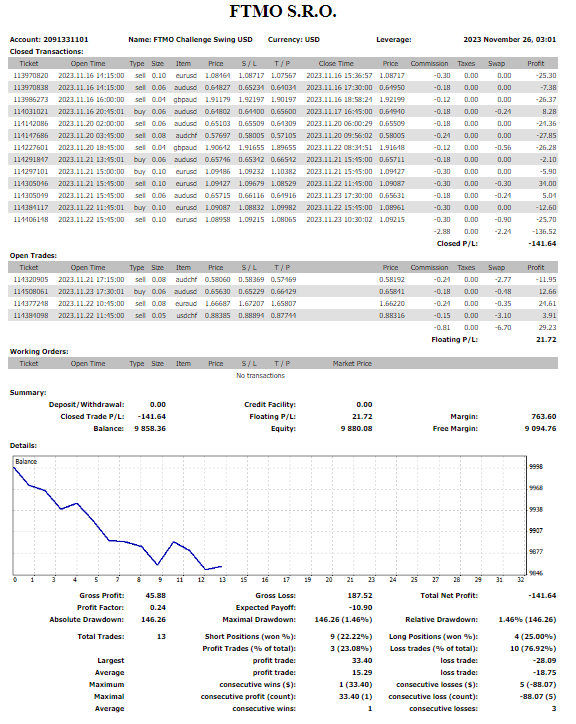
I have been on vacation the last week. Just got back and trying to catch up on the Forum. I saw your responses to this Topic. Sorry to hear about your frustration with the FTMO Challenge and the robots. I have been trading the FTMO V5 robots on a live FTMO Challenge now for just a little over one week now. Or, I should say I have been testing the robots on a live FTMO Challenge. I currently have the lot size for each robot set about 1/5 of the normal set file size during my forward testing. Over the last week I see that the account has been going through a drawdown period. This is normal. All robots will go through a period of profit, a period of moving sideways, and a period of drawdown as I have explained before. My plan, right now, is to wait for the account to move back above breakeven. This will tell me the robots are in a profitable period. Once the account breaks even I will adjust the lot sizes upward. Not sure if I will increase lot sizes back to the set file amounts. Might wait until account reaches 1% or 2% but I will increase lot size to some larger amount once the account breaks even.
The following is my MT4 Detailed Account summary:
So, hang in there, and lets take this journey together!
Alan,
ParticipantClosing EA’s on Friday is a personal choice. What I do is as follows: If my EA’s are in profit and heading upward towards TP, I will leave them open over the weekend. However, if my EA’s are in losing positions and heading downward towards SL I will close the positions and let them start new trades the following week.
Alan,
ParticipantTo create your own strategies using EA Studio go to the Strategies Tab. Look for the white rectangle box that says “Add a new entry rule” and click on it. From there you can select the indicators you want to use in your strategy. Note: EA Studio only uses indicators that are included in Metatrader 4/5 to create strategies.
Alan,
ParticipantI don’t have sufficient real time trading results with my FTMO account to determine top performers. All I can go on is backtesting the v5 EAs using EA Studio.
There are only two top performers over the last 1 month, they are USDCHF and AUDUSD. These two EAs have upward sloping balance lines with pullbacks less than 1%. Trading for these two EAs were typically flat over the last one week. Typically after a period of trading flat trading can go in either direction in the future. Typically what you need to do is to monitor these two EAs to see which direction they start to trade in and then make trading decisions on those initial movements.
Over the last one week there were two EAs that had the deepest pullbacks of approximately 1.5%, they are EURUSD and GBPAUD. Typically after a large pullback or drawdown, same thing, trading starts to resume in the direction it was trading before the pullback started. What is unknown is if the pullback is now complete. With a pullback of 1.5% my guess is that it is close to being complete. Again, what needs to happen is to watch these two EAs to see if they start to make profitable trades again and then start trading them.
Having said all of this I don’t worry about what will happen over the short term such as one week as EAs will either be profitable, flat, or in drawdown. What the EAs do over the short term is unknown! What I look for is the longer term performance knowing that over the short term the EAs will either be profitable, flat or in drawdowns. I am interested in being profitable over the next several months and longer.
This is what I am interested in:
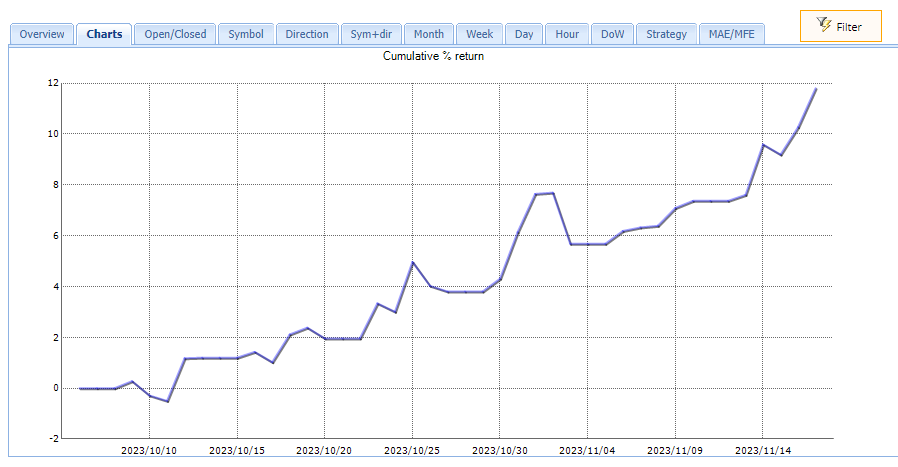
*This chart is from my own portfolio of 10 EAs.
Notice the periods in which this balance line moved higher (profits), moved sideways (flat), and moved downward (pullback or drawdown)? However, over the longer term the balance line moves upward indicating long term profits. In this case it shows approximately a 12% profit in just over one month. This is what I look for is a nice upward profitable balance line over the long term. Keeping your eye on the short term is fruitless, in my opinion.
Keep in mind there are no absolutes, only possibilities in trading.
Hope this helps!
Alan,
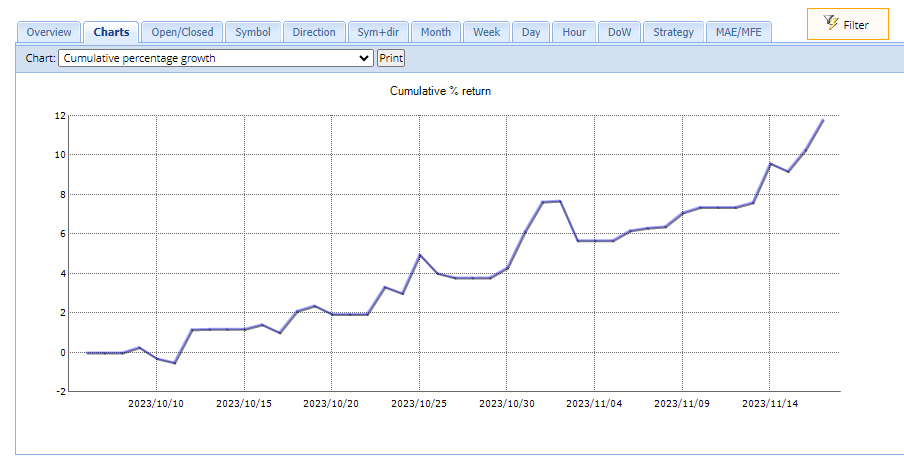
ParticipantThe following chart is an update to the EAs I created using ExpressGenerator and EA Studio. This is on an Oanda demo account. Over just a little over one month this demo account is now up approximately 12%. I have now moved my testing to an FTMO 50K challenge account. I will be testing these same EAs for the next 30 days to see how these EAs perform. I will then compare the testing on the Oanda demo account to the 50K challenge testing.
Alan,
ParticipantIn my strategy to passing the FTMO challenge I use Petko’s robots and robots I create. I also use 10K challenges. I will start a new challenge every two weeks. There are periods when the markets trend upward, move sideways, and trend downwards. By opening a new challenge every few weeks I spread the risk caused by these different market conditions. Also, if I fail a challenge the replacement cost is not so high. Right now I have six 10K challenges running all with different strategies. This spreads the risk. I also test the EAs using a live 10K challenge for one month using small lot sizes so as not blow the account. During a typical month the market will go through periods of drawdowns. Testing for one month then allows to determine maximum account drawdown. I then increase the lot size for the account to a more appropriate size based upon the drawdown during the test to complete the challenge. My trading strategy is not to try and complete the challenge quickly but to control risk.
Some Observations:
I tested FTMO v4.1 in a demo account where I had to restart it every 14 days. It took 3 months to pass the challenge. I then moved it to a 10K challenge but it is currently going through a drawdown period.
I currently have v4.3 in two challenges. One challenge uses all the EAs and the other challenge uses the top 3. What I am currently observing is that the challenge with all the EAs is doing better than the challenge with the top 3. I find that interesting.
I also started v5.0 this week. One 10K challenge has all 8 EAs running with a small loss for the week. A second 10K challenge with the Top 3 EAs has a small profit for the week.
I also have my own portfolio of 10 EAs trading in a challenge that is up 2% for the month.
Alan,
ParticipantHi Olivier,
Yes you can use the same EAs on multiple accounts.
You can also manually trade the same account and it will not affect the robot.Alan,
ParticipantPetko will always first test the EAs in a demo account. He likes to test the EAs for from 3 to 5 days. Then he will move the best 1,2, or 3 EAs to a live account. Petko uses the recommended lot size for each EA. With Petko’s strategy he aims to complete the challenge in a short period of time. However, when he fails a challenge he starts a new one. You need to be consistent with this strategy to pass the challenge.
Alan,
ParticipantHi kcy001,
Yes and yes!
Alan,
ParticipantFTOM 5.0 AUDUSD! I have only had the 10K challenge running for the last 4 days. 4 trades have been closed and now I have one trade open.
Alan,
ParticipantHi Granit,
Mine opened one trade yesterday. I only have the one open trade. Please wait another day and you should see a trade.
Alan,
ParticipantHi kcy001,
The setting in the image you show above are correct for an account of $50K or greater. I think I understand with these settings your account is able to take trades. However, once you change these default parameters your account stops trading. Can you show me a screenshot of the EA properties box after you change the default settings so I can see what you are doing? Also what is the size of your account in dollars? Also are you using the FTMO demo account?
Alan,
ParticipantIf you are using v5.0 robots then the lot sizes above are not correct. Those lot sizes are for v4.3. For the correct lot size for v5.0 you should have gotten the Set Files with your v5.0 download. They will show you how to set up the lot sizes for each of the robots.
Alan,
ParticipantWhich EAs do you have?
Alan,
ParticipantThe following is the recommended lot sizes for given account sizes. These recommendations will limit your account risk to 1% keeping you from losing your account.
200K Account: Amount for new position = 6.0 / Maximum position amount = 6.0
100K Account: Amount for new position = 3.0 / Maximum position amount = 3.0
50K Account: Amount for new position = 1.5 / Maximum position amount = 1.5
25K Account: Amount for new position = 0.75 / Maximum position amount = 0.75
10K Account: Amount for new position = 0.30 / Maximum position amount = 0.30What robot are you trading?
Alan,
-
AuthorPosts