

Forum Replies Created
-
AuthorPosts
-
Alan Northam
ParticipantI have one open trade from 11/21, one open trade from 11/23, and 2 open trades today 11/27.
I have had two closed trades today 11/27.
Alan,
ParticipantTo change the magic number open the EA properties box and scroll down to the magic number to change it.
Alan,
ParticipantContact support at [email protected]
ParticipantYou could increase the lot size to 2%. I my opinion, 3% or more would incur too much risk!
Alan,
ParticipantExpressGenerator (EG) is an advanced generator that works with EA Studio. It generates strategies 4 times faster than EA Studio. As an example, if I were to run EA Studio 24/5 generating strategies I could create just as many strategies in one approximately one day using EG. I create thousands of strategies each week by running EG 24/7 on two computers. EG does not run in windows it runs in Powershell similar to using Command Prompts.
Alan,
ParticipantHi Brian,
The first thing you can do is to just run the generator and not the reactor and only put profit factor of 1.2 in Acceptance Criteria. You should be able to generate a bunch of strategies. Once you get this working then you can advance from there.
Keep me posted!
Alan,
ParticipantI prefer using Dukascopy as their historical data does not have any gaps or missing candles. This makes testing EA’s much more accurate.
Alan,
ParticipantHi G.C.,
MT5 does not work like MT4. With MT5 you need to open the MT5 Editor by clicking in the IDE button in the MT5 tool bar. Then you need to click on one of the EAs to open it. Then you need to click on Compile. The EA will now show up in the Navigator. Now do this for each EA.
Alan,
November 26, 2023 at 4:42 pm in reply to: EA Studio Tools and Settings: Experience and Results #216189ParticipantHi Angelo,
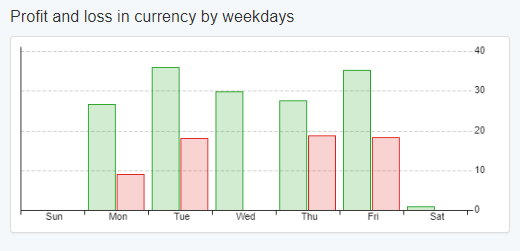
With EA Studio you can create strategies that have more balanced profit and loss throughout the week than the one you are showing.
Example:
Alan,
ParticipantNo problem!
To carry the analysis further, there are certain hours of the trading day that are better to trade than others, and there are certain months of the year that are better to trade than others. So to not trade during just a single two week period of the year and continue to trade through monthly economic news events, hours of the day where volatility is low, and months when trading is not a good as other months, makes no sense to me. In my opinion, it is better to trade all year long and just let all these periods average out over the year.
Having said this I recognize that traders have their own opinions and this is what makes trading possible.
Alan,
ParticipantHi Anthony,
This is a personal decision. Here is my take on it. EA’s created by EA Studio, FSBpro, or ExpressGenerator, create their strategies based upon the total length of the backtest. This backtesing period normally lasts for 1 to 5 years. As such, the strategies are created based upon the market performance over this time period which includes all holidays. In other words, the holidays are baked into the long term performance of the EAs. Now with this fact in mind, sometimes you might gain a little short term profit by trading through the holidays and sometimes you might lose a little. On which holidays you will gain and which you will lose is an unknown. In my opinion, over the longer term they will all average out.
This same analysis applies to economic news events!
Based upon this analysis, I let my EAs trade through holidays.
However, it is my understanding that Petko does not trade during the last two weeks of December.
Alan,
ParticipantEA’s created by EA Studio, FSBpro, or ExpressGenerator, place the SL and TP at particular price levels because in their backtesting these are the price levels where the EA generate the most profit over the backtesting time frame. It is therefore my opinion that SL and or TP should not be moved.
Alan,
ParticipantYes you can add it to the same chart as the FTMO robot, and, no it will not affect the FTMO robot!
Alan,
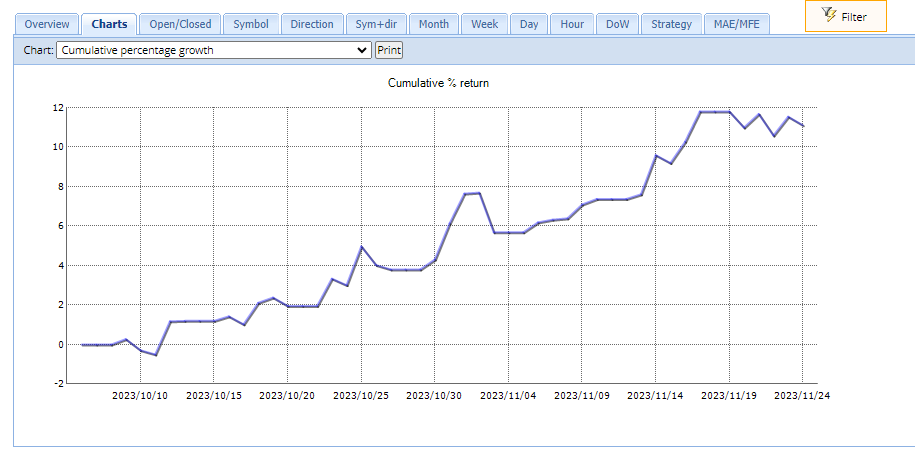
ParticipantThe following chart is an update to the strategy of 10EAs I created in early October using ExpressGenerator and EA Studio. I have removed some poor performing EAs and replaced them during this period. This is on an Oanda demo account. The account reached a profit of approximately 12%. However, over this past week the account has been going through a period of drawdown of about 1%. Overall this account is up 11% from its conception 7 weeks ago.
In mid November I started a live 50K FTMO Challenge with these same EAs. I am now forward testing the EAs with reduced lot sizes until after the first of the new year as I expect the performance to be somewhat different from my Oanda demo testing. I will share results then.
Also, since the Oanda demo testing has shown a nice balance line I will be opening a live 50K Oanda account. I will also be sharing the differences I see between the Oanda live account and the FTMO Challenge account.
In addition, I will be starting a new strategy and demo testing on Oanda as I plan on running it on a live Oanda account in the future.
Alan,
ParticipantThe following is the results of testing the FTMO robot EURUSD V4.1. From mid August until early November I have been testing the EURUSD robot on an FTMO 14 day free demo account in which I would have to restart the demo account every 14 days. The demo account size is$10,000. The Lot size was 0.33 the recommended lot size for this account size. The profit over this time frame has been 9.2%. The purpose of testing V4.1 instead of V5.0 is to see how long an EA can be profitable. The road so far has been rocky as can be seen by my previous postings. However, over the longer term the demo account shows this EA has gained 9.2%.
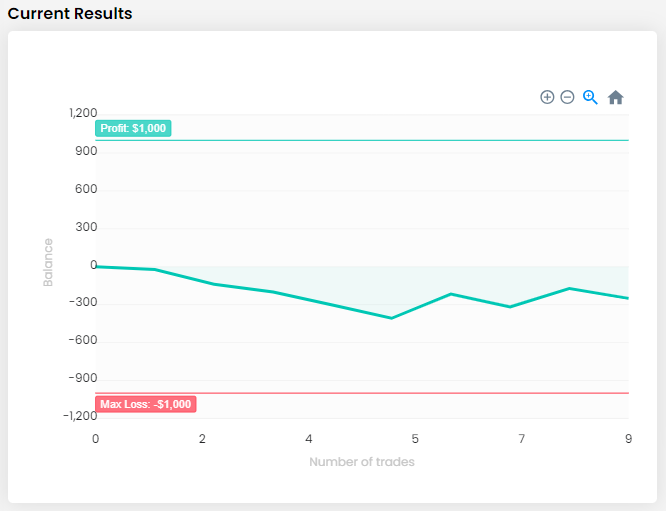
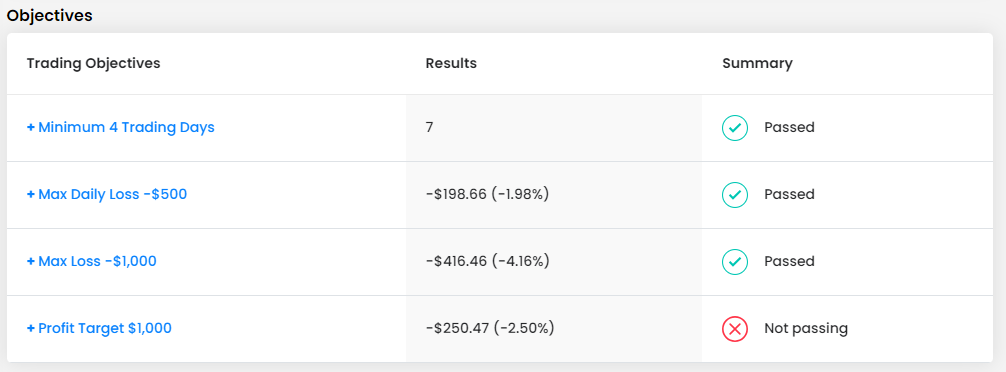
On November 9th I started a live 10K FTMO Challenge using V4.1. The account has been trading now for two weeks. The following are my results todate. During the first week the account drew down by 4.16%. Then during the second week, the most current week, the account has started to slowly work its way upward and ended this last week with a drawdown of 2.5%. Maximum daily drawdown has been 2%.
Bottom line: Over the first two weeks of trading this account has been going through a period of drawdown. Every EA will go through periods of profit, periods of drawdown, and periods of moving sideways also known as stagnation. Sometimes when we start a new account it will immediately start profiting right off the bat. At other times a new account will start off with a drawdown. These things are normal. What we need to do is to wait for the longer term picture to develop.
Alan,
-
AuthorPosts