

Forum Replies Created
-
AuthorPosts
-
Alan Northam
ParticipantRun all 8 EAs with small lot size for a weeek or two to determine which EAs are performing best. Then adjust lot size to larger lot size on the 1 to 3 EAs that are performing best.
Alan,
ParticipantUPDATE ON MY FTMO STRATEGY V4.3
From October 26 through November 15 I was testing this strategy using 0.01 lot size. In mid November I found EURUSD was performing the best. I then increased the lot size from 0.01 to 0.1 for EURUSD. Unfortunately, from mid November through today the account has gone through a drawdown of about -1.5% but has regained most of that loss. This will happen from time to time when you enter a market or increase a lot size the market goes through a drawdown; this is normal!
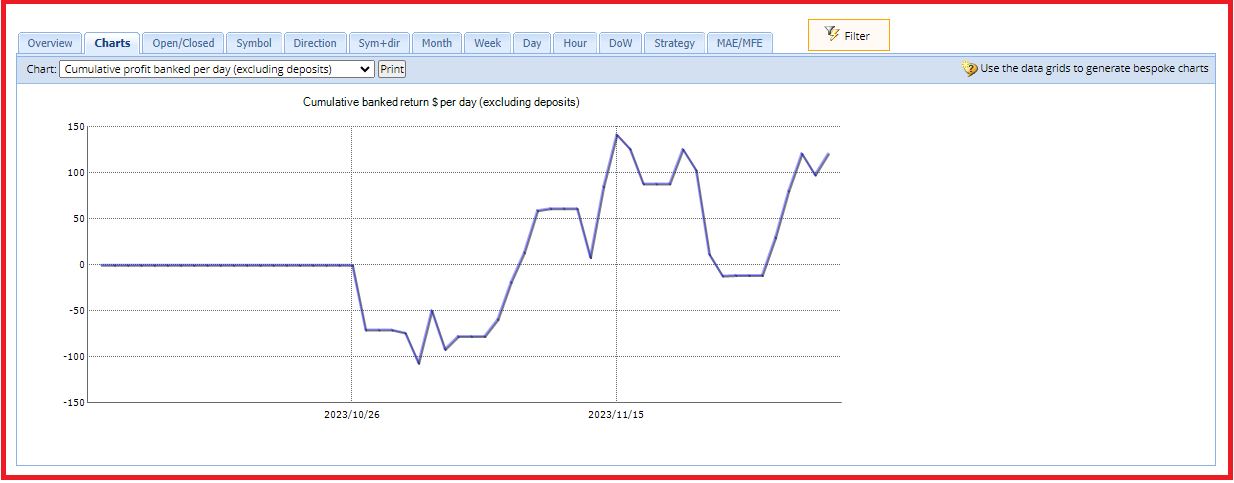
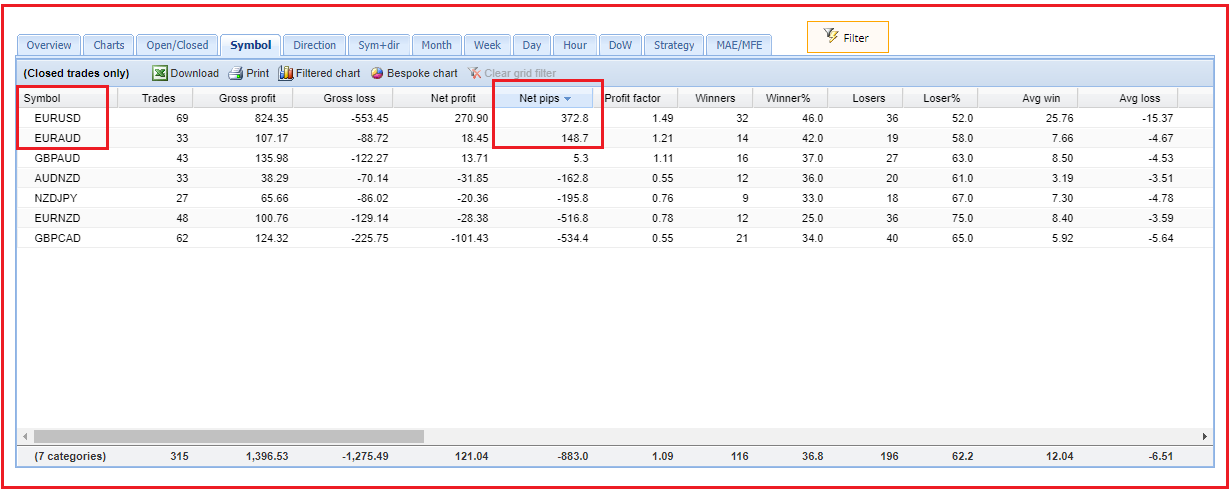
Looking to see how all the symbols in the strategy are doing I cannot go by looking at New Profit. The reason for this is that EURUSD lot size is 10 times the lot size of all the other symbols and will obviously generate most of the profit. So, how to do you compare all the symbols equally? To do this I look at Net pips. Looking at the table below I see EURAUD is now in second place. I will now increase its lot size from 0.01 to 0.1 lots. I don’t want to get more aggressive than this so I want to keep EURUSD and EURAUD at 0.1 lots as I am expecting low volatility in the market until after the first week of January.
Alan,
ParticipantUPDATE ON MY FTMO STRATEGY V5.0
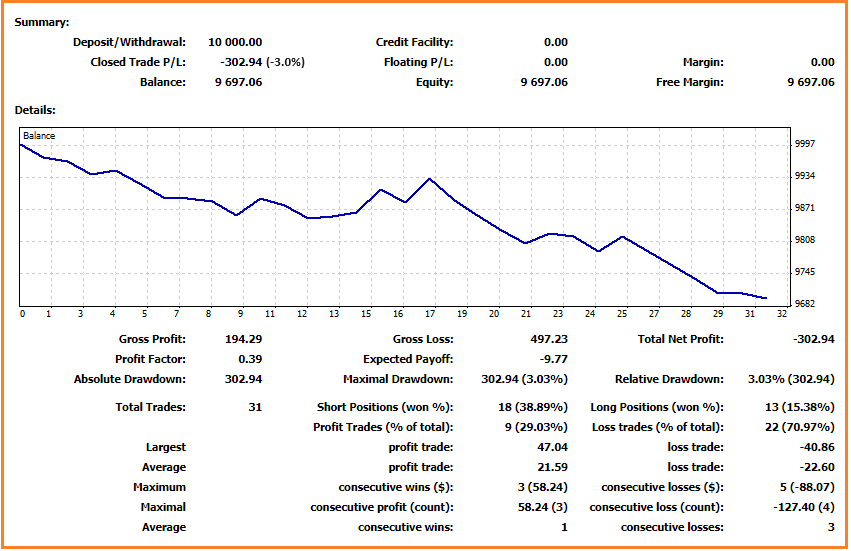
One of the FTMO strategies I am using is Petko’s FTMO v5.0. This strategy has been losing lately and has currently drawn down my FTMO 10K Challenge account by -3%. This is not a significant draw down of the account as it only takes a profit of 3.1% to get back to breakeven. What is a serious drawdown would be for an account to drawdown by 50%. In a $10,000 account this would mean the account value would then be $5,000. An account would then have to profit by 100% to get back to breakeven. This could take considerable time and that time represents a period of time where the trader is not able to use to grow his/her account from $10,000 to a larger amount. With a drawdown of 50% the cost to a trader is time and profit lost.
Since this account has only drawdown by 3% I will continue to trade FTMO V5.0 in my current 10K Challenge and see if it will start to move back upward.
I will not be adding any new FTMO 10K Challenges until after the first week of January due to the expected slow down in volatility during the holiday season!
 Participant
Hi Nicholas,
I wanted to respond to your statement “Thus the reason why I turned to prop firms. Many warned me it is a scam mostly to get the “challenge fee” and then make it almost impossible to pass and easy to fail.”
It is a well established risk management rule that successful traders use that when a trade losses 2% in one day that the trade is closed out. Also, if an account losses 6% all trades are closed and the trader takes a break from trading for a period of time, normally one month. This is done with the hope the markets will change back in favor of the traders strategy.
So in comparison, FTMO does not close out your account until you lose 5% in one day instead of the established risk management rule of successful traders which is 2%. Also, FTMO does not close out and account until the drawdown reaches 10% versus the established management rule of successful traders which is 6%.
So, in contrast between the established risk management rule of successful traders and the risk management rule of FTMO, FTMO’s risk management is quite relaxed to give beginning traders a more opportunity to be successful while at the same time protecting their account from unnecessary risk.
So, its not about scamming, its about risk management!
The one thing FTMO does that other prop firms don’t is they provide a free demo account for traders to use until they feel confident in their strategy before committing to the fee of a Challenge. So again, in my opinion, FTMO is trying to help the trader to become successful. Having success full traders trading their account helps FTMO spread their risk as the various traders trade different strategies.
Alan,
ParticipantHi Nicholas,
I don’t expect the EA’s to do well from mid December and early January. This time period will most likely see low volatility in the markets as the big traders will be on vacation for the holidays. So don’t get discouraged during this time period.
Alan,
ParticipantWith hedging MT5 can open a long and a short trade for the same robot at the same time. With netting MT5 can either open a long trade or a short trade with the same EA but not both at the same time. The EAs / robots do not determine if hedging is used. When you open an account with your broker and chose to use MT5 typically you have the option to select hedging. To change from hedging to netting you need to contact your broker and have your account changed to netting.
Alan,
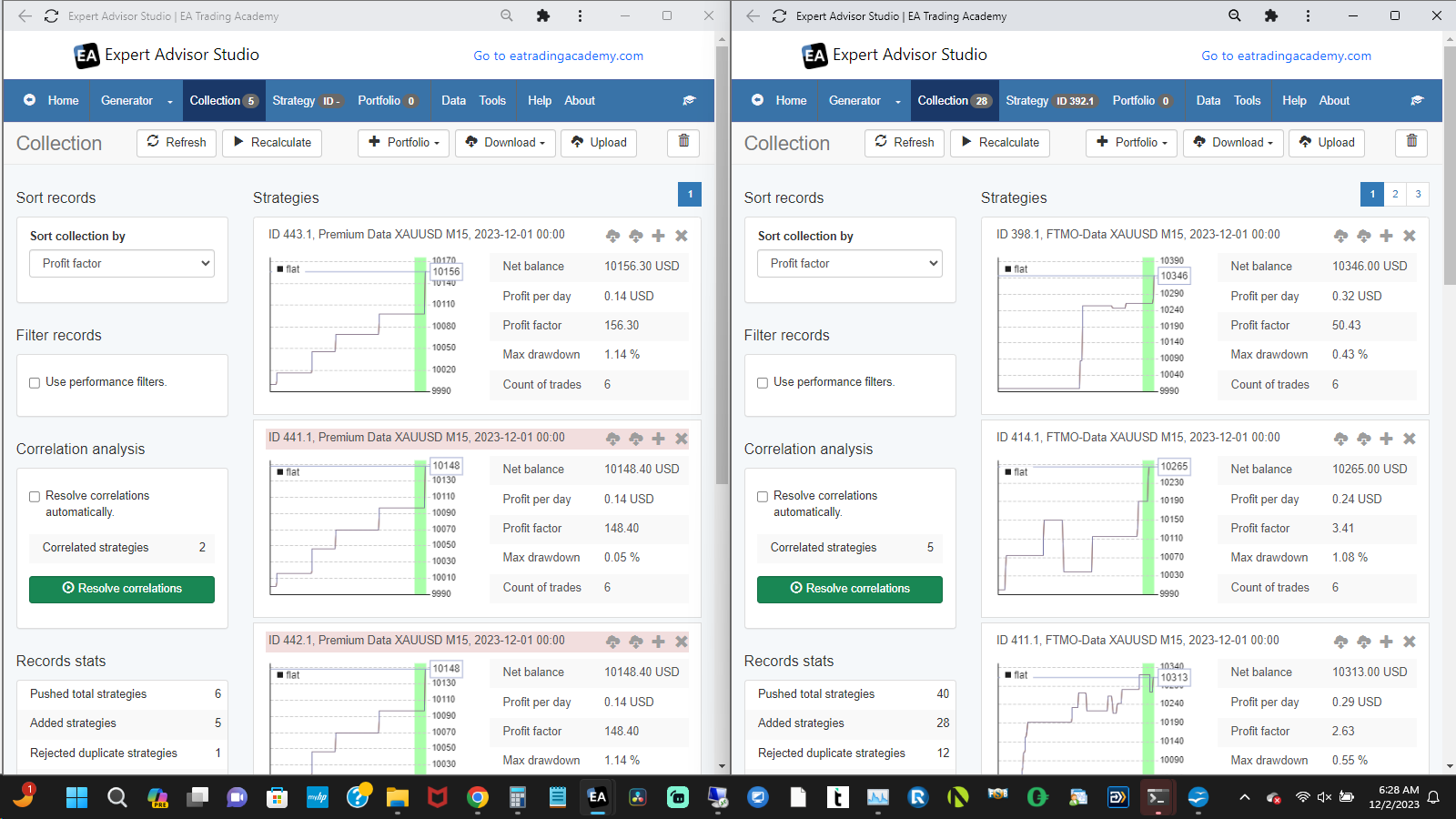
ParticipantWhen I use Premium data (left chart) I get a collection of 5 strategies after 4 hours.
When I use FTMO data (right chart) I get a collection of 28 strategies after 4 hours.
The thing I don’t like is that the historical data in the collection goes back 3 years but I am only seeing a small count of trades.
I don’t know why this is but it is not the point of this exercise. The exercise is just to show you can get a collection of strategies.
I have also included a link below of the EA Studio settings. You can download the settings and upload them into EA Studio. Then you can run EA Studio for several hours, depending upon the speed of your pc, and see if you are getting a collection of strategies.
https://1drv.ms/u/s!AmOfnvK8R72JhL8RDCSDOx5GgEaFuA?e=mr5Ran
Alan,
ParticipantI never heard of loading an EA into EA Studio and it changing the EA into a different version. I always reset EA Studio before using it so maybe try resetting EA Studio before loading an EA into it and maybe this will keep EA Studio from changing the EA into a different version.
If MT5 is set up for Hedging instead of Netting you can see both long and short positions for the same EA. If MT5 is setup for hedging you will need to have your broker change it to Netting. Note, MT4 only does netting so it will only place either a long or a short trade for each EA but not both long and short at the same time.
Alan,
ParticipantThis is not an eatradingacademy.com robot so there is not way of knowing what this means without reviewing the source code.
Alan,
ParticipantLet me work on it. I will report results in 24 hours.
Alan,
ParticipantContact [email protected] and ask for a feature change.
Alan,
ParticipantI think what you are seeing is leftover objects on the chart. Right click on the chart and go to Object List. Then delete all objects. See if this removes the stats from the chart.
Alan,
ParticipantGo to Metatrader Account History below the chart and make sure you are showing all history.
Alan,
ParticipantYou would have to go into the source code and change one line of code.
Alan,
ParticipantThis is not an error message. It is a message informing you that the account loss fell enough to trigger the Minimum Equity value which then closed the position and turned off the EA so it would no longer trade which could have caused a greater loss if it did not turn off the EA from trading. What lot size were you using for this EA? It should have been set to 0.7 lots. If it was set to 0.7 lots for AUDCHF with account size of 50K then you might consider reducing the lot size so this does not happen again.
Alan,
-
AuthorPosts