

Forum Replies Created
-
AuthorPosts
-
Alan Northam
ParticipantHow to test and trade the FTMO robots:
https://community.algotradingspace.com/forums/topic/how-to-trade-the-ftmo-v5-1-robots/
Alan,
ParticipantFor a refund request contact [email protected]
Alan,
ParticipantTo set up the robots correctly refer to the setfiles for a $50,000 USD account.
Alan,
ParticipantHere is the link to the Petko’s video on how to install and use FTMO V5.1 robots:
Alan,
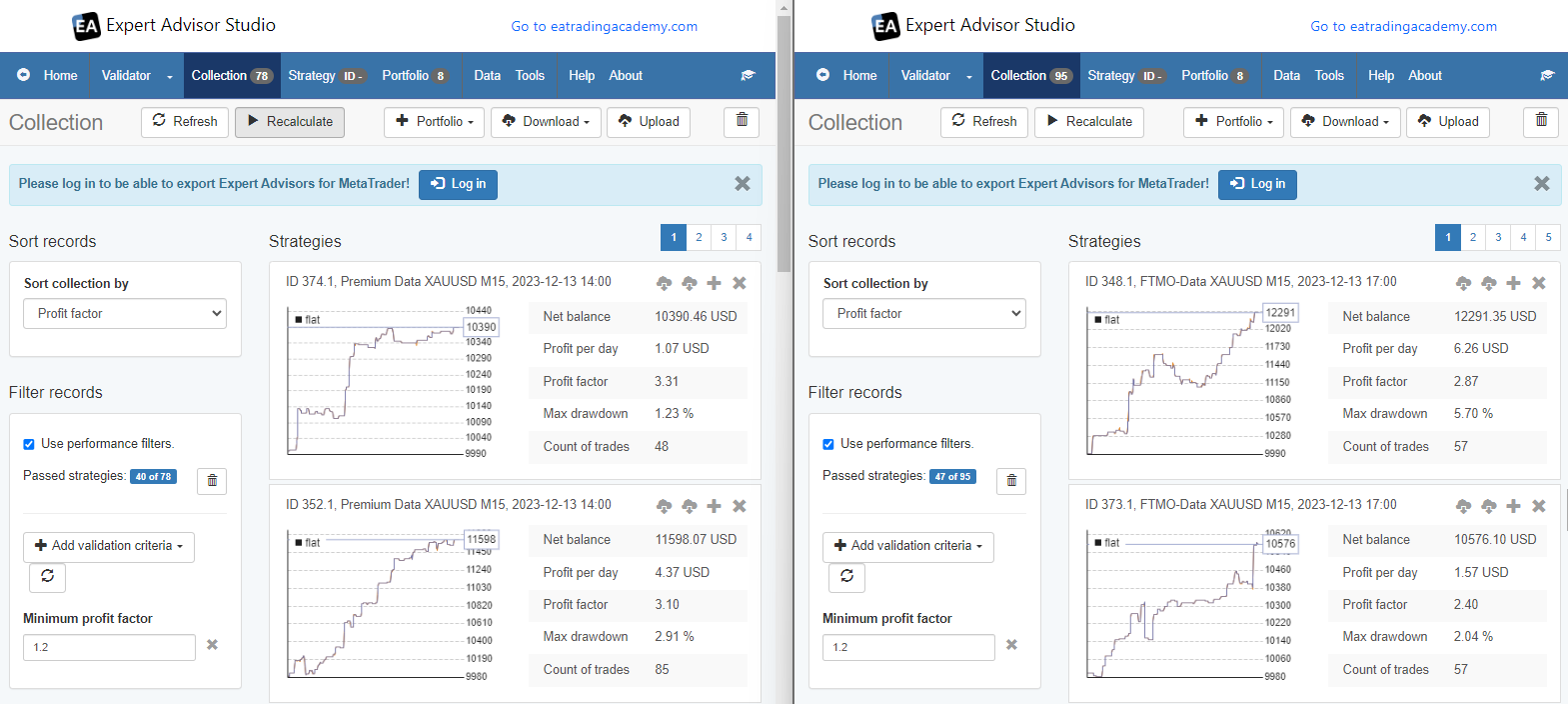
December 13, 2023 at 2:49 pm in reply to: EA Studio Tools and Settings: Errors and Solutions #220518ParticipantHi Gunther, I modified some of the EA Studio settings to improve the collection results. This is something all users of EA Studio has to do to get the results they are expecting. The results below show much better strategies. However, they still need to be filtered to find the best strategies. I did a very basis filter so only profitable strategies would be shown. I am just showing these results to show EA Studio does generate strategies for XAUUSD. Its just that the parameters of EA Studio needs to be adjusted to get the results you expect. With much experimentation, it gets easier to create good strategies. The following results show performance over last one year. Left chart is using premium data, right chart uses FTMO data.
Alan,
ParticipantYes you can use the FTMO robots with other brokers. You will need to adjust the robot properties settings accordingly.
Alan,
ParticipantHi gabiscriba,
How would this be better than each trader testing the robots?
Alan,
ParticipantIf you cannot close the trade manually it sounds like you are trying to close the trade when the market is not open. If the market is open and you still cannot close the trade manually it sounds like a problem with your broker.
Alan,
ParticipantI suggest you contact [email protected]
Alan,
ParticipantIt looks like the robot is working. The problem is that EURUSD is not being profitable. The following link will help you know how to trade the FTMO v5.1 robots:
https://community.algotradingspace.com/forums/topic/how-to-trade-the-ftmo-v5-1-robots/#post-219413
Alan,
ParticipantHi Tanyeemgazi,
When taking the FTMO Challenge you need to keep your account from losing more than 5% of your account balance in one day. To do this you need to set the risk of each robot you are trading so this does not occur. It is recommended to keep the total account balance risk below 3%. So, if you are trading 3 robots then each robot can be set to have a risk of 1%. To do this you need to set the lot size properly. Since you are using just 3 robots you can set each robot to the lot size recommended in the setfiles.
By dividing the lot size by three for each robot you have limited your daily account loss to 1%. This is fine, however it will take much longer to pass then challenge.
Here is the thing about passing the challenge. The larger the risk the sooner you could possibly pass the challenge, however the risk is increased of failing the maximum daily drawdown of 5% or falling below the total account loss of 10%. The lower the risk the longer it will take to pass the challenge but the risk of losing your account is lowered. Each trader must decide how much risk to take as each traders risk tolerance is different.
Alan,
ParticipantHi Milward,
Yes the robot will work on your pc. If you are using MT4 and there is a smiley face in the upper right corner of the chart then the robot is installed properly. If you are using MT5 and there is a blue hat in the upper right corner of the chart then the robot is installed properly.
If the robots were not installed properly you need to remove the robot. Make sure the Autotrading or Algotrading button is depressed and then install the robot.
If the robot is installed properly then you will need to give it more time for a trade to develop. Since you have been waiting for three days now I would expect a trade to develop anytime now.
If none of these solves your problem please let me know!
Alan,
ParticipantOK, the properties looks correct. Did you install the robot correctly? The proper way is to turn on the Auto Trading button first and then install the robot. If you did not install the robot in this order then remove the robot and reinstall.
Alan,
ParticipantPlease show a screenshot of all the robot properties box settings. All of them! Also, what is your account size?
Alan,
ParticipantIt is most likely because the maximum equity in the robot properties box is not set up correctly for you account size. You can find the correct settings in the setfiles.
Here is a video that shows how to setup the FTMO v5.1 robot:
If you have further questions post them below.
Alan,
-
AuthorPosts