

Forum Replies Created
-
AuthorPosts
-
January 20, 2024 at 5:59 pm in reply to: Prop Firm Robots App & v6.0 – New Features Released! #228422
Alan Northam
ParticipantHi Gaurav,
I use MT4. With MT4 I see 9 trades opened and closed this past week and 6 trades opened this past week and are still open.
FTMO V6.0 does not use set files as the robots already have the set files loaded into them so there is no need to supply them.
Alan,
ParticipantHi Rudy,
This first table shows the open trades from MT4 for the week of 01/14/2024 – 01/20/2024. Notice there is 1 open trade for USDCAD.

This second table shows the closed trades in the History tab of MT4. Notice there are 3 closed trades for USDCAD.

The FTMO app closes all open trades and adds them to the closed trades. This is why the FTMO app shows 4 trades.
Alan,
ParticipantHi Angelo,
12 years of historical data is too long a period for a EA to continue to perform well. Peko uses 5 years. I tried a test with 5 years of data for Gold and got a well performing EA.
Alan,
January 19, 2024 at 10:45 am in reply to: Prop Firm Robots App & v6.0 – New Features Released! #227871ParticipantParticipantHi Gaurav,
Your account size is not the issue. I know there has been issues using the FTMO robots with MT5, however, the developer said he fixed the issue, but there could still be other issues. If you can, you might switch to MT4 and see if you have better results.
Alan,
ParticipantHi Gaurav,
I am using MT4 and have 6 open trades. If everything is setup correctly you should be seeing some trades starting to open.
Alan,
ParticipantHi Tanyeem,
Petko uses 1 week!
Alan,
ParticipantHi Gaurav,
These robots are setup properly and should be trading. How long have you been trading these robots. Perhaps you just need to give it more time. Do you see any errors in the Experts tab in the Toolbox? If you do not see any trades over the next couple of days then contact [email protected]. It could be an issue with the robots not working correctly with MT5. It is my opinion MT4 is the better terminal for trading EA’s. Did you download the robots for MT5?
Alan,
January 18, 2024 at 2:51 pm in reply to: Prop Firm Robots App & v6.0 – New Features Released! #227667ParticipantHi Torbjorn,
I know there has been some issues with the robots running on MT5 so this could be the reason why you are getting this error message. This is a support issue. Contact [email protected]
Alan,
ParticipantHi Sammy,
I am looking for 3 winning trades.
Right now I have the lot size for all robots set to 0.01 lots. Once I find the top robot with 3 winning trades I will replace the robot with the one I downloaded from the FTMO app so it will have the correct lot size for an account risk of 1%.
Alan,
ParticipantHi Bence,
When replacing the old robots with the new robots just make sure to use the old robots magic number and copy it into the new robot if the new robots have different magic numbers. Then the new robots should recognize the open trades.
Alan,
ParticipantHi Gaurav
The 5k account should be fine as long as all the robots properties are correct.
Here are my current open trades:
AUDCHF M30
XAUUSD M15
EURUSD M30
AUDUSD M5
USDCAD M30
USDCHF M30Can you show a screenshot of one of the robots that does not work so I can see its properties box like the example shown below. I need to be able to see the data in the red box.
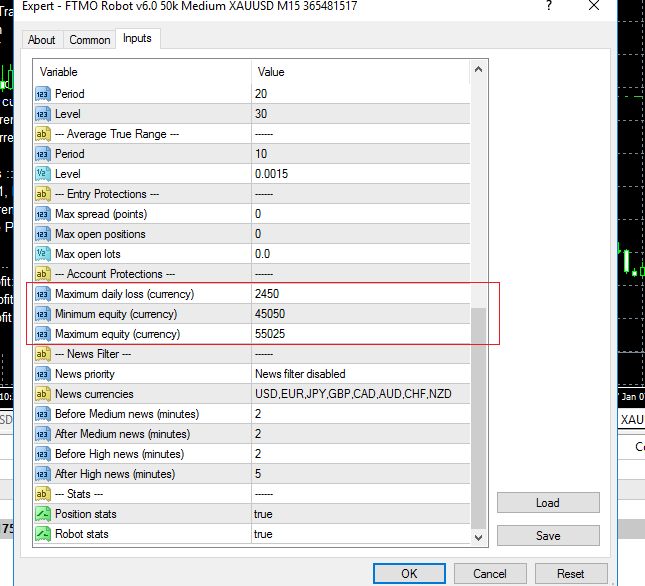
Alan,
ParticipantHi mustafa,
I already tried to help you in the previous message. Click on link:
Alan,
ParticipantHi Gaurav,
It says “Minimum equity protection activated” so the robot will not trade. I see you have downloaded the 10K robots but your account size is 5K so there is a mismatch. This is why you get the “Minimum equity protection activated” message in the upper left hand corner of the chart. So you will need to change the robots properties according the the changes I sent to you earlier.
Alan,
January 17, 2024 at 6:05 pm in reply to: Prop Firm Robots App & v6.0 – New Features Released! #227493ParticipantHi Gaurav,
Did I send robot properties changes to you or did you use the changes I had sent to someone else?
What is your account size?
What account size of robots did you download?Alan,
-
AuthorPosts