

Forum Replies Created
-
AuthorPosts
-
Alan Northam
ParticipantFollow Petko! I am just sharing how I scale up. Petko uses his own scaling plan and it works for him. Since these are Petko’s robots then I would suggest you follow his plan. Petko’s plan is based upon individual currency pairs where mine spreads the risk upon all traded pairs. My plan is less risky but will take longer to hit the price target to complete the challenge where Petko’s plan should hit the price target sooner.
Alan,
ParticipantHi Tanyeem,
No I do not interfere with the trades.
The last few weeks has not been very profitable, but the profits will come!
Alan,
ParticipantHi Tanyeem,
What I do is wait until I have 3% profit. Then I will increase risk by 1% so that I now have a total of 2% risk to my account. This way if my account draws down the trade will be closed leaving me with 1% profit in my account. Then I will start over with a 1% risk.
Alan,
ParticipantThat is what I am going to do!
Alan,
ParticipantHi Leonardos,
Yes, during the end of the NY session the spreads are very high so this is the reason you didn’t have any profit. Personally, I do not manually close trades I let the robots decide when it is best to close trades.
Alan,
ParticipantHi Julio,
Good, happy to hear you are getting a few trades. So, as long as you have a smiley face in the upper right corner of your trading chart window then the Expert Advisors are working. Here is what you need to know about using other brokers other than FTMO: The FTMO V6.0 Expert Advisors were created using the FTMO servers historical data. What you need to be aware of is that all brokers historical data will be somewhat different. This is because there is no central clearing house where all brokers / prop firms get their historical data. As a result each broker / prop firm must go directly to central banks across the world to get their currency conversion data and from that the historical data is developed. The problem is that not all brokers get their data from exactly the same banks. As a result there is variations in the historical data. Having said that please be aware that the FTMO app will show how many trades and profits each Expert Advisor has. Since the historical data is different with different brokers the number of trades and the profit of each Expert Advisor may be different.
If the broker you are using is not generating any trades you might consider looking for a different broker. What I have recommended in the past is to open demo accounts with 3 different brokers and see which one gives the best performance.
Alan,
ParticipantHi Leonardos,
When did you close the trades? If you closed the trades when the spread is very large the cost of the spread can wipe out profits.
Alan,
ParticipantHi Julio,
Have you done a backtest using the Strategy Tester to make sure the Expert Advisors are placing trades? Make sure the backtest covers more than one month.
Alan,
ParticipantHi Jesus,
According to Petko all you need to do is to make the magic numbers different. However, there is no problem with the strategies being the same during the Challenge and Verification stages according to FTMO support. Where the problem come is when you are funded. Once funded you need to make the magic numbers different.
Alan,
January 31, 2024 at 11:35 pm in reply to: Prop Firm Robots App & v6.0 – New Features Released! #231193ParticipantHI Max,
I have also been testing the FTMO V6.0 robots since 1/7/2024. The following is a profit chart of the three robots I chose. Since each robot has a different lot size I have chosen to show the profit chart using pips. The following chart shows the accumulated pips of the three robots I chose to analyze. This week I actually started trading these three robots.
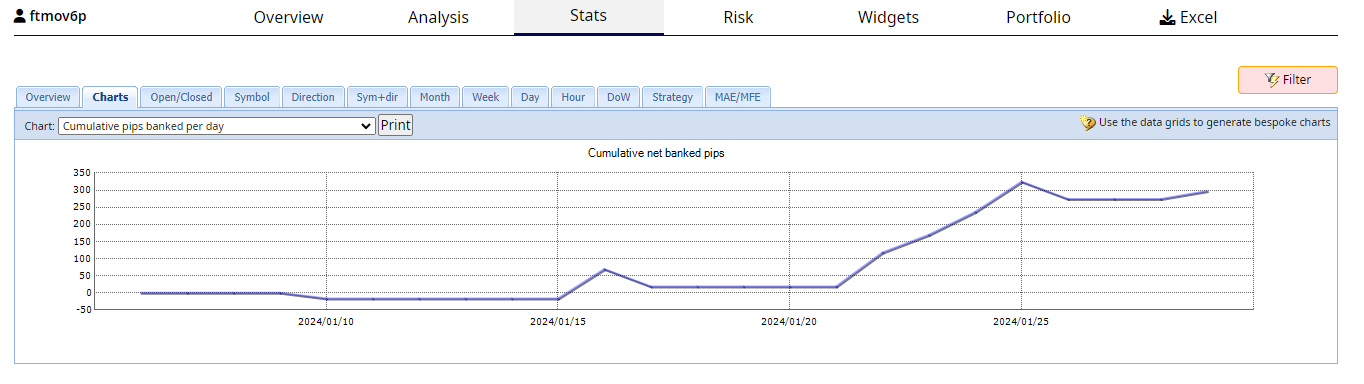
The chart shows an accoumulation of 300 pips. The 3 robots I chose has a combined lot size of 1.25 lot (1 lot equals $8 per pip on averge) among the 3 robots calculates to be a profit of $3000 far this month. Although the robots do not trade very often over the longer period they generated a nice profit this month. Since I just started trading the 3 robots I chose I will wait until the end of February to see the profit generated.
Alan,
P.S. I have let the support team know you are asking for a refund!
ParticipantHi Tanyeemgazi,
I covered this issue in a difference response. To read my response please click on the following link:
Alan,
ParticipantHi Kevwefreeborn,
With two open trades for the same pair suggest to me there are two instances of MetaTrader trading the same Expert Advisors. The reason why only one trade is closed in this case is because the Expert Advisor looked for the magic number of the open trade and closed it. The Expert Advisor thinks it did it job because it only opens one trade at a time and therefore does not look to close a second position with the same magic number.
Alan,
January 31, 2024 at 5:22 pm in reply to: Prop Firm Robots App & v6.0 – New Features Released! #231066ParticipantHi gabiscriba,
When all 8 Expert Advisors close at the same time it suggests the Minimum Equity price level found in the properties box was triggered keeping your account from being closed by FTMO.
Alan,
ParticipantHi Hope,
The Average True Range indicator is used to close positions.
Alan,
January 31, 2024 at 3:51 pm in reply to: Prop Firm Robots App & v6.0 – New Features Released! #231042ParticipantHi Daniel,
The “Maximum Daily Loss”, located in the Expert Advisors properties box, is a trailing stop!
The problem with trailing stops if they are set too close to the price action the following can occur:
Petko has been trading Expert Advisors for many years and has tested many strategies. He has determined that over many trades, not just the one or two discussed recently in the forum, it is more profitable not to use trailing stops. The reason for this is when an Expert Advisor goes through a period of draw down and is closed by the trailing stop the trade does not have the opportunity to continue higher and close out with a profit. It is true once in awhile the trailing stop can keep a trade from closing with a loss but over many trades it is still more profitable not to use trailing stops.
It is also possible to setup a trailing stop on your own. All you need to do is right click on the stop loss dotted line on the trading chart and select Trailing Stop. You can then select the number of points you want to use as a trailing stop. The trailing stop will then start changing at the beginning of each new price bar / candle.
Alan,
Alan,
-
AuthorPosts