

Forum Replies Created
-
AuthorPosts
-
February 4, 2024 at 7:31 am in reply to: Prop Firm Robots App & v6.0 – New Features Released! #232017
Alan Northam
ParticipantHi Filipe,
That is interesting because on MT4 the historical data only goes back to October 2023.
From the Journal it looks like MT5 is taking multiple orders for EURAUD where you can have more than one position open at one time. Is this correct?
Looks like order 3 is a buy and order 4 is a sell but it does not show order 3 closed before order 4 was opened. So it looks like there was a buy order and a sell order open at the same time. Is this correct?
I am not sure why there is such a discrepancy. What I do know is EA Studio was designed to be the most accurate backtester on the market and FTMO app uses the data from the EA Studio backtest. So I would have to trust the charts in the FTMO app.
Alan,
February 4, 2024 at 5:45 am in reply to: Prop Firm Robots App & v6.0 – New Features Released! #232000ParticipantHi Felipe,
The historical data for M15 in MetaTrader only goes back to October 2023. Look in the Strategy Tester Results tab and see when the first trade was taken.
Alan,
February 4, 2024 at 1:24 am in reply to: Prop Firm Robots App & v6.0 – New Features Released! #231985ParticipantHi Felipe,
The MetaTrader Strategy tester shows the profit and loss of closed trades. The FTMO app shows the sum total of all open trades added to the closed trades.
Alan,
ParticipantHI Michal,
The forum is a place where traders can share their trading experiences. If you want to know how other traders are doing just start a topic and ask your question.
Alan,
February 3, 2024 at 10:21 pm in reply to: Prop Firm Robots App & v6.0 – New Features Released! #231956ParticipantHi Bence,
I looked back from Petkos’ replies over the last few months and I do not see where he has been informing traders when the new robots are added. Perhaps since they are now available online he is no longer sending out notifications when updated robots are available.
As for AUDCHF: If you are planning on updating your account with new robots every week then use the FTMO app weekly robots. If you are going to keep the robots on your account for the whole month then use the monthly robots.
Alan,
ParticipantI have now installed the top 3 weekly FTMO app medium risk robots on my FTMO 50K Challenge!
I also installed the top 3 weekly FTMO app medium risk robots on my 100K Infinity Forex Fund 100K Algo Evaluation!Alan,
ParticipantI have now installed the top 3 weekly FTMO app medium risk robots on my FTMO 50K Challenge!
I also installed the top 3 weekly FTMO app medium risk robots on my 100K Infinity Forex Fund 100K Algo Evaluation!Alan,
ParticipantThat is correct!
Alan,
ParticipantHi fahd,
The results you are getting are normal. When you look at the FTMO app and select the weekly charts you can see how many trades were opened during the last week for all the different currency pairs. This will help you understand how often these currency pairs trade.
Alan,
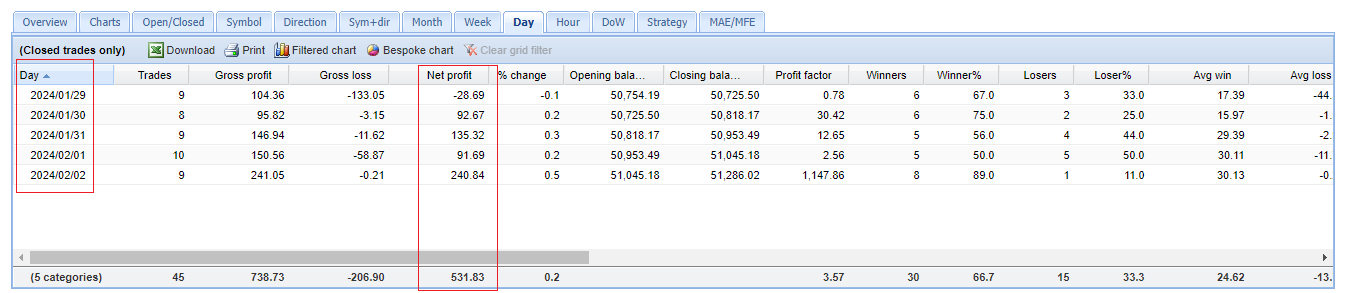
ParticipantThe following chart shows the result of my FTMO 50K Challenge for this past week. The Expert Advisors used in this challenge are 10 EAs I created using EA Studio.
Alan,
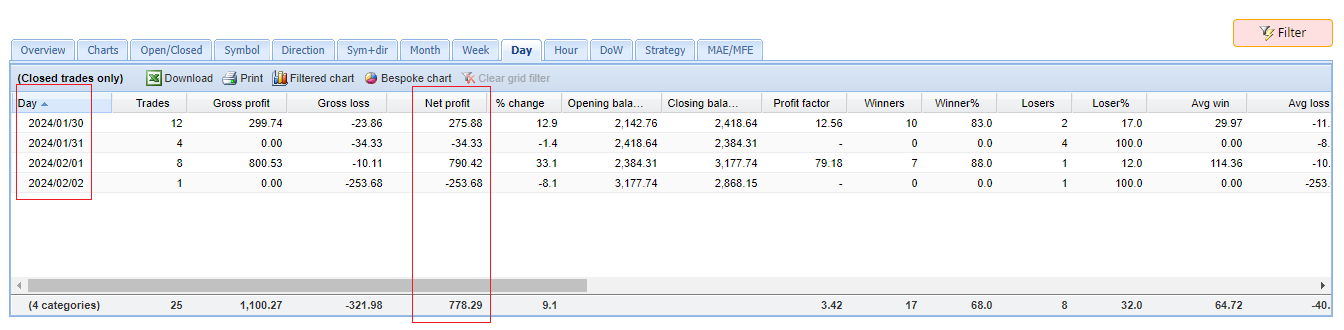
ParticipantThe following is the results of my manual trading my live Oanda account for this last week:
pairs traded: AUDNZD, EURJPY
Alan,
ParticipantHi Antonio,
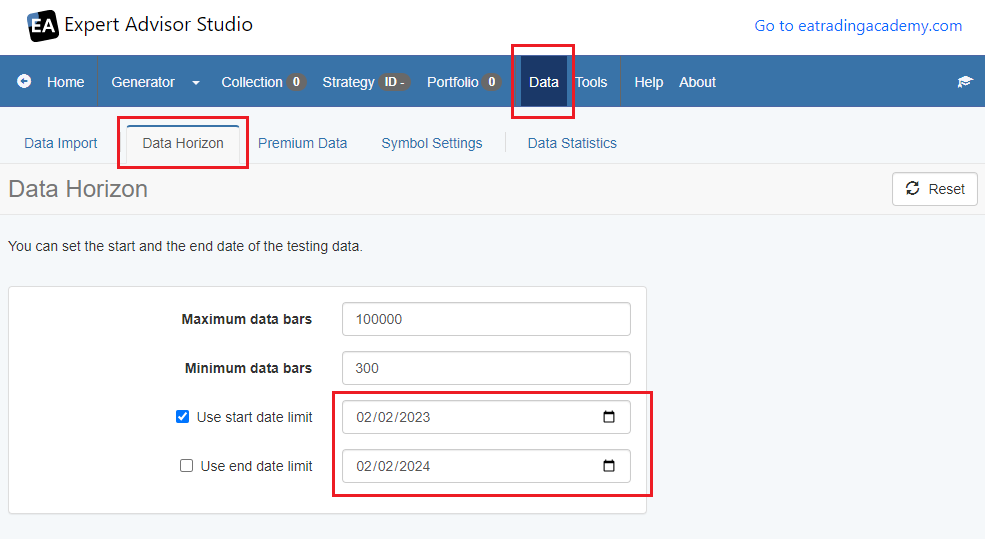
This chart will navigate you to the Data Horizzon and the settings.
Alan,
ParticipantHi Nchele,
When you look at the FTMO app the chart named “XAUUSD M15 v6.0 #365481517” notice the v6.0, this is version 6.0 and must be installed on MetaTrader in the M15 chart.
When you look at the FTMO app the chart named “XAUUSD M5 v6.1 #1402217685” notice the v6.1, this is version 6.1 and must be installed on MetaTrader in the M5 chart.
When you look at the FTMO app the chart named “XAUUSD M30 v6.1 #552113322” notice the v6.1, this is version 6.0 and must be installed on MetaTrader in the M30 chart.
These are 3 different versions. Version 6.0 or v6.0 is the orignial robot the two version 6.1 charts or v6.1 are two new versions with different time frames.
Alan,
ParticipantHi fahd,
Please use english so all traders can view your replies and learn from them.
Alan,
February 3, 2024 at 12:28 pm in reply to: Generating “Out of sample” Strategies like EA Studio #231838ParticipantHi crypto,
When you look at the collection generated by ExpressGenerator with EA Studio using the Data Horizon settings as used in EG the last 20% of the chart is the OOS part even though it is not shaded green. If you use want to look at the OOS part just set Data Horizon to the last 20% of the settings used in EG. Then when you look at the collection click on the Recalulate button and the charts of the collection will only be showing the OOS part.
Alan,
-
AuthorPosts