
Community Forums › Forums › EA Studio › Trading Robots from EA Studio › Trading Robots from EA Studio: Experience and Results
- This topic has 22 replies, 9 voices, and was last updated 1 year, 2 months ago by
Alan Northam.
-
AuthorPosts
-
February 23, 2017 at 10:21 am #436148
Stoyan Stoyanov
ParticipantIn topic, traders share their experience and results with the Trading Robots from EA Studio.
P.S. Please use the Reply button if you want to reply to a specific comment. This would make the topic organized and easier to navigate through and will reduce number of duplicate questions.
October 31, 2018 at 3:09 pm #6721Mirriam
ParticipantThis is my results from last week.I’ve been trading 1 hour chart.I’m new to trading and it is nerve racking.Marin Stoyanov is going to add the pictures.I’ve been straggling to add them.
November 2, 2018 at 6:09 pm #6735Petko Aleksandrov
ParticipantMirriam, thanks for sharing your results:
.png)
.png) November 2, 2018 at 6:12 pm #6737Participant
November 2, 2018 at 6:12 pm #6737ParticipantMarin, told me that you were asking if these were good EA results.
First, they are positive, which for me is good EA results.
Second, I guess these are the EAs from the TOp 10 GBPUSD course, aren’t they?
And I see that this is result from 3 days, which again for me is good, even I can say very good EA results for 0.01 lot.
Kind regards,
Petko ANovember 4, 2022 at 7:35 pm #130184Tanya Jay
ParticipantHello everyone and Sam!
It’s been a while since I last visited this forum. To be honest, I had a very frustrating moment with the EA studio and almost gave up on it completely. What got me frustrated most is when I moved my best winning EAs which performed really well to a mock live account, it ALWAYS tanked! I followed every single step (literally) Petko taught in Udemy course but NOPE – it still tanked!
So I decided to just let my demo account run without touching or, hell, even looking at it for almost 2 months. And then I checked the results again and tried to move the winning EAs to a mock live again. This time it works SO MUCH better. Finally, I’m seeing the light at the end of the tunnel.
Here are my notes:
** DISCLAIMER: These are my notes from my personal experiences. I could be wrong. I’m just sharing my journey. Your journey will be different because we have different ways to process things. Don’t take my notes and apply blindly. **
– My best-performing TFs are M15 and H1. I tested M5 with multiple currencies. The results looked amazing on EA studio and when applied in the real world, the results weren’t consistent. One week worked great, but two weeks later tanked. Worked great again in the next 4 days and tanked. It’s like women in that period of time.
– When choosing the winning EAs, my best lookback timeframe when comparing the results is 1 month and 3 months minimum. I noticed that when I use the lower lookback timeframe than 30 days, the result isn’t consistent. But when I compare the result in the last 30 days with the results of 90 days (or more – the longer the better), that’s when I start seeing the profit. If I have to guess, it’s because I give the EAs more time to perform? — I will need Sam to confirm this hahaha
– Complicating EA studio reactor doesn’t mean your strategies will be better. I tried WFA, normalizer, or whatever the software has. I keep it simple and run it without any optimization. If it creates too many strategies, I just re-run it again with 90% Monte Carlo
– My best-performing currencies in the past 4 months are GBPJPY and EURGBP. They both survived every month. I’m running the other 10 currencies alongside but these two are my tough cookies. Don’t ask me why because I don’t really know hahaha. I just speak from my results
Last but not least, if you read this far, you will go through multiple frustrating moments and want to give up completely. Take a break as long as you need but make sure to come back to it. Don’t give up.
Cheers!
TanyaNovember 6, 2022 at 11:29 am #130388ParticipantHey Tanya,
Glad you shared your experience in the Forum. And I am with you, it’s not easy. I never said it was easy.
And the traders should never stop improving their systems. Because if one thing works now, there is no guarantee it will work tomorrow.
Taking a break is smart.
November 6, 2022 at 11:37 am #130484Samuel Jackson
MemberHi Tanya,
Well done for your perseverance. I am very happy to hear that your results are improving so much!!
Believe it or not if you are starting to get consistent results already then you are moving fast 🙂
I do remember trying to impress that it is best to wait a minimum of two months really before moving your EAs (Id say ideally three minimum even), but we did cover a lot and it is SUPER hard to be patient as a new trader 😉
Keep doing what you are doing, and remember to set another incubator account running every few months so if you start not having enough EAs passing your selection criteria you have a fresh account as back up with sufficient demo trading history.
As long as the incubator account has sufficient EAs that have performed well on real market conditions though and your strategy moving system is working (keep it simple!), then keep doing what you are doing.
Perseverance is absolutely critical for trading! I’ve had many moments of similar dispair in my journey also
Keep working at it and you will improve and get more consistent and your understanding of what works and what doesn’t and why will deepen.
November 6, 2022 at 12:04 pm #130487MemberIt actually sounds like you are following the Plan really well Tanya 😉
I am super pleased to hear your deepening understanding and experience, you are doing things right.
I know we covered it but we of course covered a massive amount of information and I can see you are definitely really getting it now by what you have written! And as I say, this is actually fast comprehension 😉
Stick with what you are doing and keep things simple. And yes when moving EAs I have found that giving things things time under real trading conditions (I.e. demo account) is important which makes sense for several reasons.
Also stay diversified but it’s great that you are getting good results with those two pairs.
Also remember to hold on to those good robots that have stood the test of time on the real markets.
November 7, 2022 at 1:47 pm #130543MemberFor anyone reading this, Tanya has given a really great summary with her notes and understanding btw
To add to this and also for Tanya especially.
1. Keep doing what you are doing and keep things simple
2. Don’t risk real money until you are getting stable results for sufficient time and then start small only (like a 1000 dollar account maximum)
3. Practice good risk management (hugely important)
4. Remember that even the best systems and strategies have drawdowns, this is inevitable. Sometimes even for a month or two
You sound well on your way Tanya but don’t rush (Remember that Patience is key 😉 and persistence. Keep improving, deepening your understanding and slowly scaling up your risk (absolute not %) along with your experience.
July 17, 2023 at 3:44 pm #183775AA8
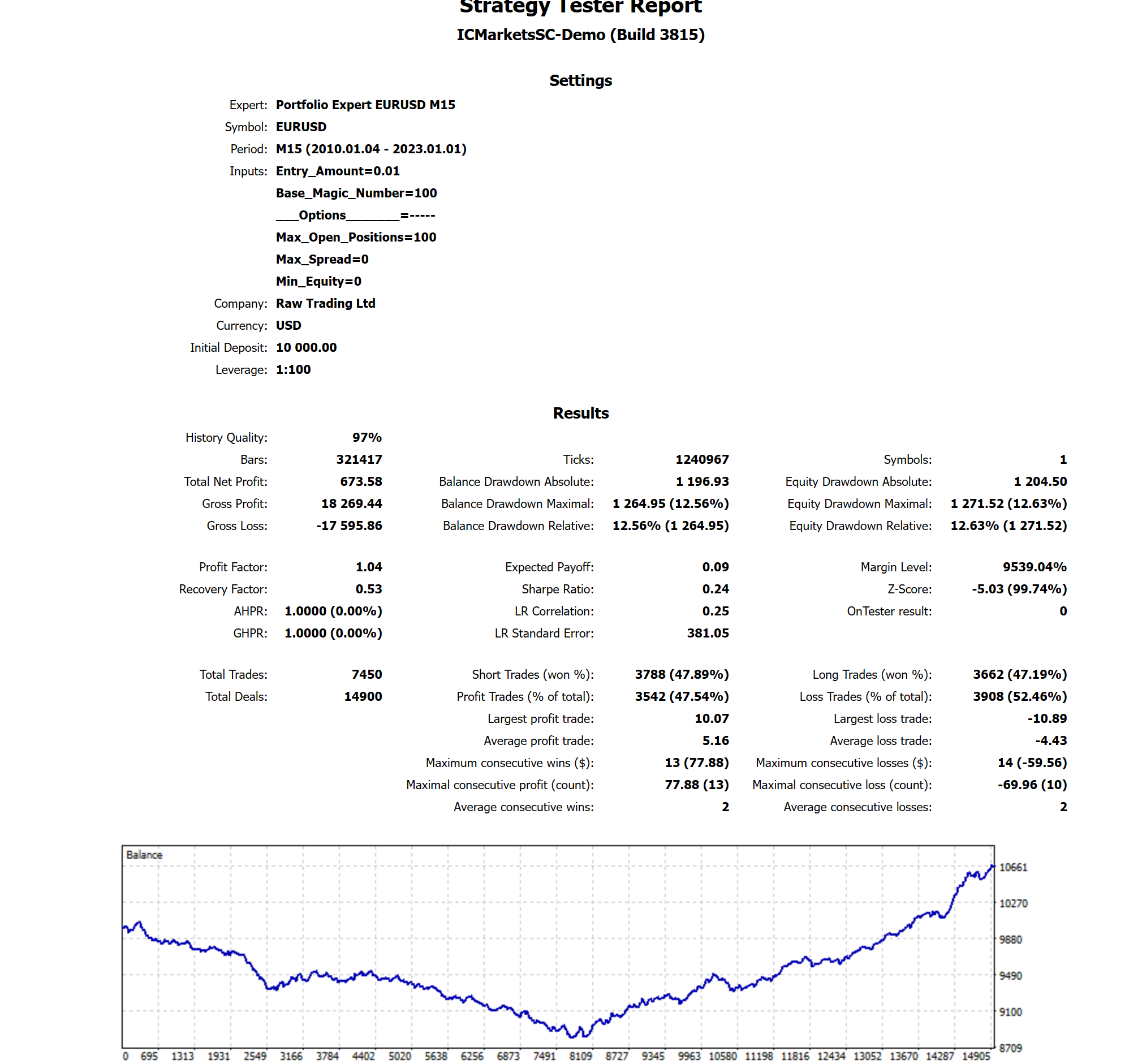
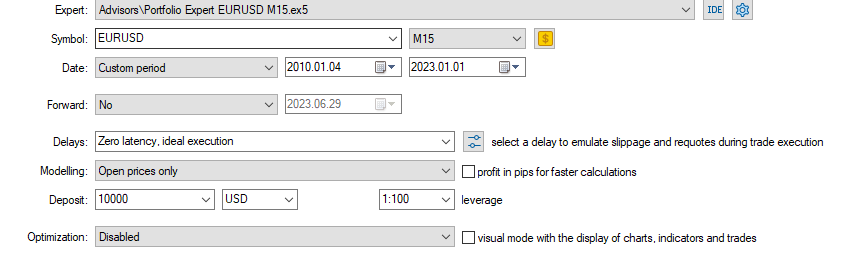
Participantim having problems trying to recreate the advertised results. im testing the Top 10 Forex EAs on mt5 ICmarkets broker. ive tried every tick and every tick modeling but still get bad results. how can i fix?
 July 17, 2023 at 4:38 pm #183802
Alan Northam
ParticipantIn the Top 10 EA course, Petko uses the last one year of historical data to generate the EAs. When testing the EAs you need to limit the historical data used to the last one year. When I look at your balance line over the approximate last one year I see the EA is generating a nice balance line.
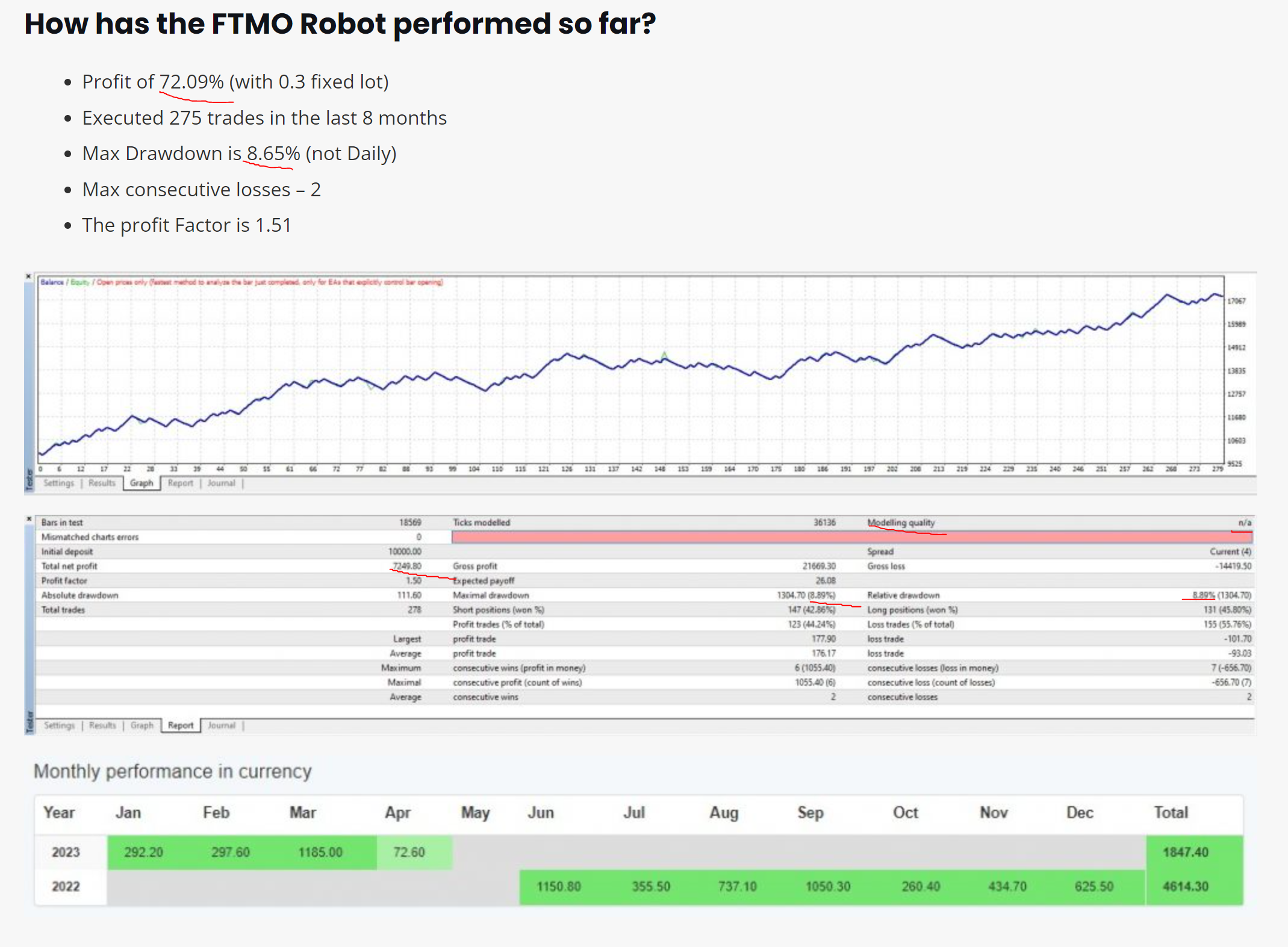
July 17, 2023 at 6:59 pm #183821Participantahh yes i see what happened. i also have the ftmo ea and i have big drawdown compared to the advertised results

 July 17, 2023 at 7:24 pm #183841Participant
The problem with passing the FTMO challenge in the past was balancing the account to have a large enough lot size to pass the challenge within 30 days and keeping the lot size small enough so as not to violate the Max Drawdown. Fortunately, lately, the time period has been eliminated from the challenge and the verification phase. So now you can reduce the lot size to help from violating the Max drawdown while taking longer to pass the challenge/verification phases. However, the problem I see with reducing the lot size is what lot size to use. So what we need is a safety net! And, here it is:
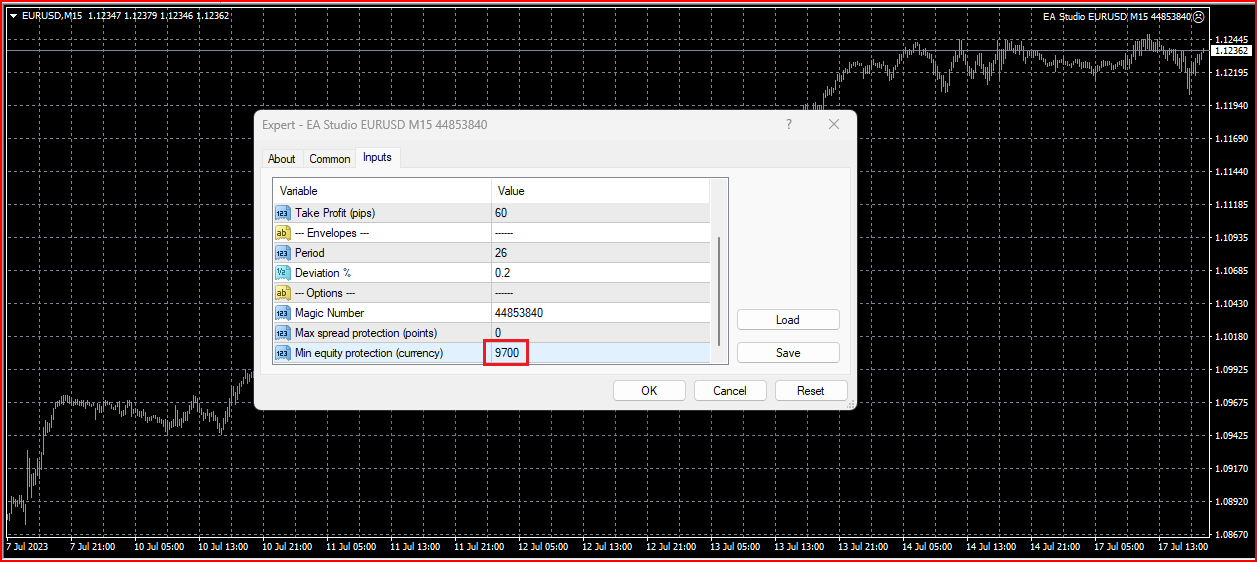
You can set the Min, equity protection to a certain percentage you will allow for the Max Drawdown. Here I have chosen 3% of a $10,000 FTMO account. What this means is that if the account drops by 3% from its initial account balance the open trade will be closed and the EA will be deleted. You will then need to reinstall the EA to make it active again. So how do you know when to reinstall it and keep it from further drawing down your account? You have a few options. You could run the EA on the FTMO demo account and monitor it. When the demo account starts profiting you might restart the EA on the live account. Another option would be to restart the EA on the live account but make the lot size small. Once the account starts to make profit again then you can increase the lot size back to its normal value. And, another option would be to test the EAs on the MetaTrader Strategy Tester to see when the EA starts profiting again and then activate it.
November 17, 2024 at 2:41 pm #378657ParticipantCREATING EA POOL and DEMO ACCT
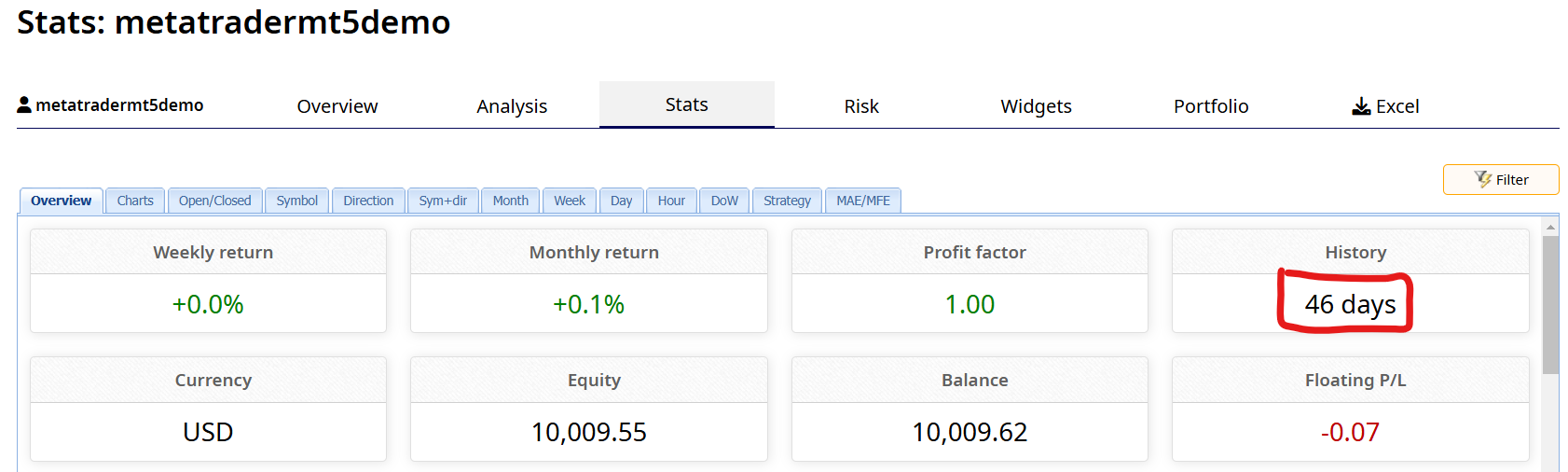
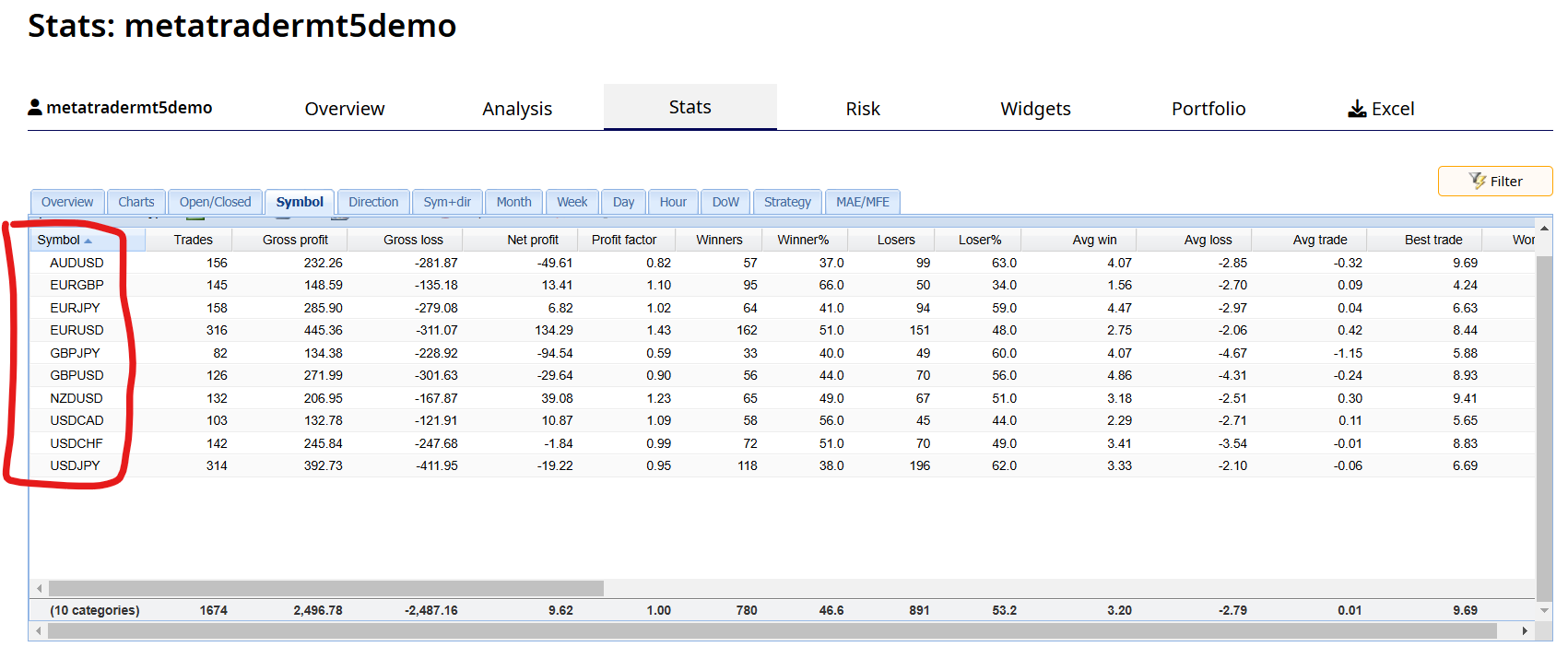
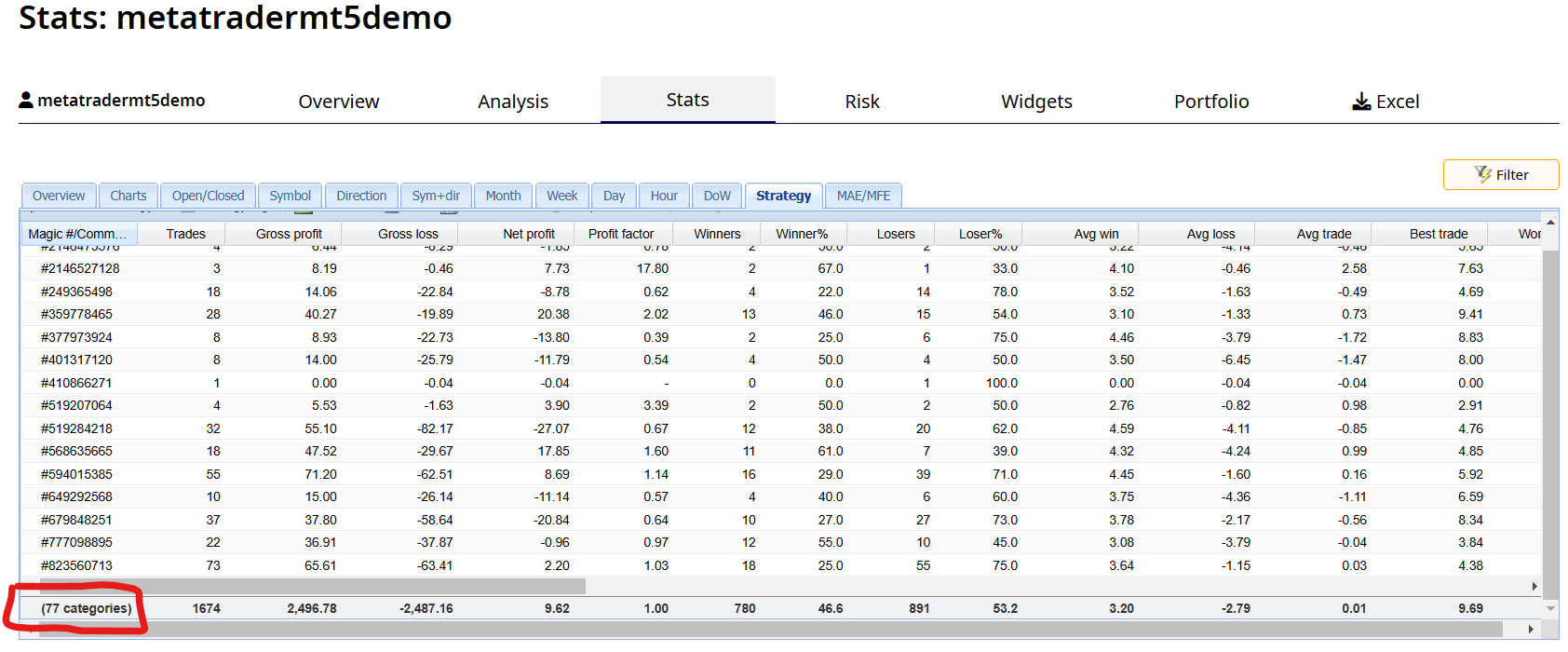
Over the last 46 days I have been building up a new pool of Expert Advisors. Every two weeks I used EA Studio to create new EA’s from 10 different forex currency symbols. I then selected the top performing EA from each symbol and added it to an MT5 demo account I call the EA pool. So far I have collected a total of 77 EA’s in the pool.
This first graphic shows I have been building this pool of EA’s for 46 days.
This graphic shows the 10 symbols in the pool.
This graphic shows I have a total of 77 EA’s in the pool as is illustrated by their individual magic numbers.
I will continue adding additional EA’s to the pool until I have a total of 99 EA’s. At that time I will start removing the bottom 10 losing EA’s so I can add 10 new ones. Note: MetaTrader only allows for a total of 99 EA’s when each EA is attached to a separate chart.
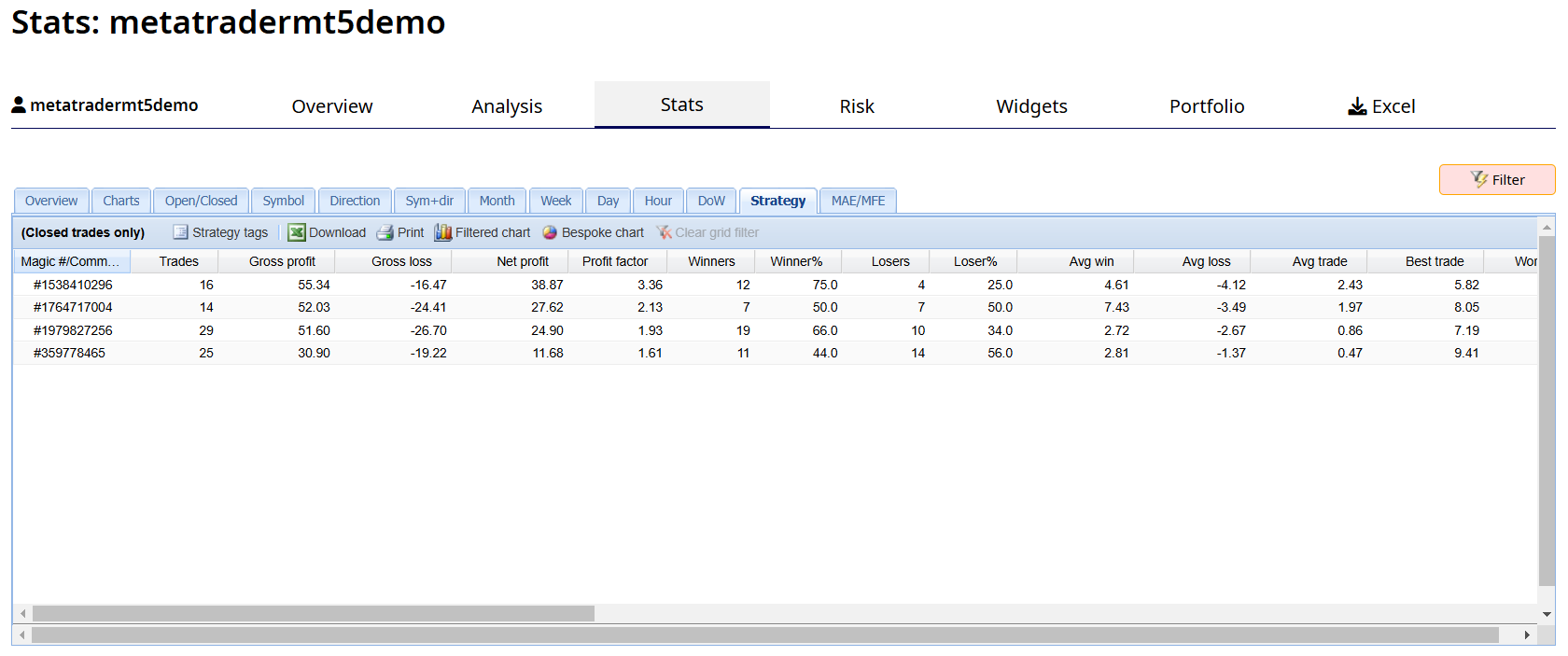
This last week I filtered the pool of EA’s so I could select the top EA from each symbol. From these 10 EA’s I then selected the top 4.
This next graphic shows the top 4 selected EA’s individual magic numbers.
This graphic shows the symbols of the top 4 EA’s selected.
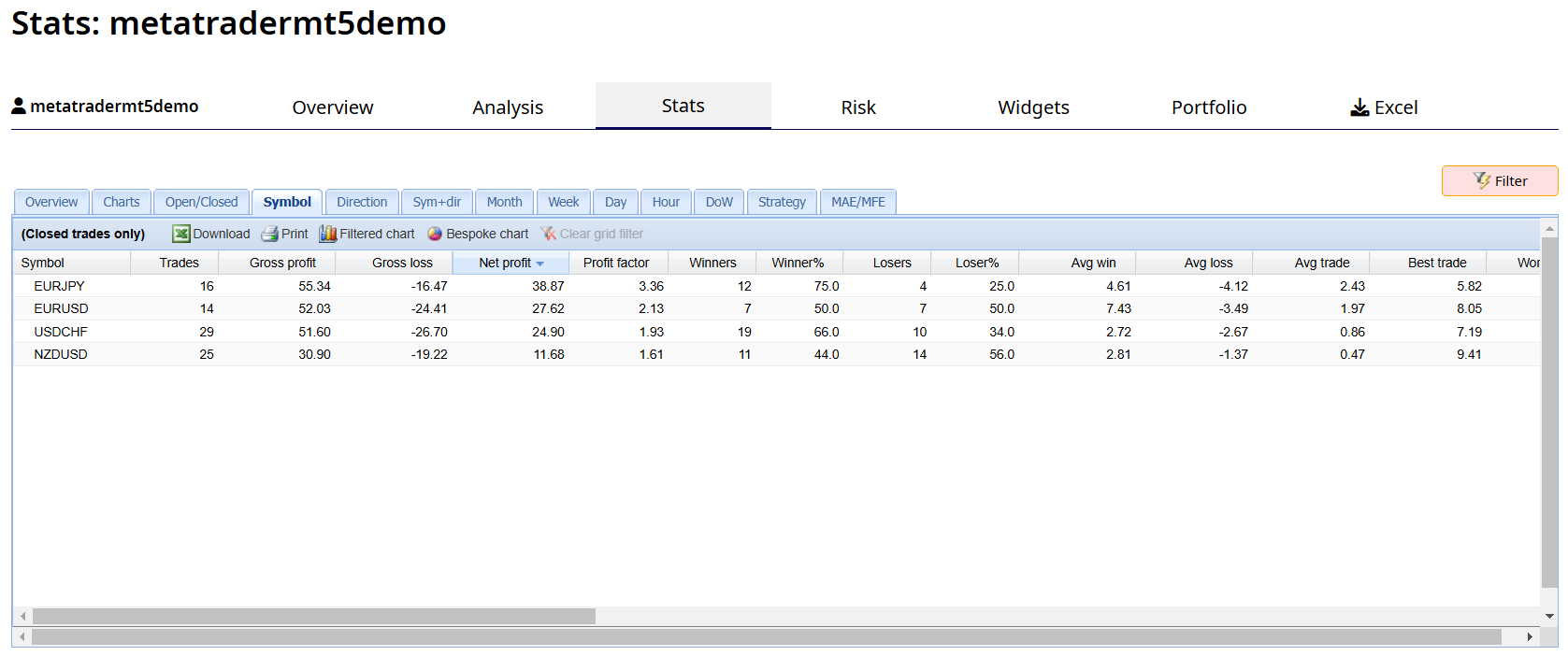
This next graphic shows the balance line of the top 4 selected EA’s over the a 42 day period excluding this last week.
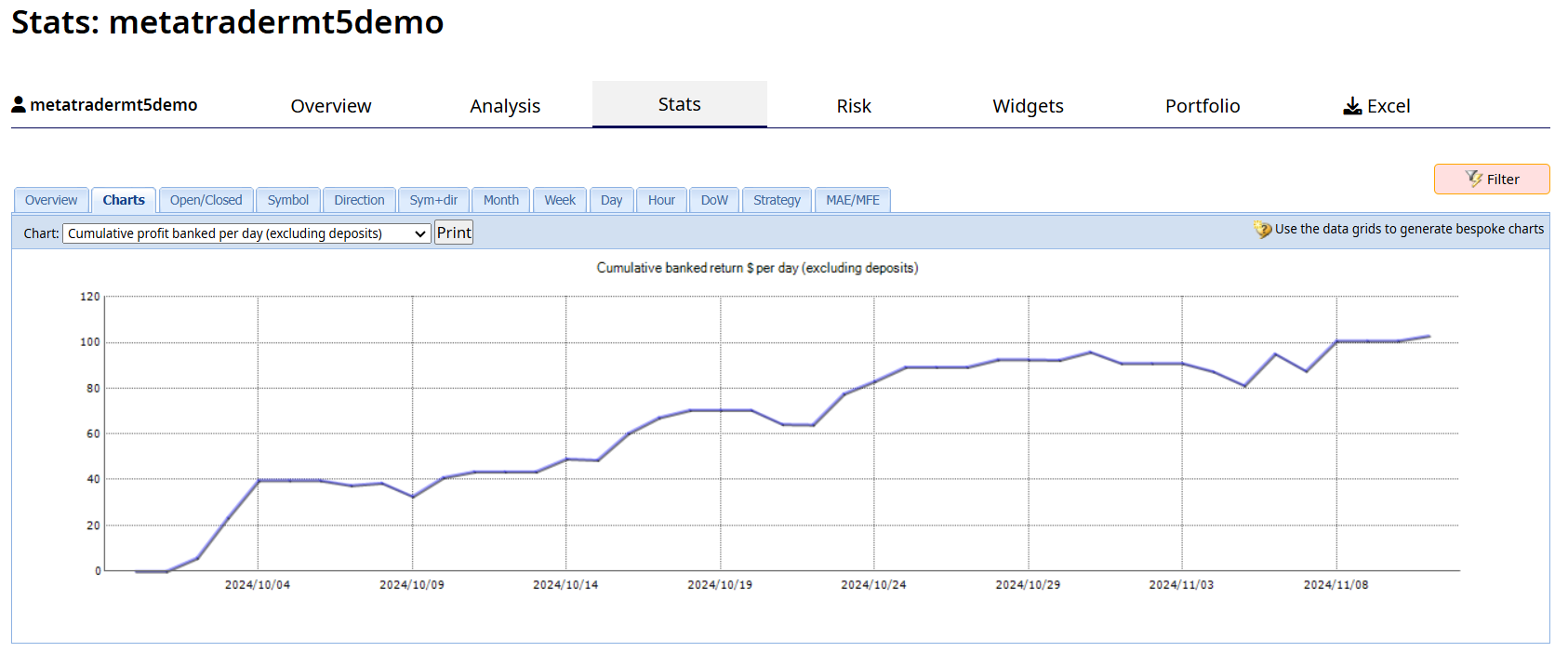
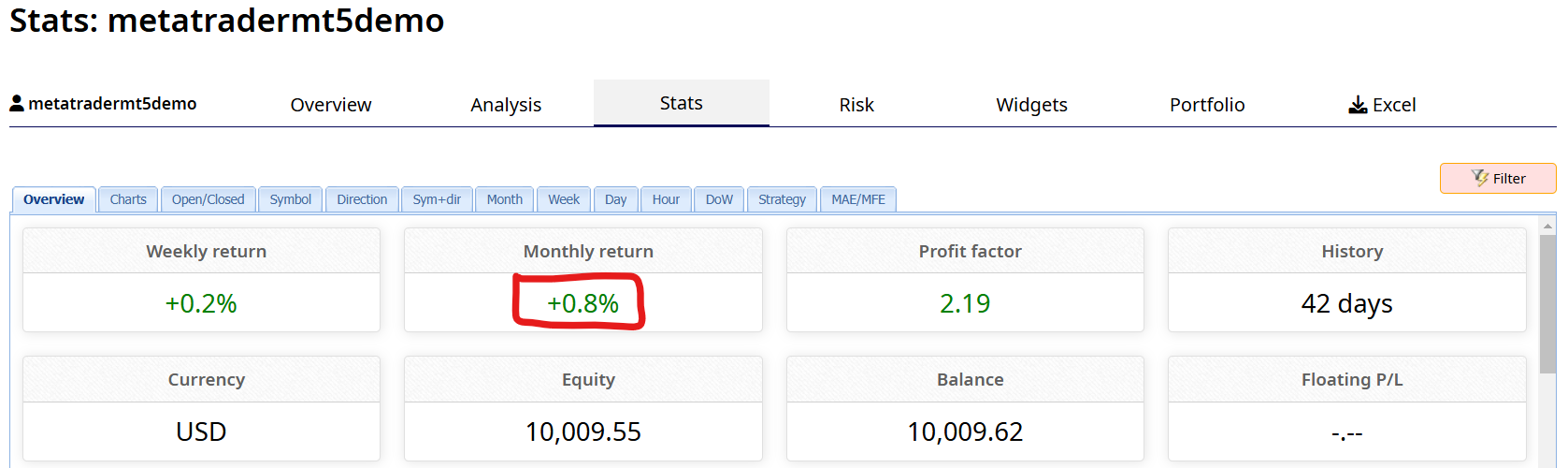
This graphic shows the calculated monthly return of 0.8% based upon a lot size of 0.01 lots for each of the 4 symbols. By increasing the lot size to 0.1 lots the monthly return would have been 8%. Not bad!
This last week I moved the top 4 EA’s to a new demo account and increased the lot size to 0.1 lots.
This first graphic shows the balance line of the top 4 selected EA’s over the last one week.
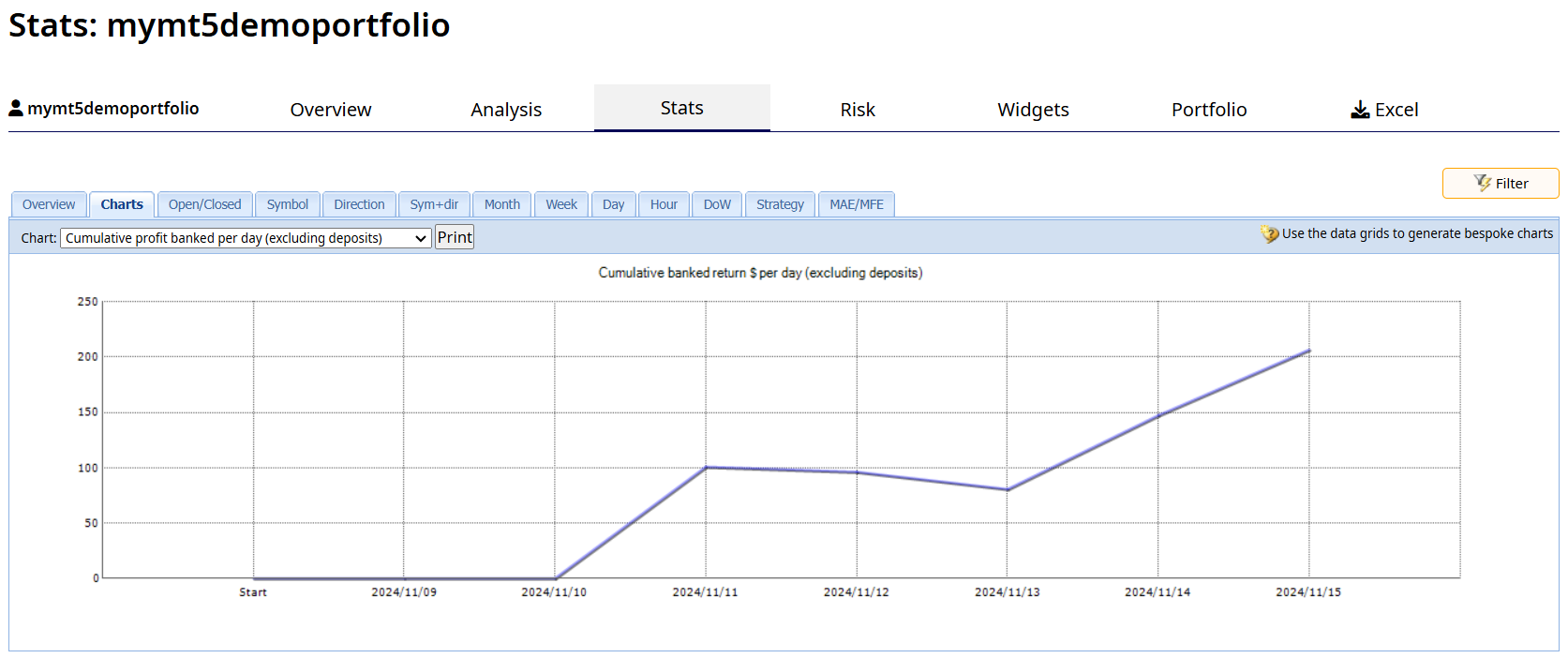
This final graphic shows a nice calculated monthly return of 9.0% based upon this last weeks performance.
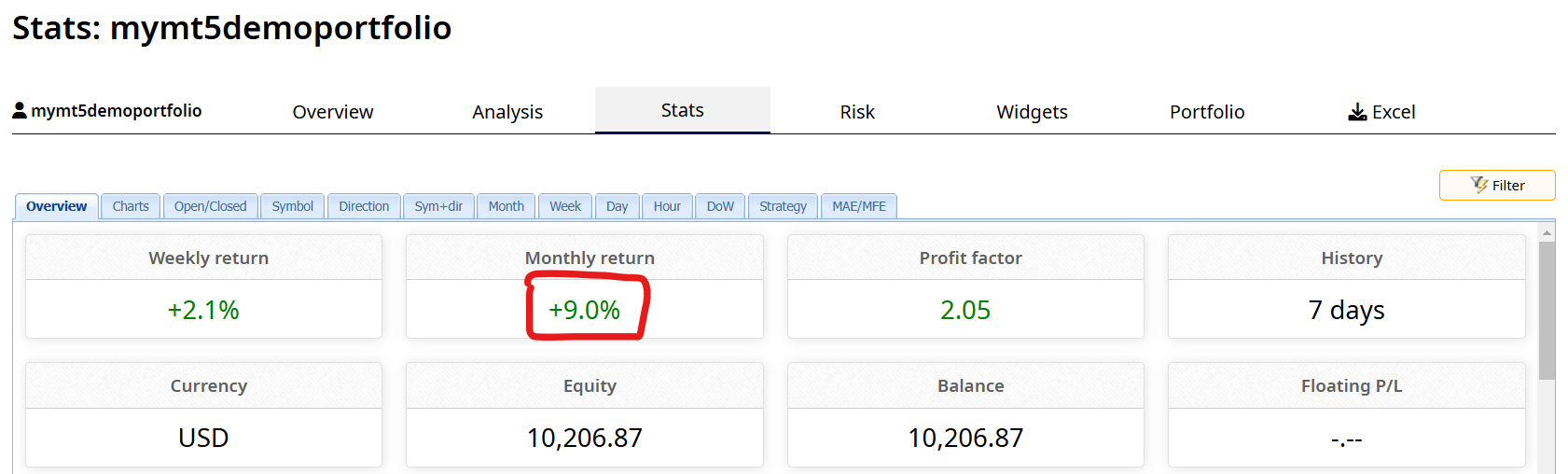
So what do I do now? Each week I will filter the EA Pool and select the Top 4 EA’s. If the top 4 EA’s change I will remove the old EA’s from the demo account and add the new EA’s. Then after one month I will re-evaluate the demo account and decide to move it to a live account.
Do you want to learn how to use EA Studio so you too can create your own EA pool? Click here!
Alan,
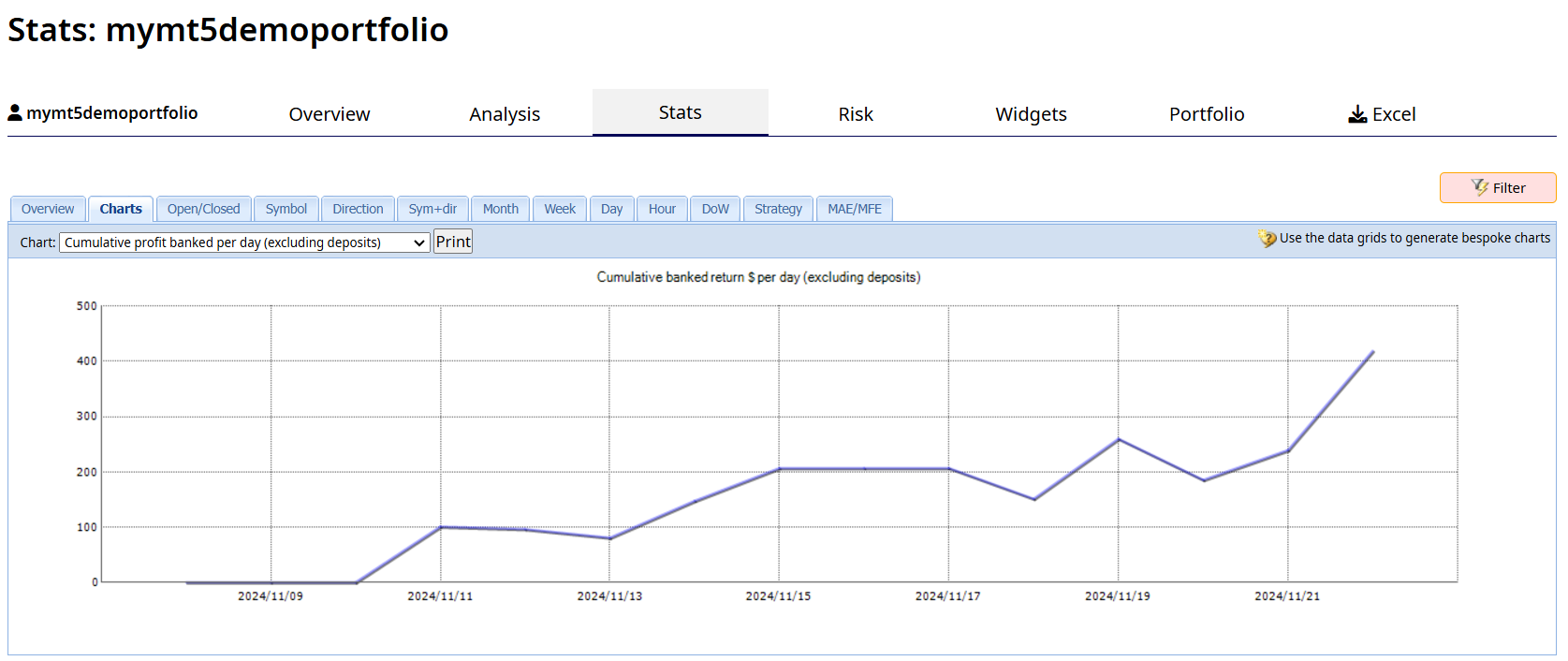
November 23, 2024 at 4:31 am #379881ParticipantThis first graphic shows the balance line of the top 4 selected EA’s over the last 14 days.
This final graphic shows a nice calculated monthly return of 9.0% based upon the last 14 days performance.
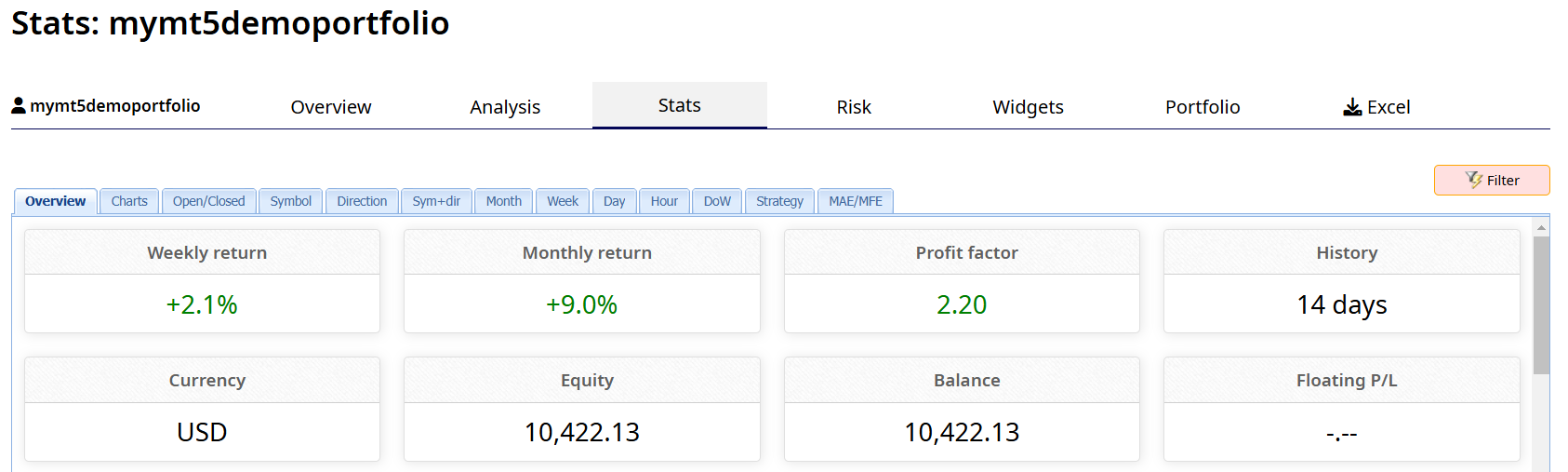
Today I replaced three of the EA’s with new EA’s selected from the pool of EA’s and kept one EA. The EA’s selected from the pool were the top performing EA’s for each Symbol based upon their performance over the last 30 days. For this next week the portfolio will continue to contain four EA’s.
I will continue to monitor and make necessary updates to the EA’s in the portfolio for the next one month. This one month testing period will validate the strategy I am using in selecting the EA’s from the pool and are added to the portfolio. At the end of the one month evaluation period I will evaluate the portfolio and decide to move it to a live account.
Note: A am also adding 10 new EAs to the pool this weekend. For more about the pool see previous postings above in this topic.
Do you want to learn how to use EA Studio so you too can create your own EA pool? Click here!
Alan,
-
AuthorPosts
- You must be logged in to reply to this topic.