
Community Forums › Forums › 21 Day Program › 21 Day Program: Experience and results
- This topic has 105 replies, 6 voices, and was last updated 4 hours, 44 minutes ago by
cyberpunkpokies.
-
AuthorPosts
-
January 19, 2024 at 9:32 am #227846
Fabian Kaeser
ParticipantHello Petko
First i want to say Thank you for your very nice Cours. I love them and I love Algo Trading. I have tried a lot of robots in the past, most of them free of charge. Unfortunately, 95% of them are useless. Your 5 EAs are really great. I have already made over 5% profit in three days. Soon I will start them in a real Account or even in a Challange.
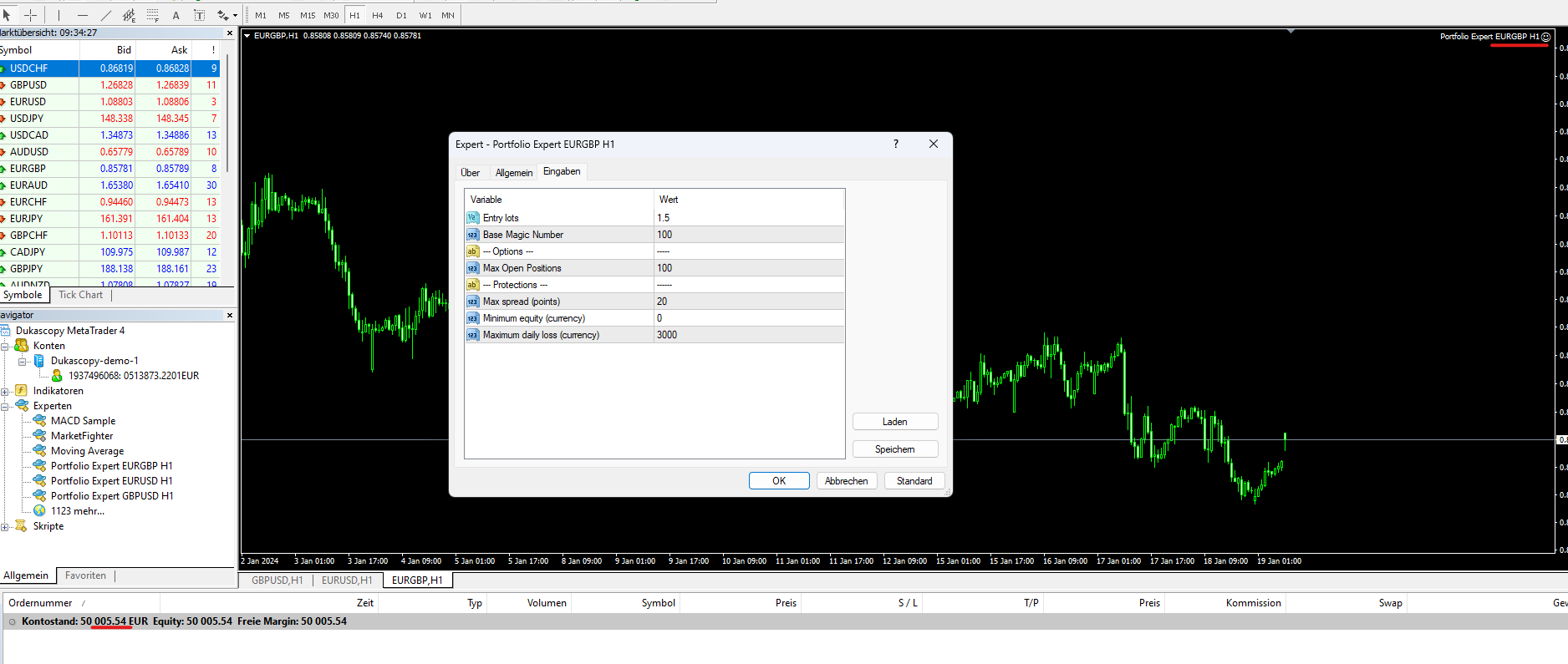
But the Portfolio EA`s from ” Last Month best Robots + 30 EAs Every Month” that I got at Day 3 are not working i dont know why? I watched al Lessons it was really interesting. I did install the 3 Portfolio EAs like in the Course described. They are running now since 3 Days but it happen only 1 small Trade till now. I Think there is something wrong. I mean there are 30 Strategys inside and only one Trade happened till now?
Thank you for your Time and Effort.
January 19, 2024 at 9:38 am #227850ParticipantLook these are the Settings is hier something wrong? The Smylei is here and you can see only a Gain of 5 Dollar in 3 Days with all of the 3 Portfolios.
 January 29, 2024 at 10:51 pm #230493
Boyan Todorov
MemberHi, I have the 5 EAs from the first course running for more than a week and they keep losing, is this normal? Am I doing something wrong?
January 30, 2024 at 10:08 am #230632Alan Northam
ParticipantHi Boyan,
Yes it is possible to EAs to have a period of losing. Monitoring the performance of EAs over just a one week period is not sufficient to determine the long term outlook for the EA. Monitoring for a month will give a better understanding as to whether or not the EAs will continue to be profitable of should be replaced.
Alan,
January 30, 2024 at 11:01 am #230646MemberHi, thanks for the quick response. I also noticed a mistake I made. I put the usdgbp EA on the eurjpy pair, do you think this might contributed to the loss? Infixed it anyway. Thanks!
January 30, 2024 at 11:16 am #230654ParticipantHi Boyan,
Sometimes an EA will work on a different pair and sometimes not. So it is hard to say if the EA in question contributed to some of the loss without doing further analysis. The way I would check to see if the EA contributed to the loss would be to do a backtest of the EA on both pairs. Then you can look at the results of both backtests to see if the EA contributed to some of the loss when attached to the wrong pair. You can use the MetaTrader Strategy Tester to do the backtest but EA Studio would give a more accurate backtest.
Also, now that I think about it more, you can do a backtest on the 5 EAs for the last one month and then look at the resulting graph to see if the EAs are in a nice upward profitable trend. This would give you an idea if the EAs are being profitable over the longer term and that they are just going through a short term drawdown.
Alan,
February 4, 2024 at 7:42 pm #232108MemberHi Alan,
thanks for the reply. I also noticed that the EURJPY M15 is not performing as good as it is in the video https://www.youtube.com/watch?v=87u_9eHlSPU . I also noticed that the one I downloaded has different setting than in the video – SL 100 and TP80 vs. SL70 and TP13 in the video. I know the EAs get updated, but with the new relation between SL and TP it did not hit the TP that often. How often do the EAs get updated? And one more thing – I have a MT4 Duksacopy demmo account and I tried to create an ‘investor’ password under Option in MT4 to link the account with FXblue and Myfxbook, but it is not working, what might be the reason? Tnaks!
February 4, 2024 at 10:20 pm #232136ParticipantHi Boyan,
I do not know if the 5 EAs from the first course get updated they might just be for practice. You would have to contact [email protected] to find out if those EAs get updated.
To create an investor pw you also have to put in your main pw as well.
Alan,
February 5, 2024 at 12:40 am #232159MemberThanks Alan,
unfortunatelly the creation of the investor password is not working even though I put in my main password. As I hit OK to exit the window nothing happens. Could it be a MT4 glitch?
best regards
Boyan
February 5, 2024 at 8:21 am #232199ParticipantHi Boyan,
I always use the Publisher mode with FXblue, you do not use the investor pw with the publisher mode. Plus with the publisher mode you get faster updates from your MetaTrader terminal.
Alan,
February 6, 2024 at 10:03 am #232502fahd arroub
ParticipantHello, I have found that the robot opens trades but it keeps them trades open for a few days, is this normal and when they close the trade?
February 9, 2024 at 10:18 pm #233579Chris Landry
ParticipantHello Petko
Yes this helps. After running on demo for a month I now have a stronger foundation on how the lot sizes and maximum losses roughly will be.
Thank You for responding. Going to work on the 21 day challenge again this month. I went live on the 5 EAs in the course on a smaller account this month. Excited to continue to learn and learn more.
Cheers
Chris
February 26, 2024 at 6:35 am #237895Ben Allen
ParticipantI’ve been enjoying the 21 day course and have been having great results with the expert advisors I generated with EA Studio. I was running my bots with a VPS and had the account connected to FX Blue so I can keep track of the performance. The balance had a gain of 3% and the equity had a gain of 13%. However, in the middle of my testing, my Demo account expired because the account had a 30 day limit. I was in the middle of about 14 trades, so this really screwed up my strategy and statistics because the EA’s weren’t able to close trades on the account. I think at this point it’s better for me to start fresh with a new demo account, and I am currently trying to get an account that doesn’t have a 30 day expiration.
February 26, 2024 at 6:57 am #237897ParticipantHi Ben,
I am happy to hear you are enjoying the 21 day course and having great success using EA Studio. To get rid of the 30 day limitation of EA Studio you can purchase a copy of EA Studio from the following image:
https://platform.algotradingspace.com/software/expert-advisor-studio/
Alan,
February 26, 2024 at 1:14 pm #237961ParticipantHi Alan, I wasn’t talking about the free trial of EA Studio. I meant the 30 day limit that was placed on my MT4 demo account by my broker.
-
AuthorPosts
- You must be logged in to reply to this topic.