
Community Forums › Forums › Ready-to-use Robots › Prop Firm Robots › Prop Firm Robots: General questions
Tagged: "prop EAs unique", #Propfirmrobots #Propfirm, #rawfeed, App success, BTC robot, challenge, Challenges, daily stop, EA Manual, EA Trading academy, Failing challenge, FTMO 6.0, FTMO Robot, ftmo robot passed challenges update, FTMO ROBOTS, FTMORobot, funded accounts, Performance Issues, Prop Firm Live Trading, Prop Firm Robots, Prop Firm Robots 100k challenge, prop firm robots app, Prop Firm Robots Parameters, Settings, Suggest me a EA for all type of prop firms, telegram, Trial test with no result, USDJPY EAs
- This topic has 1,069 replies, 228 voices, and was last updated 3 weeks, 6 days ago by
Guenther.
-
AuthorPosts
-
October 31, 2023 at 10:47 pm #208788
PARVEEN PANCHAL
ParticipantHi Petko/Alan
I purchased the FTMO robots a month ago and it passed the FTMO 50k DEMO challenge with all 7 EAs. Now I am enrolled in 100k real challenge and in last 12 days, it is up by 1.1 %. I still have my demo accounts to monitor which are the top EAs in last one week and based on that I am using top 3 EAs GBPCAD, EURUSD and AUDNZD in my real FTMO challenge:
My questions:
1) In 100k challenge, I am trading 3 pairs with 1 lot size , it that okay or should I change any settings/lot size? I am trading EA as is.
2)If I manually close any trade or manually open any trade, does it affect the EA settings or how EA trade?
3) Sometimes I see trade reverse and I tend to manually change it, should I do it or leave the EA as is? Of course that going in contrast of automatic trading. In long term, I want to trust the EA and trade automatically.
4) How to calculate the % of account size with lot size? How much account size I am risking per lot?
thanks,
Parveen
November 1, 2023 at 10:07 pm #209054Jason McKay
MemberLooking good! Can you share your setting? I was looking at your trades and they are taking trades differently than mine.
Thanks for your time.
November 1, 2023 at 10:09 pm #209056Memberok, Ill try it again
Thanks
November 1, 2023 at 10:16 pm #2090580xBitpool
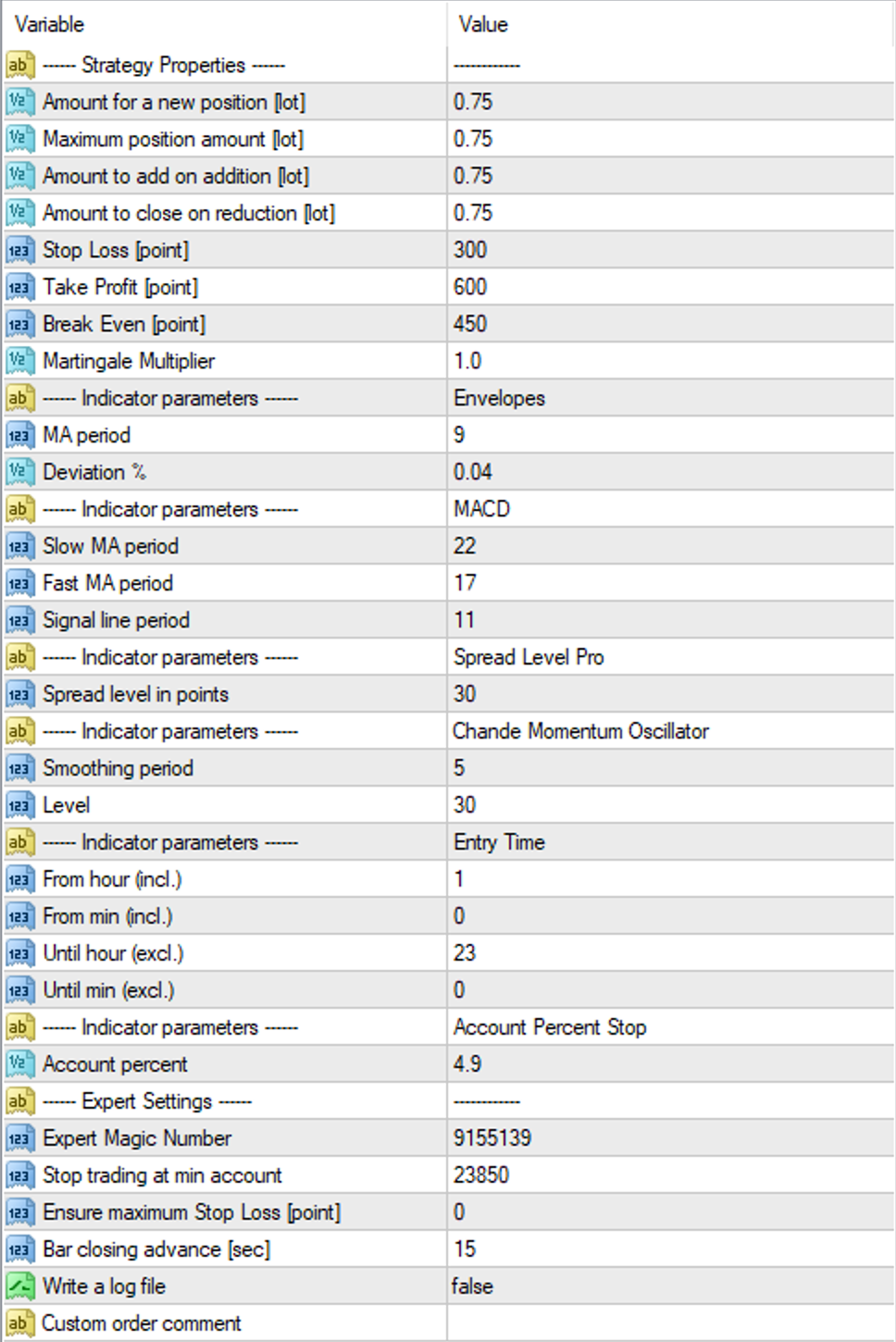
ParticipantSo for FTMO, 25K on a swing account, here are my settings (example for EURUSD)
 November 1, 2023 at 10:50 pm #209069
Alan Northam
ParticipantAnswer 1) Trading 3 pairs with 1 lot for each pair yields an account risk of 2%. This is OK.
Answer 2) Manually closing a trade does not affect the EA. It will continue to function normally.
Answer 3) If you are going to trade with EA’s then you need to have faith in them and not be changing their parameters or manually close the trades. Having said that I will manually close a trade if it is close to the TP and I see it is starting to reverse directions. This is the only time I will close a trade.
Answer 4) Use a calculator to set lot size, etc. https://www.babypips.com/tools/position-size-calculator
Alan,
November 2, 2023 at 1:12 am #209084PrimalSci
ParticipantIs there anything that I need to do before attaching the FTMO bot on to its required pairs in MT5?
I noted that Alan said to download previous data prior to attaching? I think I have done this correctly.Any additional advice would be great.
Thanks.
November 2, 2023 at 11:53 am #209181ParticipantHi PrimalSci,
Good luck with your challenge, and just be aware of your risk! Keep us posted as to how it goes.
Alan,
November 2, 2023 at 1:04 pm #209192ParticipantThanks Alan.
Not going so good at the moment unfortunately but it is early days and need to give it a chance. Trading is difficult and will always fluctuate up and down. It is what it is.
Is the bot purely a plug and play bot?
Thank you.
November 2, 2023 at 1:05 pm #209194Rick Jäger
ParticipantHey, I just wanted to start my first ftmo challenge with this bot. I have 2 questions:
1. I live in germany, with eur as currency. Do I have to choose EUR or USD as currency when I want to start ftmo?
2. I have to take the swing account, Right?Thanks Guys!
November 2, 2023 at 3:09 pm #209222ParticipantHi PrimalSci,
The only thing you need to change would be the first four lines in the EA Properties box based upon your account size.
The following is the recommended lot sizes based upon a 10K account which limits risk to 1%:
Amount for a new position = 0.3 lots
Maximum position amount = 0.3 lots
Amount to add on addition = 0.3 lots
Amount to close on reduction = 0.3 lots* For larger accounts simply scale the lot sizes.
Alan,
November 2, 2023 at 3:34 pm #209231ParticipantSuperstar.
Thanks Alan!!Will keep you updated on how it goes!
November 2, 2023 at 4:12 pm #209245ParticipantHi Rick,
Answer 1) It is up to you as to whether you should choose EUR or USD. However, since you are in Germany EUR might be your better choice.
Answer 2) Yes, use the swing account!
Alan,
November 2, 2023 at 5:59 pm #209255Marek
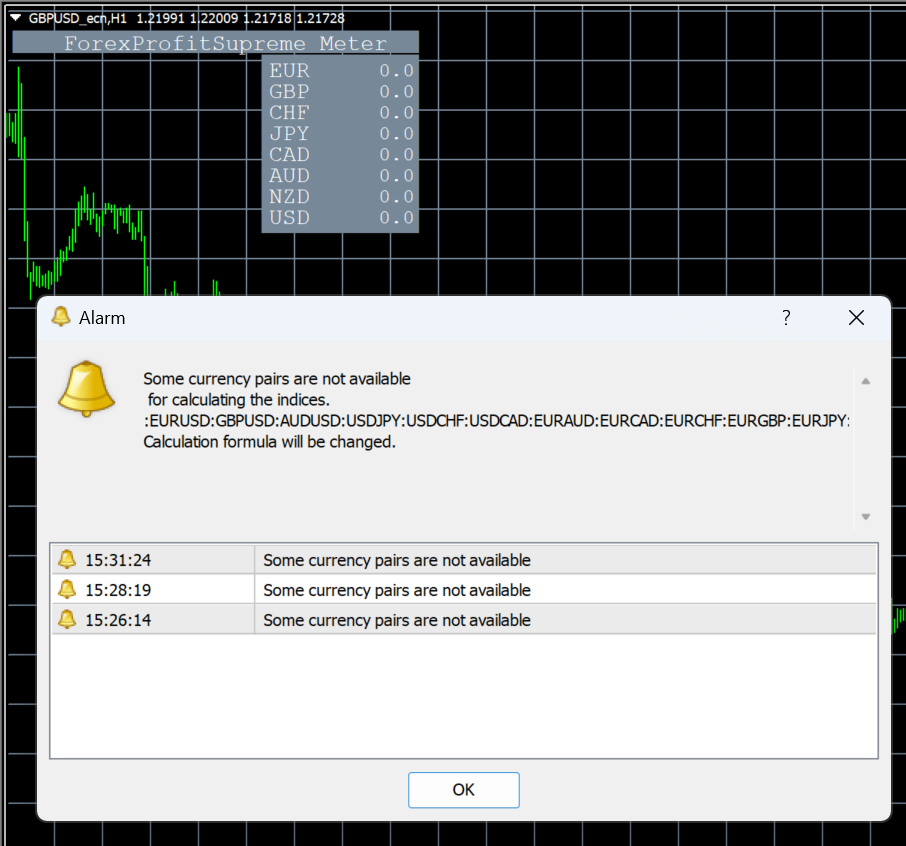
ParticipantHi, I had the same problem with the ForexProfitSupreme Meter display in the beginning, but thanks to the tutorial from Alan, the ForexProfitSupreme Meter is now displayed correctly. But unfortunately I am not getting any values. When I run ForexProfitSupreme Meter I just get the error message ForexProfitSupreme Meter GBPUSD,H1: Alert: Some currency pairs are not available\n for calculating the indices.\n:NZDCAD:NZDCHF:GBPNZD:GBPCAD:GBPAUD\nCalculation formula will be changed. and no values are loaded. Also in strategy is this: ForexProfitSupreme Meter GBPUSD_ecn,H1: incorrect start position 0 for ArraySort function

 November 3, 2023 at 11:24 am #209435Participant
Hi Marek,
It looks like you are having an issue with the broker. I suggest opening a demo account with another broker and installing the ForexProfitSupreme meter there. I have tested it with Dukascopy and the indicator works correctly there. Here is a screenshot:
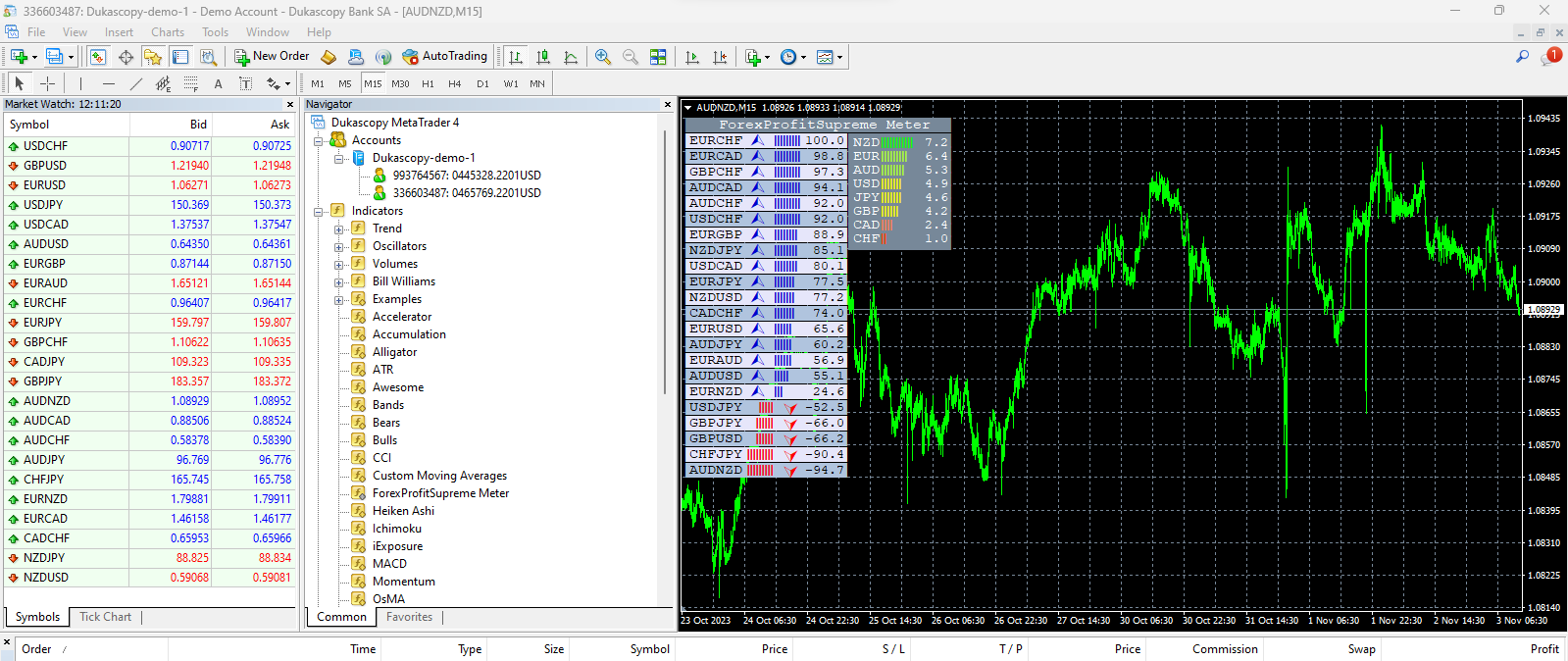
Also note the ForexProfitSupreme meter is only used for manual trading. Once you start auto trading with robots it will not be needed.
Alan,
November 3, 2023 at 2:54 pm #209473ParticipantHi Alan,
thank you for your test. When I look at your screenshot, I see the AUDNZD currency pair. And if I look at my screenshot, I can see the currency pair GBPUSD_ecn. All my currency pairs have _ecn at the end. When I added other currency pairs to the symbols that do not have _ecn at the end, ForexProfitSupreme Meter works correctly for me. Thanks for the help
-
AuthorPosts
- You must be logged in to reply to this topic.