
Community Forums › Forums › Ready-to-use Robots › Prop Firm Robots › Prop Firm Robots: General questions
Tagged: "prop EAs unique", #Propfirmrobots #Propfirm, #rawfeed, App success, BTC robot, challenge, Challenges, daily stop, EA Manual, EA Trading academy, Failing challenge, FTMO 6.0, FTMO Robot, ftmo robot passed challenges update, FTMO ROBOTS, FTMORobot, funded accounts, Performance Issues, Prop Firm Live Trading, Prop Firm Robots, Prop Firm Robots 100k challenge, prop firm robots app, Prop Firm Robots Parameters, Settings, Suggest me a EA for all type of prop firms, telegram, Trial test with no result, USDJPY EAs
- This topic has 1,069 replies, 228 voices, and was last updated 3 weeks, 6 days ago by
Guenther.
-
AuthorPosts
-
October 15, 2023 at 1:29 am #204803
Alan Northam
ParticipantSimple moving average!
October 15, 2023 at 2:01 am #204808Gary Wenger
ParticipantAlan,
I tried the link you shared but when I downloaded the files the .rar file was blocked by Microsoft as a security concern.
October 15, 2023 at 2:11 am #204810ParticipantThe link on this website to download the Forex profit supreme meter indicator, seems to work:
Best-MetaTrader-Indicators.comOctober 15, 2023 at 12:37 pm #204846ParticipantHi Majdi,
I don’t know what else to suggest either. I have tried to simulate your problem but cannot make my PC act like what you are seeing when I install the indicator. When I install the ForexProfitSupremeMeter it works normally as I have shown above in an earlier post. I will contact Petko about this issue and see if he has any other suggestions.
Alan,
October 15, 2023 at 12:49 pm #204848ParticipantHi Majdi,
You only need the ForexProfitSupreme Meter if you are going to manually trade an FTMO account. If you are going to auto-trade then you can skip down to the auto-trading section. Auto-trading does not require the ForexProfitSupreme Meter.
Alan,
October 15, 2023 at 4:32 pm #204882ParticipantHi Majdi,
Try the following:
Close MT4:
– From File Explorer, right-click on the MT4 terminal file.
– Select Properties.
– Go to the Compatibility menu.
– Click on ‘Change high DPI settings’ near the bottom.
– Check the box in the area that says ‘High DPI scaling override’. ‘Override high DPI scaling behavior.’
– Select ‘System (Enhanced)’ as the response to ‘Scaling performed by:’
– Click OK, then Apply.
– Take a look at the indicator again in MT4, and hopefully this will work.
Alan,
October 21, 2023 at 2:14 am #205843Saud Iqbal
ParticipantHelloo….i have a question…if everyone is using same EA on same TF then everyone must be getting same results while using recommended settings and lot sizes.. soo isn’t is possible if anyone tells here which EA is mostly profitable..it might save alot of time of others and secondly As Petko said in his video that metatrader backtesting results are not so precise soo forward test it for best results…soo many of traders might have forward tested it on demo or live accounts…soo can anyone share results here?
October 23, 2023 at 2:32 pm #206201Steven Sanders
ParticipantHey Alan,
I had the same problem as the original poster. I tried what you had written above and it worked!
Thanks for providing the solution.
October 23, 2023 at 3:12 pm #206249ParticipantHi Steven,
I am happy to hear the solution worked for you and you can use the Forex profit supreme meter.
Alan,
October 23, 2023 at 3:53 pm #206276Candas kasap
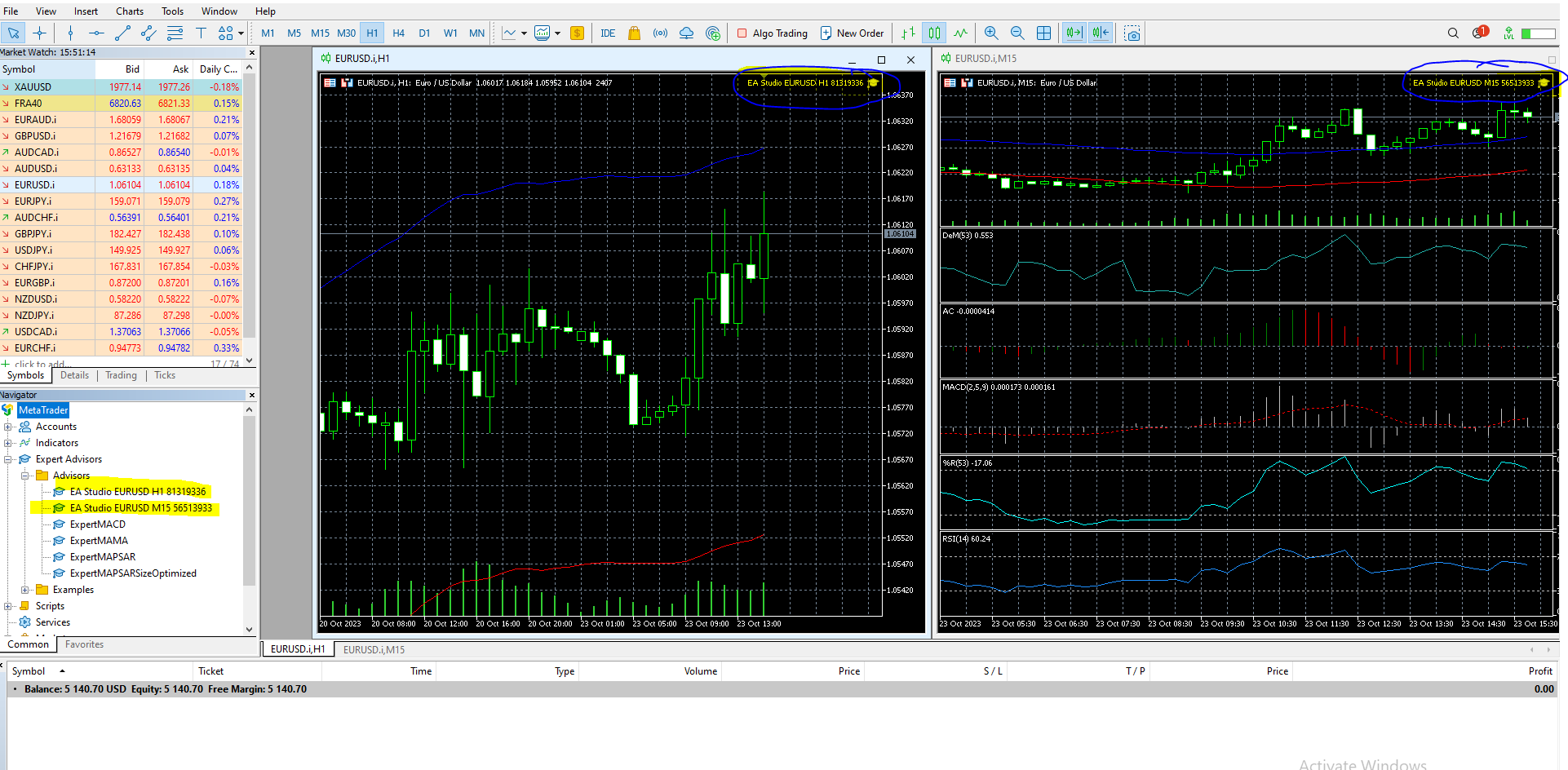
Participantcan i use 2 robot same time for eur/usd , and I’ve been waiting all day, but nothing has happened
 October 23, 2023 at 5:02 pm #206324
0xBitpool
ParticipantYou should be able to use 2 robots, as long as they are on different charts. Depending on the strategies, it can take some time before they make their first trade. Not trading is also trading 🙂
October 23, 2023 at 5:31 pm #206345Participantlast question can you check the photo, ALGO TRADING is with RED DOT is it ENABLED ore DISABLED ?
October 23, 2023 at 6:02 pm #206357ParticipantRed dot means disabled!
October 23, 2023 at 7:39 pm #206407Lee Wagstaff
ParticipantAs I know prop firms have a max allocation? when passed and if i want to use this on the actual live account already using perceptrader on one funded account. But do these ftmo bots randomize the trades at all? i can see from broker to broker they are different but im not sure if it would be on same broker… ALSO MASSIVE THANKS as its performing very well! Just one certificate from last week
 October 23, 2023 at 7:52 pm #206410Participant
Oh nice catch! Yes, auto trading is disabled, so no trade will be placed
-
AuthorPosts
- You must be logged in to reply to this topic.