
Community Forums › Forums › Ready-to-use Robots › Prop Firm Robots › Prop Firm Robots: General questions
Tagged: "prop EAs unique", #Propfirmrobots #Propfirm, #rawfeed, App success, BTC robot, challenge, Challenges, daily stop, EA Manual, EA Trading academy, Failing challenge, FTMO 6.0, FTMO Robot, ftmo robot passed challenges update, FTMO ROBOTS, FTMORobot, funded accounts, Performance Issues, Prop Firm Live Trading, Prop Firm Robots, Prop Firm Robots 100k challenge, prop firm robots app, Prop Firm Robots Parameters, Settings, Suggest me a EA for all type of prop firms, telegram, Trial test with no result, USDJPY EAs
- This topic has 1,069 replies, 228 voices, and was last updated 3 weeks, 6 days ago by
Guenther.
-
AuthorPosts
-
December 21, 2023 at 12:20 pm #221871
Alan Northam
ParticipantI have also discovered when I trade the same EAs on Oanda demo account and the Oanda live account I get different results such that my EAs win on the Oanda demo account and lose of the Oanda live account. So even when I live trade with Oanda I demo test on the live account as well.
Currently I am demo testing the FTMO v5.1 robots on the FTMO demo account. So, once I start trading these robots on a challenge I will be able to see if there is a significant change between the demo account and the challenge account. I will not be starting a challenge until after the first of the new year.
Alan,
December 21, 2023 at 2:44 pm #221895ParticipantNice! I will start a 50K Evaluation using v5.1 robots.
Alan,
December 21, 2023 at 8:56 pm #221959ParticipantSorry I just now stumbled upon this response and I wanted to clear up any confusion.
Here is what I said, “There is nothing in the terms and conditions that says anything about more than one trader using the same third party EA’s.”
In otherwords, there is nothing in the terms and conditions that says only one trader can use the same strategy, many traders can use the same strategy.
Where the problem come into play is when the total of all traders accounts reach 3 million dollars. Once this limit is reached then all traders using the same strategy will be asked to change their strategy. It is only if the traders refuse to change their strategy will their accounts be locked out. According to Petko, all you need to do to change the strategy is to change the magic number. So until the 3 million dollar limit is reached traders can use the same strategy. You are not going to lose your account. The worse thing you may have to do is to change the magic number. A good reason to use MT4 because MT5 does not use magic numbers. I don’t know if adding a comment would change the strategy just as a magic number does.
Hope this clears up the confusion.
Alan,
December 22, 2023 at 5:04 pm #222121Greg Pyles
ParticipantI completed the FTMO Masterclass on Udemy earlier this year. I only see EURUSD M1 and a EURUSD M15 and a EURUSD H1 robot files available in that class. Are all of the FTMO Robots for the currency pairs available for customers who purchased that class or does that require a separate purchase?
Thanks, Greg
December 22, 2023 at 6:11 pm #222128ParticipantTo get all 8 of the current FTMO robots you need to purchase them from the eatradingacademy website.
Alan,
December 24, 2023 at 7:01 am #222301Anthony126
ParticipantNew to the FTMO Robot community looking forward already to the New Year when I will start trading actively again. In the mean time I have been running some back tests and will be setting them all up on a demo account where I can monitor the progress.
I read back through the thread and I’d like to bring to the community on what I do before I start trading in a usual week. I will look through the majors and get a sense of the direction bearish or bullish. I will also correlate my major with DXY to see if my thought process is correct.
What I’m going to test in this theory is that if I’m bullish on one pair and lets take EURUSD as an example setting the EURUSD to only take long set ups and of course if I was bearish setting it to only take shorts.
Wondering is any others have tried this ?
Merry Christmas Everyone
Anthony
December 24, 2023 at 2:55 pm #222347ParticipantHi Anthony,
I would also suggest you take the same EA and let it decide to take a long or short trade without your intervention. Then compare the results between letting the EA make the decision to go long or short to the EA where you make that same decision.
Alan,
December 24, 2023 at 4:00 pm #222356ParticipantUPDATE ON MY FTMO STRATEGY V5.1
After two days of testing Petkos’ FTMO v5.1 robots on a FREE FTMO demo account the following are my results:
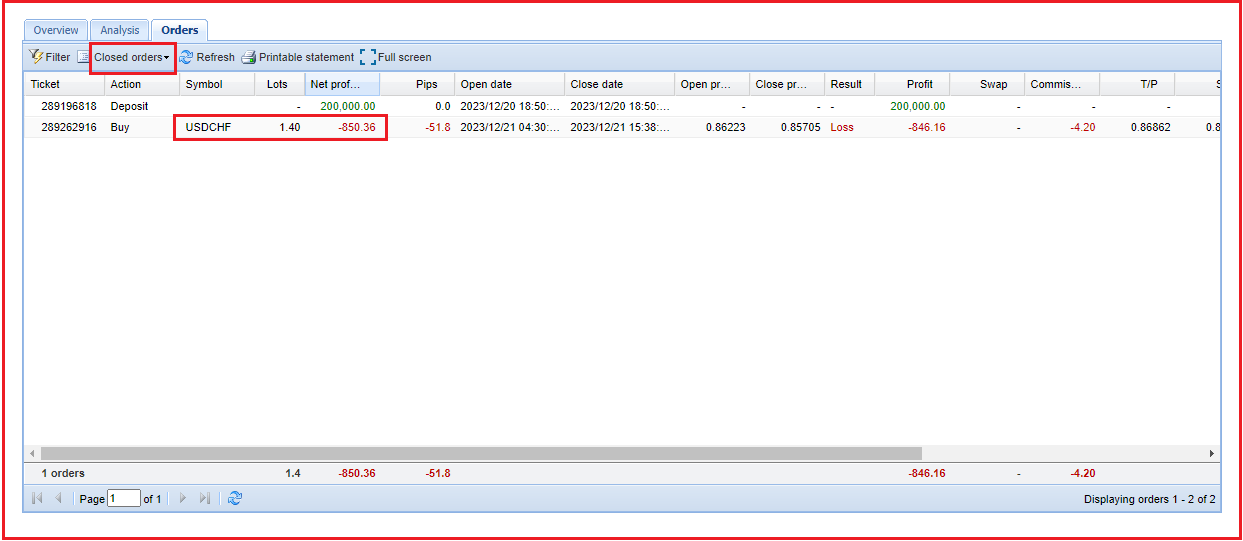
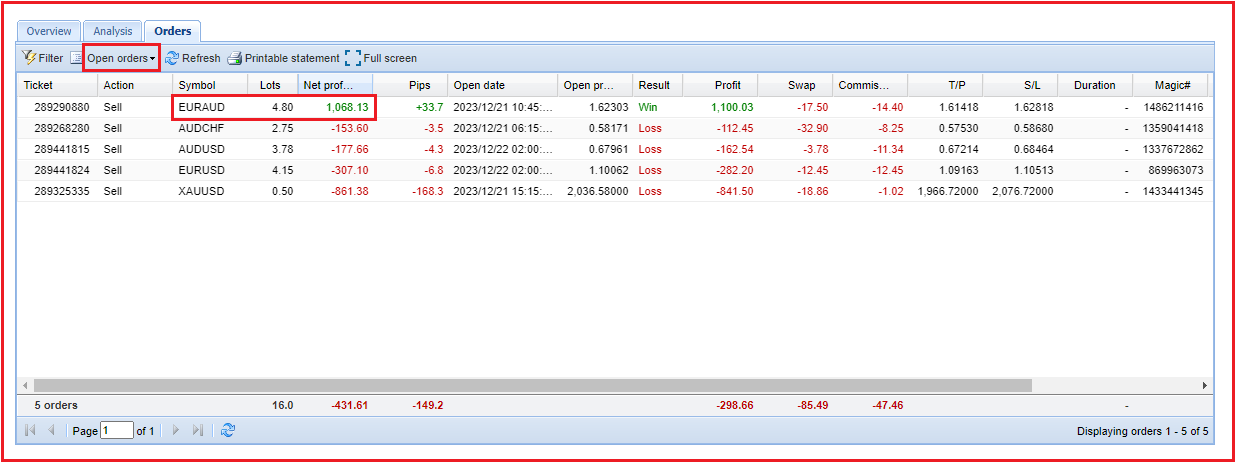
The top performer seems to be EURAUD but it is still an open trade. I cannot count it as the TOP EA until the trade is closed.
Please note this is an update of my strategy how I trade Petkos’ FTMO V5.1 robots.
Alan,
December 26, 2023 at 1:12 pm #222626Luce
ParticipantHello together,
is it a problem withe FTMO EA when i restart the mt4 terminal on my VPS?
Or is it better to restart the EA on the weekend? and what happens to the trades what are still open over the weekend?
Luce
December 26, 2023 at 1:55 pm #222650ParticipantWhen you restart your MT4 terminal the open trades will remain open. The only problem I see is if you have an open trade that is very near hitting its TP. So, if while restarting the terminal and the market moves to the price of your TP price level the open order will not be closed because the terminal is not able to send the TP signal to the brokers server. So, as long as none of your open trades are not close to a TP or SL price there is no problem with restarting your terminal.
During the weekend any open trades you have will remain open.
Alan,
December 26, 2023 at 2:19 pm #222660ParticipantHello Alan,
the same problem could happen with the StopLoss correct?
Luce
December 26, 2023 at 2:33 pm #222664ParticipantYes! So before restarting the MT4 or MT5 terminal check all your open trades to make sure they are not close to their TP or SL.
Alan,
December 26, 2023 at 3:07 pm #222676ParticipantHello,
i want to install the myfxbook ea, so that MyFXBook is always connected to the FTMO Robot.
I do this because i had several problems with connecting the EA with MyFXBook the “normal” way because often MyFxBook couldnt connect to the Account with the FTMO EA.
After i tried to place the MyFXBook Ea on the chart this error was showed:
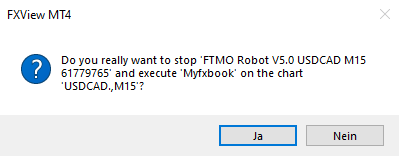
Looks like i can only have 1 EA on the same chart?
Does someone know a solution for this problem?
Luce
December 26, 2023 at 3:31 pm #222685ParticipantSorry, I don’t use Myfxbook so I cannot address your concern. Someone else will have to address your concern or you can contact [email protected].
Alan,
December 26, 2023 at 5:32 pm #222728aaronpriest
ParticipantYou just have to open a second chart. Each chart can only have one EA attached at a time. To run multiple EAs just requires multiple charts open at once.
-
AuthorPosts
- You must be logged in to reply to this topic.