
Community Forums › Forums › Ready-to-use Robots › Prop Firm Robots › Prop Firm Robots: General questions
Tagged: "prop EAs unique", #Propfirmrobots #Propfirm, #rawfeed, App success, BTC robot, challenge, Challenges, daily stop, EA Manual, EA Trading academy, Failing challenge, FTMO 6.0, FTMO Robot, ftmo robot passed challenges update, FTMO ROBOTS, FTMORobot, funded accounts, Performance Issues, Prop Firm Live Trading, Prop Firm Robots, Prop Firm Robots 100k challenge, prop firm robots app, Prop Firm Robots Parameters, Settings, Suggest me a EA for all type of prop firms, telegram, Trial test with no result, USDJPY EAs
- This topic has 1,069 replies, 228 voices, and was last updated 5 months, 2 weeks ago by
Guenther.
-
AuthorPosts
-
Alan Northam
ParticipantYou could increase the lot size to 2%. I my opinion, 3% or more would incur too much risk!
Alan,
Serghei71
ParticipantHi, I wanted to know where to find the Forex Supreme Meter to insert it into the graph. Thank you
Serghei71
ParticipantLuce
ParticipantHello Alan,
i have the same problem as Marek.
My pairs are ending with “.”
For example: EURUSD.
I dont want to change the broker just because of this problem.
In the settings of the indicator, I did not find any setting to change that :/
BR Luce
Participant*cant edit my post so i just write it here*
in the settings of the indicator its possible to edit the Prefix but not the Suffix (which i neeed)
ParticipantHi Luce,
This usually occurs when the broker operates in more than one country. Right click in Market Watch and select “Show All”. You should now be able to scroll down and find the currency pair without the “.”, if I understand your question correctly.
Alan,
ParticipantHello Alan,
i did that but they have all the point at the end:
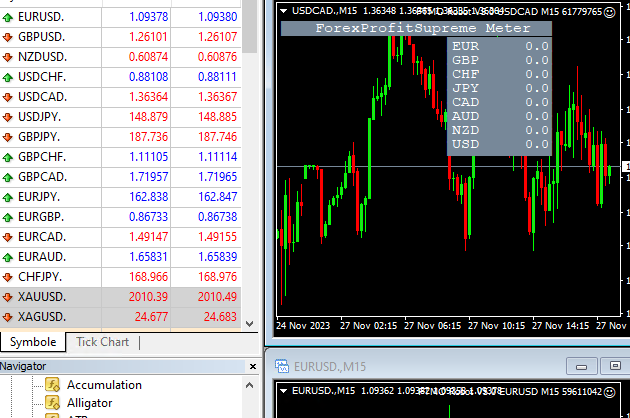
BR Luce
ParticipantDid you try clicking on View in the tool bar and then clicking on Symbol. Then search through the lists to find the right pairs?
Alan,
ParticipantIn Market Watch did you scroll all the way down to the end? Click anywhere in Market Watch and then move mouse wheel to end of the list of pairs.
Alan,
ParticipantI did find these pairs:
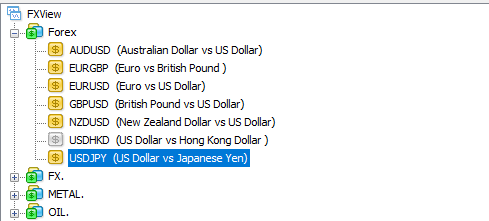 Participant
But now these are like light grey:
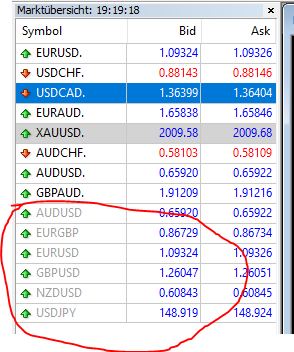 Participant
I did find these pairs:
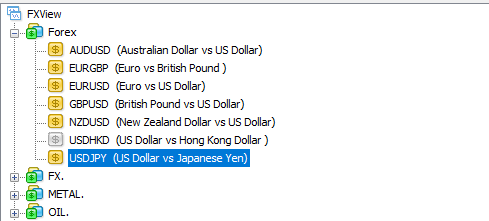
But now they are like light grey:
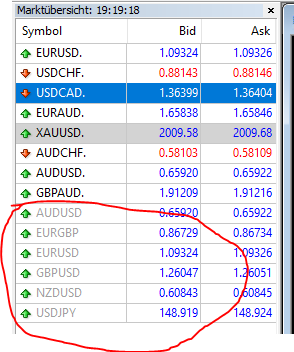 Participant
These pairs are now working but the other are missing:
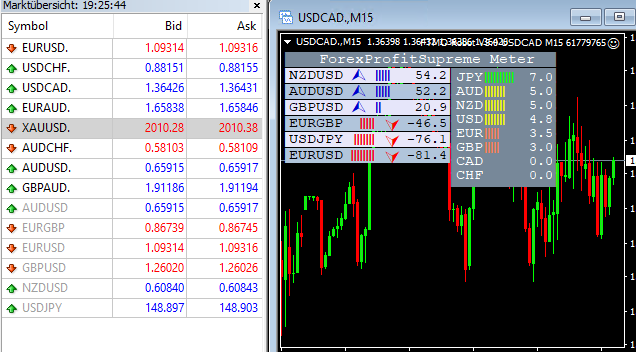 Participant
I think those are the correct ones. See if you can open a chart and install the the profitsupreme meter.
I will be off line for the next hour.
Alan.
ParticipantInteresting! Glad you got it working. I guess the greyed out feature means these symbols are not to be used in your country. So I guess the symbols with the “.” are the correct ones to use. I don’t know why it took so long for the indicator to start working correctly, but I am happy to hear it is working now.
Alan,
-
AuthorPosts