
Community Forums › Forums › EA Studio › Generator in EA Studio › Generator in EA Studio: Strategies
Tagged: Generating strategies, generator, Generator in EA Studio, reactor, Settings, spread, symbol settings
- This topic has 80 replies, 13 voices, and was last updated 1 year, 7 months ago by
[email protected].
-
AuthorPosts
-
May 31, 2023 at 10:25 pm #174350
Alan Northam
ParticipantHi Samuel,
Yes I know. Like I said in my post I am working my computer processor very hard today. Normally I do get a lot of strategies in a few minutes like you said. I should have run EA Studio on my other laptop but I didn’t. It’s ok though, as I am just trying a few things today. Another reason I may not be getting as many strategies collected is that I am just collecting strategies for the London Session. This is the first time I have tried to collect strategies over a certain session period so I am thinking that this is why I am not collecting as many strategies.
June 1, 2023 at 3:05 pm #174420Gareth
ParticipantI closed all the windows and started with two Chrome windows open on two monitors.
I used the same settings as above and generated over 400 000 strategies overnight.
I will continue with this method as it seems to be more stable.
I am testing the strategies it found from last night, so I will leave them in a demo account for a few weeks to see how they perform.
June 1, 2023 at 3:58 pm #174428ParticipantGareth,
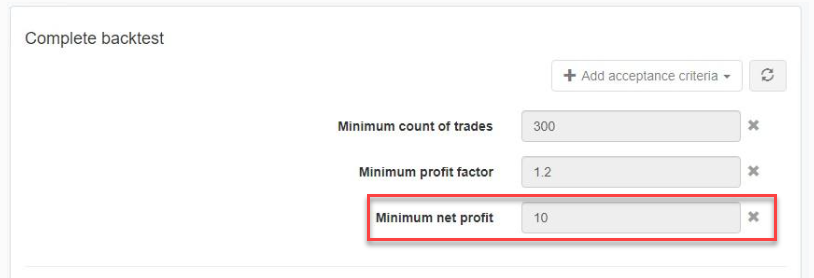
Happy to hear EA Studio is now generating thousands of strategies. Question: Did you leave the Minimum Profit at $10.00 in the Acceptance Criteria, or, did you remove it?
June 1, 2023 at 4:06 pm #174429ParticipantHi Alan,
I changed Minimum Profit to the Minimum profit factor using the values 1:2
June 1, 2023 at 5:50 pm #174442ParticipantHi Gareth,
Sorry, I used the wrong verbage. What I was wondering was if you changed the “minimum net profit of $10.00” to a smaller amount of did you delete this filter?
 June 2, 2023 at 12:11 pm #174544Participant
Hi Alan,
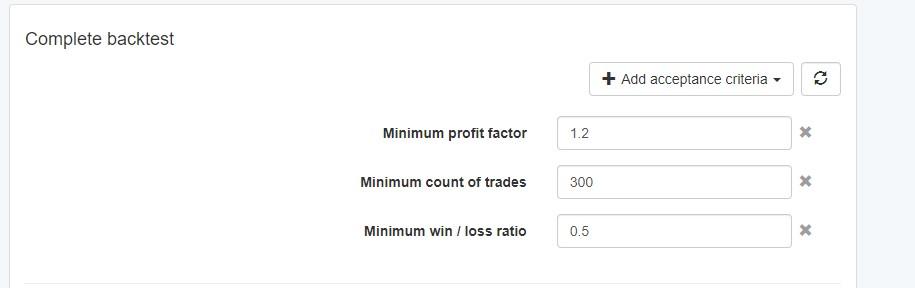
These are the settings I am using at the moment. I am testing various combinations to see what settings provide the best results.
Using the settings above I am getting results like this.
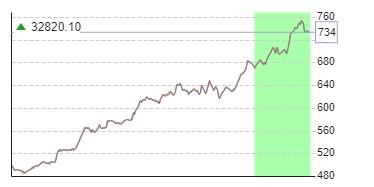
I am running these EAs on my demo account to see how they perform compared to the backtest above.
June 2, 2023 at 12:15 pm #174553ParticipantNice filtering. nice balance line!
I think the problem you were having when EA Studio was not collecting many strategies was that you had too many things going on at one time on your PC so that the computer processor was working too hard. Also, in the future, use a separate web browser, not just a tab of the current web browser you are using, but a completely different chrome browser, as this will also help to increase the EA Studio collection of strategies. When using multiple EA Studio’s use a different web browser for each EA Studio to maximize strategy collections.June 2, 2023 at 4:40 pm #174585ParticipantI will do that.
Thank you.
June 3, 2023 at 8:00 am #174654Samuel Jackson
MemberHi Gareth/Alan,
Definitely running too many reactors can slow things down but it depends on your hardware. My rule of thumb is a browser for each computer core works well so I run 8 on my 8 core computers.
However in this case I believe the issue was not this but that the browser was inactive and simply stopped churning.
You can easily test the slow down effect by doing the following:
Set a single reactor running and then time how long it takes to generate 1000 strategies (generate not collect), then open a second reactor and set running and time again. Continue doing this until you see a large drop in generation speed and you will know the optimal number of reactors for your computer.
But it’s important is making sure the browser is active so it keeps running.
June 3, 2023 at 6:20 pm #174697ParticipantI am going to run this test this weekend! I did a similar test when I was first starting to use EA Studio but it will be interesting to run the test again and to determine current results.
June 4, 2023 at 6:49 pm #174702ParticipantHere is the results of my EA Studio speed test. This test shows the results of how long it takes to generate 1000 strategies. In order to properly generate strategies each EA Studio must be opened in a separate Chrome window as shown in the figure below. Opening one instance of Chrome and opening each EA Studio in different Tabs of the same Chrome window will not allow EA Studio to collect strategies.
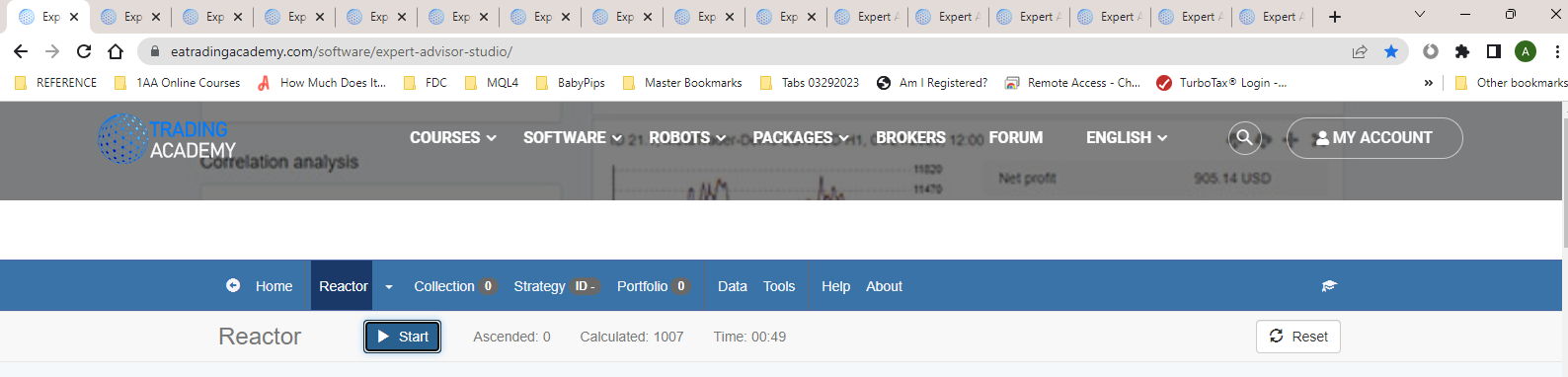
This figure shows opening multiple instances of EA Studio is separate TABs of one instance of Chrome. The only EA Studio that will collect strategies is the one selected. All other instances of EA Studio will not collect strategies.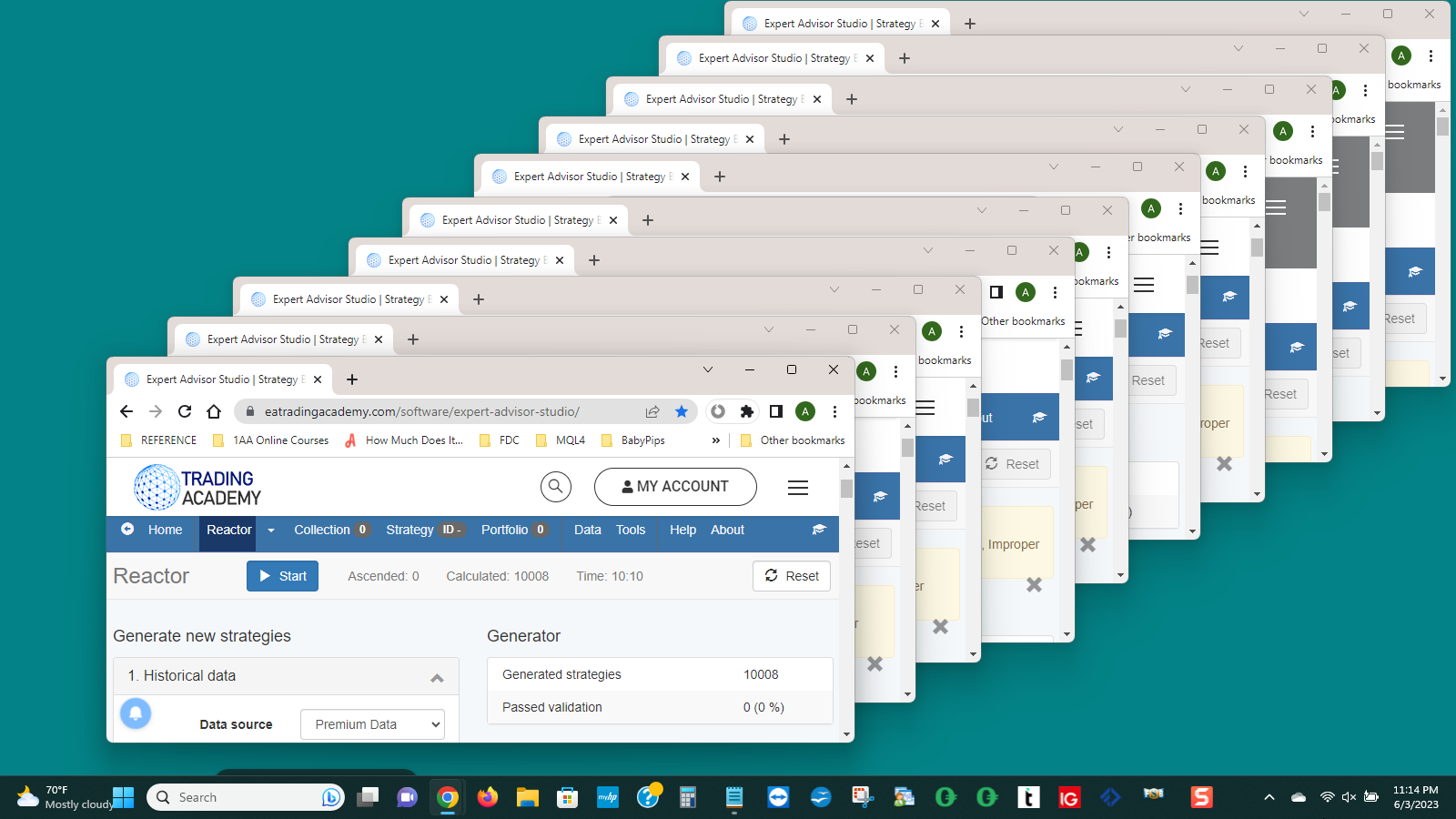
This figure shows the proper way to open several instances of EA Studio. Each instances of EA Studio is collecting strategies.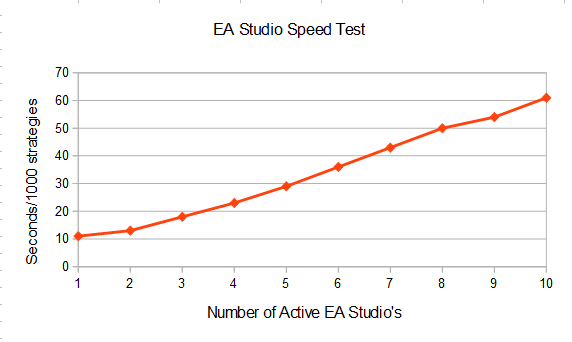
This graph shows how long it takes to collect 1000 strategies. The graph shows that when only one instance of EA Studio is running it only takes about 11 seconds to collect 1000 strategies. However, when there are 10 instances of EA Studio running it takes each EA Studio 60 seconds, or 1 minute, to collect 1000 strategies.June 5, 2023 at 12:36 am #174704MemberGood Job Alan, this is exactly right.
You can see that for 1 reactor you are getting 6000 generations a minute but between 5-10 reactors your combined generations is 10000. So I would suggest that 5 is pretty optimal for you. Although 3 is getting 9000 generations per minute total which is also pretty good.
You must have good hardware, I find if I keep increasing the reactors then at some point I get a pretty drastic slowdown.
This is good info because it lets you save some resources for other things and also dont need to work the computer hard unnecessarily
June 5, 2023 at 4:04 am #174705Participant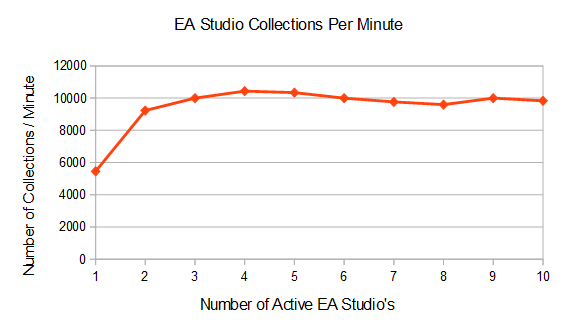
This chart shows the optimum number of EA Studio’s to be used on one computer. This chart shows that with three EA Studio’s running at the same time the total number of collections for all three instances of EA Studios is ten thousand. The chart also shows that with all ten EA Studio’s running at the same time the total number of collections for all ten EA Studio’s is also ten thousand. This then shows that there is no advantage to running more than three instances of EA Studio at one time.June 5, 2023 at 3:05 pm #174715ParticipantThanks, Alan and Samuel, I will keep this in mind.
I am only using two windows to see if that improves performance. Where can I find a copy of the software to measure the speed/performance of my generations?
On a positive note, my demo account is in profit today for the first time since I started using the software. I am pleased with this, and I look look forward to learning how to amplify my results.
June 5, 2023 at 4:16 pm #174716ParticipantGareth,
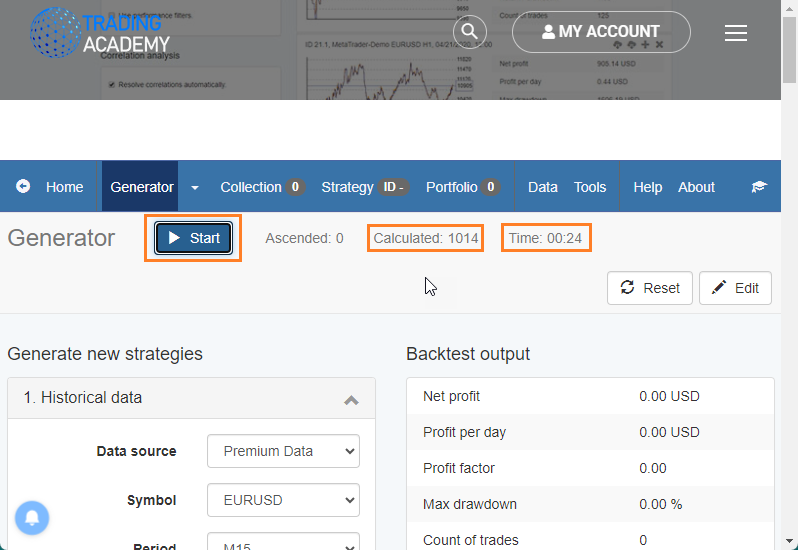
There is no software to speed test how fast EA Studio collects strategies when using multiple copies of EA Studio you have to manage this yourself. Here is how to do it:
 F
FFirst open one instance of EA Studio. Click the Start button. The Start button will change to a Stop button. Next monitor the Collected strategies. When the Collected strategies hits 1000 then click the Stop button. Record the time. Now click the Start button again and let it continue to run and do not stop it again. Add next instance of EA Studio. Click the Start button. The Start button will change to a Stop button. Next monitor the Collected strategies. When the Collected strategies hits 1000 then click the Stop button. Record the time. Now click the Start button again and let it continue to run and do not stop it again. Add next instance of EA Studio and repeat the process until you have 8 or more instances of EA Studio running.
What I did next was to enter all the recorded times into an Open Office spreadsheet, did some math, and then generated the graphs.
-
AuthorPosts
- You must be logged in to reply to this topic.