
Community Forums › Forums › EA Studio › Generator in EA Studio › Generator in EA Studio: Strategies
Tagged: Generating strategies, generator, Generator in EA Studio, reactor, Settings, spread, symbol settings
- This topic has 80 replies, 13 voices, and was last updated 1 year, 7 months ago by
[email protected].
-
AuthorPosts
-
September 4, 2022 at 12:58 am #122642
Samuel Jackson
MemberAlso to reinforce that point regarding symbols Tanya, you can defiantely add another different 4 or so symbols and then see what tends to perform best for you, then combine the 4 best ones at the mock live stage?
Just because you have lots of symbols on your incubator demo account doesn’t mean you need to trade them all on your mock live account.
September 6, 2022 at 6:44 am #122785Tanya Jay
ParticipantHi Sam,
I understand about short-term and long-term filter. 2 weeks and 1 month is, like you said, very similar. As the time passing by, I should be able to do 2 weeks and 3 months. It’s just that right now my demo account is 1.5 months old.
About building the pools over time, it sounds good to me. I don’t quite understand it just yet until I actually put my hands on them as the time goes.
I think as of now I will create more EAs on different pairs. And I will check them again every three months. This is probably the best I can do at the moment, unless you have something else you recommend me to do while waiting for the time goes by so I can use short term filter and long-term filter to move EAs to mock live account?
I just don’t like sitting and doing nothing for 3 months while waiting to practice moving EAs.
Thanks!
Tanya
September 6, 2022 at 10:36 am #122786MemberHi Tanya,
Yes that sounds like a smart way forward, get some more strategies generated for some additional pairs and get them up on demo.
You can also practice tracking using EA studio for selection against your demo accounts. If you are confident that your EA studio validation is matching your demo results (which it will if set up properly), then you can practice using your pool to trade straight to your mock live account.
I don’t recommend rushing this without practicing demo first but it should be worked towards at your own pace.
How many things you can work on depends on how much time you have really. Just make sure you keep track of what you are doing and don’t do so much that you don’t know what is working well for you and what isn’t.
For reference I have a couple of big engineering projects on at the moment that are eating most of my time so have probably only managed to spend a few hours on managing my trading systems over the last month. I’d spend all day everyday working on systems and testing new things if I could, but I modify what I am doing depending on the chaos going on around me :-/
The month before I was working 14hr days straight (9hrs job and then 5hrs trading work) just so I could work on some trading things on the side though. Burnt me out a little though haha
The path you are able to take is very time dependent really, so if you feel you have plenty of time to put in some extra work then you could definitely speed up your progression 😉
Definitely have a brainstorming session and come up with some ideas to try if you have the time to put into it, there’s always things to learn test/improve/think about. Good to have a mix of active and passive things to work on, by passive I just mean sometimes things can be achieved just by waiting for time to pass while your demo accounts run.
100% agree though, I can’t sit and do nothing either 🙂
September 6, 2022 at 10:41 am #122787MemberI have suggestion for you Tanya 🙂
For your demo account that you have 6 weeks results Already do the following:
Make sure you have all the strategies on that account in a folder of collections (with exactly the same number of strategies), then ongoingly from now have one mock account that you use FXBlue to move EAs according to your selection criteria weekly and then on a second mock account do the same but use the validator in Ea studio to apply the exact same criteria and compare the results and EAs.
This will be a good way to practice using the validator only 🙂
September 11, 2022 at 11:09 am #123065MemberHey Tanya,
How many strategies are you running on your demo account at the moment? How many of those EAs have made more than 5 trades and have a profit factor greater than 1?
Also even though its just an incubation account what is the balance of this account since starting. Is it in profit or loss generally?
May 6, 2023 at 2:44 pm #163356ROBINS
ParticipantHello
I don’t know if I’m being reasonable or not, or if I’m going to waste my time, but I would like to have new strategies every 10 days or so and therefore generate new strategies. I think the market is changing too fast, even every week and so that’s why I’m going to do this.I will generate strategies in M15 and H1, put them on a first demo account, then the winners on another demo account as you recommended.
At most, I can test them over 3 three days with 5 trades for each strategy, and put them on a real account afterwards.
With your experience, what do you think, what advice can you give me?May 6, 2023 at 4:30 pm #163400Alan Northam
ParticipantHi Robins,
I think that it is worth a try.
Here is what I do: When I generate strategies I use different look back times such as 3 months, 6 months, and 12 months, etc. Also I trade all the major currency pairs and their crosses as well as all the minor currency pairs but I don’t generate all the strategies for all these currency pairs all at one time. I have a list of all these currency pairs. So I just start down the list. Everyday I will pick the next currency pair add it to the generator, choose a lookback time period, and let is run for 10 hours overnight. The next day I pick the best strategy and add it to my demo account. Then I pick the most profitable strategies for my live account. For me I feel this diversifies the currency pairs, the lookback timeframe, and the changing market.
So, don’t be afraid to experiment with various methods, test them and determine which works best for you.
Happy Strategies,
AlannMay 6, 2023 at 11:23 pm #163601MemberHi Robins,
First point is that EA studio is undoubtedly the best software for this approach given its speed of generation and validation.
I know a trader who does exactly this with EA studio.
I would suggest that to be even more efficient that you save a pool of collections and validate first also, depending on the look back period I would expect most of the strategies you generated the week before to pass again this week (unless you are using an extremely short look back)
If looking for 5 trades in three days then I would expect that m5 and m15 timeframes will work better for this. Usually I expect my h1 EAs to make 1-2 trades a week.
Additionally can you share your trading background so I can help further if you have more questions. I would strongly recommend at this point that your live account is either very small and trading the smallest lot size available or a mock live account until you are getting stable results.
May 7, 2023 at 10:17 am #163883ParticipantHi Samuel and Alan,
Thank you very much for your reply !
May 31, 2023 at 12:06 am #174157Gareth
ParticipantGood Day Everyone,
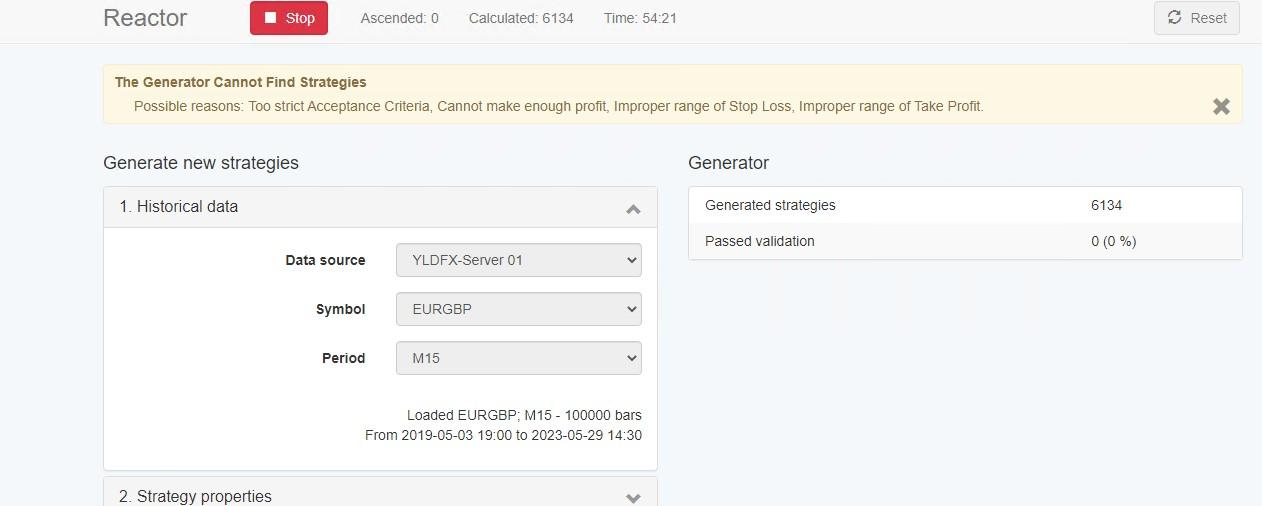
I need some help. I am running reactor on the 14-day trial, and I keep getting the message pop up even when running relaxed settings on this currency pair and another currency pair.
Possible reasons: Too strict Acceptance Criteria, Cannot make enough profit, Improper range of Stop Loss, Improper range of Take Profit.
I have included my setup below so you can see what i am doing and if I am doing anything wrong.
I uploaded my broker’s data per Petko’s instruction in the free course. I am using 100000 bars as the default in my settings.
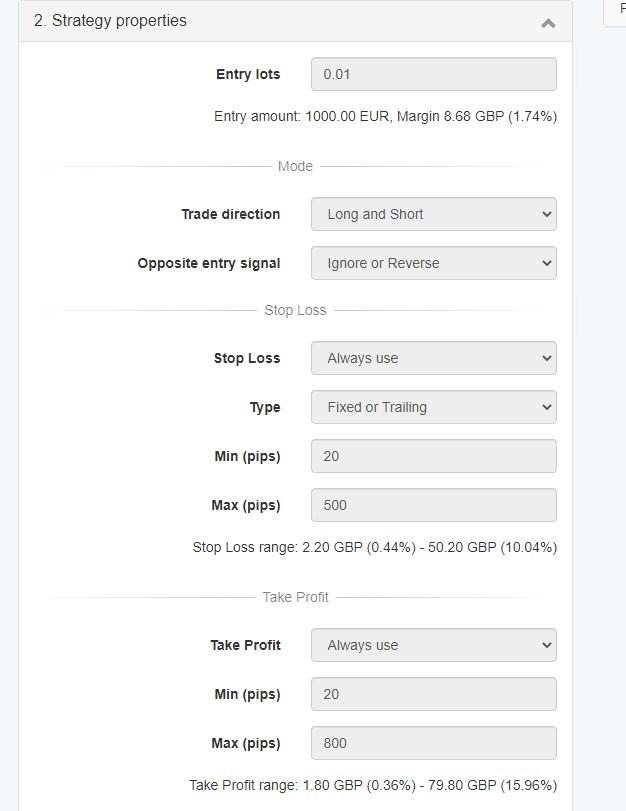
Below are the strategy properties. I increased the min and max pips to try to find more strategies.
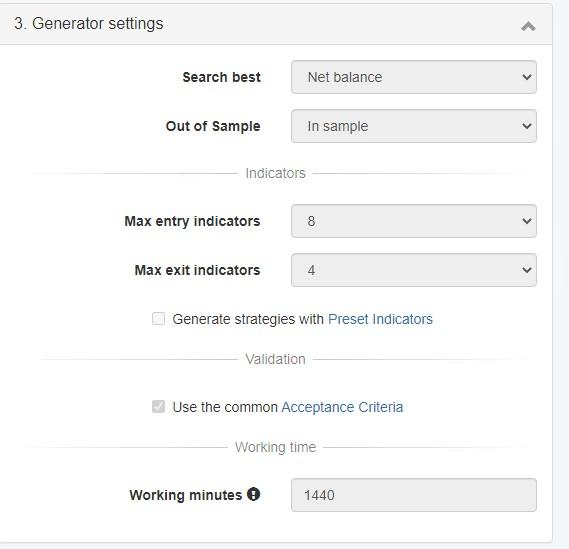
Below are the generator settings again. I increased the values to cast the net wide open.
Lastly, here is the common acceptance criteria. I reduced this from 500 to 300 to see if you could find any strategies.
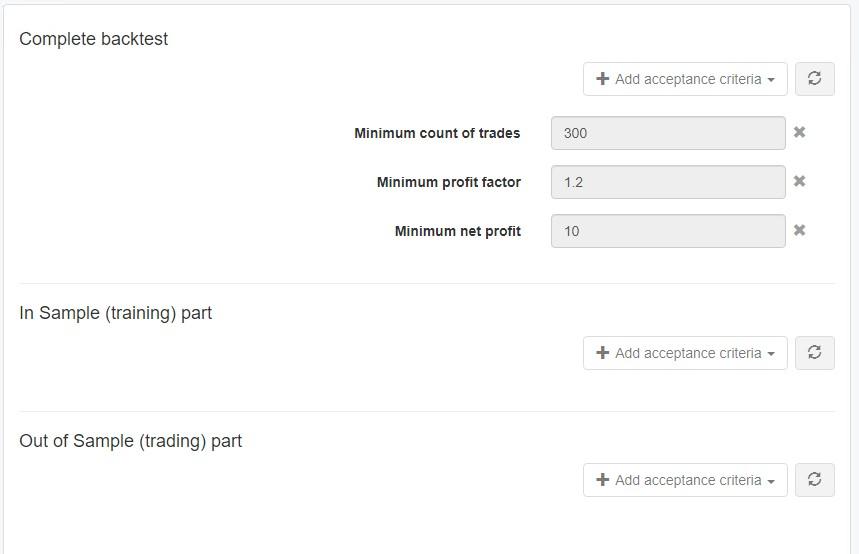
If i remove the common acceptance criteria, I get strategies, but they are not very good as most of them only have a low number of trades. I prefer to sort these out while looking for strategies.
I leave the generator running for 24 hours at a time. I have 4 Chrome windows open, and two generators have this issue. The other two are working fine and generating strategies. The VPS is 16 cores and 128 GB of ram, so it is not a resource issue on the server.
What else can i do to determine what is causing the issue on this currency pair?
Thanks
Gareth
May 31, 2023 at 12:10 am #174214ParticipantGareth,
We all get that error message from time to time so just ignore it. You can simply delete if you wish or just leave it there. EA Studio is still working correctly and gathering collections.
May 31, 2023 at 2:21 pm #174289MemberHi Garett, I agree that this message in itself isn’t a problem really. However with the hugely wide settings you have shown I would expect you to be getting some strategies.
I believe I see the issue though 😉
you have shown the generated image with only 6000 generations in 54 minutes. This is barely anything so what I expect is happening is the browser is becoming inactive.
Watch this generated number for a minute or so to see how many generations you expect and then keep an eye on if it is moving up properly.
The browsers need to be active so if you are running several, minimize them so they are all visible and they should keep running.
Any further issues just post and will help out.
May 31, 2023 at 2:34 pm #174295ParticipantHi Samuel,
I will try and keep the window active and monitor to see if the situation improves.
Thanks
Gareth
May 31, 2023 at 5:19 pm #174307ParticipantI have one instance of EA Studio running now for 7 hours with a total calculated strategies of 47000 which calculates to be an average of 6700 strategies per hour which is about the same as what you are seeing and I have 12 strategies collected. low number of collected strategies is due to my filtering. I have a lot of chrome windows open and three instances of FSBpro running. So the reason why my EA Studio is running slowly is most likely because my processor is simply just working too hard. One reason you might not be getting any collected strategies could be a result of your Acceptance Criteria filtering. In your Acceptance Criteria I see you are looking for a minimum net profit of $10.00. This might be too high of an expectation. Delete the Minimum Net Profit filter in your Acceptance Criteria. You can filter this later in the Collection. If you do this I would expect you would start seeing collected strategies. Be patient as sometimes it could take awhile before you start to see some collected strategies.
 May 31, 2023 at 9:23 pm #174345Member
Hi Alan,
Ill have to check what I get but this seems low number of generations to me so I expect you are working your computer very hard. Of course it depends on number of bars but I am pretty sure I get about 1000 generation every couple of minutes.
Maybe easiest to attach your settings file Gareth, there could be something with the account size or leverage preventing trades being taken. I see you are generating using 0.01 lots usually this is 0.1 so I am seeing a few flags of odd settings.
-
AuthorPosts
- You must be logged in to reply to this topic.