
Community Forums › Forums › Ready-to-use Robots › Prop Firm Robots › FTMO Robot V5.1 is Live!
Tagged: ftmo version 5.1, stops
- This topic has 99 replies, 27 voices, and was last updated 2 years, 6 months ago by
Sammy Trader.
-
AuthorPosts
-
akvelarde
ParticipantThanks for the update Petko. But I noticed something with the EA, it automatically closes trades based on stop loss? It would be good if we know that the trade was automatically closed by the bot and show up in the logs?
Chris Popov
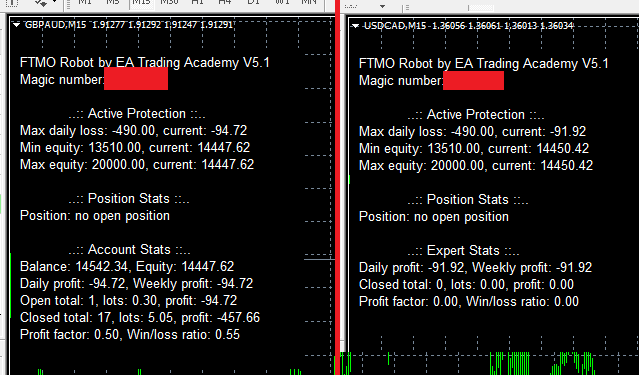
ParticipantAny idea why on some pairs the dashboard shows “Account Stats” and on others it shows “Expert Stats”? For example:
lucket
Participant
youaregreat77
ParticipantHello Petko,
How come my forum topic has been removed “Keen to get FTMO Robot V5”?
Please help.
Thank you.
Nicholas Grobler
ParticipantAwesome. Looking forward to getting this set up.
Does the new bot come with setting files as well for different account sizes?
I do not have a 100% understanding of some new settings to be able to make an educated decision…anthony attwood
ParticipantI joined last week and V5.0 gave me very disappointing results. Hopefully these tweaks will prove productive
Wealth
ParticipantNo, it’s one bot at a time when I’m testing. This is against the rules for some prop firms.
How can I switch it off so It only takes a long or a short and is not hedged?
I’m trying to find it inside the inputs area but it won’t let me do it. Can you please help figure out how to switch hedging off so I don’t violate any prop-firm rules?
Thank you.
Arik Shahar
ParticipantHi,
I installed the new version (5.1) of the robots but when I try to run them I get an error message. Only the XAUUSD robot works (there is a smiling face). All other bots don’t work and I get the attached message.
Please advise,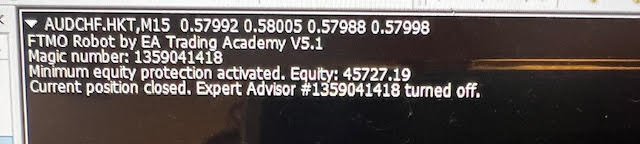
Alan Northam
ParticipantThis is not an error message. It is a message informing you that the account loss fell enough to trigger the Minimum Equity value which then closed the position and turned off the EA so it would no longer trade which could have caused a greater loss if it did not turn off the EA from trading. What lot size were you using for this EA? It should have been set to 0.7 lots. If it was set to 0.7 lots for AUDCHF with account size of 50K then you might consider reducing the lot size so this does not happen again.
Alan,
ParticipantYou would have to go into the source code and change one line of code.
Alan,
ParticipantOkay, awesome.
Can you please help me figure out what line of code is that? and what I need to add to activate it and di-activate it?
Alos, I’m not sure if you work here. But do you if we can ask for this feature so we can click activate or di-activate inside the inputs area?
Thank you.
Dylan Mueller
ParticipantHey guys i didnt update the robots to V5.1. I did reload my V5 robots into EA Studio from my harddrive using the validator and once modified i have placed them onto MT4 and MT5. The interesting thing for me is these robots have still compiled with stats screens and the account protection inputs from V5.1. Is this because these settings are standard in EA studio now? or does the robot automatically update to newest file somehow?
ParticipantI think what you are seeing is leftover objects on the chart. Right click on the chart and go to Object List. Then delete all objects. See if this removes the stats from the chart.
Alan,
ParticipantContact [email protected] and ask for a feature change.
Alan,
ParticipantHey Alan that is definitely not it, somehow the robots have updated to the new version. I notice on MT5 the robot isnt reversing trades properly to, it opens a long then leaves the long open and opens a short on the next signal. is anyone else having this problem?
-
AuthorPosts