
Community Forums › Forums › Ready-to-use Robots › Prop Firm Robots › FTMO Robot V5.0 is Live!
Tagged: FTMO, FTMO EA V5, installation, Petko
- This topic has 119 replies, 38 voices, and was last updated 2 years, 7 months ago by
youaregreat77.
-
AuthorPosts
-
Alan Northam
ParticipantYou will need to give it more time for a trade to develop!
Alan,
bryan JEAN-MARIE
ParticipantWhat do you mean?
ParticipantThe robot looks to be set up properly however you have not yet gotten any trades. You need to wait longer and you should see the robot enter a trade.
Alan,
Sergio Oliveira
ParticipantI recently purchased the Robot FTMO and am having trouble with the installation and setup. Does anyone have a link to a video tutorial or can provide some straightforward instructions?
Wouter van Wyk
ParticipantYes please I would also like an explanatory video or guide ……
ParticipantYou should get an installation PDF. Petko is currently working on a new video.
If you have the PDF and are still having problems with the installation please show a screenshot of the issue you are having so I can see what is going on.
Alan,
dusktrader
ParticipantAs of this week, I currently have 2 different bot sets running the v5.0 robot:
- an OspreyFX demo account running all 8 bots using 0.01 lots only
- an FTMO trial account running only GBPAUD, EURAUD, USDCHF
The FTMO trial account is currently in 2 trades: GBPAUD and USDCHF — currently in floating profit.
The OspreyFX demo account is current in 1 trade: XAUUSD — currently in floating profit.
—
So I’m suprised they would be this different. Why did the OspreyFX account not take either GBPAUD or USDCHF trade?
Participantdusktrader,
This occurs because each prop firm and each brokers historical data is slightly different. If you are going to use a certain prop firm then you should do your backtesting using that prop firm historical data and then plan your trades based upon the results of backtesting with that prop firm. Keep this in mind when sharing results with other traders. The results will be different with different prop firms or brokers.
Alan,
Daniel Jusayan
ParticipantHi, I just want to know what time frame does the FTMO v5.0 robot trade because it is indicated m15 so does it only trade based on 15min Time frame? If I set the chart to 1min, will it not take trades?
ParticipantHi Daniel,
FTMO v5.0 was developed to run on M15 and all its indicators have their setting optimized for this time frame. This is the time frame the FTMO robots should perform the best. I don’t know how it would perform if you were to run it on M1, however, you can always experiment.
Alan,
ParticipantAlright, thank you.
ParticipantI’m waiting for Petko’s new installation video. The PDF guide is a bit confusing for me. If possible, could we schedule a meeting through the AnyDesk remote control software? My goal is to rely on your expertise to carry out the installation and configuration of the FTMO Robot on my account. Also, is there a set file from Petko that he used to pass the FTMO test?
Participant
Pranav Mundada
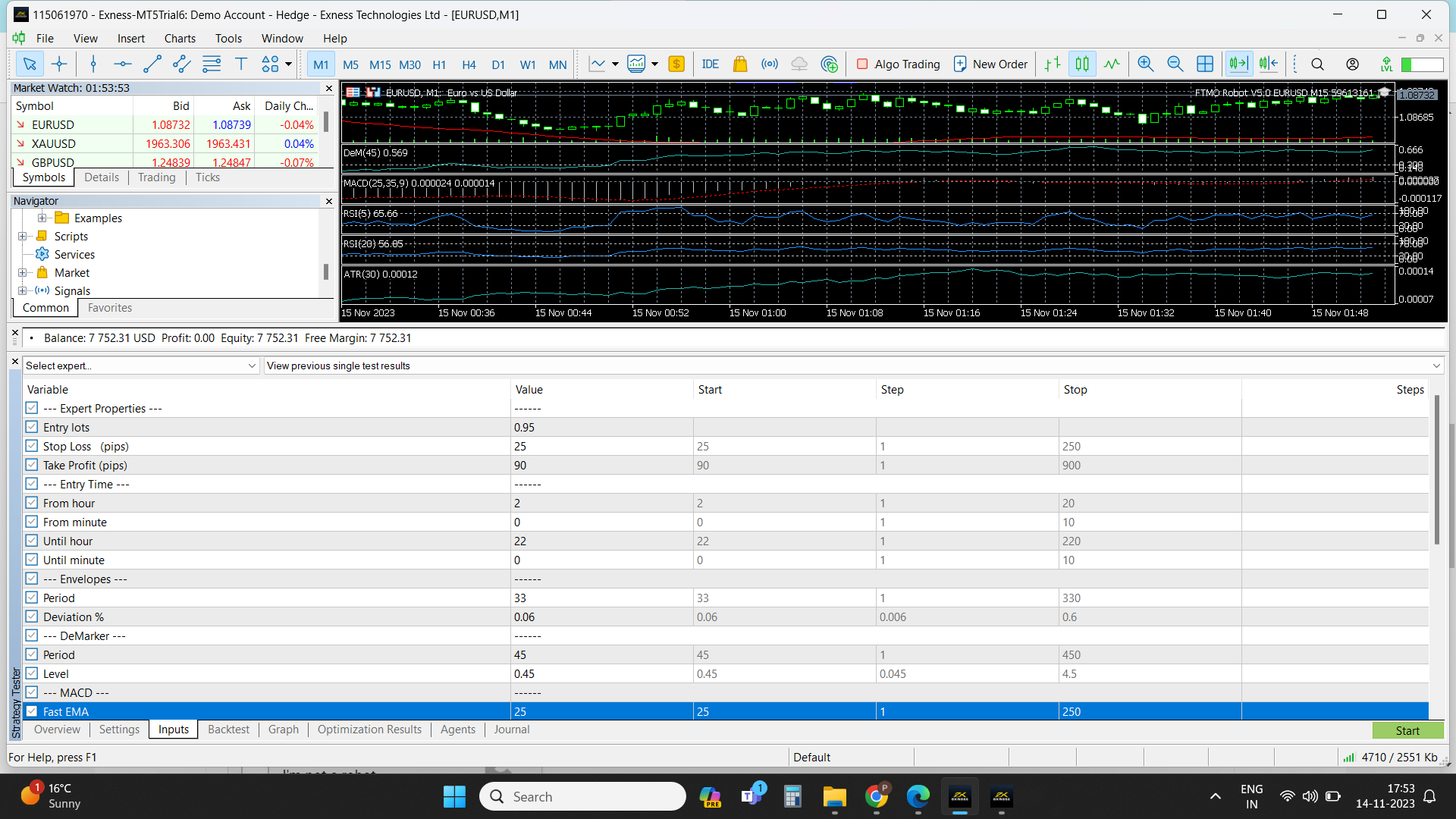
ParticipantHello, I’ve installed both MT4 and MT5, followed the procedures, but I can’t conduct backtests on MT4 and MT5 accounts. Clicking “start” on backtests doesn’t yield any results. I’ve checked recent backtests, ruling out history data issues. Third-party EAs are working fine. Could you assist? Attached are relevant photos. Here is only one photo, Sorry because I unable to upload more photos.
Kevin Pardo
Participantcheck the journal tab; should give some indication if there are any errors. I was able to backtest without issues with FTMO account
-
AuthorPosts