
Community Forums › Forums › Ready-to-use Robots › Prop Firm Robots › FTMO Robot: V4.3: What’s new?
Tagged: Back test FTMO robot, FTMO Robot, ftmo robot v4.0, ftmo robot v4.1, ftmo robot v4.2, ftmo robot v4.3, manually close transaction, Petko, Questions with prop firms
- This topic has 282 replies, 65 voices, and was last updated 2 years, 2 months ago by
Sammy Trader.
-
AuthorPosts
-
November 1, 2023 at 2:27 pm #208936
Alan Northam
ParticipantHere is one of my live FTMO EAs trading right now and showing the SL moved to breakeven. Note the red circle. The red dash is the original SL. It does not move because its price level is defined by the SL in points in the EA properties box. However, notice the red arrow, it is pointing at the new SL set at or near the original Buy price. So the orignal SL as defined in the properties box does not change. However, it is overridden in the EA’s coding such that the new SL takes priority.
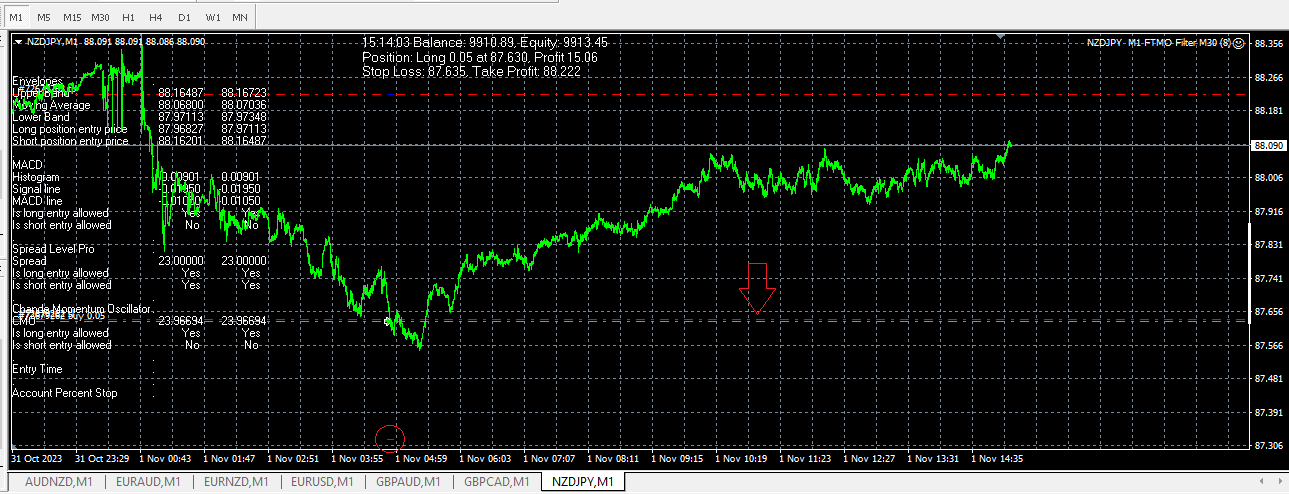
Hope this helps clear up the confusion.
Alan,
November 1, 2023 at 2:38 pm #208939Marin Stoyanov
KeymasterAlan,
Yes i can see your SL is at BE now.
So really its just a case of me restarting MT5 and loading the EAs again on the 7 pairs….this hopefully will stop the problem setting the new SL once the trade reaches “breakeven” points in profit.
Thanks for your time.
November 1, 2023 at 3:39 pm #2089560xBitpool
ParticipantHere’s a screenshot when the feature is working. You can see the “Error with OrderCheck”, so I guess there’s sometimes a problem with FTMO itself, because the position clearly exists.
 November 1, 2023 at 3:53 pm #208962Participant
Actually the position doesn’t exist! The latest closed EURUSD position is from Oct31 and the new position has been opened around 4:50PM broker time.
Do you think there are “zombie” positions? In that case, would a restart and / or EA reattachment solve the issue?
November 1, 2023 at 6:19 pm #208994KeymasterIclosed all open trades, removed all the charts, then restarted mt5 terminal.
i then added the 7 charts and an ea to each chart/ Still i get errors.
a snippet of my experts logfile : i am getting position not found and invalid lotsize errors now.
MN 0 14:49:50.903 GBPCAD M1 FTMO Filter M30 (7) (GBPCAD+,M1) Error with OrderCheck: Position doesn’t exist
JL 0 14:49:51.011 GBPCAD M1 FTMO Filter M30 (7) (GBPCAD+,M1) Error with OrderCheck: Position doesn’t exist
RK 0 14:49:51.112 GBPCAD M1 FTMO Filter M30 (7) (GBPCAD+,M1) Error with OrderCheck: Position doesn’t exist
OK 0 14:49:51.218 GBPCAD M1 FTMO Filter M30 (7) (GBPCAD+,M1) SetBreakEvenStop(300) set StopLoss to 1.68087, Bid=1.6838899999999999
NI 0 14:49:52.346 GBPCAD M1 FTMO Filter M30 (7) (GBPCAD+,M1) Error with OrderCheck: Position doesn’t exist
LG 0 14:49:52.454 GBPCAD M1 FTMO Filter M30 (7) (GBPCAD+,M1) Error with OrderCheck: Position doesn’t exist
JE 0 14:49:52.562 GBPCAD M1 FTMO Filter M30 (7) (GBPCAD+,M1) Error with OrderCheck: Position doesn’t exist
LP 0 14:49:52.670 GBPCAD M1 FTMO Filter M30 (7) (GBPCAD+,M1) Error with OrderCheck: Position doesn’t exist
DL 0 14:49:52.777 GBPCAD M1 FTMO Filter M30 (7) (GBPCAD+,M1) SetBreakEvenStop(300) set StopLoss to 1.68087, Bid=1.6838899999999999
OQ 0 14:49:54.068 GBPCAD M1 FTMO Filter M30 (7) (GBPCAD+,M1) Error with OrderCheck: Position doesn’t exist
IL 0 14:49:54.169 GBPCAD M1 FTMO Filter M30 (7) (GBPCAD+,M1) Error with OrderCheck: Position doesn’t exist
HJ 0 14:49:54.276 GBPCAD M1 FTMO Filter M30 (7) (GBPCAD+,M1) Error with OrderCheck: Position doesn’t exist
RI 0 14:49:54.377 GBPCAD M1 FTMO Filter M30 (7) (GBPCAD+,M1) Error with OrderCheck: Position doesn’t exist
HF 0 14:49:54.486 GBPCAD M1 FTMO Filter M30 (7) (GBPCAD+,M1) SetBreakEvenStop(300) set StopLoss to 1.68087, Bid=1.68391
PD 0 14:49:55.013 GBPCAD M1 FTMO Filter M30 (7) (GBPCAD+,M1) Error with OrderCheck: Position doesn’t exist
JR 0 14:49:55.121 GBPCAD M1 FTMO Filter M30 (7) (GBPCAD+,M1) Error with OrderCheck: Position doesn’t exist
DP 0 14:49:55.222 GBPCAD M1 FTMO Filter M30 (7) (GBPCAD+,M1) Error with OrderCheck: Position doesn’t exist
CO 0 14:49:55.328 GBPCAD M1 FTMO Filter M30 (7) (GBPCAD+,M1) Error with OrderCheck: Position doesn’t exist
EO 0 14:49:55.436 GBPCAD M1 FTMO Filter M30 (7) (GBPCAD+,M1) SetBreakEvenStop(300) set StopLoss to 1.68087, Bid=1.6839
RJ 0 14:49:55.578 GBPCAD M1 FTMO Filter M30 (7) (GBPCAD+,M1) Error with OrderCheck: Position doesn’t exist
NH 0 14:49:55.686 GBPCAD M1 FTMO Filter M30 (7) (GBPCAD+,M1) Error with OrderCheck: Position doesn’t exist
GG 0 14:49:55.793 GBPCAD M1 FTMO Filter M30 (7) (GBPCAD+,M1) Error with OrderCheck: Position doesn’t exist
EE 0 14:49:55.894 GBPCAD M1 FTMO Filter M30 (7) (GBPCAD+,M1) Error with OrderCheck: Position doesn’t exist
NR 0 14:49:56.001 GBPCAD M1 FTMO Filter M30 (7) (GBPCAD+,M1) SetBreakEvenStop(300) set StopLoss to 1.68087, Bid=1.6839
GQ 0 15:11:49.674 GBPCAD M1 FTMO Filter M30 (7) (GBPCAD+,M1) Error with OrderCheck: Invalid volume
IM 0 15:11:49.782 GBPCAD M1 FTMO Filter M30 (7) (GBPCAD+,M1) Error with OrderCheck: Invalid volume
GJ 0 15:11:49.890 GBPCAD M1 FTMO Filter M30 (7) (GBPCAD+,M1) Error with OrderCheck: Invalid volume
JF 0 15:11:49.998 GBPCAD M1 FTMO Filter M30 (7) (GBPCAD+,M1) Error with OrderCheck: Invalid volume
LS 0 15:11:50.181 GBPCAD M1 FTMO Filter M30 (7) (GBPCAD+,M1) Error with OrderCheck: Invalid volume
FP 0 15:11:50.282 GBPCAD M1 FTMO Filter M30 (7) (GBPCAD+,M1) Error with OrderCheck: Invalid volume
RL 0 15:11:50.390 GBPCAD M1 FTMO Filter M30 (7) (GBPCAD+,M1) Error with OrderCheck: Invalid volumeas i said earlier….this is a 25k demo account on vantage markets.
what do you suggest i do ?
November 1, 2023 at 6:46 pm #209001PrimalSci
ParticipantHello, just a quick one.
Does the account allow micro lots?
I think I may have had something similar previously with another prop firm.
Take a look at the lots if you can? Sometimes (I may be totally wrong), the prop firm may not like micro lots?Not sure if this is any help, but try and take a look at that maybe.
November 1, 2023 at 7:09 pm #209011Keymasterno it was on a regular 25k mt5 demo account.
i have given up on it and opened a 25k mt4 demo account, Lets see if it works now.
November 1, 2023 at 7:58 pm #209024ParticipantInstall the FTMO EA on the M1 timeframe! Make sure the Auto Trading button in the tool bar is pressed. Maximize historical data on M1 and M30. Use recommended lot size for a 25K account. Then EA should work properly.
Alan,
November 1, 2023 at 10:26 pm #209061KeymasterWell after moving to MT4 it all seems to working fine !
Just had an SL moved to BE. 🙂
November 1, 2023 at 10:31 pm #209063ParticipantYes, I’ve only seen the bug in MT5. Seems like MT5 is still making jokes
November 1, 2023 at 10:35 pm #209065ParticipantMT4 is best for trading with EA’s.
Alan,
November 3, 2023 at 2:49 am #209364Ling
ParticipantDear Petko,
I started my FTMO challenge this week on monday after testing the 7 robots for 2 weeks and seeing great results.
I ran the top 3 robots and today I hit -5% after 4 days of consecute losses with only 1 winning trade.
My question is, how do you decide when to stop trading completely and when to start running the top 3 EA’s again.
It seems that the timing of when to run the top 3 robotos is crucial and would appreciate any guidance you could provide regarding the timing on when to use them.
Thank you in advance.
Charles
November 3, 2023 at 11:55 am #209439ParticipantHi Charles,
The idea of using Expert Advisors is to let them do the trading without having to be manually manipulated. It is a matter of putting trust in the EA’s. Here is what to do:
Demo test your EA’s like you have been doing. Then move the top 1 , 2, or 3 to a second demo account which acts like a live account until you feel confident to trust the EA’s to do the trading. In the second demo account set the SL so that your account will not lose more than 5% of the account balance. I usually set mine to not lose more than 3% to give me some extra risk protection. Once you have been successful demo trading then move to a live account.
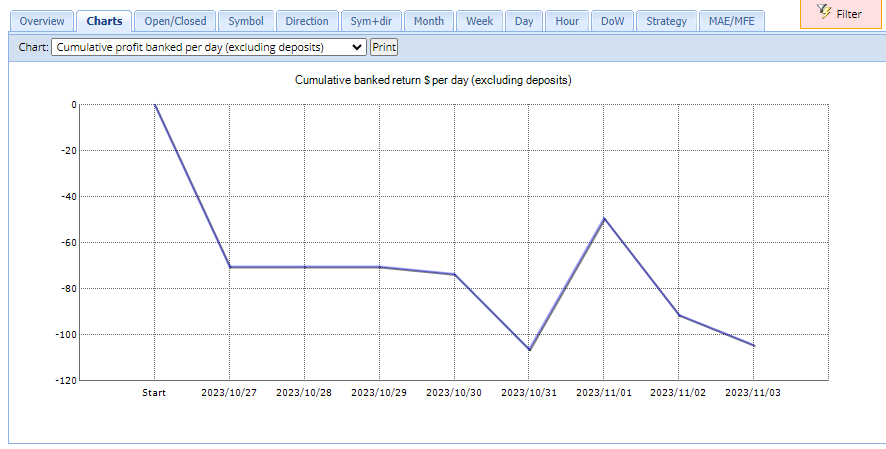
Here is what I have been doing: On October 27 I started a 10K live demo FTMO Challenge. I installed all 7 EA’s and set the Lot size to 0.05 lots. I am using the Challenge to test the EA’s because doing it in the FREE demo account interrupts the testing after 14 days. I also wanted to test the EA’s in exactly the same environment I will be using for passing the Challenge. I have kept the lot size to a small value during testing so that drawdowns don’t do much damage to the account where at the same time I can collect information on how the EA’s are performing. The chart below shows the performance of the 7 EAs since October 27. In the chart I see the collective trading of the 7 EAs have been going through a period of drawdown. I will continue testing using I see the chart start to show profit. Once the chart starts to show profit then I will select the top 3 and move the lot size to 1.0 lots.
Alan,
November 3, 2023 at 4:26 pm #209489Yassir Kachri
ParticipantI confirm same problem
work well on MT4 but not working on MT5
hope that it will be corrected !
November 4, 2023 at 2:25 pm #209533Soeren Lauritsen
ParticipantHi,
I bought the bot this morning, and started it on a 100K Demo account on IC Markets.
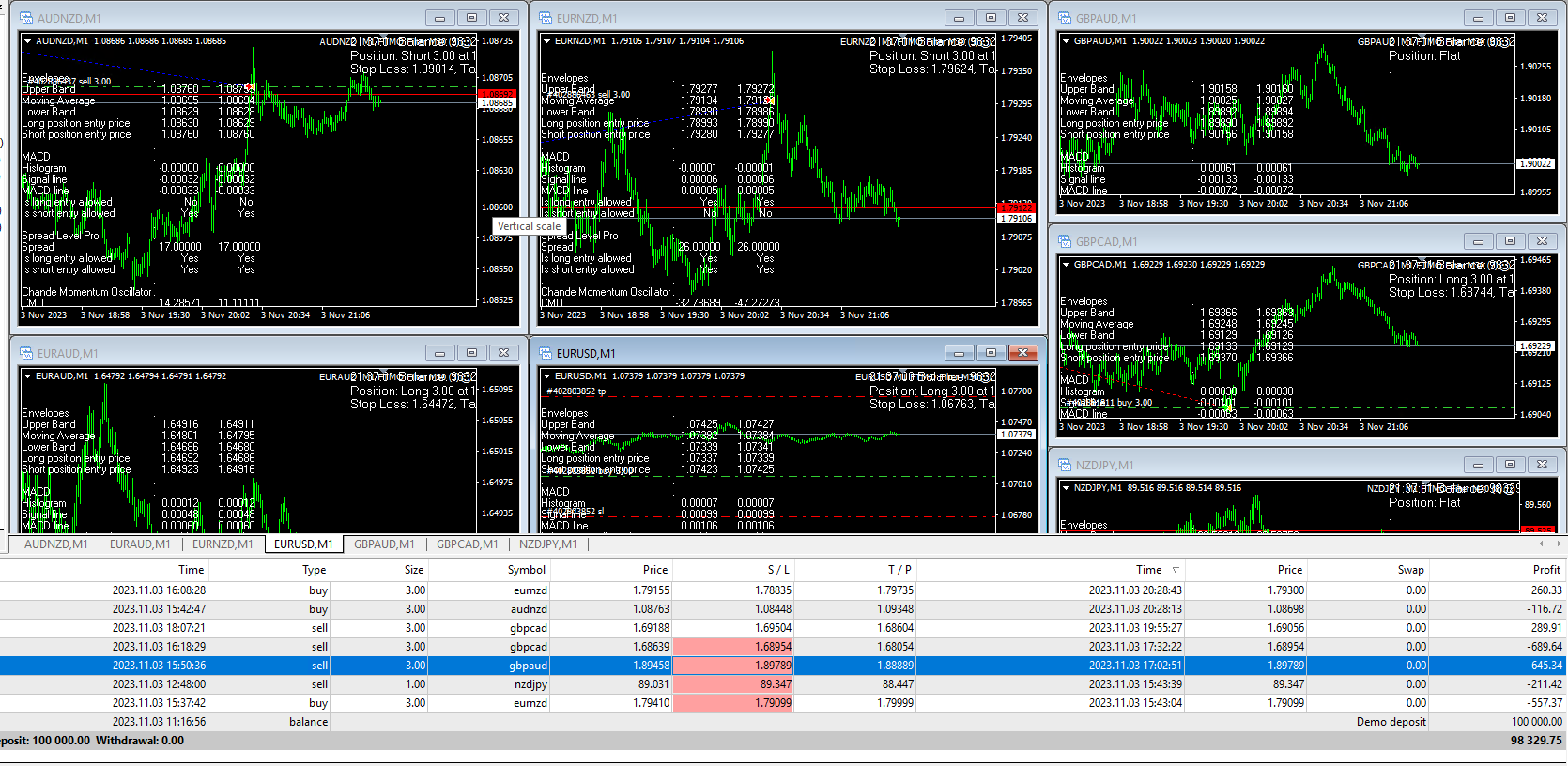
I only changed the lot size from 1 to 3.
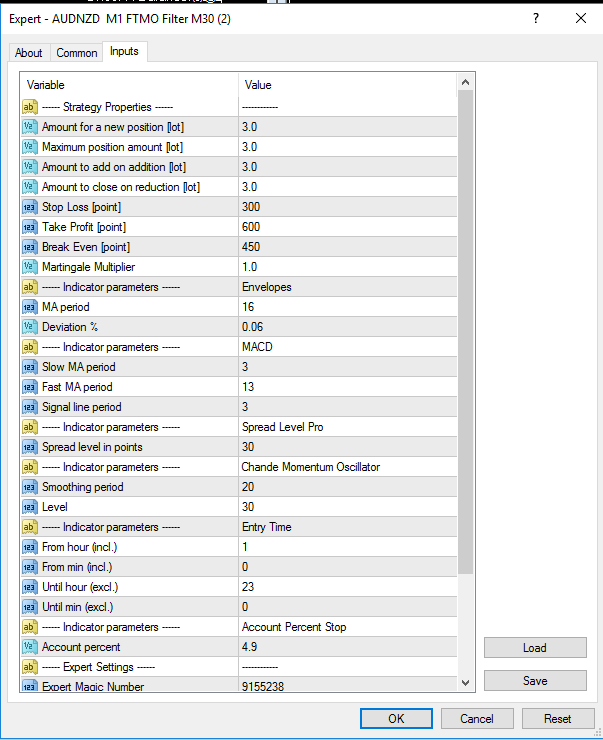
What am i supposed to change, is it enough just to change the lot size like i did?
And is these kinds of lost trades normal?
What is the recommended settings for 200K FundedNext?
-
AuthorPosts
- You must be logged in to reply to this topic.