
Community Forums › Forums › Ready-to-use Robots › Prop Firm Robots › FTMO Robot: V4.3: What’s new?
Tagged: Back test FTMO robot, FTMO Robot, ftmo robot v4.0, ftmo robot v4.1, ftmo robot v4.2, ftmo robot v4.3, manually close transaction, Petko, Questions with prop firms
- This topic has 282 replies, 65 voices, and was last updated 2 years, 2 months ago by
Sammy Trader.
-
AuthorPosts
-
October 14, 2023 at 10:04 pm #204773
Alejandro Quesada
ParticipantI just found out, also in the same THe Complete FTMO Challenge course, how to download historical data from one´s EA account… then imported into de MT4 account for backtesting, and now it worked… it backtested from end April 2023 up to 13 Octber 2023, and it was profitable, about 22%.
October 15, 2023 at 1:26 am #204800Gary Wenger
ParticipantAlan/Petco,
With the Home Key method of loading the charts, the most data I get is 2 days on the M1 and 30-45 days on the M30. Is this going to be adequate for trading with this system and if not, is there something else I can do to get more data loaded on the charts???
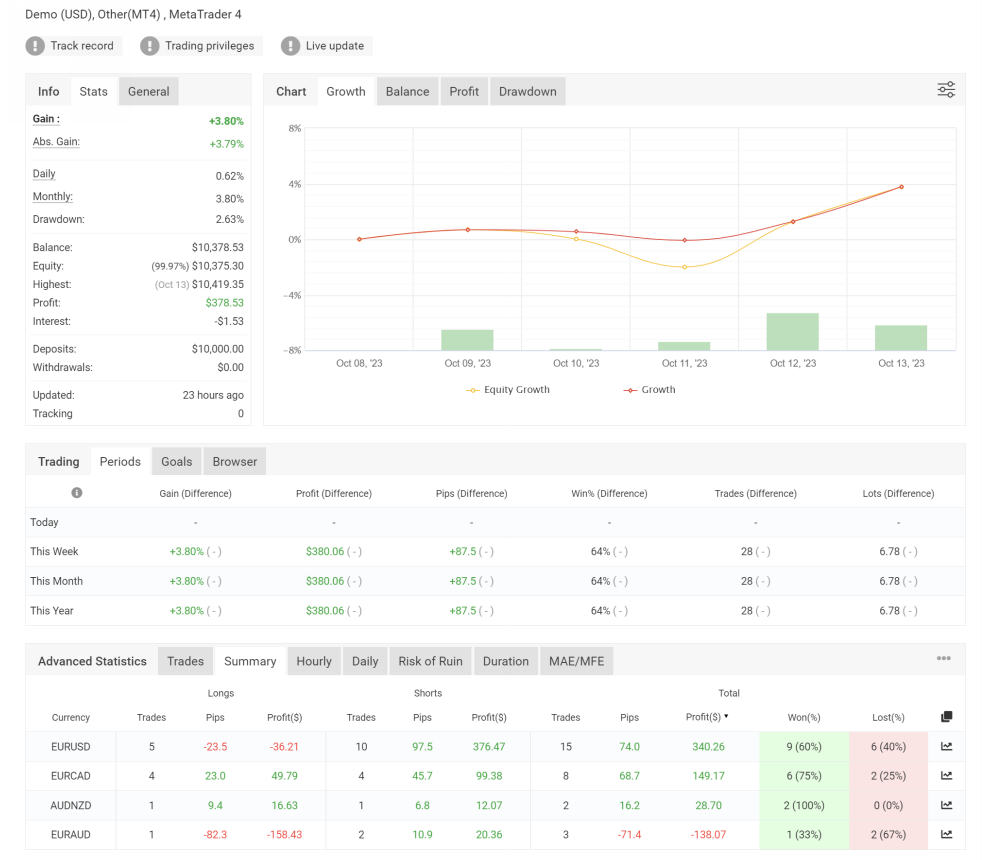
I have good results after my first week of trading on a $10,000 demo account. I will share the screenshot below. I updated to v4.3 in the middle of the week, so these results are from running both the old v4.2 up to Wednesday and then v4.3 from midday Wednesday to Friday close.
 October 15, 2023 at 1:31 am #204804Participant
Petco,
Now that you added the entry time option, is there anything we need to do to adjust to our Broker time?
October 15, 2023 at 1:41 am #204805Alan Northam
ParticipantHi Gary,
The amount of history you have will be sufficient. However, if you want to try and increase the historical data try the following:
Click on Tools>Options>Charts
In Max bars in history fill white space with 9’s
In Max bars in chart fill white space with 9’s
Click OK
Now go back to the chart and hold down the HOME key to see if you can get more history.Alan,
October 15, 2023 at 1:54 am #204807ParticipantAlan,
I tried that but even though I put in all 9’s, the highest level it will go to is 2147483647. It did add a couple of days to the M1, but no changes to the M30.
October 15, 2023 at 5:21 am #204818ParticipantHi Gary,
Yes 2147483647 is the normal result. Good to hear it added a couple more days. The EA should work properly!
Alan,
October 15, 2023 at 4:42 pm #204885Eugene Coxx
MemberWhen will the Udemy students have access to version 4.3?
October 15, 2023 at 8:18 pm #204916ParticipantHi Eugene,
I have contacted Petko about this issue but have not yet heard back from him I don’t have access to the Udemy course so I cannot check myself. I think the links are all the same so you may just need to refresh your browser to see if the link will now show version 4.3.
Alan,
October 15, 2023 at 10:52 pm #204940Dylan Mueller
ParticipantHey guys just a few questions about the chande momentum oscillator, is the chande working on the 1 min timeframe? and in mt5 is it just called the momentum indicator? as I am struggling to find chande momentum in the list of indicators and I would like to have them all on screen. Happy trading for the week ahead everyone!
October 16, 2023 at 10:19 am #204994Petko Aleksandrov
ParticipantThe EURUSD Robot was updated with V4.3 in the course.
Cheers,
October 17, 2023 at 9:28 pm #205286kamil
MemberHello Petko!I want to buy these FTMO robots from you. I am a licensed user of FSB Pro. And I have a question. Have these robots passed the MONTE CARLO test!!?? Yes or no. I just have similar robots and they do not pass the MONTE CARLO test!!! Please answer!!!!!
October 18, 2023 at 2:24 pm #205404Cristian Nembrini
ParticipantHi, I would like to ask your opinion on this thing that is driving me crazy.
I installed all 7 EAs on 2 identical FTMO trial accounts, the only difference is that one is on MT4 and one on MT5.
I gave the same settings to the EAs and I’m making them work on the same VPS.
I started them at the same time but they work differently. They’ve been working for 10 days… Can anyone explain to me why? Thank youOctober 18, 2023 at 6:10 pm #205440ParticipantMT4 only allows Hedging whereas MT5 allows both Hedging a Netting. You may have MT5 set to Netting this would cause a difference in how these two terminals trade. You can choose Hedging or Netting when you create a demo of live account.
October 18, 2023 at 8:27 pm #205466ParticipantThank you for your answer. I opened 2 identical $200k standard ftmo trial accounts. I believe MT5 is also hedged. This is the screenshot. Practically the GBPCAD operation opened it up for me in reverse between mt4 and mt5.
I realized that EURUSD is different in terms of trade but the time and direction of the trade are identical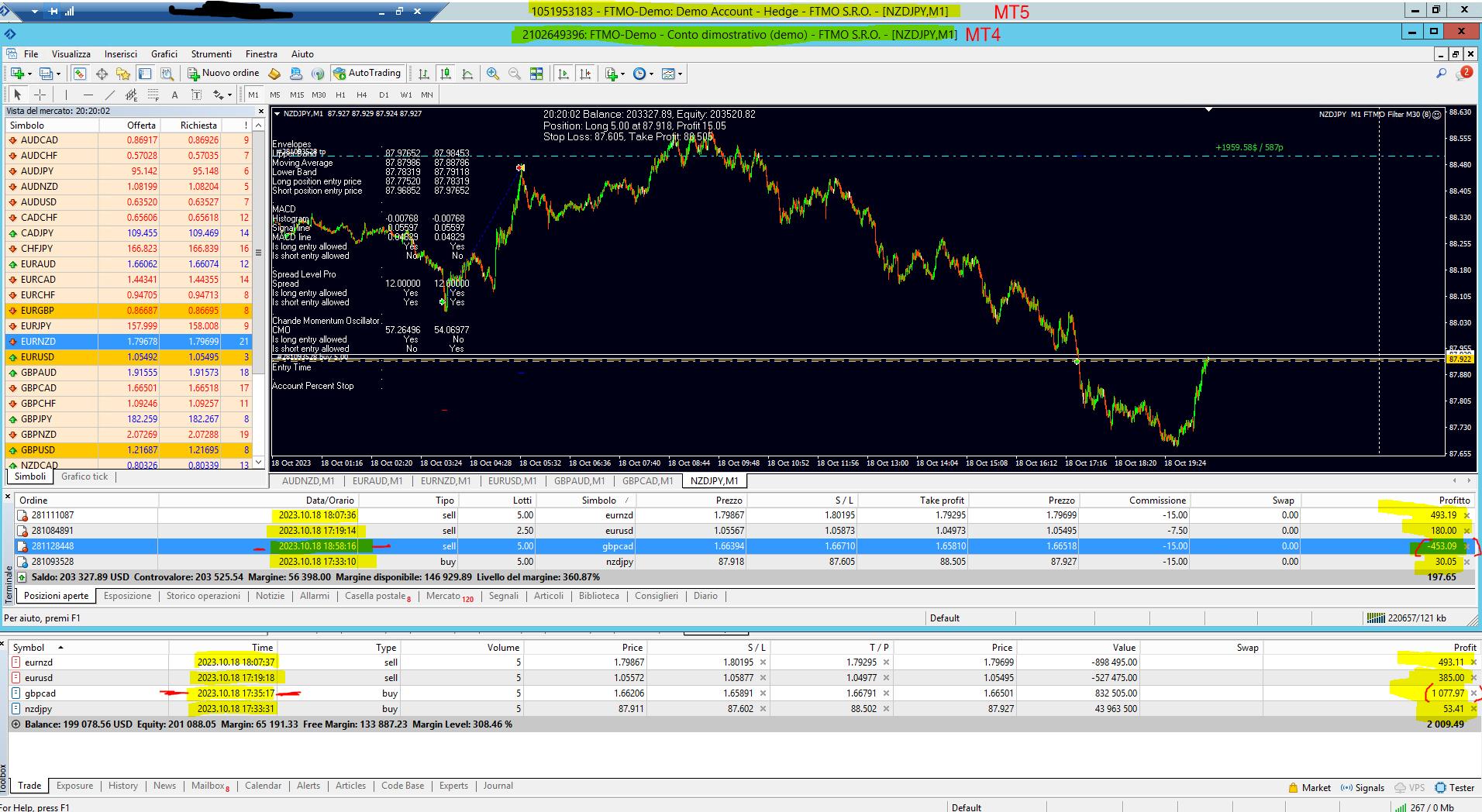 October 18, 2023 at 9:05 pm #205471Participant
Hi Cristian,
Yes MT5 is Hedged!
The reason GBPCAD is reverse between MT4 and MT5 could be the MT5 hedging or in the EA Properties settings. Please provide a screenshot of the MT4 and MT5 EA Properties settings.
Alan,
-
AuthorPosts
- You must be logged in to reply to this topic.