
Community Forums › Forums › Ready-to-use Robots › Prop Firm Robots › FTMO Robot: V4.3: What’s new?
Tagged: Back test FTMO robot, FTMO Robot, ftmo robot v4.0, ftmo robot v4.1, ftmo robot v4.2, ftmo robot v4.3, manually close transaction, Petko, Questions with prop firms
- This topic has 282 replies, 65 voices, and was last updated 2 years, 2 months ago by
Sammy Trader.
-
AuthorPosts
-
October 10, 2023 at 6:47 pm #204047
Alan Northam
ParticipantHi Martin,
It happens don’t give up. My demo FTMO account is about even for the last two weeks. I am still running FTMO EURUSD version 4.1 on my demo account. I started the demo account August 1st. As of now it is positive about 7%. You can check out my demo account results on the link below. The FTMO demo account lasts for 14 days then I have to restart it. The first 14 days saw good profit of 2.5%. The second 14 days saw good profit of 1.4%. The third 14 days saw good profit of 3.7%. When I combine these I get a 7.6% profit. Tomorrow will complete the fourth 14 day demo account test and it looks like it will be about breakeven. So for two months it looks like my profit will be 7.6%. The demo account is a $10,000 account with a lot size of 0.3 lots.
Based upon these results I started a live 50K challenge last week. As of today the account is at $49800. So I lost about $200 this last week.
hope this helps!
Kind regards,
AlanOctober 10, 2023 at 7:20 pm #204051Diego Del Castillo
ParticipantHi Petko i have 2 questions:
1. My broker uses an “x” suffix…do i have to do something? (i’ve been running the bot all day and no trades..no errors either…)
2. On the instructions it says that i need to press the home button and load the M30 bars into the M1 chart….but my mac doesn’t have a home button…Ive tried many key combinations…can you provide instructions for mac users?
October 10, 2023 at 9:39 pm #204067ParticipantHi Diego,
I can answer your questions for you:
A1. The suffix “x” is just the name of the chart on the tab and has nothing to do with the actual data feed. So no, you do not need to do anything. As long as the EA has been loaded onto the chart successfully then it is working correctly. Depending upon the EA and the time frame it may take a day or two before you will see a trade. If the EA you are referring to is one of the seven FTMO EAs then “yes” it may take a day or two before you see an open trade. The FTMO EAs are filtered such that they only take high quality trades.
A2. What the instructions say is that on the M1 chart you should hold the HOME key down until the chart loads the maximum number of candles or bars. You can tell when it is finished loading bars when the chart stops moving. Before doing this however please un-depress the “Scroll to the end of the chart” button and the “Shift end of chart” button located in the tool bar. Also press the “Zoom Out” button to zoom out as far as possible.
Also on the M30 chart do the same thing.
On the Mac here is the key combination for the Home and End keys:
Home Key: Command-Left Arrow
End Key: Command-Right ArrowHope this helps!
Kind regards,
AlanOctober 10, 2023 at 10:15 pm #204072martin garstang
Participant<p style=”text-align: left;”>Thanks Alan for replying.</p>
Be good to have a community in discord where we can discuss the robots and what ones look best for the upcoming week etc.
And also when to swap out the robots is a good question.
October 11, 2023 at 11:20 pm #204217Janek
ParticipantIt would be amazing! and live tracker …
October 13, 2023 at 2:14 pm #204507Dylan Mueller
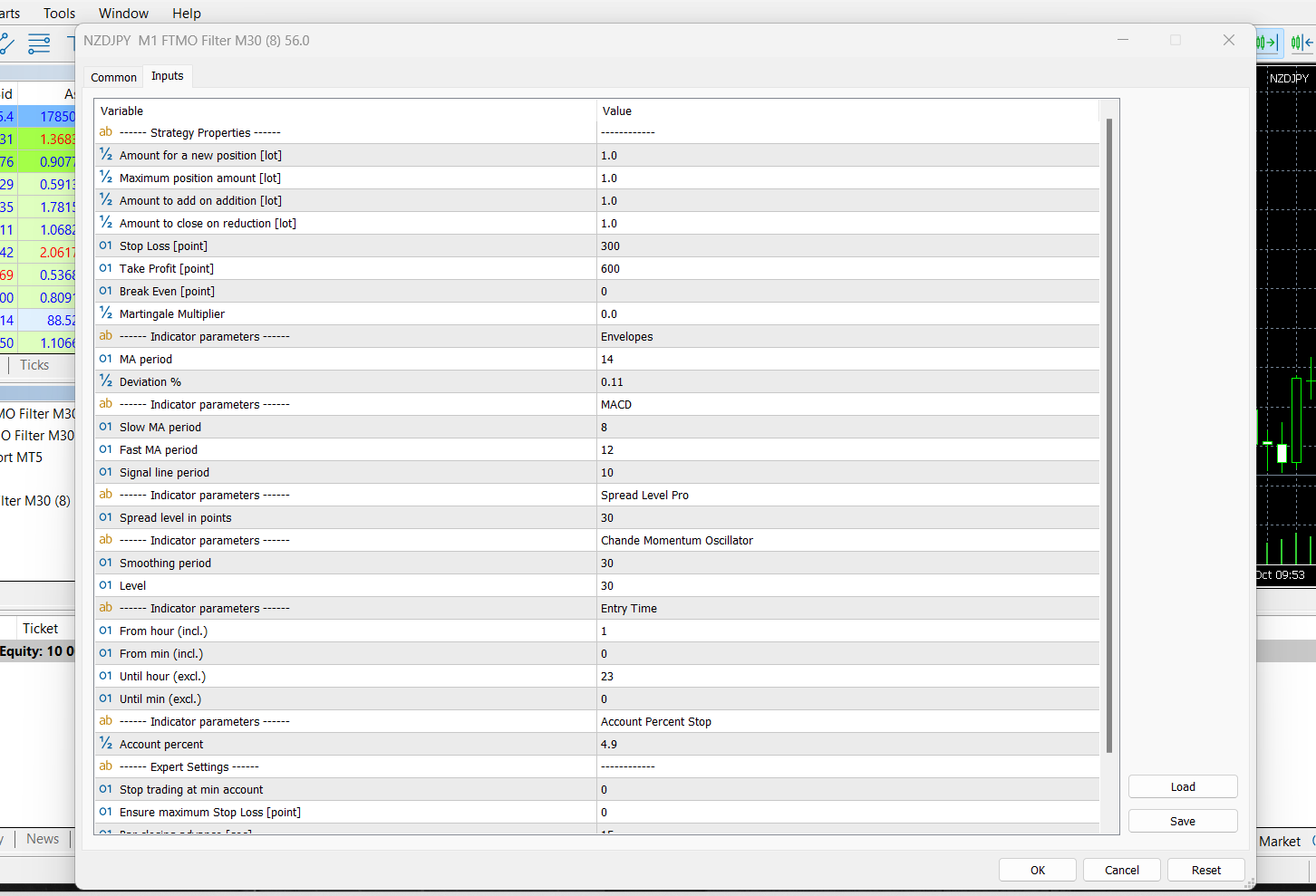
ParticipantHi guys, the issue I am having now is that the EA is only aiming for SL and TP but i would like it to reverse or close its position when a opposite signal comes in. I cant see a option for this in the input list? Can you please explain how I achieve this? Thank you.
 October 13, 2023 at 4:15 pm #204533Participant
Hi Dylan,
With the setting you have, when you get an opposite signal the open position should be closed out. Then when you get a new signal a new position will be opened. If the new signal is a signal to go short then a sell market order will be placed. If a new long signal then a new buy market order will be placed. If you do not get an opposite signal then when the TP or SL is hit the open position will be closed.
Alan,
October 13, 2023 at 6:15 pm #204567Participantok Thanks For you reply Alan. And is it possible to have the position reverse instantly on opposite signal?
October 13, 2023 at 6:33 pm #204576ParticipantSet “Amount of reduction on close” to 2 lots. This will open an opposite position of 1 lot. It closes the one open position of 1 lot and opens an opposite position of 1 lot. Hence the setting of 2 lots.
October 13, 2023 at 7:22 pm #204583ParticipantAwesome that makes perfect sense! Thank you
October 13, 2023 at 8:34 pm #204598Alejandro Quesada
ParticipantHello, Alejandro here. I have installed the FTMO Robot and it is already running in demo account of $100 in MT4, for which I inputed to use 0.01 lots. I wanted to run backtest from January 2023 to now october 2023, in same MT4, but it makes a sound, the green bar displays really quick, and does not show results. Thanks.
October 14, 2023 at 2:23 pm #204713mucho_bucho
ParticipantHello,
I have recently bought the FTMO robot, and got it all set up. I have mainly tried EURUSD, but i have tried a couple other robots to see how good they are with the backtesting. I have been fiddling around on the EURUSD bot, after setting up with the settings shown on the guide, and i had been putting in a whole range and combinations of settings.
Problem : I have never once been profitable in my backtesting results for EURUSD. Every backtesting results actually goes consistently down in a relatively straight line.
Can someone please help?Thanks
October 14, 2023 at 2:57 pm #204718ParticipantHi mucho_bucho,
How much history data do you have for M1 and M30? Can you provide a screenshot of the backtester settings?
Alan,
October 14, 2023 at 6:33 pm #204746ParticipantIn my case, I tested yesterday all 2023 for EURUSD, and it was negative as well… about 16% down… I am trying to test again but I does not want to work… I wanted to show you my screenshot.
October 14, 2023 at 6:38 pm #204749ParticipantI changed the period time to M30, from M1, and it did do backtesting… I had it from January to octiber 2023, but result was negative, about 16%…
Does changing the period affect backtesting?
Why does it not work if I choose Period M1?
I am trying to run backtest again, same as yesterday but it did not work.
In Model, in a video, Petkov indictaed to sue Model, “Open…” . but I tried it now and is not working… now it seems to be running a bit slow with Model “Every tick…”
-
AuthorPosts
- You must be logged in to reply to this topic.