
Community Forums › Forums › Ready-to-use Robots › Prop Firm Robots › FTMO Robot: V4.3: What’s new?
Tagged: Back test FTMO robot, FTMO Robot, ftmo robot v4.0, ftmo robot v4.1, ftmo robot v4.2, ftmo robot v4.3, manually close transaction, Petko, Questions with prop firms
- This topic has 282 replies, 65 voices, and was last updated 2 years, 2 months ago by
Sammy Trader.
-
AuthorPosts
-
August 2, 2023 at 5:25 pm #203860
Petko Aleksandrov
ParticipantThe FTMO Robot was updated, and here is what’s new:
- I fixed the Stop Loss and the Take Profit for all currencies to 30 pips and 60 pips accordingly
- Entry Time Option added. By default, the EAs will open trades between 01:00 and 23:00. This way, I will avoid new trades being open at midnight when the highest spreads are noticed.
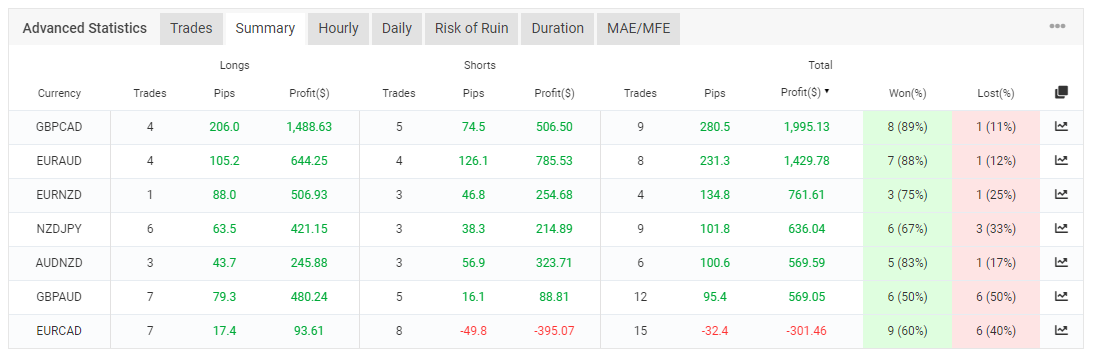
- EURUSD Robot is back in the pack (we removed EURCAD)
We hope you traded the FTMO Robot during the last one week:
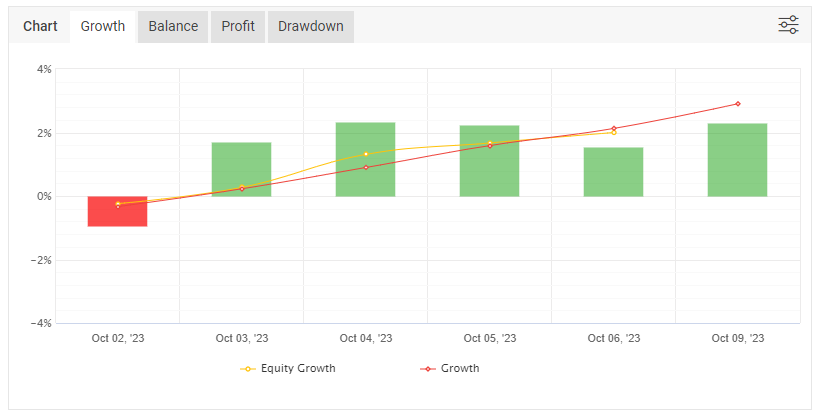
All of the pairs are on profit except the EURCAD (that is why I removed it):
You will find the EAs in the same folder. You can use the link you got.
August 2, 2023 at 5:25 pm #188055ParticipantHey traders,
Version 4.0 was just released for the FTMO Robot!
How is this Robot different from the previous 3.0 version?
- The Higher Time Frame filter is on M30
- Slightly different parameters for the Envelopes and MACD
- Account percent Stop added to the EA
Many of you shared that they failed in backtesting the Robot on Metatrader, so I recorded a video demonstrating it:
If you have already bought the FTMO Robot, you can log in and download the new version. You will also receive an e-mail in the next 24 hours.
Let me know if you have any questions.
August 2, 2023 at 10:20 pm #188122John Noland
ParticipantThank you Petko, great courses!!
2 questions…
1) when is the updated robot being updated in the course?
2) Can an input be added to use the money management strategy in the course…risk one percentage of the account , set the stop loss and TP to get a 2.5 or 3 : 1 risk reward, and then reinvest the profit plus 1 percent at 2.5 or 3 percent of the account and close all positions once the Challenge has been passed? This would be really beneficial for those of us that can not watch the markets .
Thanks again for all of your hard work …😁
August 2, 2023 at 10:21 pm #188119Robert Nikolovski
MemberHi Petko,
the question probabely already has been posted and answered, but could you please state (again) what leverage the EA
works with?Will it work on FTMO swing account with 1:30 leverage, or only on standard FTMO with 1:100?
Many thanks in advance for your respond,
best regards!Robert
August 3, 2023 at 3:00 am #188178fxbam
ParticipantThank you for that great video you shared, but I’m currently having some conflicting results with the backtesting of the FTMO Robot. I see you have numerous choices when picking a timezone. I’m assuming it’s best to choose the appropriate timezone for the broker you are using. The problem is I don’t see the specific one listed and the ones I have chosen haven’t performed well as expected. I’m testing with FTMO and HankoTrade, do you know which ones need to be selected from your list? FTMO (GMT+3/ CEST+1) – HankoTrade GMT+2 during winter and GMT+3 during summer
August 3, 2023 at 3:03 am #188179ParticipantI was referring to the historical data.
August 3, 2023 at 8:49 am #188158imed yacoub
MemberHi Petko,
Can you please share the recommended settings for 200k FTMO account (set file if possible) ? i’m struggling to configure the V4 EA.
Kindly,
August 3, 2023 at 9:42 am #188230ParticipantHello FXbam,
You need to check the time above the MarketWatch of your broker. That is the actual timezone of the server.
Then recalculate it to select the right one in the Historical App.
However, the EA trades on M1 with M30 filter, so a difference of a few hours should not be a huge problem.
August 3, 2023 at 9:44 am #188231ParticipantHi Imed,
Glad to hear from you. For the 200k challenge I use 6 lots, so if the price hits the SL, it won’t be a loss more significant than 2000 or 1 %.
Accordingly, I use 3 lots for 100k and 0.3 for 10k challenges. BUT that is me, you can do it as you decide. It depends on the risk you are willing to take.
August 3, 2023 at 5:16 pm #188331ParticipantI’m currently trying to backtest this with FTMO and HankoTrade but I’m having an issue with it performing as it should. A set file would have been helpful for the different account sizes but I believe the video was helpful enough.
This could of eliminating some of the common problems I see people complaining about.
I’m using the recommended settings but it doesn’t seem to be working as it should for the backtesting. I’m also forward testing it on FTMO and HankoTrade right now and it has opened a position on both today.
August 3, 2023 at 6:16 pm #188342ParticipantHey John,
I appreciate your words!
The EA will be updated in the course in the following days (by the end of the week).
I decided not to add the scaling-up method because it might be risky if one does not understand it. That is why the trader can control the risk just by switching the lots or the SL and the TP.
In the updated section of the course, you will see how I passed the 200k challenge with a few trades, and I really do not spend a lot of time in front of the platform.
August 3, 2023 at 6:18 pm #188344ParticipantI prefer not to recommend trading amounts because it is a personal choice.
However, these are the amounts I use:
10k accounts – 0.3 lots
100k accounts – 3 lots
200k accounts – 6 lots
August 3, 2023 at 6:42 pm #188349ParticipantThank you for always replying to my questions Petko. I have all of your Udemy courses and they are great! I have learned more from you and your courses in a few months than from years of courses and Gurus that cost me thousands of Dollars. If your students will focus on what you are teaching and not just skip to downloading the EA, they would be really glad they did. Thank you for all of the help, I am finally a profitable trader.
My question is…can you add the auto scaling under an input category , money management for example, that can be disabled or turned off if traders do not understand it? But be available to those that do and would like to?
Question 2) Will the software that built the new FTMO robot add the scaling option? Does it have capability? If so do you have a video on how to do that ?
Thanks Again
John
August 3, 2023 at 6:47 pm #188350ParticipantHell Petko..(-:
Sorry if this is a duplicate, bad cell reception .
Thank you for always replying to my questions Petko. I have all of your Udemy courses and they are great! I have learned more from you and your courses in a few months than from years of courses and Gurus that cost me thousands of Dollars. If your students will focus on what you are teaching and not just skip to downloading the EA, they would be really glad they did. Thank you for all of the help, I am finally a profitable trader.
My question is…can you add the auto scaling under an input category , money management for example, that can be disabled or turned off if traders do not understand it? But be available to those that do and would like to?
Question 2) Will the software that built the new FTMO robot add the scaling option? Does it have capability? If so do you have a video on how to do that
August 5, 2023 at 6:22 am #188673JOSE RODRIGUEZ
ParticipantAmazing Video as Always Thank you very much sir
-
AuthorPosts
- You must be logged in to reply to this topic.