
Community Forums › Forums › EA Studio › FTMO CHALLENGE with EA Studio EAs
Tagged: challenge
- This topic has 13 replies, 3 voices, and was last updated 1 year, 9 months ago by
Alan Northam.
-
AuthorPosts
-
January 28, 2024 at 4:14 pm #230162
Alan Northam
ParticipantBesides using the FTMO app robots in an FTMO Challenge I also create my own EAs using EA Studio and using them in an FTMO Challenge. The following is the result of my FTMO Challenge using the EAs created using EA Studio for last week:
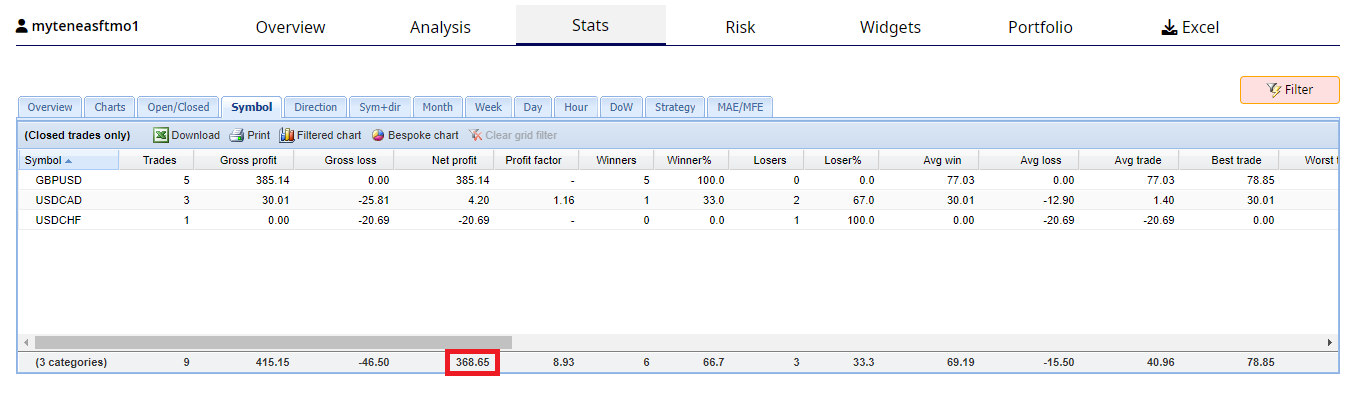
This shows how traders, experienced in EA Studio, can generate EAs that can be uses in FTMO Challenges.
Alan,
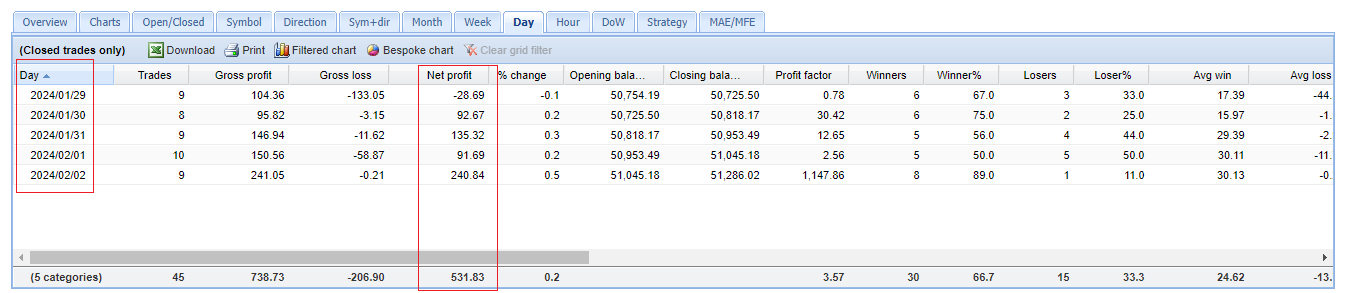
February 3, 2024 at 1:45 pm #231854ParticipantThe following chart shows the result of my FTMO 50K Challenge for this past week. The Expert Advisors used in this challenge are 10 EAs I created using EA Studio.
Alan,
February 5, 2024 at 8:48 am #232202ParticipantThe Expert Advisors I use in one of my FTMO 50K Challenges where created by me using EA Studio. The EAs were created about one month ago so I decided to update them. Instead of using EA Studio to generate new EAs I decided to tweek the parameters of the current EAs to improve their performance. I did this by using the Walk Forward feature of EA Studio. Once the EAs were tweeked I then verified they were not overoptimized by using the Monte Carlo feature. The result was improved balance lines and backtest stats. I then added the TOP 3 to my 50K Challenge.
Alan,
February 14, 2024 at 2:47 pm #234481ParticipantLast weekend I updated my ftmo robots I created using EA Studio. In updating my robots I chose to use the Walk Forward feature of EA Studio. The week now is half over and so far the results are gratifying. The following table from FXblue shows these results:

Alan,
February 15, 2024 at 2:02 am #234673Llalmar Goedhart
MemberI don’t have very much experience with forex trading that’s why I want to use the FTMO robot. Creating your own EA in the EA studio sounds difficult. Or is it also possible for a beginner in forex trading?
February 15, 2024 at 10:43 am #234748ParticipantHi Llalmar,
There is a free course that will teach the basics of using EA Studio. You can review this course to see if you think it would be too difficult for you. You can even use EA Studio for Free and use it as you take the free course. Using EA Studio for free does come with some limitations but I don’t think, if I can remember correctly, that these limitations will not be a problem while taking the FREE EA Studio course. Then after taking the free course and you think you you feel capable of creating your own EAs there is an EA Studio professional course you can take to teach you the advanced features of EA Studio.
Alan,
February 16, 2024 at 12:20 pm #235276ParticipantThe following chart shows the result of my FTMO 50K Challenge for this week. I call it my FTMO Challenge because the Expert Advisors were created by me using EA Studio. The EAs used this week were GBPUSD M15, USDCHF M15, and EURUSD M15. This week was a very profitable week for my Expert Advisors.

Alan,
February 16, 2024 at 12:59 pm #235289MemberI don’t think these results are relevant in a topic about the FTMO robot made by Ea Trading Academy. Now you are just showing your results from your own robot that you have made. This topic is about the trades being made about the EA’s from the FTMO Robot app.
February 16, 2024 at 1:21 pm #235294ParticipantHi Llalmar,
This Forum is “EA Studio” and the Topic is “FTMO CHALLENGE with EA Studio EAs”. This is not the topic about EAs created by EA Trading Academy nor is it the topic about EAs from the FTMO app.
These trades are from the EAs I created using EA Studio and I am using them in my FTMO Challenge. I share my results for those who use EA Studio to create their own EAs.
Alan,
March 13, 2024 at 12:07 am #241203Angelo
MemberHello Alan,
thanks for sharing your results. So, can you confirm you use:
M15
5 years data
300 minimum trades
1.2 minimum Profit Factor
Reactor with Generator + Montecarlo (80% passed on the last two options: Strategy variations flagged)
Once passed MonteC, how do you select the best? 10-20 trades for pair with highest BalanceLine? SQN? Profit Factor? Winloss?ReturnDrawdown? All of these?
On average, after how many weeks do you create new Portfolios from scratch because the first does not profit anymore?
Any detail can make the difference here…
Thanks a lot!
Angelo
March 13, 2024 at 2:17 pm #241305ParticipantHi Angelo,
I use various EA Studio settings when creating my Expert Advisors. I have found there is not just one set of EA Studio settings that make the Expert Advisors profitable, its the overall workflow. However, the follow are the EA Studio settings I used when trading the Expert Adviors with an FTMO Challenge. Please be advised that I live in the United States and can no longer use FTMO Challenges as FTMO no longer allows the use of MT4 or MT5 in the US.
M15
3 years data
300 minimum trades
1.2 minimum Profit Factor
Reactor with Generator + Montecarlo (80% passed on the last two options: Strategy variations both checked, Market Variations both checked.)
OutOfSample not used
MonteCarlo uses default settings
Collections: Data Horizon changed to last three months. Profit factor increased until 10 strategies left. I then select the one strategy with best balance line.
On average, after how many weeks do you create new Portfolios from scratch because the first does not profit anymore? Every weekend I select the top 3 performing Expert Advisors. I use FXblue and sort the Expert Advisors using the Net Pips column.Now for the workflow: To view the workflow I use follow the thread in the following link:
https://community.algotradingspace.com/forums/topic/recommended-forex-pairs/#post-239251
https://community.algotradingspace.com/forums/topic/prop-firms-infinity-forex-funds/#post-239385Alan,
March 23, 2024 at 1:42 pm #243579ParticipantHi Traders,
I just published my weekly results of trading my Infinity Forex Fund prop firm account. The results can be viewed by clicking on the link:
https://community.algotradingspace.com/forums/topic/prop-firms-infinity-forex-funds/#post-243574
I used EA Studio to create the Expert Advisors used in trading this prop firm account.
https://platform.algotradingspace.com/software/expert-advisor-studio/
Alan,
April 12, 2024 at 2:41 am #248123MemberHey Alan,
thanks again for replying, just telling you that you’re read even if you’re not commented by me 😉
1) So, you DO NOT optimize the strategy, right? Just Generation + Montecarlo. No optimization, no normalization.
2) So, from the Montecarlo you choose 1 EA for Pair based on the best balance line.
3) Which pairs you test the EA on? The following 8?
EURUSD
GBPUSD
USDJPYGBPJPY
EURJPY
AUDUSD
USDCAD
NZDUSD
Thanks!
May 26, 2024 at 2:16 pm #257086ParticipantHi Angelo,
Sorry for the very late response to your questions. Somehow, I managed to miss your questions until just now.
You are correct, I do not optimize. I just run the Reactor + Acceptance Criteria + Monte Carlo. From the Collection I further filter. I then choose 1 EA for each pair based upon Balance Line, Daily Loss, Max loss, and Count of trades.
The pairs I trade are the 8 you show plus USDCHF.
I recently pass my Infinity Forex Fund Evaluation and now have a 100K funded account!
Alan,
-
AuthorPosts
- You must be logged in to reply to this topic.